
How to Use CubePilot Power Brick Mini: Examples, Pinouts, and Specs
 Design with CubePilot Power Brick Mini in Cirkit Designer
Introduction
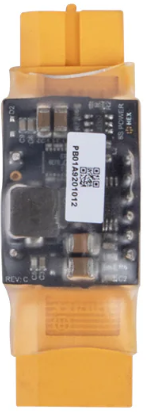
The CubePilot Power Brick Mini is a compact and efficient power management module designed specifically for use with the CubePilot flight controller. It provides regulated power to various components in drones, robotic systems, and other embedded applications. The Power Brick Mini ensures stable voltage and current delivery while also offering current and voltage sensing capabilities for monitoring power consumption.
Explore Projects Built with CubePilot Power Brick Mini
 Open Project in Cirkit Designer
 Open Project in Cirkit Designer
 Open Project in Cirkit Designer
 Open Project in Cirkit Designer
Explore Projects Built with CubePilot Power Brick Mini
Open Project in Cirkit DesignerOpen Project in Cirkit DesignerOpen Project in Cirkit DesignerOpen Project in Cirkit DesignerCommon Applications and Use Cases
- Powering CubePilot flight controllers and peripherals in drones
- Voltage and current monitoring for UAV systems
- Robotics and embedded systems requiring regulated power
- Battery-powered applications needing power management
Technical Specifications
Key Technical Details
| Parameter | Value |
|---|---|
| Input Voltage Range | 4.8V to 52.2V (2S to 12S LiPo batteries) |
| Output Voltage | 5.35V ± 0.1V |
| Maximum Output Current | 30A (continuous) |
| Voltage Measurement Range | 0V to 60V |
| Current Measurement Range | 0A to 120A |
| Connector Type | XT60 for input/output |
| Dimensions | 39mm x 18mm x 9mm |
| Weight | 20g |
Pin Configuration and Descriptions
The Power Brick Mini has a 6-pin JST-GH connector for interfacing with the CubePilot flight controller. Below is the pinout:
| Pin Number | Name | Description |
|---|---|---|
| 1 | VCC | Regulated 5.35V output |
| 2 | GND | Ground |
| 3 | Voltage Sense | Voltage measurement signal |
| 4 | Current Sense | Current measurement signal |
| 5 | Reserved | Not used |
| 6 | Reserved | Not used |
Usage Instructions
How to Use the Component in a Circuit
Connect the Input Power:
- Use the XT60 connector to connect the Power Brick Mini to the battery (2S to 12S LiPo).
- Ensure correct polarity to avoid damage.
Connect to the Flight Controller:
- Use the 6-pin JST-GH cable to connect the Power Brick Mini to the power input port of the CubePilot flight controller.
- Ensure the connector is securely seated.
Power Distribution:
- The Power Brick Mini will regulate the input voltage and provide a stable 5.35V output to the flight controller and connected peripherals.
Voltage and Current Monitoring:
- The Voltage Sense and Current Sense pins provide real-time power consumption data to the flight controller for monitoring and logging.
Important Considerations and Best Practices
- Battery Compatibility: Ensure the battery voltage is within the supported range (4.8V to 52.2V).
- Current Limitations: Do not exceed the maximum continuous current rating of 30A to prevent overheating or damage.
- Secure Connections: Use high-quality connectors and cables to minimize resistance and ensure reliable operation.
- Environmental Conditions: Avoid exposing the Power Brick Mini to extreme temperatures, moisture, or vibration.
Example Code for Arduino UNO
While the Power Brick Mini is primarily designed for CubePilot flight controllers, you can interface it with an Arduino UNO for voltage and current monitoring. Below is an example code snippet:
// Example code to read voltage and current from the Power Brick Mini
// Connect Voltage Sense to A0 and Current Sense to A1 on Arduino UNO

const int voltagePin = A0; // Pin connected to Voltage Sense
const int currentPin = A1; // Pin connected to Current Sense

// Calibration factors (adjust based on your setup)
const float voltageDividerRatio = 18.182; // Voltage divider ratio for scaling
const float currentSensorScale = 37.89;   // Scale factor for current sensor

void setup() {
  Serial.begin(9600); // Initialize serial communication
  pinMode(voltagePin, INPUT);
  pinMode(currentPin, INPUT);
}

void loop() {
  // Read analog values
  int rawVoltage = analogRead(voltagePin);
  int rawCurrent = analogRead(currentPin);

  // Convert to actual voltage and current
  float voltage = (rawVoltage * 5.0 / 1023.0) * voltageDividerRatio;
  float current = (rawCurrent * 5.0 / 1023.0) * currentSensorScale;

  // Print values to Serial Monitor
  Serial.print("Voltage: ");
  Serial.print(voltage);
  Serial.print(" V, Current: ");
  Serial.print(current);
  Serial.println(" A");

  delay(1000); // Wait for 1 second before next reading
}
Troubleshooting and FAQs
Common Issues and Solutions
No Output Voltage:
- Cause: Incorrect battery connection or damaged Power Brick Mini.
- Solution: Verify the battery polarity and ensure the XT60 connector is securely connected.
Inaccurate Voltage or Current Readings:
- Cause: Calibration mismatch or noise in the signal.
- Solution: Recalibrate the voltage divider ratio and current sensor scale in your code. Use shielded cables to reduce noise.
Overheating:
- Cause: Exceeding the maximum current rating.
- Solution: Ensure the connected load does not draw more than 30A continuously.
Flight Controller Not Powering On:
- Cause: Loose or damaged JST-GH cable.
- Solution: Check the cable connections and replace the cable if necessary.
FAQs
Q1: Can the Power Brick Mini be used with other flight controllers?
A1: Yes, it can be used with other flight controllers that support the same voltage and current sensing interface.
Q2: What happens if I connect a battery with a voltage higher than 52.2V?
A2: Connecting a battery with a voltage higher than the specified range may damage the Power Brick Mini. Always use a compatible battery.
Q3: Is the Power Brick Mini waterproof?
A3: No, the Power Brick Mini is not waterproof. Avoid exposing it to water or moisture.
Q4: Can I use the Power Brick Mini for non-drone applications?
A4: Yes, it can be used in any application requiring regulated power and current/voltage monitoring within its specifications.