
How to Use STS3215: Examples, Pinouts, and Specs
 Design with STS3215 in Cirkit Designer
Introduction
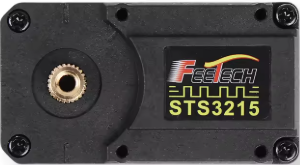
The STS3215 is a dual-channel, low-side MOSFET driver manufactured by Feetech (Part ID: ST-3215-C018). It is designed to drive N-channel MOSFETs in a variety of applications, such as power management, motor control, and high-speed switching circuits. With its high-speed output stage, low propagation delay, and ability to drive large gate capacitances, the STS3215 ensures efficient and reliable operation in demanding environments.
Explore Projects Built with STS3215
 Open Project in Cirkit Designer
 Open Project in Cirkit Designer
 Open Project in Cirkit Designer
 Open Project in Cirkit Designer
Explore Projects Built with STS3215
Open Project in Cirkit DesignerOpen Project in Cirkit DesignerOpen Project in Cirkit DesignerOpen Project in Cirkit DesignerCommon Applications
- Motor control systems
- Power management circuits
- DC-DC converters
- High-speed switching applications
- LED drivers
Technical Specifications
Key Technical Details
| Parameter | Value |
|---|---|
| Supply Voltage (VDD) | 4.5V to 18V |
| Output Voltage (VO) | 0V to VDD |
| Peak Output Current | 2A (source), 3A (sink) |
| Propagation Delay | 25ns (typical) |
| Operating Temperature | -40°C to +125°C |
| Input Threshold Voltage | CMOS/TTL compatible |
| Package Type | SOIC-8 |
Pin Configuration and Descriptions
The STS3215 is available in an 8-pin SOIC package. The pinout and descriptions are as follows:
| Pin Number | Pin Name | Description |
|---|---|---|
| 1 | IN1 | Input signal for Channel 1 (CMOS/TTL compatible) |
| 2 | GND | Ground connection |
| 3 | IN2 | Input signal for Channel 2 (CMOS/TTL compatible) |
| 4 | VDD | Supply voltage (4.5V to 18V) |
| 5 | OUT2 | Output for Channel 2 (drives the gate of the MOSFET) |
| 6 | GND | Ground connection (shared with Pin 2) |
| 7 | OUT1 | Output for Channel 1 (drives the gate of the MOSFET) |
| 8 | NC | No connection (leave unconnected or use for mechanical support if needed) |
Usage Instructions
How to Use the STS3215 in a Circuit
- Power Supply: Connect the VDD pin to a stable power supply within the range of 4.5V to 18V. Ensure proper decoupling by placing a 0.1µF ceramic capacitor close to the VDD pin.
- Grounding: Connect both GND pins (Pin 2 and Pin 6) to the circuit ground. Use a low-impedance ground plane for optimal performance.
- Input Signals: Apply CMOS/TTL-compatible signals to the IN1 and IN2 pins to control the corresponding outputs (OUT1 and OUT2).
- Output Connections: Connect the OUT1 and OUT2 pins to the gates of the N-channel MOSFETs. Ensure the MOSFETs are suitable for the application and can handle the required current and voltage.
- Load: Connect the load to the drain of the MOSFETs, and ensure proper heat dissipation for high-power applications.
Important Considerations and Best Practices
- Decoupling Capacitors: Always use a 0.1µF ceramic capacitor close to the VDD pin to minimize noise and ensure stable operation.
- Input Signal Integrity: Use clean, fast-rising input signals to minimize propagation delay and ensure efficient switching.
- Thermal Management: If driving large gate capacitances or operating at high frequencies, ensure adequate cooling to prevent overheating.
- PCB Layout: Use short, wide traces for the output connections to minimize inductance and resistance.
Example: Using the STS3215 with an Arduino UNO
The following example demonstrates how to use the STS3215 to drive an N-channel MOSFET for motor control using an Arduino UNO.
Circuit Connections
- Connect the VDD pin of the STS3215 to the Arduino's 5V pin.
- Connect the GND pins of the STS3215 to the Arduino's GND.
- Connect the IN1 pin to Arduino digital pin 9.
- Connect the OUT1 pin to the gate of the N-channel MOSFET.
- Connect the motor between the MOSFET's drain and the power supply.
Arduino Code
// Example code to control a motor using the STS3215 and an Arduino UNO

const int motorPin = 9; // Pin connected to IN1 of the STS3215

void setup() {
  pinMode(motorPin, OUTPUT); // Set motorPin as an output
}

void loop() {
  digitalWrite(motorPin, HIGH); // Turn the motor ON
  delay(1000);                  // Keep the motor ON for 1 second
  digitalWrite(motorPin, LOW);  // Turn the motor OFF
  delay(1000);                  // Keep the motor OFF for 1 second
}
Troubleshooting and FAQs
Common Issues and Solutions
No Output Signal on OUT1/OUT2
- Cause: Missing or incorrect input signal.
- Solution: Verify that the IN1/IN2 pins are receiving proper CMOS/TTL-compatible signals.
MOSFET Not Switching Properly
- Cause: Gate capacitance too high or insufficient drive current.
- Solution: Ensure the MOSFET's gate capacitance is within the STS3215's drive capability. Use a lower switching frequency if necessary.
Overheating
- Cause: Excessive power dissipation due to high switching frequency or large gate capacitance.
- Solution: Reduce the switching frequency or improve thermal management (e.g., add a heatsink or improve PCB layout).
Noise or Instability
- Cause: Insufficient decoupling or poor PCB layout.
- Solution: Add a 0.1µF ceramic capacitor close to the VDD pin and ensure short, wide traces for power and ground connections.
FAQs
Q1: Can the STS3215 drive P-channel MOSFETs?
A1: No, the STS3215 is designed specifically for driving N-channel MOSFETs in low-side configurations.
Q2: What is the maximum switching frequency of the STS3215?
A2: The STS3215 can operate at frequencies up to several hundred kHz, depending on the gate capacitance of the MOSFET and the drive current.
Q3: Can I use the STS3215 with a 3.3V microcontroller?
A3: Yes, the STS3215 has CMOS/TTL-compatible inputs and can accept 3.3V logic signals. However, ensure that the VDD supply voltage is within the specified range (4.5V to 18V).