
Cirkit Designer Logo
Cirkit Designer
Your all-in-one circuit design IDE
Home / 
Component Documentation

How to Use ZY12PDN: Examples, Pinouts, and Specs
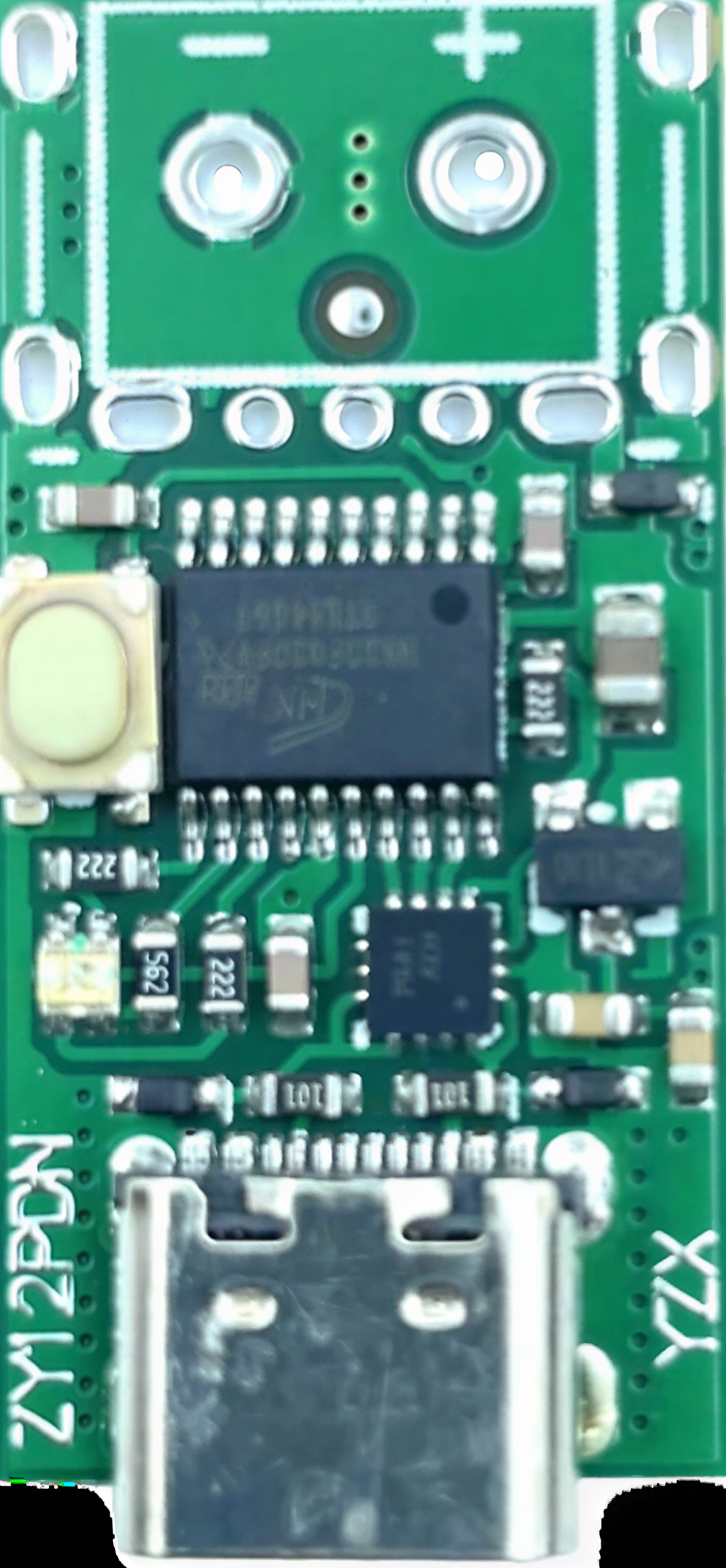

Image of ZY12PDN
Cirkit Designer LogoDesign with ZY12PDN in Cirkit Designer

Introduction

The ZY12PDN is a high-performance voltage regulator designed to provide a stable output voltage with low dropout. It is widely used in applications requiring precise voltage regulation, such as power management systems, battery-powered devices, and embedded systems. Its compact design and reliable performance make it a popular choice for both hobbyists and professionals.

Explore Projects Built with ZY12PDN
Use Cirkit Designer to design, explore, and prototype these projects online. Some projects support real-time simulation. Click "Open Project" to start designing instantly!
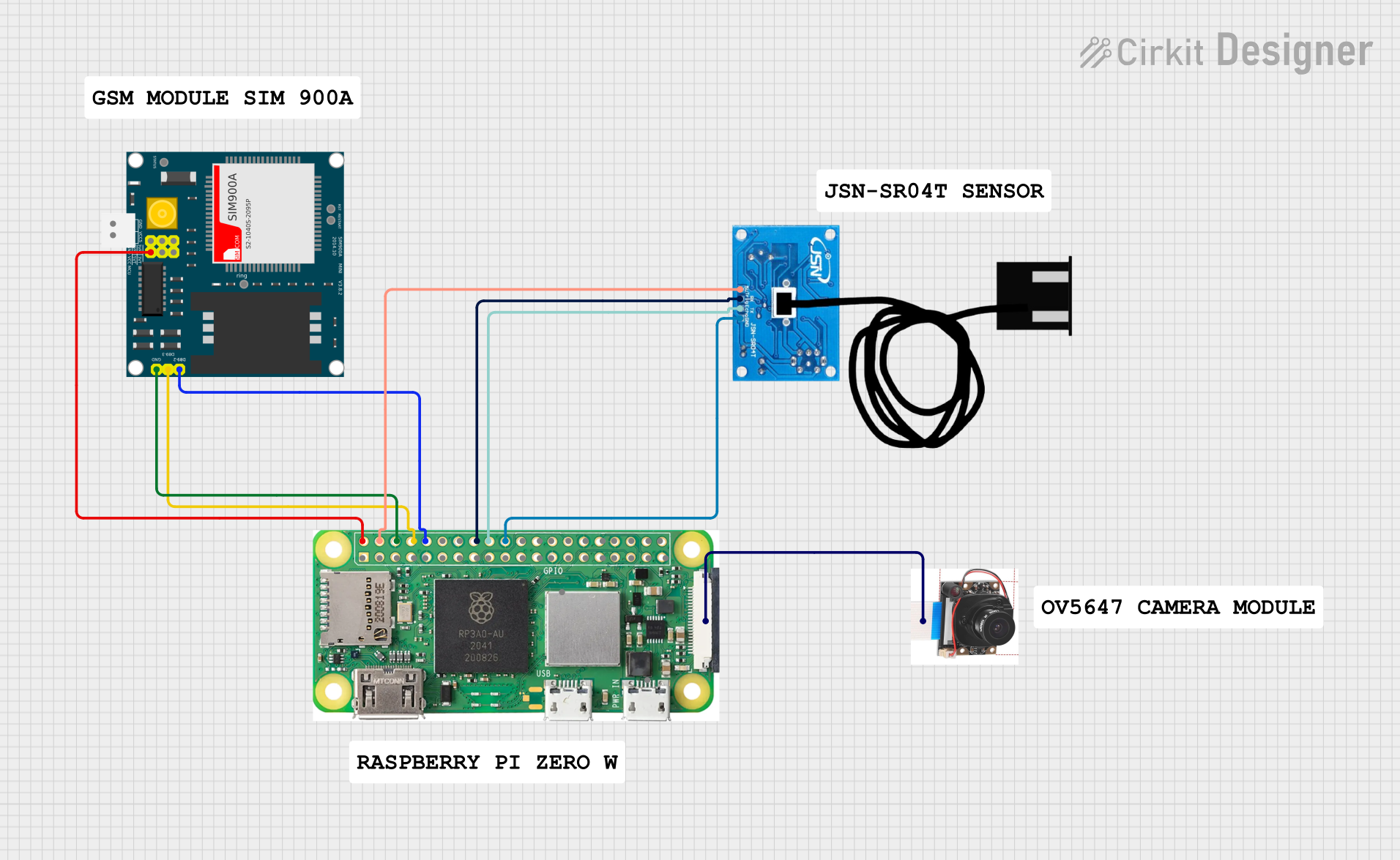
Raspberry Pi Zero W Smart Surveillance System with GSM and Ultrasonic Sensor
Image of CIRCUIT FYP: A project utilizing ZY12PDN in a practical application
This circuit integrates a Raspberry Pi Zero W with a SIM900A GSM module, an OV5647 camera module, and a JSN-SR04T ultrasonic sensor. The Raspberry Pi controls the GSM module for communication, captures images using the camera module, and measures distance using the ultrasonic sensor, making it suitable for remote monitoring and data acquisition applications.
Cirkit Designer LogoOpen Project in Cirkit Designer
Satellite-Based Timing and Navigation System with SDR and Atomic Clock Synchronization
Image of GPS 시스템 측정 구성도_Confirm: A project utilizing ZY12PDN in a practical application
This circuit appears to be a complex system involving power supply management, GPS and timing synchronization, and data communication. It includes a SI-TEX G1 Satellite Compass for GPS data, an XHTF1021 Atomic Rubidium Clock for precise timing, and Ettus USRP B200 units for software-defined radio communication. Power is supplied through various SMPS units and distributed via terminal blocks and DC jacks. Data communication is facilitated by Beelink MINI S12 N95 computers, RS232 splitters, and a 1000BASE-T Media Converter for network connectivity. RF Directional Couplers are used to interface antennas with the USRP units, and the entire system is likely contained within cases for protection and organization.
Cirkit Designer LogoOpen Project in Cirkit Designer
Smart Energy Monitoring and Control System with Wi-Fi Connectivity and Visual Feedback
Image of energy monitoring: A project utilizing ZY12PDN in a practical application
This is a smart energy monitoring and control system that uses an ESP32 microcontroller to read from a PZEM004t energy monitor and control a relay, with a TFT display for user interaction and a NeoPixel Ring for status indication. The circuit includes a step-down converter to regulate power to the microcontroller and peripherals, and a circuit breaker for safety.
Cirkit Designer LogoOpen Project in Cirkit Designer
Cellular-Enabled IoT Device with Real-Time Clock and Power Management
Image of LRCM PHASE 2 BASIC: A project utilizing ZY12PDN in a practical application
This circuit features a LilyGo-SIM7000G module for cellular communication and GPS functionality, interfaced with an RTC DS3231 for real-time clock capabilities. It includes voltage sensing through two voltage sensor modules, and uses an 8-channel opto-coupler for isolating different parts of the circuit. Power management is handled by a buck converter connected to a DC power source and batteries, with a fuse for protection and a rocker switch for on/off control. Additionally, there's an LED for indication purposes.
Cirkit Designer LogoOpen Project in Cirkit Designer

Explore Projects Built with ZY12PDN

Use Cirkit Designer to design, explore, and prototype these projects online. Some projects support real-time simulation. Click "Open Project" to start designing instantly!
Image of CIRCUIT FYP: A project utilizing ZY12PDN in a practical application
Raspberry Pi Zero W Smart Surveillance System with GSM and Ultrasonic Sensor
This circuit integrates a Raspberry Pi Zero W with a SIM900A GSM module, an OV5647 camera module, and a JSN-SR04T ultrasonic sensor. The Raspberry Pi controls the GSM module for communication, captures images using the camera module, and measures distance using the ultrasonic sensor, making it suitable for remote monitoring and data acquisition applications.
Cirkit Designer LogoOpen Project in Cirkit Designer
Image of GPS 시스템 측정 구성도_Confirm: A project utilizing ZY12PDN in a practical application
Satellite-Based Timing and Navigation System with SDR and Atomic Clock Synchronization
This circuit appears to be a complex system involving power supply management, GPS and timing synchronization, and data communication. It includes a SI-TEX G1 Satellite Compass for GPS data, an XHTF1021 Atomic Rubidium Clock for precise timing, and Ettus USRP B200 units for software-defined radio communication. Power is supplied through various SMPS units and distributed via terminal blocks and DC jacks. Data communication is facilitated by Beelink MINI S12 N95 computers, RS232 splitters, and a 1000BASE-T Media Converter for network connectivity. RF Directional Couplers are used to interface antennas with the USRP units, and the entire system is likely contained within cases for protection and organization.
Cirkit Designer LogoOpen Project in Cirkit Designer
Image of energy monitoring: A project utilizing ZY12PDN in a practical application
Smart Energy Monitoring and Control System with Wi-Fi Connectivity and Visual Feedback
This is a smart energy monitoring and control system that uses an ESP32 microcontroller to read from a PZEM004t energy monitor and control a relay, with a TFT display for user interaction and a NeoPixel Ring for status indication. The circuit includes a step-down converter to regulate power to the microcontroller and peripherals, and a circuit breaker for safety.
Cirkit Designer LogoOpen Project in Cirkit Designer
Image of LRCM PHASE 2 BASIC: A project utilizing ZY12PDN in a practical application
Cellular-Enabled IoT Device with Real-Time Clock and Power Management
This circuit features a LilyGo-SIM7000G module for cellular communication and GPS functionality, interfaced with an RTC DS3231 for real-time clock capabilities. It includes voltage sensing through two voltage sensor modules, and uses an 8-channel opto-coupler for isolating different parts of the circuit. Power management is handled by a buck converter connected to a DC power source and batteries, with a fuse for protection and a rocker switch for on/off control. Additionally, there's an LED for indication purposes.
Cirkit Designer LogoOpen Project in Cirkit Designer

Common Applications

  • Power supply regulation for microcontrollers and sensors
  • Battery-powered devices
  • Portable electronics
  • Embedded systems
  • USB Power Delivery (PD) applications

Technical Specifications

Key Technical Details

Parameter Value
Input Voltage Range 5V to 20V
Output Voltage Options 5V, 9V, 12V, 15V, 20V
Maximum Output Current 3A
Dropout Voltage < 0.5V
Efficiency Up to 95%
Operating Temperature -40°C to +85°C
Package Type SMD (Surface-Mount Device)

Pin Configuration and Descriptions

Pin Number Pin Name Description
1 VIN Input voltage pin (5V to 20V)
2 GND Ground pin
3 VOUT Regulated output voltage pin
4 CC1 USB Type-C Configuration Channel 1
5 CC2 USB Type-C Configuration Channel 2

Usage Instructions

How to Use the ZY12PDN in a Circuit

  1. Power Input: Connect the VIN pin to a power source within the range of 5V to 20V. Ensure the input voltage is stable and within the specified range.
  2. Ground Connection: Connect the GND pin to the ground of your circuit.
  3. Output Voltage: The VOUT pin provides the regulated output voltage. Connect this pin to the load or circuit requiring the regulated voltage.
  4. USB PD Configuration: If using the ZY12PDN in a USB Power Delivery application, connect the CC1 and CC2 pins to the appropriate configuration channels of the USB Type-C connector.

Important Considerations and Best Practices

  • Use appropriate decoupling capacitors (e.g., 10µF and 0.1µF) near the VIN and VOUT pins to ensure stable operation and reduce noise.
  • Ensure the input voltage is within the specified range to prevent damage to the component.
  • If using the ZY12PDN in a USB PD application, ensure proper configuration of the CC1 and CC2 pins to negotiate the desired voltage level.
  • Avoid exceeding the maximum output current of 3A to prevent overheating or damage.

Example: Using ZY12PDN with Arduino UNO

The ZY12PDN can be used to power an Arduino UNO by providing a stable 5V output. Below is an example circuit and code to demonstrate its usage:

Circuit Setup

  1. Connect the VIN pin of the ZY12PDN to a 12V DC power source.
  2. Connect the GND pin of the ZY12PDN to the ground of the power source and Arduino UNO.
  3. Connect the VOUT pin of the ZY12PDN to the 5V pin of the Arduino UNO.

Arduino Code Example

// Example code to blink an LED connected to Arduino UNO
// Ensure the Arduino is powered via the ZY12PDN regulator

const int ledPin = 13; // Pin connected to the onboard LED

void setup() {
  pinMode(ledPin, OUTPUT); // Set the LED pin as an output
}

void loop() {
  digitalWrite(ledPin, HIGH); // Turn the LED on
  delay(1000);                // Wait for 1 second
  digitalWrite(ledPin, LOW);  // Turn the LED off
  delay(1000);                // Wait for 1 second
}

Troubleshooting and FAQs

Common Issues and Solutions

  1. No Output Voltage:

    • Ensure the input voltage is within the specified range (5V to 20V).
    • Check all connections, especially VIN, GND, and VOUT.
    • Verify that the load does not exceed the maximum output current of 3A.
  2. Overheating:

    • Ensure proper heat dissipation by using a heatsink or placing the component in a well-ventilated area.
    • Check if the load current exceeds the maximum rating.
  3. Unstable Output Voltage:

    • Add decoupling capacitors (e.g., 10µF and 0.1µF) near the VIN and VOUT pins.
    • Verify that the input voltage is stable and free from significant noise.

FAQs

Q: Can the ZY12PDN be used with a USB Type-C connector?
A: Yes, the ZY12PDN is designed for USB Power Delivery applications and can be used with a USB Type-C connector. Ensure proper configuration of the CC1 and CC2 pins.

Q: What is the maximum output current of the ZY12PDN?
A: The ZY12PDN can provide a maximum output current of 3A.

Q: What should I do if the ZY12PDN overheats?
A: Check the load current and ensure it does not exceed 3A. Use a heatsink or improve ventilation to enhance heat dissipation.

Q: Can I use the ZY12PDN to power a microcontroller?
A: Yes, the ZY12PDN is suitable for powering microcontrollers, including Arduino boards, as long as the input and output voltage requirements are met.

