
How to Use USB Type B Female: Examples, Pinouts, and Specs
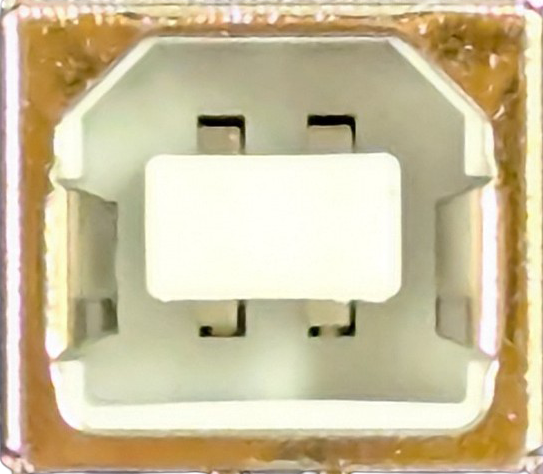
 Design with USB Type B Female in Cirkit Designer
Introduction
The USB Type B Female connector is a widely used interface for connecting peripheral devices such as printers, external hard drives, and other USB-enabled devices to a computer. It features a rectangular shape with a slightly beveled top and a specific pin configuration designed for reliable data transfer and power delivery. This connector is commonly found on devices that require a stable connection for both communication and power supply.
Explore Projects Built with USB Type B Female
 Open Project in Cirkit Designer
 Open Project in Cirkit Designer
 Open Project in Cirkit Designer
 Open Project in Cirkit Designer
Explore Projects Built with USB Type B Female
Open Project in Cirkit DesignerOpen Project in Cirkit DesignerOpen Project in Cirkit DesignerOpen Project in Cirkit DesignerCommon Applications and Use Cases
- Connecting printers, scanners, and external hard drives to computers.
- Used in industrial equipment for data communication.
- Powering and interfacing with microcontroller-based development boards.
- Providing a secure and durable connection for devices requiring frequent plugging and unplugging.
Technical Specifications
Key Technical Details
- Connector Type: USB Type B Female
- Voltage Rating: 5V DC (standard USB voltage)
- Current Rating: Up to 500mA (USB 2.0) or 900mA (USB 3.0)
- Data Transfer Rate:
- USB 2.0: Up to 480 Mbps
- USB 3.0: Up to 5 Gbps
- Durability: Rated for 1,500 insertion/removal cycles
- Operating Temperature: -20°C to 70°C
- Mounting Style: Through-hole or surface mount, depending on the model
Pin Configuration and Descriptions
The USB Type B Female connector has four pins (for USB 2.0) or nine pins (for USB 3.0). Below is the pin configuration for USB 2.0:
| Pin Number | Name | Description |
|---|---|---|
| 1 | VBUS | +5V Power Supply |
| 2 | D- | Data Line (Negative) |
| 3 | D+ | Data Line (Positive) |
| 4 | GND | Ground |
For USB 3.0, the additional pins are used for SuperSpeed data transfer:
| Pin Number | Name | Description |
|---|---|---|
| 5 | StdA_SSRX- | SuperSpeed Receiver (Negative) |
| 6 | StdA_SSRX+ | SuperSpeed Receiver (Positive) |
| 7 | GND_DRAIN | Ground for SuperSpeed |
| 8 | StdA_SSTX- | SuperSpeed Transmitter (Negative) |
| 9 | StdA_SSTX+ | SuperSpeed Transmitter (Positive) |
Usage Instructions
How to Use the Component in a Circuit
Mounting the Connector:
- Choose a through-hole or surface-mount USB Type B Female connector based on your PCB design.
- Solder the connector securely to the PCB, ensuring proper alignment of the pins.
Connecting to a Microcontroller or Device:
- Connect the VBUS pin to a 5V power source.
- Connect the D+ and D- pins to the corresponding data lines of your microcontroller or USB interface IC.
- Ensure the GND pin is connected to the ground of your circuit.
Cable Connection:
- Use a standard USB Type B Male to USB Type A Male cable to connect the device to a computer or power source.
Important Considerations and Best Practices
- Power Supply: Ensure the power supply does not exceed the rated voltage and current to avoid damaging the connector or connected devices.
- Data Integrity: Use high-quality USB cables to minimize data loss or interference.
- Mounting: Secure the connector firmly to prevent mechanical stress during repeated insertions and removals.
- USB 3.0 Compatibility: If using a USB 3.0 connector, ensure your circuit and cable support the additional SuperSpeed pins.
Example: Connecting to an Arduino UNO
The USB Type B Female connector is commonly used on Arduino UNO boards for programming and power. Below is an example of how to interface with the connector:
// Example: Reading data from a USB-connected device via Arduino UNO
// Note: The USB Type B Female connector is already integrated on the Arduino UNO.
// This code demonstrates serial communication with a computer.

void setup() {
  Serial.begin(9600); // Initialize serial communication at 9600 baud
  while (!Serial) {
    ; // Wait for the serial port to connect (for Leonardo/Micro boards)
  }
  Serial.println("USB Type B Female Connector Example");
}

void loop() {
  if (Serial.available() > 0) {
    // Read incoming data from the USB connection
    char received = Serial.read();
    Serial.print("Received: ");
    Serial.println(received); // Echo the received data back to the computer
  }
}
Troubleshooting and FAQs
Common Issues Users Might Face
No Power or Device Not Recognized:
- Cause: Loose connection or damaged cable.
- Solution: Ensure the USB cable is securely connected and test with a different cable.
Data Transfer Errors:
- Cause: Poor-quality cable or interference.
- Solution: Use a shielded, high-quality USB cable and avoid running cables near high-power devices.
Connector Damage:
- Cause: Excessive force during insertion/removal or misalignment.
- Solution: Replace the connector and ensure proper alignment during use.
Overheating:
- Cause: Exceeding the rated current or voltage.
- Solution: Verify the power supply specifications and ensure they are within the connector's limits.
FAQs
Q: Can I use a USB 2.0 cable with a USB 3.0 Type B Female connector?
- A: Yes, USB 3.0 connectors are backward compatible with USB 2.0 cables, but you will not achieve SuperSpeed data rates.
Q: How many times can I plug and unplug the connector before it wears out?
- A: The USB Type B Female connector is rated for approximately 1,500 insertion/removal cycles.
Q: Can this connector supply power to my device?
- A: Yes, the VBUS pin provides a 5V power supply, but ensure your device does not exceed the current rating.
Q: Is the USB Type B Female connector waterproof?
- A: Standard USB Type B Female connectors are not waterproof. For outdoor or industrial applications, use a waterproof variant.