
How to Use RUT955: Examples, Pinouts, and Specs
 Design with RUT955 in Cirkit Designer
Introduction
The RUT955 is a robust industrial router manufactured by Teltonika, designed for secure and reliable wireless communication in IoT applications. It supports multiple connectivity options, including LTE, Ethernet, and Wi-Fi, making it a versatile solution for remote monitoring, control, and data transmission in industrial, commercial, and residential environments.
This router is particularly well-suited for applications such as:
- Industrial automation and control systems
- Remote monitoring of sensors and devices
- Smart transportation and fleet management
- Renewable energy systems (e.g., solar or wind monitoring)
- Retail and Point-of-Sale (POS) systems
Explore Projects Built with RUT955
 Open Project in Cirkit Designer
 Open Project in Cirkit Designer
 Open Project in Cirkit Designer
 Open Project in Cirkit Designer
Explore Projects Built with RUT955
Open Project in Cirkit DesignerOpen Project in Cirkit DesignerOpen Project in Cirkit DesignerOpen Project in Cirkit DesignerTechnical Specifications
Key Technical Details
| Parameter | Specification |
|---|---|
| Manufacturer | Teltonika |
| Part ID | RUT955 |
| Cellular Connectivity | LTE Cat 4 (up to 150 Mbps download, 50 Mbps upload) |
| Wi-Fi | IEEE 802.11b/g/n, 2.4 GHz |
| Ethernet Ports | 4 x 10/100 Mbps (1 WAN, 3 LAN) |
| Serial Ports | 1 x RS232, 1 x RS485 |
| GNSS Support | GPS, GLONASS, BeiDou |
| Input Voltage Range | 9 V to 30 V DC |
| Power Consumption | < 7 W (typical) |
| Operating Temperature Range | -40°C to +75°C |
| Dimensions | 110 mm x 100 mm x 50 mm |
| Certifications | CE, RoHS, E-Mark, FCC, PTCRB |
Pin Configuration and Descriptions
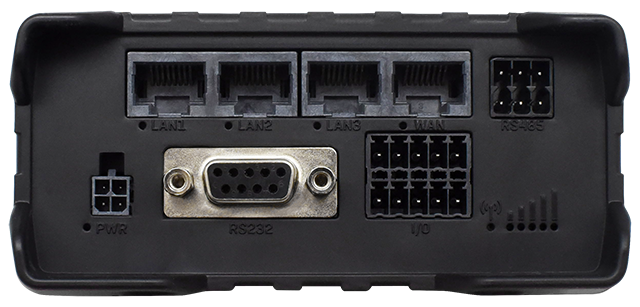
The RUT955 features multiple interfaces for connectivity and control. Below is a summary of its key ports and their functions:
Power and I/O Ports
| Pin/Port | Description |
|---|---|
| Power Input | 2-pin terminal block for DC power input (9 V to 30 V) |
| Digital I/O | 4 configurable digital inputs/outputs for monitoring or control |
| USB Port | 1 x USB 2.0 for external device connection |
Communication Interfaces
| Port | Description |
|---|---|
| Ethernet WAN | 1 x 10/100 Mbps Ethernet port for WAN connection |
| Ethernet LAN | 3 x 10/100 Mbps Ethernet ports for LAN devices |
| RS232 | Serial communication port for legacy devices |
| RS485 | Serial communication port for industrial devices |
| SIM Slots | 2 x Mini-SIM slots for dual SIM functionality |
Antenna Connectors
| Connector | Description |
|---|---|
| LTE Main/Backup | 2 x SMA connectors for LTE antennas |
| Wi-Fi | 1 x RP-SMA connector for Wi-Fi antenna |
| GNSS | 1 x SMA connector for GPS/GNSS antenna |
Usage Instructions
How to Use the RUT955 in a Network
Powering the Device:
- Connect a DC power supply (9 V to 30 V) to the power input terminal block.
- Ensure the power source is stable and within the specified voltage range.
Connecting to the Internet:
- Insert a SIM card into one of the SIM slots for LTE connectivity.
- Alternatively, connect the WAN port to an existing Ethernet network.
Configuring the Router:
- Connect a computer to one of the LAN ports or via Wi-Fi.
- Access the web interface by entering the default IP address (192.168.1.1) in a browser.
- Log in using the default credentials (username:
admin, password:admin01). - Follow the setup wizard to configure network settings, security, and other parameters.
Connecting Devices:
- Use the LAN ports, Wi-Fi, or serial interfaces (RS232/RS485) to connect devices.
- Configure digital I/O ports for monitoring or controlling external equipment.
Important Considerations and Best Practices
- Antenna Placement: Ensure that LTE, Wi-Fi, and GNSS antennas are securely connected and positioned for optimal signal strength.
- Firmware Updates: Regularly update the firmware to ensure the latest features and security patches are applied.
- Power Supply: Use a stable and clean power source to avoid disruptions or damage to the device.
- Environmental Conditions: Install the router in a location that adheres to the operating temperature and humidity specifications.
Example: Connecting to an Arduino UNO
The RUT955 can be used to send data from an Arduino UNO to a remote server via LTE. Below is an example of Arduino code to send sensor data over a serial connection to the RUT955:
#include <SoftwareSerial.h>

// Define RX and TX pins for SoftwareSerial
SoftwareSerial mySerial(10, 11); // RX = pin 10, TX = pin 11

void setup() {
  // Initialize serial communication with Arduino and RUT955
  Serial.begin(9600); // Arduino Serial Monitor
  mySerial.begin(9600); // Communication with RUT955

  // Print a message to indicate setup is complete
  Serial.println("Arduino is ready to send data to RUT955.");
}

void loop() {
  // Example: Send a temperature reading to RUT955
  float temperature = 25.5; // Replace with actual sensor reading
  mySerial.print("Temperature: ");
  mySerial.println(temperature);

  // Wait for 1 second before sending the next reading
  delay(1000);
}
Note: Ensure the RS232 or RS485 interface on the RUT955 is properly configured to receive data from the Arduino.
Troubleshooting and FAQs
Common Issues and Solutions
No Internet Connection:
- Cause: Incorrect SIM card installation or APN settings.
- Solution: Verify the SIM card is properly inserted and configure the correct APN in the web interface.
Unable to Access Web Interface:
- Cause: Incorrect IP address or network configuration.
- Solution: Ensure the computer is on the same subnet as the router (default IP: 192.168.1.1). Reset the router if necessary.
Weak Signal Strength:
- Cause: Poor antenna placement or interference.
- Solution: Reposition the antennas and ensure they are securely connected. Avoid placing the router near metal objects or other sources of interference.
Device Not Powering On:
- Cause: Insufficient or unstable power supply.
- Solution: Check the power source and ensure it meets the voltage and current requirements.
FAQs
Q: Can the RUT955 operate with dual SIM cards?
- A: Yes, the RUT955 supports dual SIM functionality for failover and load balancing.
Q: Is the RUT955 compatible with 5 GHz Wi-Fi?
- A: No, the RUT955 only supports 2.4 GHz Wi-Fi.
Q: How can I reset the router to factory settings?
- A: Press and hold the reset button for 5 seconds until the LEDs start blinking.
Q: Can I use the RUT955 in outdoor environments?
- A: The RUT955 is designed for industrial use but should be installed in a weatherproof enclosure for outdoor applications.