
How to Use HIH-4030: Examples, Pinouts, and Specs
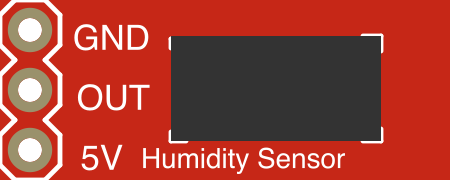
 Design with HIH-4030 in Cirkit Designer
Introduction
The HIH-4030 is a precision humidity sensor manufactured by Honeywell. It is designed to provide accurate and reliable measurements of relative humidity (RH) with a linear voltage output proportional to the humidity level. This sensor operates on low voltage, making it energy-efficient and suitable for a wide range of applications.
Explore Projects Built with HIH-4030
 Open Project in Cirkit Designer
 Open Project in Cirkit Designer
 Open Project in Cirkit Designer
 Open Project in Cirkit Designer
Explore Projects Built with HIH-4030
Open Project in Cirkit DesignerOpen Project in Cirkit DesignerOpen Project in Cirkit DesignerOpen Project in Cirkit DesignerCommon Applications and Use Cases
- HVAC (Heating, Ventilation, and Air Conditioning) systems
- Environmental monitoring and weather stations
- Consumer electronics (e.g., humidifiers, dehumidifiers)
- Industrial process control
- Medical devices and laboratory equipment
Technical Specifications
The HIH-4030 is a compact and efficient sensor with the following key specifications:
| Parameter | Value |
|---|---|
| Manufacturer Part ID | HIH-4030 |
| Supply Voltage (Vcc) | 4.0 V to 5.8 V |
| Typical Operating Voltage | 5.0 V |
| Current Consumption | 200 µA (typical) |
| Output Voltage Range | 0.8 V to 3.9 V (at 0% to 100% RH) |
| Humidity Accuracy | ±3.5% RH (typical) |
| Operating Temperature Range | -40°C to +85°C |
| Response Time | 5 seconds (typical) |
| Output Type | Analog Voltage |
Pin Configuration and Descriptions
The HIH-4030 has a 3-pin configuration as described below:
| Pin Number | Pin Name | Description |
|---|---|---|
| 1 | Vcc | Power supply input (4.0 V to 5.8 V) |
| 2 | GND | Ground connection |
| 3 | Vout | Analog output voltage proportional to humidity |
Usage Instructions
How to Use the HIH-4030 in a Circuit
- Power Supply: Connect the Vcc pin to a regulated 5 V power supply and the GND pin to the ground of the circuit.
- Output Signal: The Vout pin provides an analog voltage output proportional to the relative humidity. This output can be read using an analog-to-digital converter (ADC) on a microcontroller or data acquisition system.
- Calibration: The sensor is factory-calibrated, but for high-precision applications, you may need to apply a correction factor based on your specific environment.
- Filtering: To reduce noise, place a 0.1 µF capacitor between Vcc and GND near the sensor.
Important Considerations and Best Practices
- Avoid exposing the sensor to condensing humidity or liquid water, as this may damage the sensor.
- Ensure proper ventilation around the sensor for accurate humidity readings.
- Use shielded cables or place the sensor away from high-frequency noise sources to minimize interference.
- Allow the sensor to stabilize for a few seconds after power-up before taking measurements.
Example: Connecting the HIH-4030 to an Arduino UNO
Below is an example of how to connect and read data from the HIH-4030 using an Arduino UNO:
Circuit Connections
- Connect the Vcc pin of the HIH-4030 to the 5V pin on the Arduino.
- Connect the GND pin of the HIH-4030 to the GND pin on the Arduino.
- Connect the Vout pin of the HIH-4030 to the A0 analog input pin on the Arduino.
Arduino Code
// HIH-4030 Humidity Sensor Example Code
// Reads the analog output from the sensor and calculates relative humidity (RH)

const int sensorPin = A0; // Analog pin connected to HIH-4030 Vout
const float supplyVoltage = 5.0; // Arduino supply voltage (5V)
const float sensorMinVoltage = 0.8; // Minimum sensor output voltage at 0% RH
const float sensorMaxVoltage = 3.9; // Maximum sensor output voltage at 100% RH

void setup() {
  Serial.begin(9600); // Initialize serial communication
}

void loop() {
  int sensorValue = analogRead(sensorPin); // Read the analog value (0-1023)
  float sensorVoltage = (sensorValue / 1023.0) * supplyVoltage; // Convert to voltage

  // Calculate relative humidity (RH) as a percentage
  float relativeHumidity = ((sensorVoltage - sensorMinVoltage) /
                            (sensorMaxVoltage - sensorMinVoltage)) * 100.0;

  // Print the results to the Serial Monitor
  Serial.print("Sensor Voltage: ");
  Serial.print(sensorVoltage);
  Serial.print(" V, Relative Humidity: ");
  Serial.print(relativeHumidity);
  Serial.println(" %");

  delay(1000); // Wait 1 second before the next reading
}
Troubleshooting and FAQs
Common Issues and Solutions
No Output or Incorrect Readings
- Cause: Incorrect wiring or power supply issues.
- Solution: Double-check the connections and ensure the sensor is powered with a regulated 5 V supply.
Fluctuating or Noisy Readings
- Cause: Electrical noise or insufficient filtering.
- Solution: Add a 0.1 µF capacitor between Vcc and GND near the sensor.
Slow Response Time
- Cause: Poor airflow around the sensor.
- Solution: Ensure the sensor is placed in a well-ventilated area.
Sensor Damage
- Cause: Exposure to liquid water or extreme environmental conditions.
- Solution: Replace the sensor and avoid exposing it to condensing humidity.
FAQs
Q: Can the HIH-4030 measure temperature?
A: No, the HIH-4030 is designed specifically for measuring relative humidity. For temperature measurements, a separate temperature sensor is required.
Q: Is the HIH-4030 suitable for outdoor use?
A: The HIH-4030 can operate in a wide temperature range, but it should be protected from direct exposure to water and extreme environmental conditions.
Q: How accurate is the HIH-4030?
A: The sensor has a typical accuracy of ±3.5% RH, which is sufficient for most applications.
Q: Can I use the HIH-4030 with a 3.3 V microcontroller?
A: The HIH-4030 requires a minimum supply voltage of 4.0 V. You may need a level shifter or a separate 5 V power supply to use it with a 3.3 V microcontroller.