
How to Use PN532 NFC RFID module V4: Examples, Pinouts, and Specs
 Design with PN532 NFC RFID module V4 in Cirkit Designer
Introduction
The PN532 NFC RFID Module V4 is a versatile and widely used module for enabling wireless communication with NFC-enabled devices and RFID tags. It is based on the NXP PN532 chip, which supports multiple communication protocols, including I2C, SPI, and UART. This module is ideal for applications such as contactless payments, access control, data exchange, and smart card reading.
With its robust design and compatibility with various microcontrollers, including Arduino, Raspberry Pi, and others, the PN532 module is a popular choice for developers and hobbyists working on NFC and RFID projects.
Explore Projects Built with PN532 NFC RFID module V4
 Open Project in Cirkit Designer
 Open Project in Cirkit Designer
 Open Project in Cirkit Designer
 Open Project in Cirkit Designer
Explore Projects Built with PN532 NFC RFID module V4
Open Project in Cirkit DesignerOpen Project in Cirkit DesignerOpen Project in Cirkit DesignerOpen Project in Cirkit DesignerTechnical Specifications
Below are the key technical details of the PN532 NFC RFID Module V4:
- Chipset: NXP PN532
- Operating Voltage: 3.3V to 5V
- Communication Protocols: I2C, SPI, UART
- Operating Frequency: 13.56 MHz
- Supported Standards: ISO/IEC 14443 Type A & B, FeliCa, NFC Forum Type 1-4 tags
- Reading Distance: Up to 5 cm (depending on tag and environment)
- Dimensions: Approximately 40mm x 40mm
- Current Consumption: ~50mA during operation
Pin Configuration and Descriptions
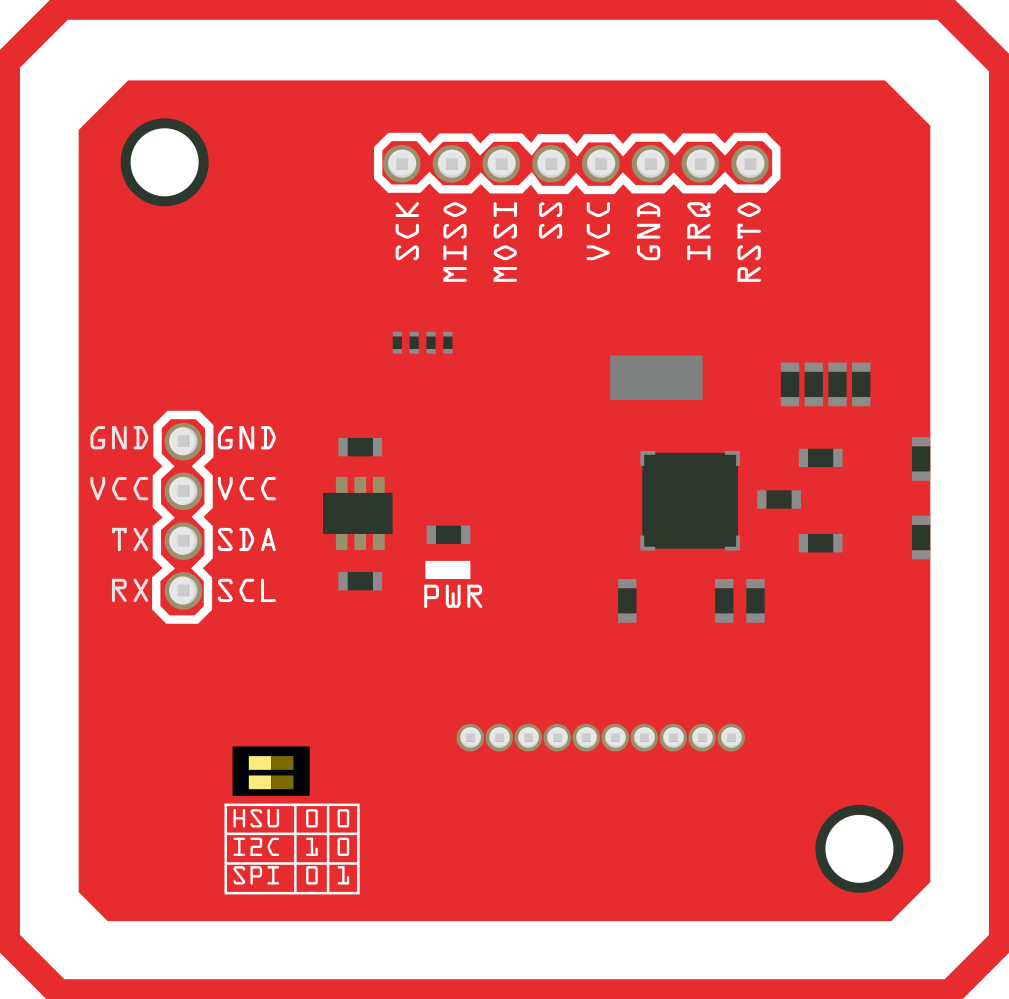
The PN532 module has multiple pins for communication and power. Below is the pin configuration:
| Pin Name | Description |
|---|---|
| VCC | Power input (3.3V or 5V) |
| GND | Ground connection |
| SDA | I2C data line (used in I2C communication mode) |
| SCL | I2C clock line (used in I2C communication mode) |
| MOSI | Master Out Slave In (used in SPI communication mode) |
| MISO | Master In Slave Out (used in SPI communication mode) |
| SCK | Serial Clock (used in SPI communication mode) |
| SS | Slave Select (used in SPI communication mode) |
| TXD | UART transmit line (used in UART communication mode) |
| RXD | UART receive line (used in UART communication mode) |
| IRQ | Interrupt request pin (used for event notifications) |
| RSTPD | Reset and power-down pin (used to reset the module or enter power-down mode) |
Usage Instructions
How to Use the PN532 Module in a Circuit
- Power the Module: Connect the VCC pin to a 3.3V or 5V power source and the GND pin to ground.
- Select Communication Protocol:
- For I2C: Connect the SDA and SCL pins to the corresponding I2C pins on your microcontroller.
- For SPI: Connect the MOSI, MISO, SCK, and SS pins to the respective SPI pins on your microcontroller.
- For UART: Connect the TXD and RXD pins to the UART pins on your microcontroller.
- Install Necessary Libraries: If using Arduino, install the "Adafruit_PN532" library from the Arduino Library Manager.
- Connect an Antenna: Ensure the onboard antenna is properly connected for optimal NFC/RFID performance.
- Write Code: Use the appropriate library functions to initialize the module, read/write NFC tags, or communicate with NFC-enabled devices.
Important Considerations and Best Practices
- Ensure the module is powered within the specified voltage range (3.3V to 5V).
- Avoid placing the module near metal objects, as they can interfere with NFC/RFID communication.
- Use pull-up resistors on the I2C lines (SDA and SCL) if they are not already included on the module.
- When using SPI or UART, ensure the correct baud rate and settings are configured in your code.
- Keep the reading distance within 5 cm for reliable communication with NFC tags.
Example Code for Arduino UNO
Below is an example of how to use the PN532 module with an Arduino UNO in I2C mode:
#include <Wire.h>
#include <Adafruit_PN532.h>

// Define the I2C pins for the PN532 module
#define SDA_PIN 2  // SDA pin on Arduino
#define SCL_PIN 3  // SCL pin on Arduino

// Create an instance of the Adafruit_PN532 library
Adafruit_PN532 nfc(SDA_PIN, SCL_PIN);

void setup() {
  Serial.begin(9600); // Initialize serial communication
  Serial.println("Initializing PN532 module...");

  nfc.begin(); // Initialize the PN532 module

  // Check if the module is detected
  uint32_t versiondata = nfc.getFirmwareVersion();
  if (!versiondata) {
    Serial.println("PN532 not detected. Check connections.");
    while (1); // Halt execution if module is not found
  }

  // Display firmware version
  Serial.print("Found PN532 with firmware version: ");
  Serial.println((versiondata >> 16) & 0xFF, HEX);

  // Configure the module to read passive targets (NFC tags)
  nfc.SAMConfig();
  Serial.println("PN532 ready to scan NFC tags.");
}

void loop() {
  Serial.println("Waiting for an NFC tag...");

  // Check for an NFC tag
  uint8_t success;
  uint8_t uid[] = { 0 };
  uint8_t uidLength;

  success = nfc.readPassiveTargetID(PN532_MIFARE_ISO14443A, uid, &uidLength);

  if (success) {
    Serial.println("NFC tag detected!");
    Serial.print("UID Length: "); Serial.print(uidLength, DEC); Serial.println(" bytes");
    Serial.print("UID Value: ");
    for (uint8_t i = 0; i < uidLength; i++) {
      Serial.print(" 0x"); Serial.print(uid[i], HEX);
    }
    Serial.println();
    delay(1000); // Wait before scanning again
  } else {
    Serial.println("No NFC tag detected.");
  }

  delay(500); // Short delay before next scan
}
Troubleshooting and FAQs
Common Issues and Solutions
PN532 Module Not Detected:
- Ensure the module is properly powered and connected to the microcontroller.
- Verify that the correct communication protocol (I2C, SPI, or UART) is selected.
- Check for loose or incorrect wiring.
NFC Tags Not Being Read:
- Ensure the tag is within the 5 cm reading range.
- Verify that the tag is compatible with the PN532 module (e.g., ISO14443 Type A/B).
- Avoid interference from metal objects or other electronic devices.
Communication Errors:
- Check the baud rate and protocol settings in your code.
- Use pull-up resistors on I2C lines if necessary.
- Ensure the microcontroller and module share a common ground.
FAQs
Q: Can the PN532 module write data to NFC tags?
A: Yes, the PN532 module can both read from and write to compatible NFC tags.
Q: What is the maximum range of the PN532 module?
A: The maximum range is approximately 5 cm, depending on the tag and environmental conditions.
Q: Can I use the PN532 module with a Raspberry Pi?
A: Yes, the PN532 module is compatible with Raspberry Pi. You can use libraries such as "libnfc" or Python-based libraries for integration.
Q: How do I switch between I2C, SPI, and UART modes?
A: The communication mode can be selected by configuring the onboard jumpers or switches on the module. Refer to the module's datasheet for specific instructions.