
How to Use Terminal PCB 3 Pin: Examples, Pinouts, and Specs
 Design with Terminal PCB 3 Pin in Cirkit Designer
Introduction
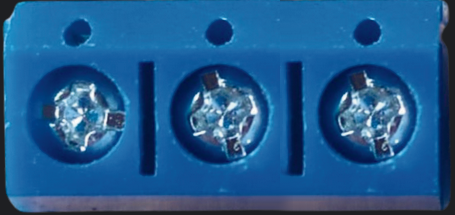
The Terminal PCB 3 Pin is a compact and reliable 3-pin terminal block designed for printed circuit boards (PCBs). It provides a convenient way to connect and disconnect wires in electronic circuits without the need for soldering. This component is widely used in applications where secure and removable wire connections are required, such as power distribution, signal transmission, and prototyping.
Explore Projects Built with Terminal PCB 3 Pin
 Open Project in Cirkit Designer
 Open Project in Cirkit Designer
 Open Project in Cirkit Designer
 Open Project in Cirkit Designer
Explore Projects Built with Terminal PCB 3 Pin
Open Project in Cirkit DesignerOpen Project in Cirkit DesignerOpen Project in Cirkit DesignerOpen Project in Cirkit DesignerCommon Applications and Use Cases
- Power supply connections in electronic devices
- Signal interfacing in control systems
- Prototyping and testing circuits
- Industrial automation and robotics
- Audio and communication equipment
Technical Specifications
The following table outlines the key technical details of the Terminal PCB 3 Pin:
| Parameter | Specification |
|---|---|
| Number of Pins | 3 |
| Rated Voltage | 300V AC/DC |
| Rated Current | 10A |
| Wire Gauge Support | 26-12 AWG |
| Pitch (Pin Spacing) | 5.08 mm |
| Material (Housing) | Polyamide (PA66), flame-retardant |
| Contact Material | Copper alloy with nickel plating |
| Operating Temperature | -40°C to +105°C |
| Mounting Type | Through-hole (THT) |
Pin Configuration and Descriptions
The Terminal PCB 3 Pin has three pins, each corresponding to a terminal for wire connections. The pin configuration is as follows:
| Pin Number | Description |
|---|---|
| 1 | Terminal for wire 1 |
| 2 | Terminal for wire 2 |
| 3 | Terminal for wire 3 |
Usage Instructions
How to Use the Component in a Circuit
Mounting the Terminal Block:
- Insert the pins of the terminal block into the corresponding through-hole pads on the PCB.
- Solder the pins securely to the PCB to ensure a stable connection.
Connecting Wires:
- Strip the insulation from the wire ends (approximately 5-7 mm).
- Insert the stripped wire ends into the terminal openings.
- Tighten the screws on the terminal block to secure the wires in place.
Testing the Connection:
- Verify that the wires are firmly held in place by gently tugging on them.
- Check for continuity using a multimeter to ensure proper electrical connections.
Important Considerations and Best Practices
- Ensure that the wire gauge matches the supported range (26-12 AWG) for optimal performance.
- Avoid overtightening the screws, as this may damage the wires or the terminal block.
- Use a PCB layout with appropriate pad sizes and spacing to accommodate the 5.08 mm pitch.
- When connecting high-current loads, ensure that the PCB traces are wide enough to handle the current.
Example: Connecting to an Arduino UNO
The Terminal PCB 3 Pin can be used to connect external components, such as sensors or power supplies, to an Arduino UNO. Below is an example of how to use it for a simple LED circuit:
Circuit Description:
- Pin 1: Connected to the positive terminal of the power supply (5V).
- Pin 2: Connected to the LED anode (via a 220-ohm resistor).
- Pin 3: Connected to the Arduino UNO ground (GND).
Arduino Code Example:
// Simple LED Blink Example
// Connect the LED anode to Pin 2 of the terminal block (via a resistor).
// Connect the cathode to GND (Pin 3 of the terminal block).

const int ledPin = 13; // Arduino digital pin connected to the LED

void setup() {
  pinMode(ledPin, OUTPUT); // Set the LED pin as an output
}

void loop() {
  digitalWrite(ledPin, HIGH); // Turn the LED on
  delay(1000);               // Wait for 1 second
  digitalWrite(ledPin, LOW);  // Turn the LED off
  delay(1000);               // Wait for 1 second
}
Troubleshooting and FAQs
Common Issues Users Might Face
Loose Wire Connections:
- Cause: Wires not properly secured in the terminal block.
- Solution: Ensure the screws are tightened adequately and the wires are stripped to the correct length.
Intermittent Connections:
- Cause: Poor soldering of the terminal block to the PCB.
- Solution: Re-solder the pins, ensuring a clean and solid joint.
Overheating of the Terminal Block:
- Cause: Exceeding the rated current (10A).
- Solution: Ensure the connected load does not exceed the current rating.
Wire Damage During Installation:
- Cause: Overtightening the screws.
- Solution: Tighten the screws just enough to hold the wires securely without damaging them.
FAQs
Q1: Can I use this terminal block for AC connections?
A1: Yes, the Terminal PCB 3 Pin is rated for both AC and DC connections up to 300V.
Q2: What tools are required to use this component?
A2: You will need a screwdriver (typically a flathead or Phillips), a wire stripper, and a soldering iron for PCB mounting.
Q3: Can I use this terminal block for high-frequency signals?
A3: While it can handle low-frequency signals, it is not ideal for high-frequency applications due to potential signal degradation.
Q4: Is the terminal block reusable?
A4: Yes, the terminal block can be reused as long as it is not physically damaged or worn out.
By following this documentation, you can effectively integrate the Terminal PCB 3 Pin into your electronic projects for secure and reliable wire connections.