
How to Use PoE PSU 48V DC: Examples, Pinouts, and Specs
 Design with PoE PSU 48V DC in Cirkit Designer
Introduction
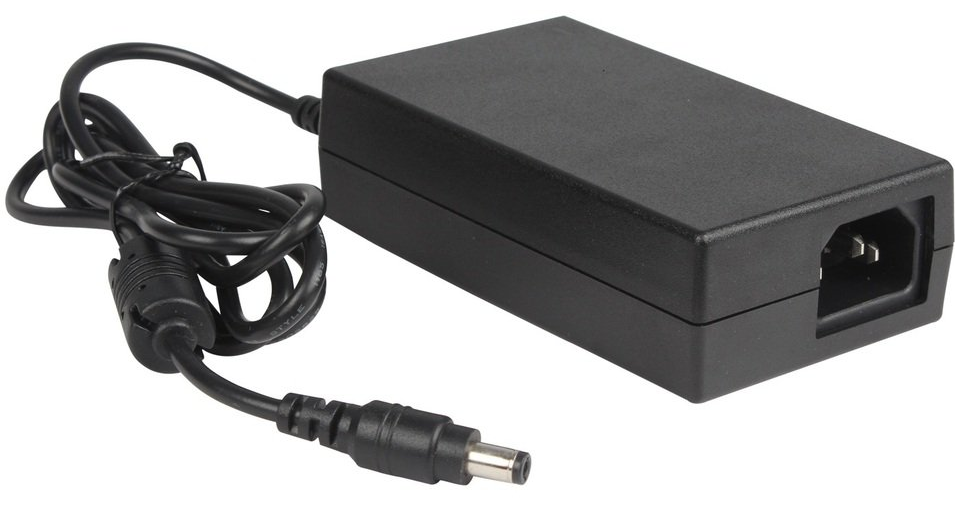
The Power over Ethernet (PoE) Power Supply Unit (PSU) 48V DC is an electronic component designed to deliver power to PoE-enabled devices through Ethernet cabling. This allows for the transmission of both power and data over a single network cable, simplifying wiring and reducing installation costs. Common applications include powering IP cameras, wireless access points, VoIP phones, and other network devices that support PoE.
Explore Projects Built with PoE PSU 48V DC
 Open Project in Cirkit Designer
 Open Project in Cirkit Designer
 Open Project in Cirkit Designer
 Open Project in Cirkit Designer
Explore Projects Built with PoE PSU 48V DC
Open Project in Cirkit DesignerOpen Project in Cirkit DesignerOpen Project in Cirkit DesignerOpen Project in Cirkit DesignerTechnical Specifications
General Specifications
| Parameter | Value | Description |
|---|---|---|
| Output Voltage | 48V DC | The DC voltage supplied to the device. |
| Output Current | Varies | Maximum current the PSU can provide. |
| Power Rating | Varies | Total power output capacity. |
| PoE Standard | IEEE 802.3af/at | Compatibility with PoE standards. |
| Operating Temperature | -10°C to +45°C | Suitable temperature range for operation. |
Pin Configuration and Descriptions
| Pin Number | Name | Description |
|---|---|---|
| 1 | V+ | Positive voltage output (48V DC) |
| 2 | V- | Ground reference for the voltage output |
| 3 | DATA+ | Data pair positive (if applicable) |
| 4 | DATA- | Data pair negative (if applicable) |
| 5 | LED+ | Anode for status LED (if present) |
| 6 | LED- | Cathode for status LED (if present) |
Note: The actual pinout may vary depending on the specific model and manufacturer. Always refer to the manufacturer's datasheet for exact pin configuration.
Usage Instructions
Integration into a Circuit
- Connection to PoE Device: Connect the V+ and V- pins to the power input of the PoE-enabled device, ensuring correct polarity.
- Data Connection (if applicable): If the PSU also carries data, connect DATA+ and DATA- to the respective data input pins on the device.
- Status LED (if present): Connect LED+ and LED- to the status LED pins if you wish to have a visual indicator of the PSU status.
Best Practices
- Cable Quality: Use high-quality Ethernet cables to ensure reliable power and data transmission.
- Overload Protection: Ensure the connected device does not exceed the PSU's current and power ratings.
- Ventilation: Provide adequate ventilation around the PSU to prevent overheating.
- Compliance: Use the PSU with devices that comply with the same PoE standards (IEEE 802.3af/at).
Troubleshooting and FAQs
Common Issues
- No Power to Device: Check connections for proper polarity and ensure the cable is not damaged.
- Intermittent Power: Verify that the PSU and device are not overheating and that the cable quality is adequate.
- Device Not Recognizing Power: Ensure the device is PoE-compatible and that the PSU meets the required PoE standard.
FAQs
Q: Can I use this PSU with non-PoE devices? A: No, this PSU is designed for PoE-enabled devices only.
Q: What is the maximum cable length I can use with this PSU? A: The maximum recommended length for Ethernet cables with PoE is 100 meters.
Q: Can I daisy-chain multiple PoE devices with this PSU? A: Daisy-chaining is not recommended as it may exceed the PSU's power capacity and violate PoE standards.
Q: Is this PSU compatible with all PoE standards? A: This PSU is compatible with IEEE 802.3af/at standards. Check your device's specifications to ensure compatibility.
Example Code for Arduino UNO
This section provides an example of how to control a PoE-powered device with an Arduino UNO. The code demonstrates a simple on/off toggle for a PoE-powered LED light.
// Define the control pin for the PoE PSU
const int poeControlPin = 2;

void setup() {
  // Initialize the control pin as an output
  pinMode(poeControlPin, OUTPUT);
}

void loop() {
  // Turn on the PoE-powered device
  digitalWrite(poeControlPin, HIGH);
  delay(1000); // Wait for 1 second

  // Turn off the PoE-powered device
  digitalWrite(poeControlPin, LOW);
  delay(1000); // Wait for 1 second
}
Note: This example assumes that the Arduino UNO controls a relay or similar device that switches the PoE PSU on and off. The Arduino itself cannot directly switch the 48V DC power.
Remember to consult the datasheet and technical resources provided by the manufacturer for the most accurate and specific information regarding the PoE PSU 48V DC component.