
How to Use 5 wire Terminal Connector: Examples, Pinouts, and Specs
 Design with 5 wire Terminal Connector in Cirkit Designer
Introduction
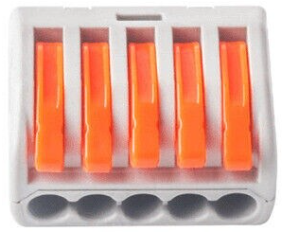
A 5 wire terminal connector is a type of electrical connector designed to join five separate wires securely and efficiently. It provides a reliable and organized way to connect multiple circuits or components in an electrical system. These connectors are commonly used in applications requiring modularity, ease of maintenance, and secure electrical connections.
Explore Projects Built with 5 wire Terminal Connector
 Open Project in Cirkit Designer
 Open Project in Cirkit Designer
 Open Project in Cirkit Designer
 Open Project in Cirkit Designer
Explore Projects Built with 5 wire Terminal Connector
Open Project in Cirkit DesignerOpen Project in Cirkit DesignerOpen Project in Cirkit DesignerOpen Project in Cirkit DesignerCommon Applications and Use Cases
- Industrial control panels and automation systems
- Home electrical wiring and distribution
- Audio and video equipment connections
- Robotics and DIY electronics projects
- Automotive and marine electrical systems
Technical Specifications
Key Technical Details
- Number of Terminals: 5
- Rated Voltage: Typically 250V AC/DC (varies by model)
- Rated Current: 10A to 30A (depending on the specific connector)
- Wire Gauge Compatibility: 22 AWG to 12 AWG
- Material: Insulating body (e.g., polyamide or thermoplastic), metal contacts (e.g., brass or copper alloy)
- Mounting Type: Screw terminal or push-in connection
- Operating Temperature Range: -40°C to +105°C (varies by model)
- Durability: Rated for 100+ connection cycles
Pin Configuration and Descriptions
The 5 wire terminal connector does not have traditional "pins" but instead features terminals for wire connections. Below is a description of the terminal layout:
| Terminal Number | Description | Typical Use Case |
|---|---|---|
| 1 | Terminal for wire 1 | Power input or signal line |
| 2 | Terminal for wire 2 | Power output or signal line |
| 3 | Terminal for wire 3 | Ground or additional signal line |
| 4 | Terminal for wire 4 | Auxiliary power or signal line |
| 5 | Terminal for wire 5 | Auxiliary power or signal line |
Usage Instructions
How to Use the Component in a Circuit
Prepare the Wires:
- Strip approximately 5-7 mm of insulation from the ends of the wires you intend to connect.
- Ensure the wire ends are clean and free of frayed strands.
Connect the Wires:
- Loosen the screws on the terminal connector (if using a screw-type connector).
- Insert the stripped end of each wire into the corresponding terminal slot.
- Tighten the screws securely to ensure a firm connection. Avoid overtightening, as this may damage the wire or connector.
Verify the Connections:
- Double-check that each wire is securely fastened and that there are no loose strands.
- Ensure the wires are connected to the correct terminals as per your circuit design.
Integrate into the Circuit:
- Mount the terminal connector in its designated location (e.g., on a DIN rail or enclosure).
- Connect the other ends of the wires to the appropriate components in your circuit.
Important Considerations and Best Practices
- Wire Compatibility: Ensure the wire gauge matches the connector's specifications to avoid loose connections or overheating.
- Insulation: Use heat shrink tubing or electrical tape to insulate exposed wire ends if necessary.
- Current Rating: Do not exceed the rated current of the connector to prevent overheating or damage.
- Secure Mounting: If the connector is mounted in a high-vibration environment, ensure it is securely fastened to prevent accidental disconnections.
- Testing: After installation, test the circuit for continuity and proper operation before applying full power.
Example: Connecting to an Arduino UNO
While a 5 wire terminal connector is not directly connected to an Arduino UNO, it can be used to organize and distribute power or signals to multiple components in an Arduino-based project. Below is an example of how to use it in a simple LED circuit:
// Example: Controlling 5 LEDs using an Arduino UNO and a 5 wire terminal connector

// Define the pins connected to the LEDs
const int ledPins[5] = {2, 3, 4, 5, 6};

void setup() {
  // Initialize all LED pins as outputs
  for (int i = 0; i < 5; i++) {
    pinMode(ledPins[i], OUTPUT);
  }
}

void loop() {
  // Turn LEDs on and off sequentially
  for (int i = 0; i < 5; i++) {
    digitalWrite(ledPins[i], HIGH); // Turn on LED
    delay(500);                     // Wait for 500ms
    digitalWrite(ledPins[i], LOW);  // Turn off LED
    delay(500);                     // Wait for 500ms
  }
}
In this example:
- The 5 wire terminal connector is used to distribute the connections from the Arduino's digital pins to the LEDs.
- Each terminal connects one Arduino pin to the positive lead of an LED, while the negative leads are connected to a common ground.
Troubleshooting and FAQs
Common Issues Users Might Face
Loose Connections:
- Cause: Wires not securely fastened in the terminals.
- Solution: Ensure screws are tightened properly, and the wire gauge matches the connector's specifications.
Overheating:
- Cause: Exceeding the rated current of the connector.
- Solution: Verify the current requirements of your circuit and ensure they are within the connector's limits.
Intermittent Connections:
- Cause: Poor contact between the wire and terminal.
- Solution: Check for corrosion or dirt on the wire ends and clean them if necessary.
Wire Slippage:
- Cause: Using wires with insulation that is too soft or slippery.
- Solution: Use wires with proper insulation and ensure the stripped ends are securely clamped.
FAQs
Q: Can I use a 5 wire terminal connector for high-frequency signals?
A: Yes, but ensure the connector's material and design are suitable for the frequency range to avoid signal degradation.
Q: Is the connector waterproof?
A: Most standard 5 wire terminal connectors are not waterproof. For outdoor or wet environments, use a waterproof-rated connector.
Q: Can I connect fewer than 5 wires?
A: Yes, unused terminals can remain empty without affecting the functionality of the connected wires.
Q: How do I prevent accidental disconnections in a high-vibration environment?
A: Use locking mechanisms or secure the wires with additional clamps or cable ties.
This documentation provides a comprehensive guide to understanding, using, and troubleshooting a 5 wire terminal connector.