Cirkit Designer Logo
Cirkit Designer
Your all-in-one circuit design IDE
Home / 
Component Documentation

How to Use ESP32-C6-DevKit1: Examples, Pinouts, and Specs
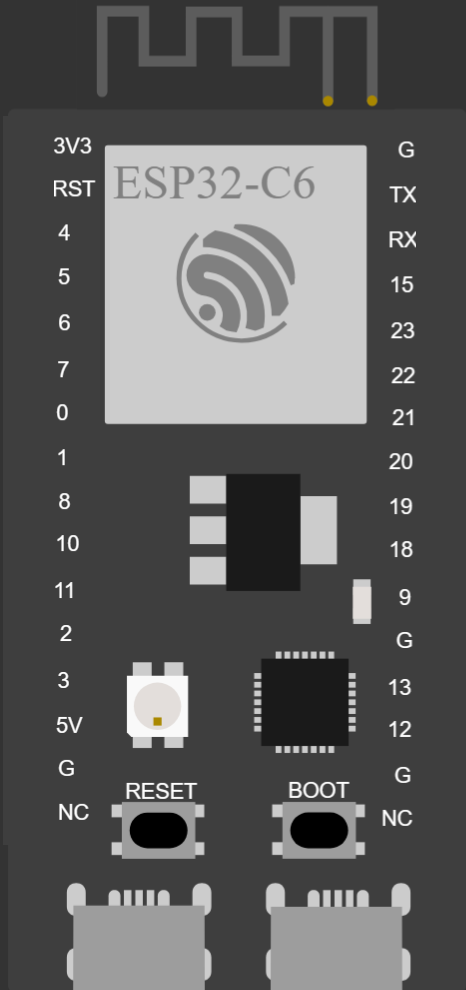

Image of ESP32-C6-DevKit1
Cirkit Designer LogoDesign with ESP32-C6-DevKit1 in Cirkit Designer

Introduction

The ESP32-C6-DevKit1, manufactured by Espressif, is a development board built around the ESP32-C6 chip. This board integrates Wi-Fi 6, Bluetooth 5 (LE), and 802.15.4 (Thread/Zigbee) capabilities, making it an ideal choice for IoT applications. It provides a versatile platform for prototyping and development, featuring multiple GPIO pins, ADCs, and support for various communication protocols.

Explore Projects Built with ESP32-C6-DevKit1
Use Cirkit Designer to design, explore, and prototype these projects online. Some projects support real-time simulation. Click "Open Project" to start designing instantly!
ESP32-Based Environmental Monitoring and Alert System with Solar Charging
Image of mark: A project utilizing ESP32-C6-DevKit1 in a practical application
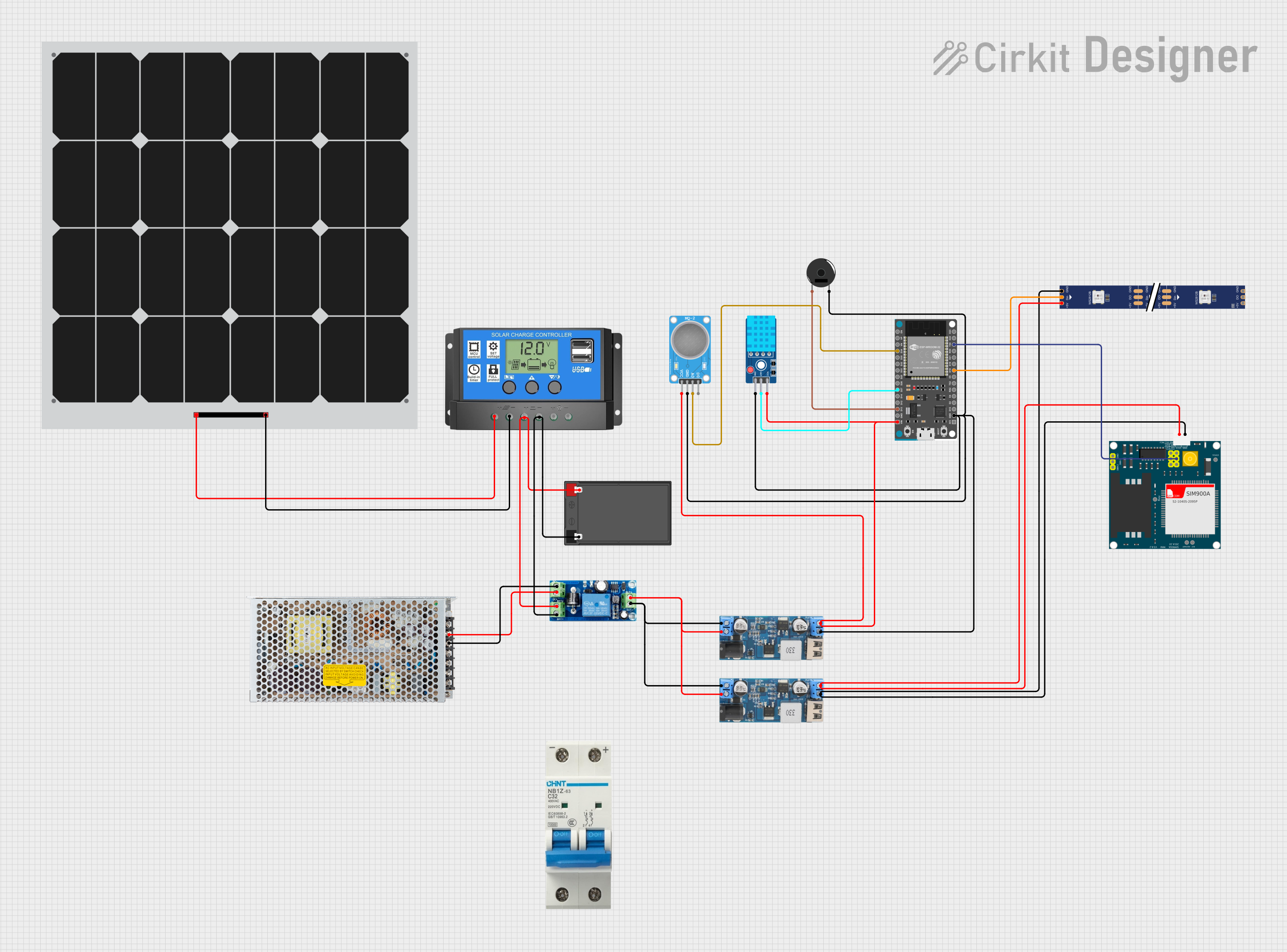
This circuit features an ESP32 Devkit V1 microcontroller connected to various sensors and modules for monitoring and communication purposes. It includes an MQ-2 gas sensor and a DHT11 temperature and humidity sensor, both interfaced with the ESP32 for environmental data collection. The circuit is powered by a 12V battery, regulated to 5V by step-down converters, and includes a solar charge controller connected to a solar panel for battery charging, a UPS module for power management, and a SIM900A module for GSM communication. Additionally, there is a WS2812 RGB LED strip for visual feedback and a piezo buzzer for audio alerts, both controlled by the ESP32.
Cirkit Designer LogoOpen Project in Cirkit Designer
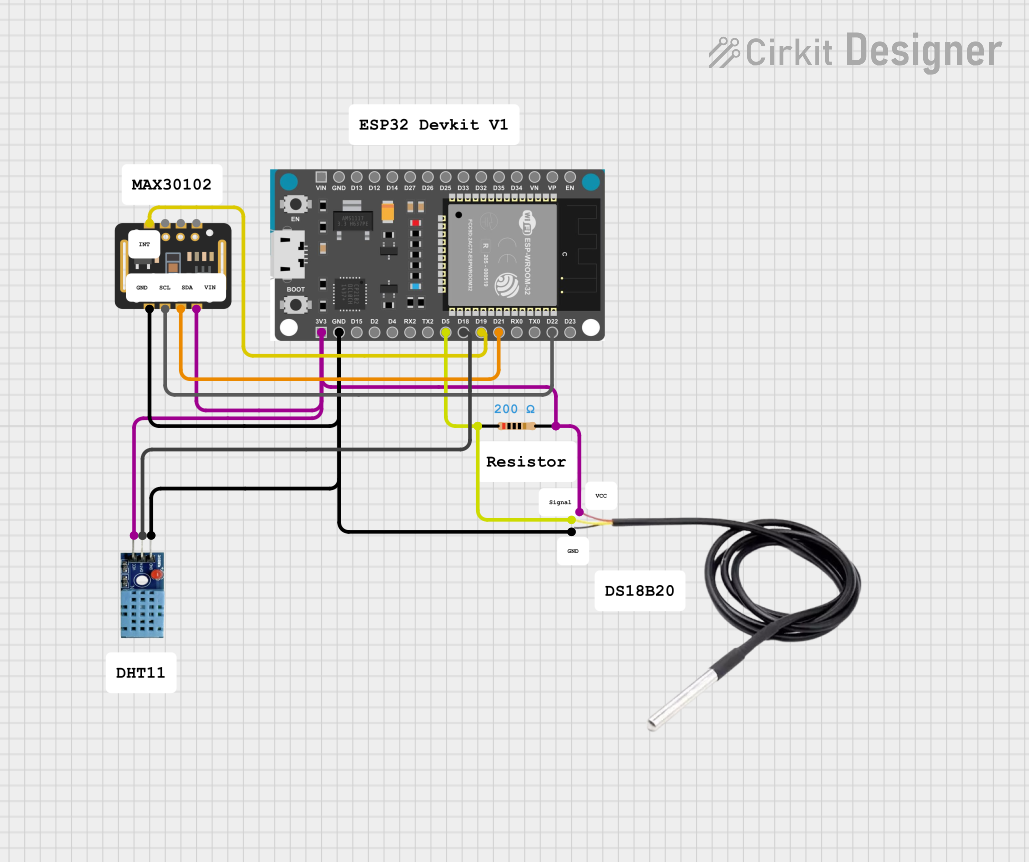
ESP32-Based Smart Weather and Health Monitoring System with Wi-Fi Connectivity
Image of Health Monitoring System: A project utilizing ESP32-C6-DevKit1 in a practical application
This circuit uses an ESP32 Devkit V1 microcontroller to interface with multiple sensors, including a DHT11 temperature and humidity sensor, a DS18B20 temperature sensor, and a MAX30102 pulse oximeter and heart-rate sensor. The ESP32 reads data from these sensors and can process or transmit the information for further use.
Cirkit Designer LogoOpen Project in Cirkit Designer
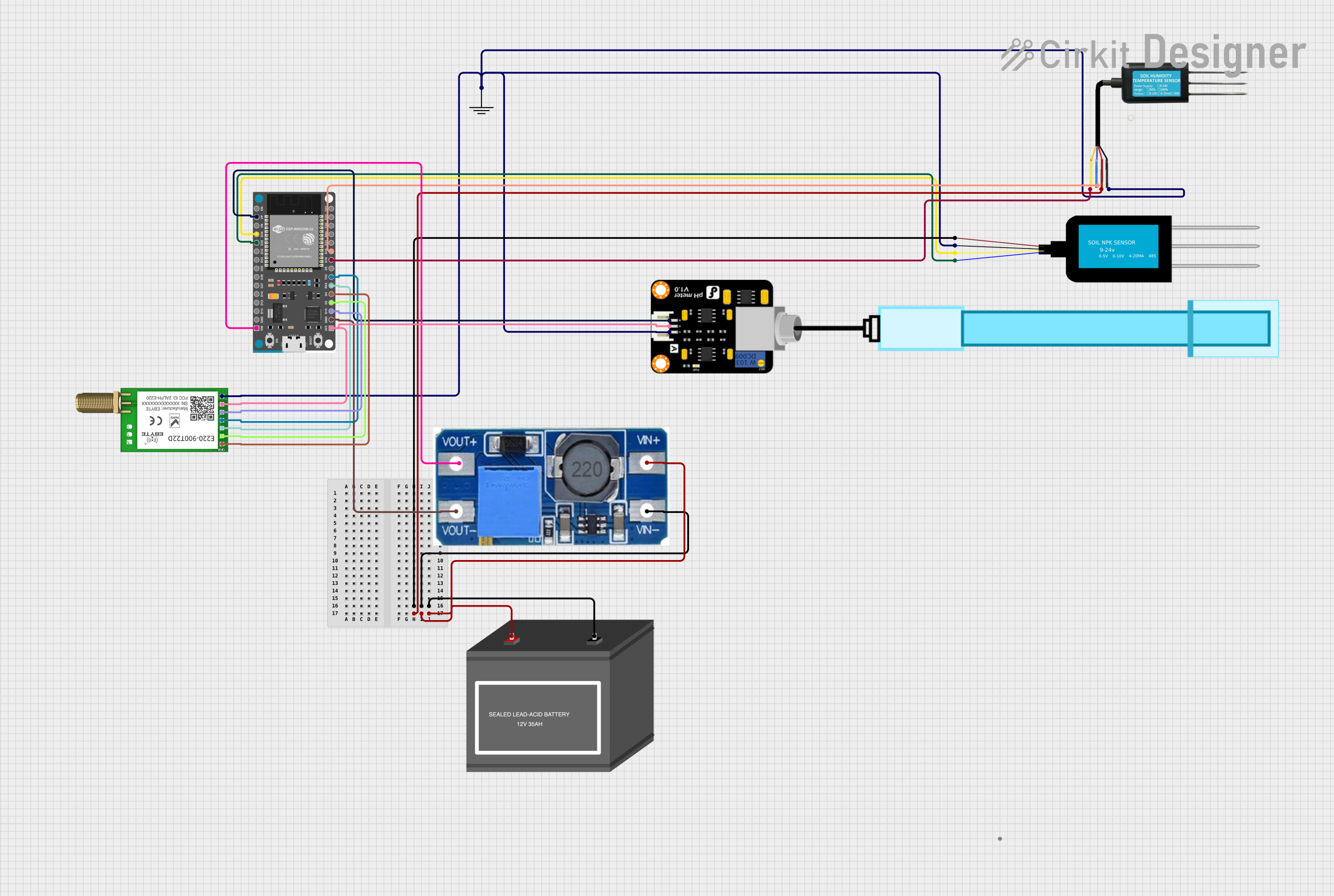
ESP32-Based Smart Agriculture System with LoRa Communication
Image of Soil Monitoring Device: A project utilizing ESP32-C6-DevKit1 in a practical application
This circuit features an ESP32 Devkit V1 microcontroller as the central processing unit, interfacing with various sensors including a PH Meter, an NPK Soil Sensor, and a Soil Moisture Sensor for environmental data collection. It also includes an EBYTE LoRa E220 module for wireless communication. Power management is handled by a Step Up Boost Power Converter, which is connected to a 12V Battery, stepping up the voltage to power the ESP32 and sensors, with common ground connections throughout the circuit.
Cirkit Designer LogoOpen Project in Cirkit Designer
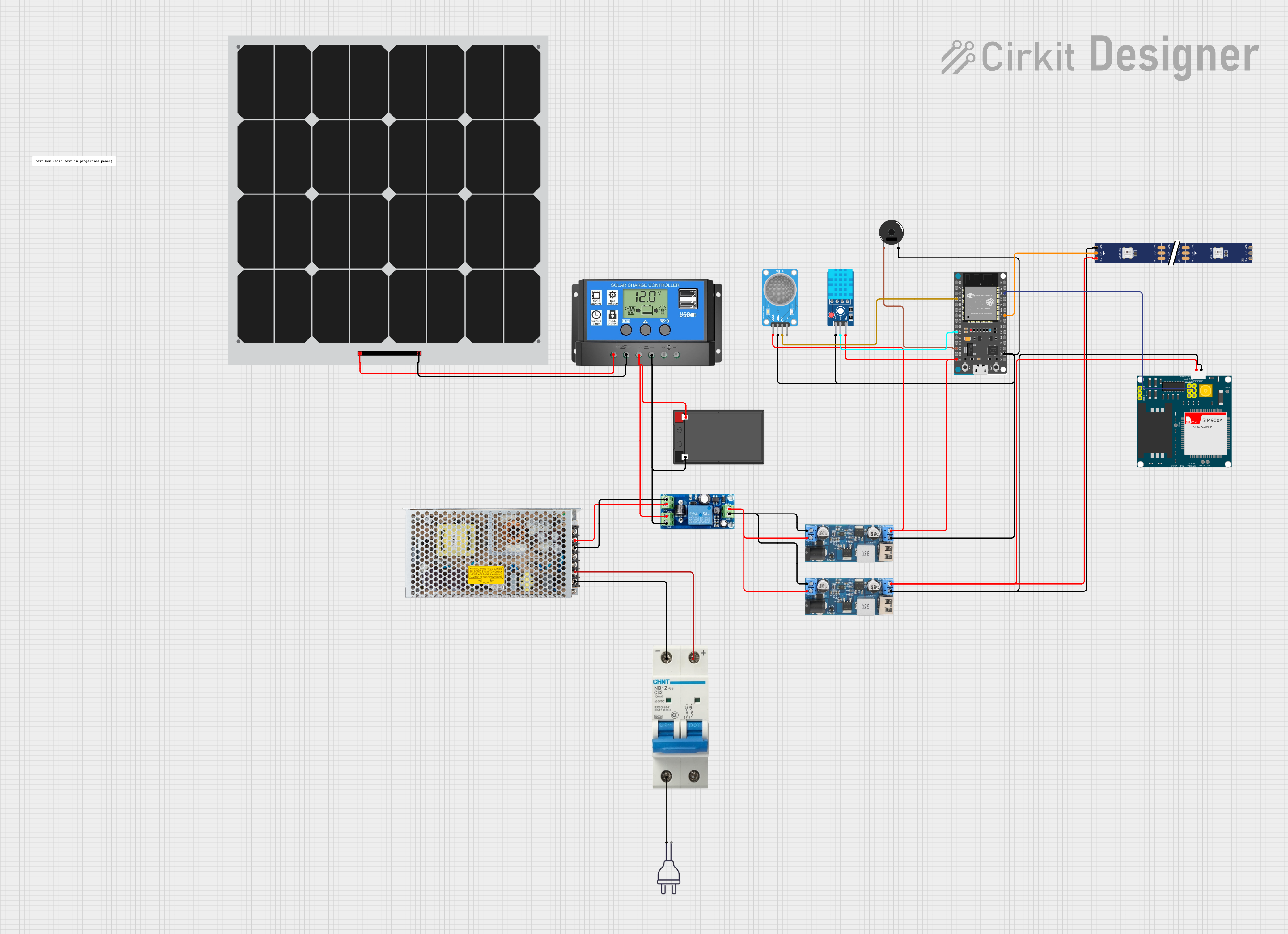
ESP32-Based Environmental Monitoring and Alert System with Solar Charging
Image of Schematic: A project utilizing ESP32-C6-DevKit1 in a practical application
This circuit features an ESP32 Devkit V1 microcontroller connected to various sensors and devices, including a DHT11 temperature and humidity sensor, an MQ-2 gas sensor, and a WS2812 RGB LED strip. The ESP32 controls the LED strip and processes sensor readings, while a SIM900A module provides cellular communication capabilities. Power management is handled by a UPS module fed by a 12V battery charged via a solar panel and charge controller, with voltage regulation provided by step-down converters. Additionally, a piezo buzzer is included for audible alerts, and the system's safety is ensured by a circuit breaker connected to a switching power supply for AC to DC conversion.
Cirkit Designer LogoOpen Project in Cirkit Designer

Explore Projects Built with ESP32-C6-DevKit1

Use Cirkit Designer to design, explore, and prototype these projects online. Some projects support real-time simulation. Click "Open Project" to start designing instantly!
Image of mark: A project utilizing ESP32-C6-DevKit1 in a practical application
ESP32-Based Environmental Monitoring and Alert System with Solar Charging
This circuit features an ESP32 Devkit V1 microcontroller connected to various sensors and modules for monitoring and communication purposes. It includes an MQ-2 gas sensor and a DHT11 temperature and humidity sensor, both interfaced with the ESP32 for environmental data collection. The circuit is powered by a 12V battery, regulated to 5V by step-down converters, and includes a solar charge controller connected to a solar panel for battery charging, a UPS module for power management, and a SIM900A module for GSM communication. Additionally, there is a WS2812 RGB LED strip for visual feedback and a piezo buzzer for audio alerts, both controlled by the ESP32.
Cirkit Designer LogoOpen Project in Cirkit Designer
Image of Health Monitoring System: A project utilizing ESP32-C6-DevKit1 in a practical application
ESP32-Based Smart Weather and Health Monitoring System with Wi-Fi Connectivity
This circuit uses an ESP32 Devkit V1 microcontroller to interface with multiple sensors, including a DHT11 temperature and humidity sensor, a DS18B20 temperature sensor, and a MAX30102 pulse oximeter and heart-rate sensor. The ESP32 reads data from these sensors and can process or transmit the information for further use.
Cirkit Designer LogoOpen Project in Cirkit Designer
Image of Soil Monitoring Device: A project utilizing ESP32-C6-DevKit1 in a practical application
ESP32-Based Smart Agriculture System with LoRa Communication
This circuit features an ESP32 Devkit V1 microcontroller as the central processing unit, interfacing with various sensors including a PH Meter, an NPK Soil Sensor, and a Soil Moisture Sensor for environmental data collection. It also includes an EBYTE LoRa E220 module for wireless communication. Power management is handled by a Step Up Boost Power Converter, which is connected to a 12V Battery, stepping up the voltage to power the ESP32 and sensors, with common ground connections throughout the circuit.
Cirkit Designer LogoOpen Project in Cirkit Designer
Image of Schematic: A project utilizing ESP32-C6-DevKit1 in a practical application
ESP32-Based Environmental Monitoring and Alert System with Solar Charging
This circuit features an ESP32 Devkit V1 microcontroller connected to various sensors and devices, including a DHT11 temperature and humidity sensor, an MQ-2 gas sensor, and a WS2812 RGB LED strip. The ESP32 controls the LED strip and processes sensor readings, while a SIM900A module provides cellular communication capabilities. Power management is handled by a UPS module fed by a 12V battery charged via a solar panel and charge controller, with voltage regulation provided by step-down converters. Additionally, a piezo buzzer is included for audible alerts, and the system's safety is ensured by a circuit breaker connected to a switching power supply for AC to DC conversion.
Cirkit Designer LogoOpen Project in Cirkit Designer

Common Applications

  • Smart home devices (e.g., lighting, thermostats, security systems)
  • Industrial IoT (e.g., sensors, actuators, monitoring systems)
  • Wearable devices
  • Wireless communication hubs (e.g., Zigbee/Thread gateways)
  • Low-power, high-performance IoT solutions

Technical Specifications

The ESP32-C6-DevKit1 is designed to provide robust performance for IoT applications. Below are its key technical details:

Key Features

  • Processor: 32-bit RISC-V single-core processor, up to 160 MHz
  • Wireless Connectivity:
    • Wi-Fi 6 (802.11ax) with 20 MHz bandwidth
    • Bluetooth 5 (LE) with long-range support
    • IEEE 802.15.4 (Thread/Zigbee)
  • Memory:
    • 320 KB SRAM
    • 384 KB ROM
    • External flash support via SPI
  • GPIO: 22 programmable GPIO pins
  • ADC: 12-bit ADC with up to 5 channels
  • Operating Voltage: 3.3V
  • Power Supply: USB or external 5V
  • Interfaces:
    • SPI, I2C, I2S, UART, PWM
    • JTAG debugging support
  • Dimensions: 52 mm x 25 mm

Pin Configuration

The ESP32-C6-DevKit1 features a 2-row pin header layout. Below is the pin configuration:

Pin Name Function Notes
1 3V3 Power Supply 3.3V output
2 GND Ground Common ground
3 GPIO0 General Purpose I/O Boot mode selection
4 GPIO1 General Purpose I/O UART TX
5 GPIO2 General Purpose I/O ADC channel 1
6 GPIO3 General Purpose I/O UART RX
7 GPIO4 General Purpose I/O ADC channel 2
8 GPIO5 General Purpose I/O PWM output
9 EN Enable Active high to enable chip
10 IOREF I/O Voltage Reference Typically 3.3V

Note: Refer to the official datasheet for the complete pinout and advanced configurations.

Usage Instructions

The ESP32-C6-DevKit1 is straightforward to use for prototyping and development. Below are the steps and best practices for using the board effectively.

Getting Started

  1. Powering the Board:

    • Connect the board to your computer using a USB-C cable.
    • Alternatively, supply 5V to the VIN pin and connect GND to the ground.
  2. Installing Drivers:

    • Download and install the USB-to-serial drivers from the Espressif website if required.
  3. Setting Up the Development Environment:

    • Install the Arduino IDE or Espressif IDF (IoT Development Framework).
    • Add the ESP32-C6 board support package to your IDE.
  4. Uploading Code:

    • Connect the board to your computer.
    • Select the correct board and port in your IDE.
    • Write or load your code and upload it to the board.

Example: Blinking an LED

The following example demonstrates how to blink an LED connected to GPIO2 using the Arduino IDE:

// Define the GPIO pin for the LED
#define LED_PIN 2

void setup() {
  // Set GPIO2 as an output pin
  pinMode(LED_PIN, OUTPUT);
}

void loop() {
  // Turn the LED on
  digitalWrite(LED_PIN, HIGH);
  delay(1000); // Wait for 1 second

  // Turn the LED off
  digitalWrite(LED_PIN, LOW);
  delay(1000); // Wait for 1 second
}

Best Practices

  • Use a stable 3.3V power supply to avoid damaging the board.
  • Avoid connecting GPIO pins directly to high-current devices; use transistors or relays.
  • Use pull-up or pull-down resistors for input pins to prevent floating states.
  • When using Wi-Fi or Bluetooth, ensure the antenna area is unobstructed for optimal performance.

Troubleshooting and FAQs

Common Issues

  1. Board Not Detected by IDE:

    • Ensure the USB cable is functional and supports data transfer.
    • Install the correct USB-to-serial drivers.
    • Check if the board is powered on (EN pin should be high).
  2. Code Upload Fails:

    • Verify the correct board and port are selected in the IDE.
    • Press and hold the BOOT button while uploading the code.
  3. Wi-Fi or Bluetooth Not Working:

    • Ensure the antenna area is not obstructed by metal objects.
    • Check the firmware version and update if necessary.
  4. GPIO Pin Not Responding:

    • Confirm the pin is not being used by another peripheral (e.g., ADC, UART).
    • Check for short circuits or incorrect wiring.

FAQs

Q: Can I power the board with a battery?
A: Yes, you can use a 3.7V LiPo battery connected to the 3V3 pin or a 5V source connected to the VIN pin.

Q: Does the board support OTA updates?
A: Yes, the ESP32-C6 supports Over-The-Air (OTA) updates for firmware.

Q: How do I reset the board?
A: Press the EN button to reset the board.

Q: Can I use the ESP32-C6-DevKit1 with Zigbee devices?
A: Yes, the board supports IEEE 802.15.4, which is compatible with Zigbee and Thread protocols.

By following this documentation, you can effectively use the ESP32-C6-DevKit1 for your IoT projects. For more advanced configurations, refer to the official Espressif documentation.