Cirkit Designer LogoCirkit DesignerYour all-in-one circuit design IDE Launch Cirkit Designer App

How to Use Pilot Lamp Yellon: Examples, Pinouts, and Specs

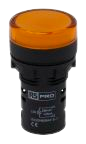
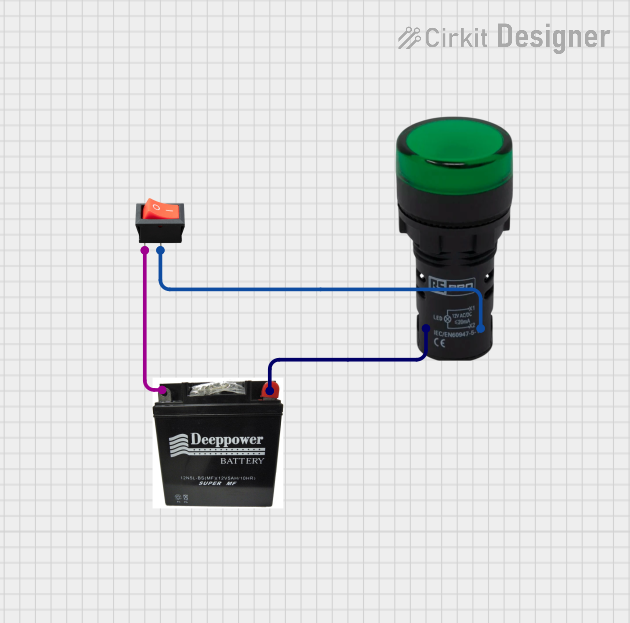
Image of Pilot Lamp YellonDesign with Pilot Lamp Yellon in Cirkit Designer

Introduction

The Pilot Lamp Yellon is a small indicator light designed to visually signal the operational status of a device or system. This variant emits a yellow light, which is commonly used to indicate caution, warnings, or standby conditions. Its compact design and reliable performance make it a popular choice in industrial control panels, machinery, and consumer electronics.

Explore Projects Built with Pilot Lamp Yellon

Use Cirkit Designer to design, explore, and prototype these projects online. Some projects support real-time simulation. Click "Open Project" to start designing instantly!

Common Applications and Use Cases

Technical Specifications

Key Technical Details

Parameter Value
Operating Voltage 12V DC (typical)
Current Consumption 20mA (nominal)
Light Color Yellow
Mounting Hole Diameter 8mm
Housing Material Polycarbonate (flame-retardant)
LED Lifespan 50,000 hours (approx.)
Operating Temperature -20°C to +70°C
Connection Type Solder terminals or screw terminals

Pin Configuration and Descriptions

Pin Number Label Description
1 Positive (+) Connect to the positive terminal of the power supply.
2 Negative (-) Connect to the negative terminal (ground).

Usage Instructions

How to Use the Component in a Circuit

  1. Determine the Operating Voltage: Ensure the power supply matches the lamp's operating voltage (12V DC).
  2. Prepare the Mounting Hole: Drill an 8mm hole in the panel or enclosure where the lamp will be installed.
  3. Connect the Terminals:
    • Attach the positive terminal of the power supply to the Positive (+) pin.
    • Attach the ground (negative terminal) to the Negative (-) pin.
  4. Secure the Lamp: Insert the lamp into the mounting hole and tighten the securing nut.
  5. Test the Circuit: Power on the system to verify the lamp illuminates correctly.

Important Considerations and Best Practices

Example: Connecting to an Arduino UNO

The Pilot Lamp Yellon can be used with an Arduino UNO to indicate the status of a digital output pin. Below is an example circuit and code:

Circuit Setup

Arduino Code

// Pilot Lamp Yellon Example with Arduino UNO
// This code toggles the lamp on and off every second.

const int lampPin = 13; // Pin connected to the lamp's positive terminal

void setup() {
  pinMode(lampPin, OUTPUT); // Set the lamp pin as an output
}

void loop() {
  digitalWrite(lampPin, HIGH); // Turn the lamp ON
  delay(1000);                // Wait for 1 second
  digitalWrite(lampPin, LOW);  // Turn the lamp OFF
  delay(1000);                // Wait for 1 second
}

Troubleshooting and FAQs

Common Issues and Solutions

Issue Possible Cause Solution
Lamp does not light up Incorrect polarity Verify and correct the wiring.
Lamp flickers during operation Unstable power supply Use a regulated 12V DC power source.
Lamp overheats Excessive voltage or prolonged use Check the voltage and ensure proper ventilation.
Lamp fails prematurely Exceeded operating temperature or voltage Operate within specified limits.

FAQs

  1. Can the Pilot Lamp Yellon operate on AC power?
    No, this lamp is designed for 12V DC operation only. Using AC power may damage the component.

  2. What resistor value should I use if connecting to a higher voltage?
    Use Ohm's Law to calculate the resistor value:
    ( R = \frac{V_{supply} - V_{lamp}}{I_{lamp}} )
    For example, with a 24V supply:
    ( R = \frac{24V - 12V}{0.02A} = 600 , \Omega ).

  3. Can the lamp be used outdoors?
    The lamp is not waterproof. Use it in a dry, indoor environment or within a sealed enclosure for outdoor applications.