
How to Use 600w INDUSTRIAL AC/DC POWER SUPPLY: Examples, Pinouts, and Specs
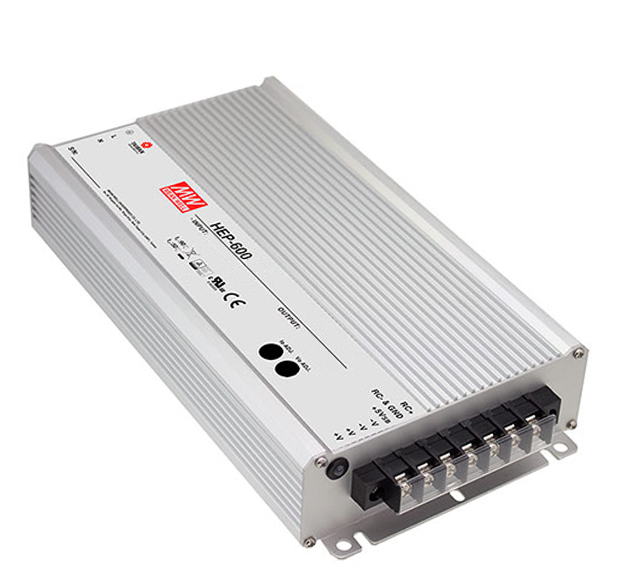
 Design with 600w INDUSTRIAL AC/DC POWER SUPPLY in Cirkit Designer
Introduction
The MEAN WELL HEP-600 is a high-power AC/DC power supply unit designed for industrial applications. It converts alternating current (AC) to direct current (DC) and is capable of delivering up to 600 watts of power. This robust and reliable power supply is ideal for use in harsh environments, including factory automation, industrial control systems, and outdoor telecommunications equipment.
Explore Projects Built with 600w INDUSTRIAL AC/DC POWER SUPPLY
 Open Project in Cirkit Designer
 Open Project in Cirkit Designer
 Open Project in Cirkit Designer
 Open Project in Cirkit Designer
Explore Projects Built with 600w INDUSTRIAL AC/DC POWER SUPPLY
Open Project in Cirkit DesignerOpen Project in Cirkit DesignerOpen Project in Cirkit DesignerOpen Project in Cirkit DesignerTechnical Specifications
Key Technical Details
| Parameter | Value |
|---|---|
| Input Voltage Range | 90-305 VAC / 127-431 VDC |
| Output Voltage Options | 12V, 24V, 36V, 48V, 72V |
| Output Power | 600W |
| Efficiency | Up to 96% |
| Operating Temperature | -40°C to +70°C |
| Protection Features | Overload, Over Voltage, Over Temperature, Short Circuit |
| Dimensions | 280 x 144 x 48.5 mm |
| Weight | 2.5 kg |
Pin Configuration and Descriptions
| Pin No. | Pin Name | Description |
|---|---|---|
| 1 | AC/L | AC Line Input |
| 2 | AC/N | AC Neutral Input |
| 3 | FG | Frame Ground |
| 4 | +V | DC Output Positive |
| 5 | -V | DC Output Negative |
| 6 | Remote Control | Remote ON/OFF Control |
| 7 | DC OK | DC OK Signal Output |
| 8 | PV | Output Voltage Programming |
Usage Instructions
How to Use the HEP-600 in a Circuit
Wiring the Input:
- Connect the AC/L pin to the live wire of the AC mains.
- Connect the AC/N pin to the neutral wire of the AC mains.
- Connect the FG pin to the ground for safety.
Wiring the Output:
- Connect the +V pin to the positive terminal of your load.
- Connect the -V pin to the negative terminal of your load.
Remote Control:
- Use the Remote Control pin to enable or disable the power supply remotely. This can be done by connecting it to a control circuit.
DC OK Signal:
- The DC OK pin can be used to monitor the status of the power supply. It provides a signal indicating whether the output voltage is within the specified range.
Output Voltage Programming:
- The PV pin allows for programming the output voltage. This can be done by connecting a resistor or a voltage source to this pin.
Important Considerations and Best Practices
- Cooling: Ensure adequate ventilation around the power supply to prevent overheating.
- Mounting: Securely mount the power supply in a stable location to avoid mechanical stress.
- Protection: Utilize the built-in protection features to safeguard against overload, over voltage, over temperature, and short circuits.
- Compliance: Follow all local electrical codes and standards when installing and using the power supply.
Troubleshooting and FAQs
Common Issues and Solutions
No Output Voltage:
- Check Input Connections: Ensure that the AC/L and AC/N pins are properly connected to the AC mains.
- Verify Remote Control: Make sure the Remote Control pin is correctly configured to enable the power supply.
- Inspect Protection Features: Check if any protection features (overload, over voltage, etc.) have been triggered.
Output Voltage Fluctuations:
- Check Load: Ensure that the load connected to the power supply is within the specified range.
- Inspect Wiring: Verify that all connections are secure and free from corrosion or damage.
- Cooling: Ensure that the power supply is not overheating and that there is adequate ventilation.
Overheating:
- Ventilation: Ensure that there is sufficient airflow around the power supply.
- Ambient Temperature: Check that the operating environment is within the specified temperature range.
FAQs
Q: Can the HEP-600 be used in outdoor applications? A: Yes, the HEP-600 is designed to operate in harsh environments, including outdoor applications, thanks to its robust construction and wide operating temperature range.
Q: How do I program the output voltage? A: The output voltage can be programmed using the PV pin. Connect a resistor or a voltage source to this pin to adjust the output voltage as needed.
Q: What should I do if the power supply triggers a protection feature? A: First, identify the cause of the protection trigger (e.g., overload, over voltage). Once identified, rectify the issue and reset the power supply.
Conclusion
The MEAN WELL HEP-600 is a versatile and reliable industrial AC/DC power supply, suitable for a wide range of applications. By following the usage instructions and best practices outlined in this documentation, users can ensure optimal performance and longevity of the power supply. For further assistance, refer to the troubleshooting section or contact MEAN WELL support.