
How to Use Fuse: Examples, Pinouts, and Specs
 Design with Fuse in Cirkit Designer
Introduction
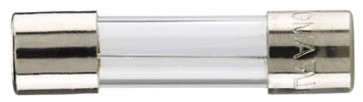
A fuse is a safety device designed to protect electrical circuits from excessive current. It operates by breaking the circuit when the current exceeds a predefined threshold, thereby preventing damage to components and reducing the risk of fire. Fuses are widely used in various applications, including household appliances, automotive systems, industrial equipment, and electronic circuits.
Explore Projects Built with Fuse
 Open Project in Cirkit Designer
 Open Project in Cirkit Designer
 Open Project in Cirkit Designer
 Open Project in Cirkit Designer
Explore Projects Built with Fuse
Open Project in Cirkit DesignerOpen Project in Cirkit DesignerOpen Project in Cirkit DesignerOpen Project in Cirkit DesignerCommon Applications and Use Cases
- Household Appliances: Protecting devices like microwaves, refrigerators, and washing machines.
- Automotive Systems: Safeguarding electrical systems in vehicles.
- Industrial Equipment: Ensuring the safety of heavy machinery and control systems.
- Electronic Circuits: Preventing damage to sensitive components in power supplies, amplifiers, and microcontroller-based systems.
Technical Specifications
Fuses come in various types, sizes, and ratings. Below are the key technical details to consider:
General Specifications
- Voltage Rating: Typically ranges from 12V to 600V, depending on the application.
- Current Rating: Commonly ranges from 0.1A to 200A or more.
- Breaking Capacity: The maximum current the fuse can safely interrupt without damage.
- Response Time: Can be fast-blow (quick response) or slow-blow (delayed response for inrush currents).
- Material: Fuse elements are often made of zinc, copper, or silver.
Pin Configuration and Descriptions
Fuses do not have traditional pins like ICs but are categorized by their physical form factor and terminals. Below is a table summarizing common fuse types and their configurations:
| Fuse Type | Configuration/Terminals | Description |
|---|---|---|
| Glass Cartridge | Cylindrical body with metal caps | Used in small electronic devices. |
| Blade Fuse | Two flat metal prongs | Common in automotive applications. |
| Ceramic Fuse | Cylindrical body with metal caps | High breaking capacity for industrial use. |
| Surface Mount Fuse | SMD pads | Compact design for PCB-mounted applications. |
Usage Instructions
How to Use a Fuse in a Circuit
Determine the Fuse Rating:
- Select a fuse with a current rating slightly higher than the normal operating current of the circuit.
- Ensure the voltage rating of the fuse matches or exceeds the circuit voltage.
Install the Fuse:
- Place the fuse in series with the load to ensure it interrupts the current flow in case of an overload.
- Use a proper fuse holder or clip for secure installation.
Test the Circuit:
- Power on the circuit and verify that the fuse operates correctly under normal conditions.
- If the fuse blows immediately, check for short circuits or incorrect ratings.
Important Considerations and Best Practices
- Always replace a blown fuse with one of the same type and rating.
- Avoid bypassing a fuse with wire or other conductive materials, as this defeats its safety purpose.
- For circuits with high inrush currents (e.g., motors), use a slow-blow fuse to prevent nuisance tripping.
- Ensure proper ventilation around the fuse to prevent overheating.
Example: Using a Fuse with an Arduino UNO
When connecting an Arduino UNO to a power supply, a fuse can protect the board from overcurrent. Below is an example circuit and code:
Circuit Setup
- Connect a 5V power supply to the Arduino UNO through a 500mA fast-blow fuse.
- Place the fuse in series with the positive power line.
Arduino Code Example
// Example code to demonstrate a simple LED circuit with overcurrent protection
// using a fuse. Ensure the fuse is rated for the circuit's current requirements.

const int ledPin = 13; // Pin connected to the LED

void setup() {
  pinMode(ledPin, OUTPUT); // Set the LED pin as an output
}

void loop() {
  digitalWrite(ledPin, HIGH); // Turn the LED on
  delay(1000);                // Wait for 1 second
  digitalWrite(ledPin, LOW);  // Turn the LED off
  delay(1000);                // Wait for 1 second
}
Troubleshooting and FAQs
Common Issues
Fuse Blows Immediately:
- Cause: Short circuit or incorrect fuse rating.
- Solution: Check the circuit for shorts and verify the fuse rating.
Fuse Does Not Blow During Overload:
- Cause: Fuse rating is too high or the fuse is defective.
- Solution: Replace the fuse with the correct rating and test again.
Frequent Fuse Blowing:
- Cause: Circuit draws excessive current or has intermittent faults.
- Solution: Inspect the circuit for faults and consider using a slow-blow fuse if inrush current is the issue.
FAQs
Q: Can I use a higher-rated fuse to prevent frequent blowing?
A: No, using a higher-rated fuse can compromise circuit protection and lead to damage.Q: How do I know if a fuse is blown?
A: Check for a visible break in the fuse element or use a multimeter to test for continuity.Q: Can I reuse a blown fuse?
A: No, fuses are single-use devices and must be replaced after blowing.
By following this documentation, you can safely and effectively use fuses to protect your electrical circuits.