
How to Use SHT 30: Examples, Pinouts, and Specs
 Design with SHT 30 in Cirkit Designer
Introduction
The SHT 30 is a digital humidity and temperature sensor designed for precise environmental monitoring. It combines high accuracy, low power consumption, and a compact design, making it ideal for a wide range of applications. The sensor communicates via an I²C interface, enabling easy integration into microcontroller-based systems. Its robust design ensures reliable performance in HVAC systems, weather stations, smart home devices, and industrial automation.
Explore Projects Built with SHT 30
 Open Project in Cirkit Designer
 Open Project in Cirkit Designer
 Open Project in Cirkit Designer
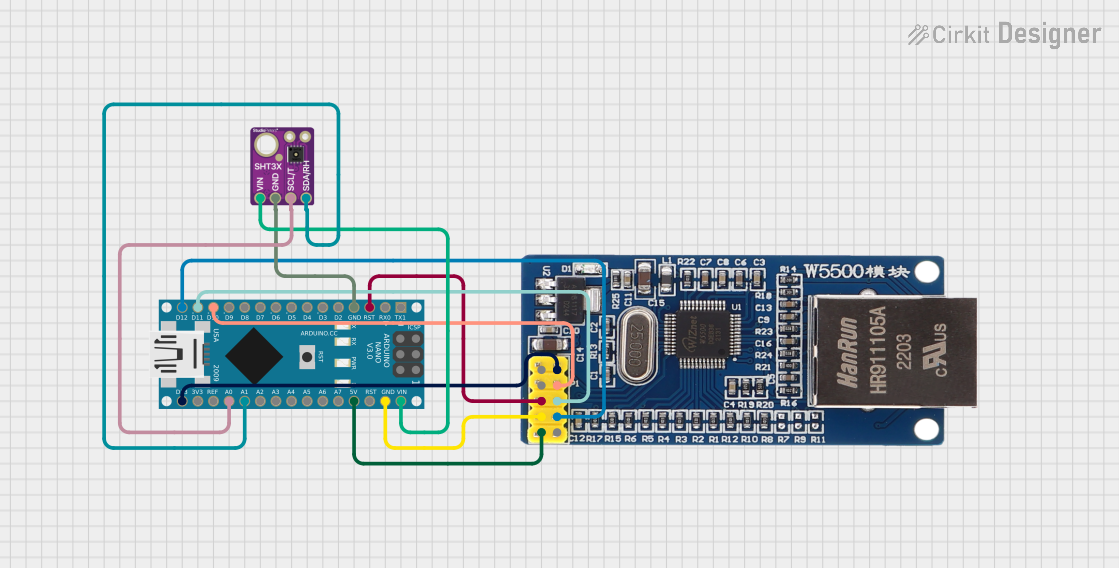 Open Project in Cirkit Designer
Explore Projects Built with SHT 30
Open Project in Cirkit DesignerOpen Project in Cirkit DesignerOpen Project in Cirkit DesignerOpen Project in Cirkit DesignerTechnical Specifications
The SHT 30 offers the following key technical details:
General Specifications
- Supply Voltage: 2.4V to 5.5V
- Current Consumption: 2 µA (standby), 650 µA (measuring)
- Humidity Measurement Range: 0% to 100% RH
- Temperature Measurement Range: -40°C to 125°C
- Accuracy:
- Humidity: ±2% RH
- Temperature: ±0.3°C
- Communication Protocol: I²C
- Operating Temperature: -40°C to 125°C
- Dimensions: 2.5mm x 2.5mm x 0.9mm
Pin Configuration
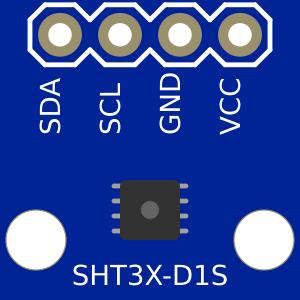
The SHT 30 sensor typically comes in a breakout board format. Below is the pin configuration:
| Pin Name | Description |
|---|---|
| VCC | Power supply (2.4V to 5.5V) |
| GND | Ground |
| SDA | I²C data line |
| SCL | I²C clock line |
| ADDR | I²C address selection (optional) |
I²C Address
- Default I²C Address:
0x44 - Alternate Address (if ADDR pin is pulled high):
0x45
Usage Instructions
Connecting the SHT 30 to a Circuit
- Power Supply: Connect the VCC pin to a 3.3V or 5V power source and the GND pin to ground.
- I²C Communication:
- Connect the SDA pin to the I²C data line of your microcontroller.
- Connect the SCL pin to the I²C clock line of your microcontroller.
- Pull-Up Resistors: Use 4.7kΩ pull-up resistors on the SDA and SCL lines if not already included on the breakout board.
- Address Selection: Leave the ADDR pin unconnected for the default address (
0x44), or pull it high for the alternate address (0x45).
Example Code for Arduino UNO
Below is an example of how to use the SHT 30 with an Arduino UNO. This code reads temperature and humidity data and displays it on the Serial Monitor.
#include <Wire.h>
#include "Adafruit_SHT31.h" // Include the Adafruit SHT31 library

Adafruit_SHT31 sht30 = Adafruit_SHT31();

void setup() {
  Serial.begin(9600); // Initialize Serial Monitor at 9600 baud
  while (!Serial) delay(10); // Wait for Serial Monitor to connect

  if (!sht30.begin(0x44)) { // Initialize SHT 30 at default I²C address
    Serial.println("Failed to find SHT30 sensor!");
    while (1) delay(1); // Halt execution if sensor is not found
  }
  Serial.println("SHT30 sensor initialized.");
}

void loop() {
  float temperature = sht30.readTemperature(); // Read temperature in Celsius
  float humidity = sht30.readHumidity();       // Read relative humidity

  if (!isnan(temperature) && !isnan(humidity)) {
    // Check if readings are valid
    Serial.print("Temperature: ");
    Serial.print(temperature);
    Serial.println(" °C");

    Serial.print("Humidity: ");
    Serial.print(humidity);
    Serial.println(" %");
  } else {
    Serial.println("Failed to read data from SHT30 sensor!");
  }

  delay(2000); // Wait 2 seconds before the next reading
}
Best Practices
- Ensure proper decoupling capacitors (e.g., 0.1µF) are placed near the VCC pin to stabilize the power supply.
- Avoid exposing the sensor to extreme conditions (e.g., condensation or high humidity for prolonged periods) to maintain accuracy.
- Use a weatherproof enclosure if deploying the sensor outdoors.
Troubleshooting and FAQs
Common Issues
Sensor Not Detected:
- Ensure the correct I²C address (
0x44or0x45) is used in the code. - Verify the SDA and SCL connections and check for proper pull-up resistors.
- Confirm that the power supply voltage is within the specified range (2.4V to 5.5V).
- Ensure the correct I²C address (
Incorrect Readings:
- Check for environmental factors such as condensation or dust on the sensor.
- Ensure the sensor is not placed near heat sources or in direct sunlight.
Communication Errors:
- Verify the I²C clock speed (typically 100kHz or 400kHz).
- Check for loose or faulty wiring.
FAQs
Q: Can the SHT 30 operate at 5V logic levels?
A: Yes, the SHT 30 supports a supply voltage range of 2.4V to 5.5V, making it compatible with both 3.3V and 5V systems.
Q: How do I calibrate the SHT 30?
A: The SHT 30 is factory-calibrated and does not require additional calibration. However, ensure proper handling to maintain accuracy.
Q: Can I use the SHT 30 outdoors?
A: Yes, but it is recommended to use a weatherproof enclosure to protect the sensor from moisture and debris.
Q: What is the maximum cable length for I²C communication?
A: The maximum cable length depends on the pull-up resistor values and I²C clock speed. For typical setups, keep the cable length under 1 meter to ensure reliable communication.
By following this documentation, you can effectively integrate the SHT 30 sensor into your projects for accurate humidity and temperature measurements.