
How to Use ADXL375: Examples, Pinouts, and Specs
 Design with ADXL375 in Cirkit Designer
Introduction
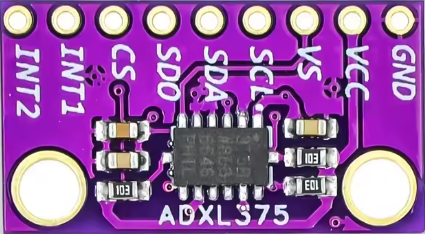
The ADXL375, manufactured by BMHM with the part ID CJMCU-375, is a low-power, 3-axis accelerometer with a digital output. It is designed for motion sensing applications and features a wide measurement range of ±200 g, high resolution, and built-in features such as tap detection, activity monitoring, and free-fall detection. The ADXL375 communicates via an I²C or SPI digital interface, making it suitable for integration into a wide variety of systems.
Explore Projects Built with ADXL375
 Open Project in Cirkit Designer
 Open Project in Cirkit Designer
 Open Project in Cirkit Designer
 Open Project in Cirkit Designer
Explore Projects Built with ADXL375
Open Project in Cirkit DesignerOpen Project in Cirkit DesignerOpen Project in Cirkit DesignerOpen Project in Cirkit DesignerCommon Applications
- Impact and shock detection
- Sports and fitness equipment
- Industrial vibration monitoring
- Automotive crash detection
- Wearable devices and motion tracking
Technical Specifications
Key Technical Details
| Parameter | Value |
|---|---|
| Measurement Range | ±200 g |
| Resolution | 13-bit |
| Supply Voltage (VDD) | 2.0 V to 3.6 V |
| Interface | I²C, SPI |
| Operating Temperature | -40°C to +85°C |
| Power Consumption | 140 µA (typical) |
| Output Data Rate (ODR) | 0.1 Hz to 3200 Hz |
| Sensitivity | 49 mg/LSB |
| Package Type | LGA-14 (3 mm × 5 mm × 1 mm) |
Pin Configuration and Descriptions
The ADXL375 comes in a 14-pin LGA package. Below is the pin configuration:
| Pin Number | Pin Name | Description |
|---|---|---|
| 1 | VDD | Power supply (2.0 V to 3.6 V) |
| 2 | GND | Ground |
| 3 | CS | Chip Select (Active Low, used in SPI mode) |
| 4 | INT1 | Interrupt 1 output |
| 5 | INT2 | Interrupt 2 output |
| 6 | SCL/SCLK | I²C Clock / SPI Clock |
| 7 | SDA/SDI/SDO | I²C Data / SPI Data Input/Output |
| 8 | NC | No Connection |
| 9-14 | NC | No Connection |
Usage Instructions
How to Use the ADXL375 in a Circuit
- Power Supply: Connect the VDD pin to a 2.0 V to 3.6 V power source and the GND pin to ground.
- Interface Selection:
- For I²C communication, connect the SCL and SDA pins to the corresponding I²C lines of your microcontroller.
- For SPI communication, connect the CS, SCLK, and SDI/SDO pins to the SPI lines of your microcontroller.
- Interrupts: Use the INT1 and INT2 pins to configure and monitor interrupts for events like tap detection or free-fall detection.
- Pull-Up Resistors: For I²C communication, ensure pull-up resistors (typically 4.7 kΩ) are connected to the SDA and SCL lines.
- Bypass Capacitor: Place a 0.1 µF ceramic capacitor close to the VDD pin for power supply decoupling.
Important Considerations and Best Practices
- Ensure the ADXL375 is mounted securely to minimize mechanical noise and improve measurement accuracy.
- Use proper filtering techniques to reduce noise in high-vibration environments.
- Configure the output data rate (ODR) and range settings based on your application requirements.
- Avoid exceeding the maximum voltage ratings to prevent damage to the device.
Example Code for Arduino UNO
Below is an example of interfacing the ADXL375 with an Arduino UNO using I²C communication:
#include <Wire.h> // Include the Wire library for I²C communication

#define ADXL375_ADDRESS 0x53 // I²C address of the ADXL375
#define POWER_CTL 0x2D       // Power control register
#define DATA_FORMAT 0x31     // Data format register
#define DATAX0 0x32          // X-axis data register (low byte)

// Function to initialize the ADXL375
void setupADXL375() {
  Wire.begin(); // Initialize I²C communication
  Wire.beginTransmission(ADXL375_ADDRESS);
  Wire.write(POWER_CTL); // Select the power control register
  Wire.write(0x08);      // Set the device to measurement mode
  Wire.endTransmission();

  Wire.beginTransmission(ADXL375_ADDRESS);
  Wire.write(DATA_FORMAT); // Select the data format register
  Wire.write(0x0B);        // Set range to ±200 g and enable full resolution
  Wire.endTransmission();
}

void setup() {
  Serial.begin(9600); // Initialize serial communication
  setupADXL375();     // Initialize the ADXL375
}

void loop() {
  int16_t xData = 0;

  // Read X-axis data
  Wire.beginTransmission(ADXL375_ADDRESS);
  Wire.write(DATAX0); // Request the X-axis data (low byte)
  Wire.endTransmission(false);
  Wire.requestFrom(ADXL375_ADDRESS, 2); // Request 2 bytes of data

  if (Wire.available() == 2) {
    xData = Wire.read();          // Read low byte
    xData |= (Wire.read() << 8);  // Read high byte and combine
  }

  // Convert to g-force (sensitivity = 49 mg/LSB)
  float xG = xData * 0.049;

  // Print the X-axis acceleration
  Serial.print("X-axis: ");
  Serial.print(xG);
  Serial.println(" g");

  delay(500); // Delay for readability
}
Troubleshooting and FAQs
Common Issues
No Communication with the Device
- Cause: Incorrect I²C address or wiring.
- Solution: Verify the I²C address (default is 0x53) and check all connections.
No Data Output
- Cause: Device not in measurement mode.
- Solution: Ensure the POWER_CTL register is configured correctly (set to 0x08).
Inaccurate Readings
- Cause: Excessive noise or improper mounting.
- Solution: Use proper filtering and ensure the device is securely mounted.
Interrupts Not Triggering
- Cause: Interrupts not configured properly.
- Solution: Verify the interrupt configuration registers and ensure the INT1/INT2 pins are connected.
FAQs
Can the ADXL375 operate at 5V?
- No, the maximum supply voltage is 3.6 V. Use a voltage regulator if your system operates at 5V.
What is the maximum sampling rate?
- The maximum output data rate (ODR) is 3200 Hz.
Can I use the ADXL375 for free-fall detection?
- Yes, the ADXL375 has built-in free-fall detection functionality that can be configured via its registers.
Is the ADXL375 suitable for high-impact measurements?
- Yes, with a range of ±200 g, it is ideal for high-impact and shock detection applications.