
How to Use U2D2 PHB set: Examples, Pinouts, and Specs
 Design with U2D2 PHB set in Cirkit Designer
Introduction
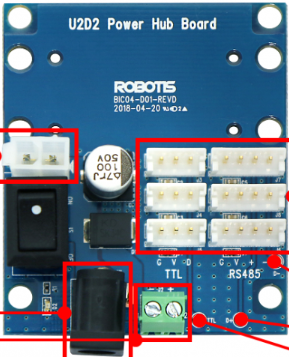
The U2D2 Power Hub Board (PHB) Set, manufactured by Robotis, is a versatile interface board designed to facilitate communication and power distribution in electronic circuits. It is particularly useful for connecting and controlling Robotis Dynamixel servo motors and other peripherals. The U2D2 PHB set includes connectors, headers, and interface elements that simplify the integration of multiple components in robotics and automation projects.
Explore Projects Built with U2D2 PHB set
 Open Project in Cirkit Designer
 Open Project in Cirkit Designer
 Open Project in Cirkit Designer
 Open Project in Cirkit Designer
Explore Projects Built with U2D2 PHB set
Open Project in Cirkit DesignerOpen Project in Cirkit DesignerOpen Project in Cirkit DesignerOpen Project in Cirkit DesignerCommon Applications and Use Cases
- Robotics and automation systems
- Controlling and powering Dynamixel servo motors
- Prototyping and testing electronic circuits
- Power distribution in multi-device setups
- Communication interface for UART-based devices
Technical Specifications
The U2D2 PHB set is designed to work seamlessly with the Robotis U2D2 USB-to-serial converter and Dynamixel actuators. Below are the key technical details:
General Specifications
| Parameter | Value |
|---|---|
| Manufacturer | Robotis |
| Part ID | U2D2 Power Hub Board |
| Input Voltage Range | 6.5V to 16V |
| Output Voltage | Matches input voltage |
| Communication Protocol | UART (TTL) |
| Supported Devices | Dynamixel TTL servo motors |
| Dimensions | 50mm x 30mm x 10mm |
| Weight | 10g |
Pin Configuration and Descriptions
The U2D2 PHB set includes multiple connectors and pins for power and communication. Below is the pinout description:
Power Input and Output
| Pin/Connector Name | Description |
|---|---|
| VIN | Power input (6.5V to 16V) |
| GND | Ground |
| VOUT | Power output (matches VIN voltage) |
Communication Interface
| Pin/Connector Name | Description |
|---|---|
| TXD | UART Transmit Data |
| RXD | UART Receive Data |
| GND | Ground |
Dynamixel Connectors
| Connector Name | Description |
|---|---|
| TTL Port 1 | Connects to Dynamixel TTL motors |
| TTL Port 2 | Additional TTL motor connection |
Usage Instructions
The U2D2 PHB set is straightforward to use and integrates seamlessly with the Robotis U2D2 USB-to-serial converter. Follow the steps below to use the component effectively:
Step 1: Power Supply Connection
- Connect a DC power source (6.5V to 16V) to the VIN and GND pins of the U2D2 PHB.
- Ensure the power source matches the voltage requirements of your connected devices.
Step 2: Communication Setup
- Connect the U2D2 USB-to-serial converter to your computer via USB.
- Use the provided TTL ports on the U2D2 PHB to connect to Dynamixel servo motors or other UART-based devices.
Step 3: Software Configuration
- Install the necessary drivers and software for the U2D2 USB-to-serial converter.
- Use the Robotis Dynamixel SDK or other compatible software to control and communicate with connected devices.
Step 4: Circuit Integration
- Use the VOUT pin to distribute power to additional components in your circuit.
- Ensure proper grounding by connecting all GND pins to a common ground.
Arduino UNO Example Code
The U2D2 PHB set can be used with an Arduino UNO to control Dynamixel motors. Below is an example code snippet:
#include <SoftwareSerial.h>

// Define TX and RX pins for communication with the U2D2 PHB
#define TX_PIN 10  // Arduino pin connected to U2D2 PHB TXD
#define RX_PIN 11  // Arduino pin connected to U2D2 PHB RXD

// Initialize SoftwareSerial for UART communication
SoftwareSerial dynamixelSerial(RX_PIN, TX_PIN);

void setup() {
  // Start serial communication with the U2D2 PHB
  dynamixelSerial.begin(57600); // Set baud rate to match Dynamixel motors
  Serial.begin(9600);           // For debugging via Serial Monitor

  Serial.println("U2D2 PHB Set Example: Communication Initialized");
}

void loop() {
  // Example: Send a command to the Dynamixel motor
  dynamixelSerial.write(0xFF); // Example byte (replace with actual command)
  delay(1000);                 // Wait for 1 second

  // Example: Read data from the Dynamixel motor
  if (dynamixelSerial.available()) {
    int incomingByte = dynamixelSerial.read();
    Serial.print("Received: ");
    Serial.println(incomingByte, HEX); // Print received data in HEX format
  }
}
Important Considerations and Best Practices
- Always verify the input voltage to avoid damaging the U2D2 PHB or connected devices.
- Use appropriate cables and connectors to ensure secure connections.
- Avoid exceeding the current rating of the power supply to prevent overheating.
- Ensure proper grounding to avoid communication errors or noise.
Troubleshooting and FAQs
Common Issues and Solutions
No Power Output on VOUT Pin
- Ensure the VIN pin is receiving the correct voltage (6.5V to 16V).
- Check all connections for loose or faulty wiring.
Communication Errors with Dynamixel Motors
- Verify the baud rate settings in your software match the motor's configuration.
- Ensure the TXD and RXD pins are correctly connected.
Overheating of Components
- Check for excessive current draw from connected devices.
- Use a power supply with sufficient current capacity.
No Response from Connected Devices
- Confirm that the devices are powered and properly connected.
- Test the U2D2 USB-to-serial converter separately to rule out issues.
FAQs
Q: Can I use the U2D2 PHB set with non-Dynamixel devices?
A: Yes, the U2D2 PHB set supports UART communication and can be used with other UART-based devices.
Q: What is the maximum current the U2D2 PHB can handle?
A: The maximum current depends on the power supply and connected devices. Ensure the total current does not exceed the power supply's rating.
Q: Is the U2D2 PHB compatible with Arduino boards?
A: Yes, the U2D2 PHB can be used with Arduino boards for UART communication and power distribution.
Q: Can I daisy-chain multiple Dynamixel motors using the U2D2 PHB?
A: Yes, the TTL ports on the U2D2 PHB allow for daisy-chaining multiple Dynamixel motors.
By following this documentation, users can effectively integrate the U2D2 PHB set into their projects and troubleshoot common issues with ease.