
How to Use STC 1000: Examples, Pinouts, and Specs
 Design with STC 1000 in Cirkit Designer
Introduction
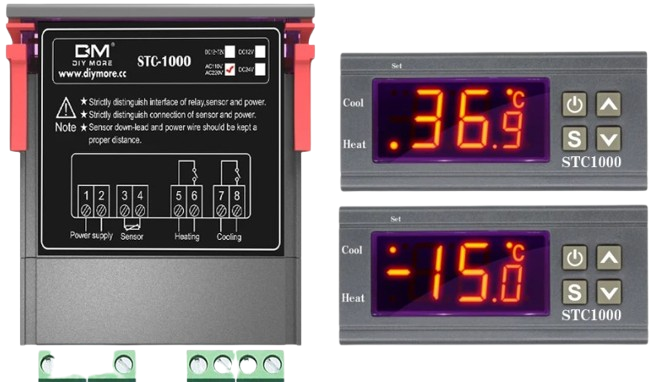
The STC 1000 is a versatile digital temperature controller designed for regulating temperature in a wide range of applications. It is widely used in incubators, refrigeration systems, brewing setups, and other temperature-sensitive environments. The device features a dual display for real-time temperature monitoring and setpoint adjustment, offering precise control with customizable parameters. Its compact design and ease of use make it a popular choice for both hobbyists and professionals.
Explore Projects Built with STC 1000
 Open Project in Cirkit Designer
 Open Project in Cirkit Designer
 Open Project in Cirkit Designer
 Open Project in Cirkit Designer
Explore Projects Built with STC 1000
Open Project in Cirkit DesignerOpen Project in Cirkit DesignerOpen Project in Cirkit DesignerOpen Project in Cirkit DesignerTechnical Specifications
The STC 1000 is equipped with essential features and specifications to ensure reliable temperature control. Below are the key technical details:
General Specifications
- Power Supply: AC 110V-220V, 50/60Hz
- Temperature Range: -50°C to 99°C (-58°F to 210°F)
- Temperature Accuracy: ±1°C (±2°F)
- Relay Output Capacity:
- Heating: 10A at 220V AC
- Cooling: 10A at 220V AC
- Sensor Type: NTC (10kΩ) temperature probe
- Display: Dual 3-digit LED display (current temperature and setpoint)
- Operating Temperature: -10°C to 60°C (14°F to 140°F)
- Storage Temperature: -20°C to 75°C (-4°F to 167°F)
- Dimensions: 75mm x 34.5mm x 85mm (L x W x H)
Pin Configuration and Descriptions
The STC 1000 has a total of 8 terminals for wiring. The table below describes each terminal:
| Terminal Number | Label | Description |
|---|---|---|
| 1 | Power (L) | Live wire input for AC power supply |
| 2 | Power (N) | Neutral wire input for AC power supply |
| 3 | Cooling (NO) | Normally open terminal for cooling relay output |
| 4 | Cooling (COM) | Common terminal for cooling relay output |
| 5 | Heating (NO) | Normally open terminal for heating relay output |
| 6 | Heating (COM) | Common terminal for heating relay output |
| 7 | Sensor Input 1 | Temperature probe input (connect one wire of the NTC sensor) |
| 8 | Sensor Input 2 | Temperature probe input (connect the other wire of the NTC sensor) |
Usage Instructions
How to Use the STC 1000 in a Circuit
Wiring the Power Supply:
- Connect the live wire (L) to terminal 1 and the neutral wire (N) to terminal 2.
- Ensure the power supply matches the voltage rating of the STC 1000 (110V-220V AC).
Connecting the Temperature Probe:
- Attach the two wires of the NTC temperature probe to terminals 7 and 8.
- Place the probe in the environment where temperature monitoring is required.
Wiring the Heating and Cooling Devices:
- For a cooling device (e.g., a refrigerator), connect its live wire to terminal 3 (NO) and its neutral wire to terminal 4 (COM).
- For a heating device (e.g., a heater), connect its live wire to terminal 5 (NO) and its neutral wire to terminal 6 (COM).
Setting the Parameters:
- Power on the STC 1000 and press the "Set" button to enter the parameter configuration mode.
- Adjust the desired temperature setpoint using the "+" and "-" buttons.
- Configure additional parameters such as hysteresis, delay time, and temperature calibration as needed.
Testing the System:
- Verify that the heating and cooling devices activate and deactivate correctly based on the set temperature range.
Important Considerations and Best Practices
- Ensure all connections are secure and insulated to prevent electrical hazards.
- Place the temperature probe in a location that accurately represents the environment's temperature.
- Avoid exposing the STC 1000 to moisture or extreme conditions beyond its operating range.
- Use a fuse or circuit breaker for added protection against overcurrent.
Example Arduino Code for Monitoring Temperature
Although the STC 1000 is a standalone device, you can use an Arduino UNO to monitor the temperature from the NTC sensor. Below is an example code snippet:
// Example Arduino code to read temperature from an NTC sensor
// connected to the STC 1000 and display it on the Serial Monitor.

const int sensorPin = A0; // Analog pin connected to the NTC sensor
float resistance = 10000; // Resistance of the NTC sensor at 25°C
float beta = 3950;        // Beta coefficient of the NTC sensor
float tempNominal = 25;   // Nominal temperature (in °C)
float resistanceNominal = 10000; // Resistance at nominal temperature

void setup() {
  Serial.begin(9600); // Initialize serial communication
}

void loop() {
  int analogValue = analogRead(sensorPin); // Read analog value from sensor
  float voltage = analogValue * (5.0 / 1023.0); // Convert to voltage
  float resistanceSensor = (5.0 - voltage) * resistance / voltage; // Calculate resistance

  // Calculate temperature using the Steinhart-Hart equation
  float tempKelvin = 1.0 / (1.0 / (tempNominal + 273.15) +
                            (1.0 / beta) * log(resistanceSensor / resistanceNominal));
  float tempCelsius = tempKelvin - 273.15; // Convert to Celsius

  Serial.print("Temperature: ");
  Serial.print(tempCelsius);
  Serial.println(" °C");

  delay(1000); // Wait 1 second before the next reading
}
Troubleshooting and FAQs
Common Issues and Solutions
The STC 1000 does not power on:
- Check the power supply voltage and ensure proper wiring to terminals 1 and 2.
- Verify that the power source is functional.
Temperature readings are inaccurate:
- Ensure the NTC sensor is properly connected to terminals 7 and 8.
- Check for damage to the sensor or replace it if necessary.
- Use the temperature calibration parameter to fine-tune the readings.
Heating or cooling devices do not activate:
- Verify the wiring of the devices to the appropriate relay terminals.
- Check the setpoint and hysteresis settings to ensure they are configured correctly.
- Inspect the devices for faults or malfunctions.
The display shows an error code (e.g., "EE"):
- Refer to the STC 1000 user manual for specific error code meanings.
- Commonly, this indicates a sensor fault or disconnection.
FAQs
Can the STC 1000 be used with DC-powered devices?
- No, the STC 1000 is designed for AC-powered devices only.
What is the maximum cable length for the temperature probe?
- The probe can typically be extended up to 10 meters, but ensure proper shielding to avoid interference.
Can I use the STC 1000 for both heating and cooling simultaneously?
- Yes, the STC 1000 can control both heating and cooling devices, but they must be wired to their respective relay terminals.
Is the STC 1000 waterproof?
- No, the STC 1000 is not waterproof. Avoid exposing it to moisture or liquids.
This concludes the documentation for the STC 1000. For further assistance, consult the manufacturer's manual or contact technical support.