
How to Use Logic Level Shifter Converter Module: Examples, Pinouts, and Specs
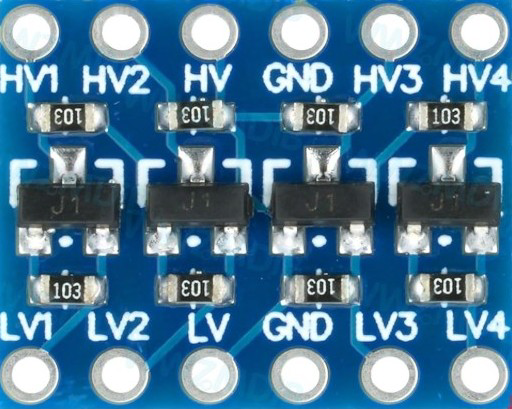
 Design with Logic Level Shifter Converter Module in Cirkit Designer
Introduction
The Logic Level Shifter Converter Module is a device designed to enable seamless communication between circuits operating at different voltage levels. It is commonly used to convert signals from one logic level (e.g., 5V) to another (e.g., 3.3V) without damaging the components involved. This module is essential in mixed-voltage systems, where microcontrollers, sensors, or other devices operate at incompatible voltage levels.
Explore Projects Built with Logic Level Shifter Converter Module
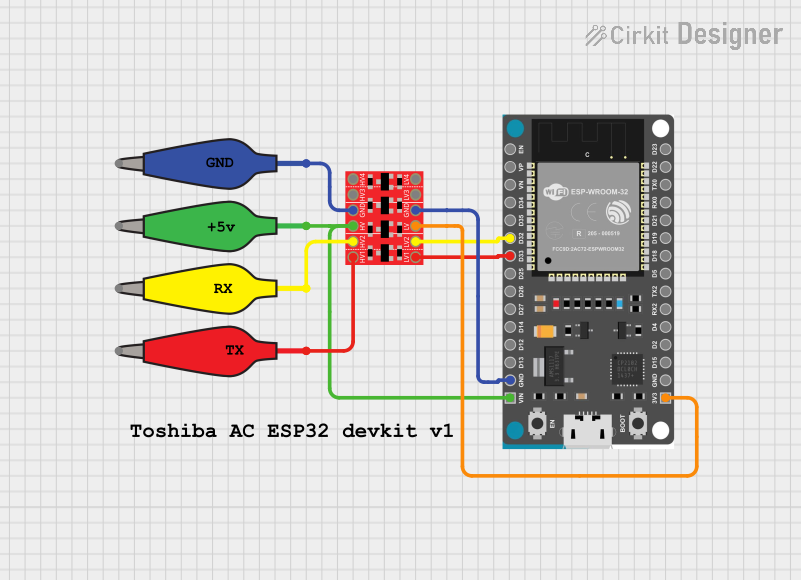 Open Project in Cirkit Designer
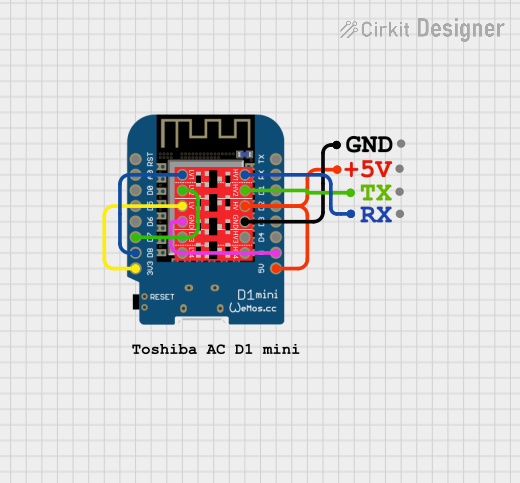 Open Project in Cirkit Designer
 Open Project in Cirkit Designer
 Open Project in Cirkit Designer
Explore Projects Built with Logic Level Shifter Converter Module
Open Project in Cirkit DesignerOpen Project in Cirkit DesignerOpen Project in Cirkit DesignerOpen Project in Cirkit DesignerCommon Applications and Use Cases
- Interfacing 5V microcontrollers (e.g., Arduino UNO) with 3.3V sensors or modules (e.g., ESP8266, SD cards).
- Enabling communication between 1.8V, 3.3V, and 5V devices in IoT projects.
- Protecting low-voltage devices from overvoltage damage.
- Bidirectional communication in I2C, SPI, UART, or GPIO-based systems.
Technical Specifications
The Logic Level Shifter Converter Module typically uses MOSFET-based circuits to achieve bidirectional voltage translation. Below are the key technical details:
Key Specifications
- Voltage Range (High Side): 3.3V to 5V
- Voltage Range (Low Side): 1.8V to 3.3V
- Maximum Current per Channel: 50mA (varies by module design)
- Number of Channels: 4 (common), 8, or more depending on the module
- Communication Type: Bidirectional
- Supported Protocols: I2C, SPI, UART, GPIO
Pin Configuration and Descriptions
The module typically has the following pin layout:
| Pin Name | Description |
|---|---|
| HV | High voltage input (e.g., 5V) |
| LV | Low voltage input (e.g., 3.3V) |
| GND | Ground connection (common ground for both voltage levels) |
| TX1, RX1 | Channel 1 for bidirectional signal conversion |
| TX2, RX2 | Channel 2 for bidirectional signal conversion |
| TX3, RX3 | Channel 3 for bidirectional signal conversion |
| TX4, RX4 | Channel 4 for bidirectional signal conversion |
Note: The exact pin names may vary depending on the manufacturer. Always refer to the specific module's datasheet for precise details.
Usage Instructions
How to Use the Component in a Circuit
Power the Module:
- Connect the HV pin to the high voltage source (e.g., 5V).
- Connect the LV pin to the low voltage source (e.g., 3.3V).
- Connect the GND pin to the common ground of the circuit.
Connect the Signal Lines:
- For each channel, connect the high-voltage signal to the TX pin and the low-voltage signal to the RX pin (or vice versa, depending on the direction of communication).
Verify Connections:
- Ensure that the voltage levels on the HV and LV sides match the requirements of the devices being interfaced.
Test the Circuit:
- Power on the system and verify that signals are being correctly translated between the two voltage levels.
Important Considerations and Best Practices
- Common Ground: Always ensure that the ground (GND) of the module is connected to the ground of both the high-voltage and low-voltage circuits.
- Voltage Limits: Do not exceed the specified voltage ranges for HV and LV inputs to avoid damaging the module.
- Signal Integrity: For high-speed communication protocols like SPI, ensure that the module's bandwidth is sufficient to handle the signal frequency.
- Unused Channels: If not all channels are used, leave the unused pins unconnected.
Example: Connecting to an Arduino UNO and a 3.3V Sensor
Below is an example of how to use the Logic Level Shifter Converter Module to interface an Arduino UNO (5V logic) with a 3.3V sensor.
Circuit Diagram
- Connect the Arduino's 5V pin to the module's HV pin.
- Connect the Arduino's GND pin to the module's GND pin.
- Connect the sensor's 3.3V pin to the module's LV pin.
- Connect the Arduino's digital pin (e.g., D2) to the module's TX1 pin.
- Connect the sensor's data pin to the module's RX1 pin.
Arduino Code Example
// Example code for interfacing Arduino UNO with a 3.3V sensor using a logic level shifter

const int sensorPin = 2; // Arduino pin connected to the sensor via the level shifter

void setup() {
  Serial.begin(9600); // Initialize serial communication
  pinMode(sensorPin, INPUT); // Set the sensor pin as input
}

void loop() {
  int sensorValue = digitalRead(sensorPin); // Read the sensor value
  Serial.println(sensorValue); // Print the sensor value to the Serial Monitor
  delay(500); // Wait for 500ms before reading again
}
Note: Ensure that the sensor's data pin is connected to the correct channel on the level shifter.
Troubleshooting and FAQs
Common Issues and Solutions
No Signal Translation:
- Cause: Incorrect power supply connections.
- Solution: Verify that the HV and LV pins are connected to the correct voltage sources.
Signal Distortion or Noise:
- Cause: Poor grounding or long signal wires.
- Solution: Ensure a solid common ground and minimize wire lengths.
Device Not Responding:
- Cause: Incorrect channel connections.
- Solution: Double-check the connections between the module and the devices.
Overheating Module:
- Cause: Exceeding the current or voltage limits.
- Solution: Ensure that the voltage and current ratings are within the module's specifications.
FAQs
Q1: Can I use this module for unidirectional communication?
A1: Yes, the module supports both unidirectional and bidirectional communication. Simply use one direction of the channel if bidirectional communication is not required.
Q2: Can I use this module for analog signals?
A2: No, the module is designed for digital signals only. For analog signals, consider using a dedicated voltage divider or level shifter designed for analog applications.
Q3: What is the maximum data rate supported by the module?
A3: The maximum data rate depends on the specific module design and the protocol being used. For most modules, it is sufficient for standard I2C, SPI, and UART communication.
Q4: Can I use this module with 1.8V devices?
A4: Yes, as long as the module supports 1.8V on the LV side. Check the module's datasheet to confirm compatibility.