
How to Use BK-7070G: Examples, Pinouts, and Specs
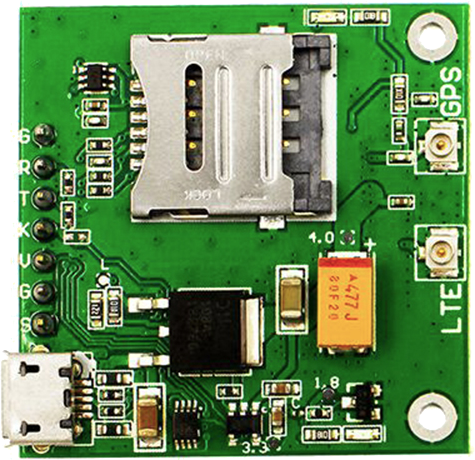
 Design with BK-7070G in Cirkit Designer
Introduction
The BK-7070G, manufactured by And-G (Part ID: SIM7070G_Breakout), is a programmable DC power supply designed for laboratory and industrial applications. It features adjustable voltage and current outputs, a digital display for precise monitoring, and multiple protection mechanisms to ensure safe and reliable operation. This versatile power supply is ideal for powering and testing electronic circuits, prototyping, and educational purposes.
Explore Projects Built with BK-7070G
 Open Project in Cirkit Designer
 Open Project in Cirkit Designer
 Open Project in Cirkit Designer
 Open Project in Cirkit Designer
Explore Projects Built with BK-7070G
Open Project in Cirkit DesignerOpen Project in Cirkit DesignerOpen Project in Cirkit DesignerOpen Project in Cirkit DesignerCommon Applications and Use Cases
- Powering and testing electronic circuits in laboratories
- Industrial equipment testing and calibration
- Prototyping and development of electronic devices
- Educational demonstrations and experiments
- Battery charging and maintenance
Technical Specifications
Key Technical Details
| Parameter | Specification |
|---|---|
| Input Voltage | 100-240V AC, 50/60Hz |
| Output Voltage Range | 0-30V DC |
| Output Current Range | 0-5A DC |
| Display Type | Digital LCD with backlight |
| Voltage Resolution | 10mV |
| Current Resolution | 1mA |
| Protection Features | Overvoltage, Overcurrent, Overheat |
| Operating Temperature | 0°C to 40°C |
| Dimensions | 200mm x 150mm x 80mm |
| Weight | 1.5kg |
Pin Configuration and Descriptions
The BK-7070G features output terminals and control interfaces for easy integration into various setups. Below is the pin configuration:
| Pin/Terminal Name | Description |
|---|---|
| V+ | Positive DC output terminal |
| V- | Negative DC output terminal (ground) |
| USB Port | For firmware updates and PC communication |
| Rotary Knob | Adjusts voltage and current settings |
| Power Switch | Turns the power supply on/off |
Usage Instructions
How to Use the BK-7070G in a Circuit
Setup and Connection:
- Connect the BK-7070G to a standard AC power outlet (100-240V AC).
- Use the V+ and V- terminals to connect the power supply to your circuit or device.
- Ensure proper polarity when connecting to avoid damage to the circuit.
Adjusting Voltage and Current:
- Turn on the power supply using the power switch.
- Use the rotary knob to set the desired output voltage and current.
- Monitor the digital display to ensure accurate settings.
Operating the Device:
- Once the desired settings are configured, the power supply will deliver the specified voltage and current to the connected load.
- The display will show real-time voltage and current readings.
Using the USB Port:
- Connect the USB port to a PC for firmware updates or remote control via compatible software.
Important Considerations and Best Practices
- Always verify the voltage and current requirements of your circuit before connecting the BK-7070G.
- Avoid short-circuiting the output terminals to prevent triggering the overcurrent protection.
- Operate the device within the specified temperature range (0°C to 40°C) to ensure optimal performance.
- Use proper ventilation to prevent overheating during prolonged use.
Arduino UNO Integration Example
The BK-7070G can be used to power an Arduino UNO for prototyping. Below is an example of how to connect and use the power supply with an Arduino UNO:
- Connect the V+ terminal of the BK-7070G to the VIN pin of the Arduino UNO.
- Connect the V- terminal to the GND pin of the Arduino UNO.
- Set the output voltage of the BK-7070G to 9V (recommended for Arduino UNO VIN input).
// Example Arduino code to blink an LED
// Connect an LED to pin 13 with a 220-ohm resistor

void setup() {
  pinMode(13, OUTPUT); // Set pin 13 as an output
}

void loop() {
  digitalWrite(13, HIGH); // Turn the LED on
  delay(1000);            // Wait for 1 second
  digitalWrite(13, LOW);  // Turn the LED off
  delay(1000);            // Wait for 1 second
}
Troubleshooting and FAQs
Common Issues and Solutions
| Issue | Possible Cause | Solution |
|---|---|---|
| No output voltage | Power supply not turned on | Ensure the power switch is in the ON position. |
| Output voltage fluctuates | Load exceeds current limit | Check and adjust the current limit setting. |
| Overvoltage or overcurrent warning | Circuit is drawing excessive power | Verify the circuit's power requirements and adjust settings. |
| Device overheats | Insufficient ventilation | Ensure proper airflow around the device. |
FAQs
Q: Can the BK-7070G be used to charge batteries?
A: Yes, the BK-7070G can charge batteries. Ensure the voltage and current settings match the battery's specifications.
Q: Is the BK-7070G compatible with PC software?
A: Yes, the USB port allows for PC communication and firmware updates. Check the manufacturer's website for compatible software.
Q: What happens if I short the output terminals?
A: The overcurrent protection will activate to prevent damage. Remove the short circuit and reset the power supply.
Q: Can I use the BK-7070G outdoors?
A: No, the BK-7070G is designed for indoor use only. Protect it from moisture and extreme temperatures.
By following this documentation, users can safely and effectively operate the BK-7070G for a variety of applications.