
How to Use DC-DC 12V/24V to 5V 15A Converter 75W Step Down: Examples, Pinouts, and Specs
 Design with DC-DC 12V/24V to 5V 15A Converter 75W Step Down in Cirkit Designer
Introduction
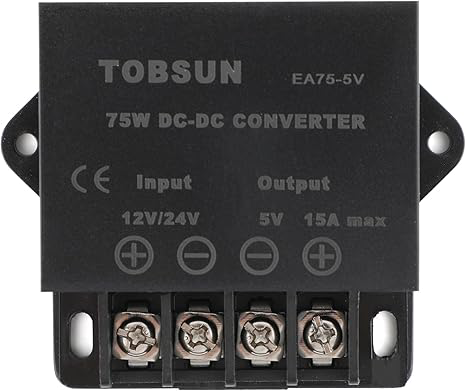
The Tobsun DC-DC 12V/24V to 5V 15A Converter is a high-efficiency step-down power converter designed to provide a stable 5V output from a 12V or 24V DC input. With a maximum output current of 15A and a power rating of 75W, this converter is ideal for powering a wide range of electronic devices, including microcontrollers, sensors, communication modules, and USB-powered devices.
Explore Projects Built with DC-DC 12V/24V to 5V 15A Converter 75W Step Down
 Open Project in Cirkit Designer
 Open Project in Cirkit Designer
 Open Project in Cirkit Designer
 Open Project in Cirkit Designer
Explore Projects Built with DC-DC 12V/24V to 5V 15A Converter 75W Step Down
Open Project in Cirkit DesignerOpen Project in Cirkit DesignerOpen Project in Cirkit DesignerOpen Project in Cirkit DesignerCommon Applications and Use Cases
- Powering USB devices such as smartphones, tablets, and Raspberry Pi boards.
- Supplying power to automotive electronics from a 12V or 24V vehicle battery.
- Providing a stable 5V output for industrial control systems.
- Supporting LED lighting systems and other low-voltage devices.
Technical Specifications
The following table outlines the key technical specifications of the Tobsun DC-DC 12V/24V to 5V 15A Converter:
| Parameter | Specification |
|---|---|
| Input Voltage Range | 8V to 40V DC |
| Output Voltage | 5V DC ± 0.2V |
| Maximum Output Current | 15A |
| Output Power | 75W |
| Efficiency | Up to 96% |
| Ripple and Noise | ≤ 50mV |
| Operating Temperature | -40°C to +80°C |
| Protection Features | Overcurrent, Overvoltage, Overheat, Short Circuit |
| Dimensions | 74mm x 74mm x 32mm |
| Weight | Approximately 150g |
Pin Configuration and Descriptions
The converter has four connection terminals for input and output. The pin configuration is as follows:
| Pin | Label | Description |
|---|---|---|
| 1 | VIN+ | Positive input voltage (12V or 24V DC) |
| 2 | VIN- | Negative input voltage (Ground) |
| 3 | VOUT+ | Positive output voltage (5V DC) |
| 4 | VOUT- | Negative output voltage (Ground) |
Usage Instructions
How to Use the Component in a Circuit
Connect the Input Voltage:
- Connect the positive terminal of your 12V or 24V DC power source to the
VIN+pin. - Connect the negative terminal of your power source to the
VIN-pin.
- Connect the positive terminal of your 12V or 24V DC power source to the
Connect the Output Load:
- Connect the positive terminal of your load (e.g., a 5V device) to the
VOUT+pin. - Connect the negative terminal of your load to the
VOUT-pin.
- Connect the positive terminal of your load (e.g., a 5V device) to the
Verify Connections:
- Double-check all connections to ensure proper polarity and secure wiring.
Power On:
- Turn on the input power source. The converter will automatically regulate the input voltage to provide a stable 5V output.
Important Considerations and Best Practices
- Ensure that the input voltage is within the specified range (8V to 40V DC) to avoid damaging the converter.
- Do not exceed the maximum output current of 15A to prevent overheating or triggering the overcurrent protection.
- Use appropriately rated wires and connectors to handle the high current output.
- Mount the converter in a well-ventilated area to allow proper heat dissipation, especially under high load conditions.
- If using the converter in an automotive environment, consider adding a fuse on the input side for additional protection.
Example: Using the Converter with an Arduino UNO
The Tobsun DC-DC converter can be used to power an Arduino UNO from a 12V car battery. Below is an example wiring diagram and Arduino code:
Wiring Diagram
- Connect the car battery's positive terminal to
VIN+and the negative terminal toVIN-. - Connect the
VOUT+pin to the Arduino UNO's 5V pin. - Connect the
VOUT-pin to the Arduino UNO's GND pin.
Arduino Code Example
// Example code to blink an LED on pin 13 of the Arduino UNO
// Ensure the Arduino is powered via the 5V output of the DC-DC converter

void setup() {
  pinMode(13, OUTPUT); // Set pin 13 as an output pin
}

void loop() {
  digitalWrite(13, HIGH); // Turn the LED on
  delay(1000);            // Wait for 1 second
  digitalWrite(13, LOW);  // Turn the LED off
  delay(1000);            // Wait for 1 second
}
Troubleshooting and FAQs
Common Issues and Solutions
No Output Voltage:
- Cause: Incorrect wiring or insufficient input voltage.
- Solution: Verify that the input voltage is within the 8V to 40V range and check all connections.
Overheating:
- Cause: Excessive load or poor ventilation.
- Solution: Reduce the load to stay within the 15A limit and ensure proper airflow around the converter.
Output Voltage Fluctuations:
- Cause: Input voltage instability or excessive ripple.
- Solution: Use a stable DC power source and consider adding input/output capacitors for additional filtering.
Short Circuit Protection Triggered:
- Cause: Output terminals are shorted.
- Solution: Disconnect the power source, fix the short circuit, and reconnect.
FAQs
Q1: Can this converter be used to charge USB devices?
A1: Yes, the converter provides a stable 5V output suitable for charging USB devices. However, ensure the connected devices do not exceed the 15A current limit.
Q2: Is the converter waterproof?
A2: No, the converter is not waterproof. It should be used in a dry environment or enclosed in a waterproof housing if used outdoors.
Q3: Can I use this converter with a 48V input?
A3: No, the maximum input voltage is 40V. Using a 48V input may damage the converter.
Q4: Does the converter require an external heatsink?
A4: The converter has built-in thermal protection and a heat-dissipating design. However, for continuous high-current applications, additional cooling may be beneficial.