
How to Use NUCLEO-H533RE: Examples, Pinouts, and Specs
 Design with NUCLEO-H533RE in Cirkit Designer
Introduction
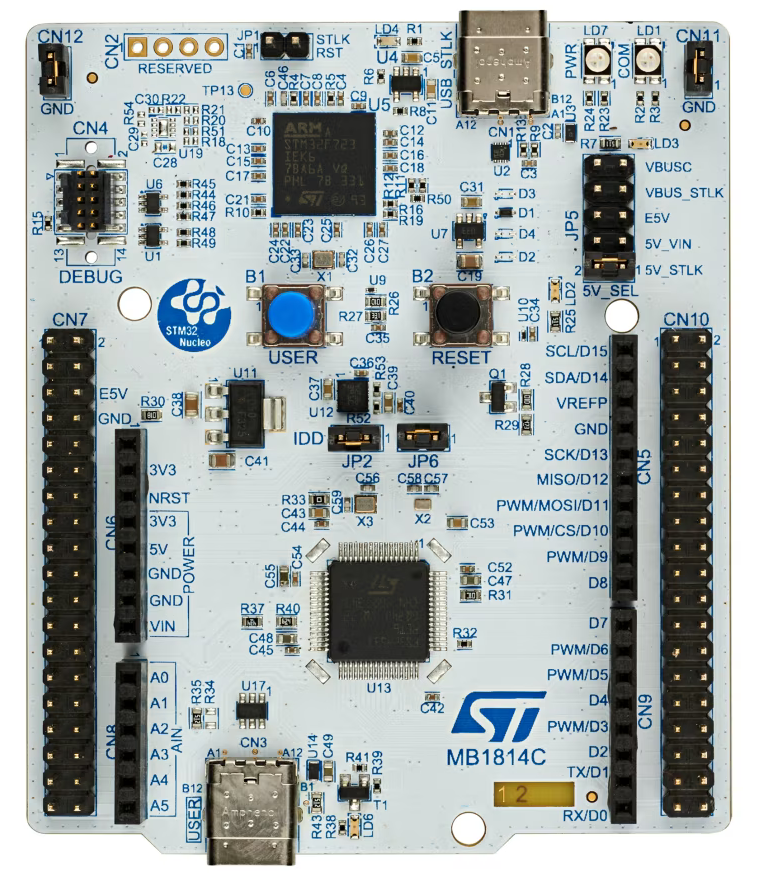
The NUCLEO-H533RE is a development board manufactured by STM32, featuring the powerful STM32H5 microcontroller. This board is designed for rapid prototyping and development of embedded applications, offering a wide range of features and connectivity options. It supports Arduino Uno V3 and ST morpho headers, making it compatible with a variety of expansion boards and shields. The NUCLEO-H533RE is ideal for applications requiring high performance, security, and flexibility.
Explore Projects Built with NUCLEO-H533RE
 Open Project in Cirkit Designer
 Open Project in Cirkit Designer
 Open Project in Cirkit Designer
 Open Project in Cirkit Designer
Explore Projects Built with NUCLEO-H533RE
Open Project in Cirkit DesignerOpen Project in Cirkit DesignerOpen Project in Cirkit DesignerOpen Project in Cirkit DesignerCommon Applications and Use Cases
- IoT (Internet of Things) devices
- Industrial automation
- Robotics and motor control
- Data acquisition systems
- Prototyping for consumer electronics
- Educational and research projects
Technical Specifications
Key Technical Details
| Parameter | Specification |
|---|---|
| Microcontroller | STM32H503RCT6 (ARM Cortex-M33, 32-bit, 250 MHz) |
| Flash Memory | 256 KB |
| RAM | 128 KB |
| Operating Voltage | 3.3V |
| Input Voltage (VIN) | 7V to 12V (via external power supply) |
| USB Supply Voltage | 5V (via USB connection) |
| GPIO Pins | 50+ |
| Communication Interfaces | UART, I2C, SPI, CAN, USB |
| Debugging Interface | ST-LINK/V3 embedded debugger |
| Expansion Compatibility | Arduino Uno V3 and ST morpho headers |
| Dimensions | 68.6 mm x 53.3 mm |
Pin Configuration and Descriptions
Arduino Uno V3 Header Pinout
| Pin Name | Functionality | Description |
|---|---|---|
| A0-A5 | Analog Input | 12-bit ADC channels |
| D0-D13 | Digital I/O | General-purpose digital pins |
| PWM Pins | D3, D5, D6, D9, D10, D11 | PWM output for motor control, LEDs, etc. |
| 5V | Power Output | 5V output from USB or external supply |
| 3.3V | Power Output | 3.3V regulated output |
| GND | Ground | Common ground |
| VIN | Power Input | External power supply input (7-12V) |
ST Morpho Header Pinout (Partial)
| Pin Name | Functionality | Description |
|---|---|---|
| PA0-PA15 | GPIO, ADC, PWM, Alternate Func | Configurable for multiple functions |
| PB0-PB15 | GPIO, ADC, PWM, Alternate Func | Configurable for multiple functions |
| PC0-PC15 | GPIO, ADC, PWM, Alternate Func | Configurable for multiple functions |
Usage Instructions
How to Use the NUCLEO-H533RE in a Circuit
Powering the Board:
- Connect the board to your computer via the USB Type-A to Micro-B cable for power and programming.
- Alternatively, use an external power supply (7-12V) connected to the VIN pin.
Programming the Board:
- Install the STM32CubeIDE or Arduino IDE (with STM32 core support).
- Connect the board to your computer via USB.
- Select the appropriate board and port in your IDE.
- Write your code and upload it to the board.
Connecting Peripherals:
- Use the Arduino Uno V3 headers for shields or the ST morpho headers for custom peripherals.
- Ensure proper voltage levels and pin configurations for connected devices.
Debugging:
- Use the ST-LINK/V3 embedded debugger for real-time debugging and programming.
Important Considerations and Best Practices
- Ensure the input voltage does not exceed the specified range (7-12V for VIN).
- Avoid drawing excessive current from the GPIO pins (maximum 25 mA per pin).
- Use proper decoupling capacitors when connecting external components to reduce noise.
- Always check the pin configuration and alternate functions in the STM32H5 datasheet before use.
Example Code for Arduino IDE
Below is an example code to blink an LED connected to pin D13:
// Blink an LED on pin D13 (onboard LED)

// Define the LED pin
const int ledPin = 13;

void setup() {
  // Set the LED pin as an output
  pinMode(ledPin, OUTPUT);
}

void loop() {
  // Turn the LED on
  digitalWrite(ledPin, HIGH);
  delay(1000); // Wait for 1 second

  // Turn the LED off
  digitalWrite(ledPin, LOW);
  delay(1000); // Wait for 1 second
}
Troubleshooting and FAQs
Common Issues and Solutions
Board Not Detected by IDE:
- Ensure the USB cable is properly connected and functional.
- Install the required drivers for the ST-LINK/V3 debugger.
- Verify that the correct board and port are selected in the IDE.
Code Upload Fails:
- Check the power supply and ensure the board is powered on.
- Press the reset button on the board and try uploading again.
- Ensure no other application is using the COM port.
Peripherals Not Working:
- Double-check the pin connections and configurations.
- Verify that the peripheral is compatible with the board's voltage levels.
- Use a multimeter to check for continuity and proper power supply.
FAQs
Q: Can I use the NUCLEO-H533RE with the Arduino IDE?
A: Yes, the board is compatible with the Arduino IDE. Install the STM32 core to enable support.
Q: What is the maximum clock speed of the STM32H5 microcontroller?
A: The STM32H5 microcontroller operates at a maximum clock speed of 250 MHz.
Q: How do I reset the board?
A: Press the reset button located on the board to perform a hardware reset.
Q: Can I power the board using only the USB connection?
A: Yes, the board can be powered via the USB connection, which provides 5V.
Q: Is the NUCLEO-H533RE suitable for low-power applications?
A: Yes, the STM32H5 microcontroller includes power-saving modes, making it suitable for low-power applications.