
How to Use HBS 57 Motor Driver: Examples, Pinouts, and Specs
 Design with HBS 57 Motor Driver in Cirkit Designer
Introduction
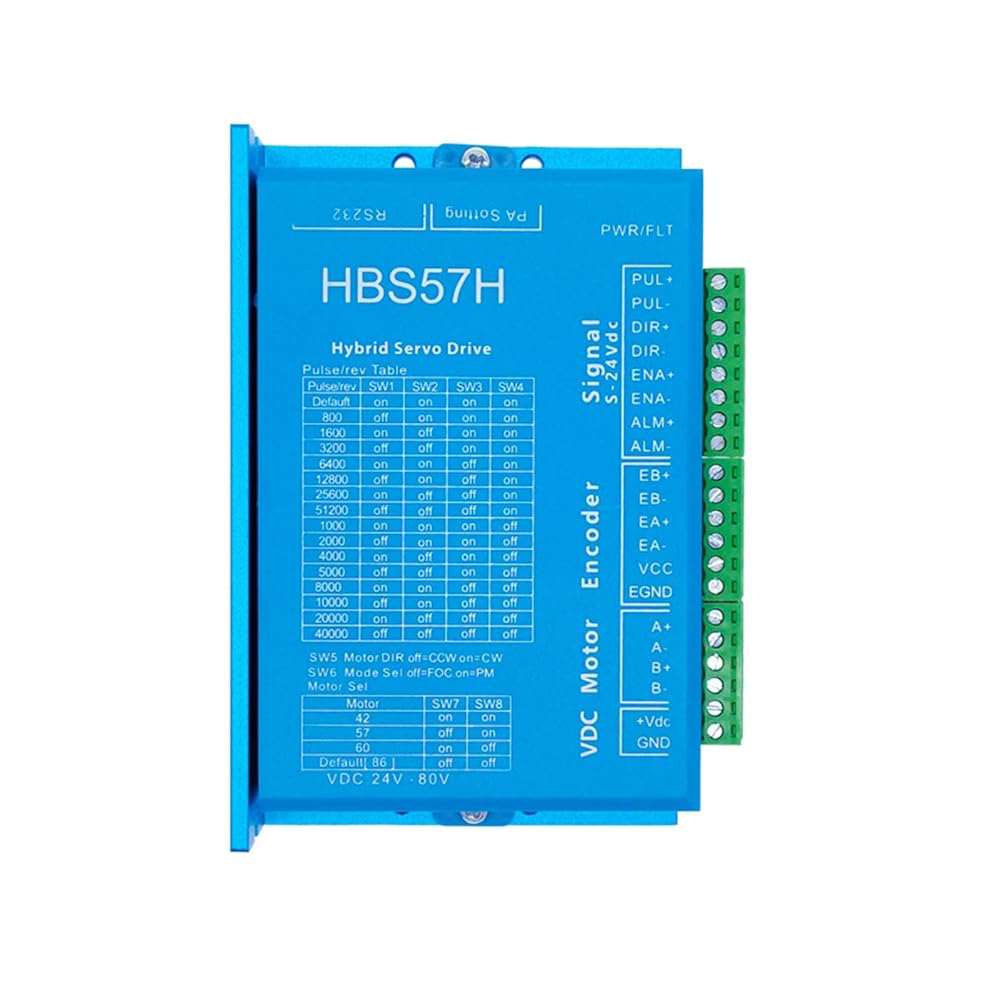
The HBS 57 Motor Driver is a high-performance driver designed for controlling stepper motors. It features advanced microstepping technology, enabling smooth and precise motor control. This driver is ideal for applications requiring accurate positioning and speed control, such as robotics, CNC machinery, 3D printers, and automated systems. Its robust design ensures reliable operation in demanding environments, making it a versatile choice for both industrial and hobbyist projects.
Explore Projects Built with HBS 57 Motor Driver
 Open Project in Cirkit Designer
 Open Project in Cirkit Designer
 Open Project in Cirkit Designer
 Open Project in Cirkit Designer
Explore Projects Built with HBS 57 Motor Driver
Open Project in Cirkit DesignerOpen Project in Cirkit DesignerOpen Project in Cirkit DesignerOpen Project in Cirkit DesignerTechnical Specifications
Below are the key technical details and pin configuration for the HBS 57 Motor Driver:
Key Technical Details
| Parameter | Specification |
|---|---|
| Input Voltage Range | 20V - 50V DC |
| Output Current Range | 0.5A - 5.7A (adjustable) |
| Microstepping Resolution | Up to 256 microsteps per full step |
| Control Signal Input | Pulse/Direction or CW/CCW |
| Signal Voltage Range | 3.3V - 24V |
| Operating Temperature | -10°C to +45°C |
| Protection Features | Over-voltage, over-current, and short-circuit protection |
Pin Configuration and Descriptions
| Pin Name | Type | Description |
|---|---|---|
| PUL+ | Input | Pulse signal input (positive terminal). Used for step control. |
| PUL- | Input | Pulse signal input (negative terminal). |
| DIR+ | Input | Direction signal input (positive terminal). Determines motor rotation. |
| DIR- | Input | Direction signal input (negative terminal). |
| ENA+ | Input | Enable signal input (positive terminal). Activates the driver. |
| ENA- | Input | Enable signal input (negative terminal). |
| A+ | Output | Motor winding A positive terminal. |
| A- | Output | Motor winding A negative terminal. |
| B+ | Output | Motor winding B positive terminal. |
| B- | Output | Motor winding B negative terminal. |
| VCC | Power Input | Power supply positive terminal (20V - 50V DC). |
| GND | Power Input | Power supply ground terminal. |
Usage Instructions
How to Use the HBS 57 Motor Driver in a Circuit
- Power Supply: Connect a DC power supply (20V - 50V) to the
VCCandGNDpins. Ensure the power supply can provide sufficient current for the motor. - Motor Connection: Connect the stepper motor's windings to the
A+,A-,B+, andB-terminals. Verify the wiring matches the motor's datasheet. - Control Signals:
- Connect the
PUL+andPUL-pins to the pulse signal source (e.g., a microcontroller or PLC). - Connect the
DIR+andDIR-pins to the direction signal source. - Optionally, connect the
ENA+andENA-pins to an enable signal source. If unused, leave them disconnected or tied to a logic high state.
- Connect the
- Microstepping Configuration: Adjust the DIP switches on the driver to set the desired microstepping resolution and current limit. Refer to the driver’s datasheet for DIP switch settings.
- Testing: Power on the system and send pulse and direction signals to the driver. Observe the motor's movement to ensure proper operation.
Important Considerations and Best Practices
- Signal Voltage Compatibility: Ensure the control signal voltage (3.3V - 24V) matches the driver’s input range.
- Current Settings: Set the output current limit to match the motor's rated current to avoid overheating or damage.
- Wiring: Use appropriately rated wires for power and motor connections to handle the required current.
- Cooling: Provide adequate ventilation or cooling for the driver to prevent overheating during prolonged operation.
- Isolation: Use optocouplers or isolation circuits if connecting to sensitive control systems like microcontrollers.
Example: Connecting to an Arduino UNO
Below is an example of how to control the HBS 57 Motor Driver using an Arduino UNO:
// Define pin connections
#define PUL_PIN 3  // Pulse signal connected to Arduino pin 3
#define DIR_PIN 4  // Direction signal connected to Arduino pin 4
#define ENA_PIN 5  // Enable signal connected to Arduino pin 5

void setup() {
  pinMode(PUL_PIN, OUTPUT); // Set pulse pin as output
  pinMode(DIR_PIN, OUTPUT); // Set direction pin as output
  pinMode(ENA_PIN, OUTPUT); // Set enable pin as output

  digitalWrite(ENA_PIN, HIGH); // Enable the motor driver
  digitalWrite(DIR_PIN, LOW);  // Set initial direction (LOW = clockwise)
}

void loop() {
  // Generate pulses to move the motor
  digitalWrite(PUL_PIN, HIGH); // Set pulse pin HIGH
  delayMicroseconds(500);      // Wait for 500 microseconds
  digitalWrite(PUL_PIN, LOW);  // Set pulse pin LOW
  delayMicroseconds(500);      // Wait for 500 microseconds
}
Troubleshooting and FAQs
Common Issues and Solutions
Motor Not Moving:
- Verify the power supply voltage and current are within the specified range.
- Check the wiring between the motor and the driver.
- Ensure the pulse and direction signals are being sent correctly.
Motor Vibrates but Does Not Rotate:
- Check the motor wiring. Incorrect wiring can cause the motor to vibrate instead of rotating.
- Verify the microstepping settings on the DIP switches.
Driver Overheating:
- Ensure the current limit is set correctly for the motor.
- Provide adequate cooling or ventilation for the driver.
Erratic Motor Movement:
- Check for noise or interference in the control signal lines.
- Use shielded cables for signal connections if necessary.
FAQs
Q: Can I use the HBS 57 Motor Driver with a 12V power supply?
A: No, the minimum input voltage for the HBS 57 is 20V. Using a 12V supply may result in improper operation or damage.
Q: How do I set the microstepping resolution?
A: Use the DIP switches on the driver to configure the microstepping resolution. Refer to the driver’s datasheet for the correct switch settings.
Q: Is the driver compatible with NEMA 23 stepper motors?
A: Yes, the HBS 57 Motor Driver is compatible with NEMA 23 stepper motors, provided the motor's voltage and current ratings are within the driver's specifications.
Q: Can I control the driver with a Raspberry Pi?
A: Yes, the HBS 57 can be controlled with a Raspberry Pi. Ensure the GPIO pins provide the correct signal voltage (3.3V or use a level shifter if needed).