Cirkit Designer Logo
Cirkit Designer
Your all-in-one circuit design IDE
Home / 
Component Documentation

How to Use nidec24h: Examples, Pinouts, and Specs
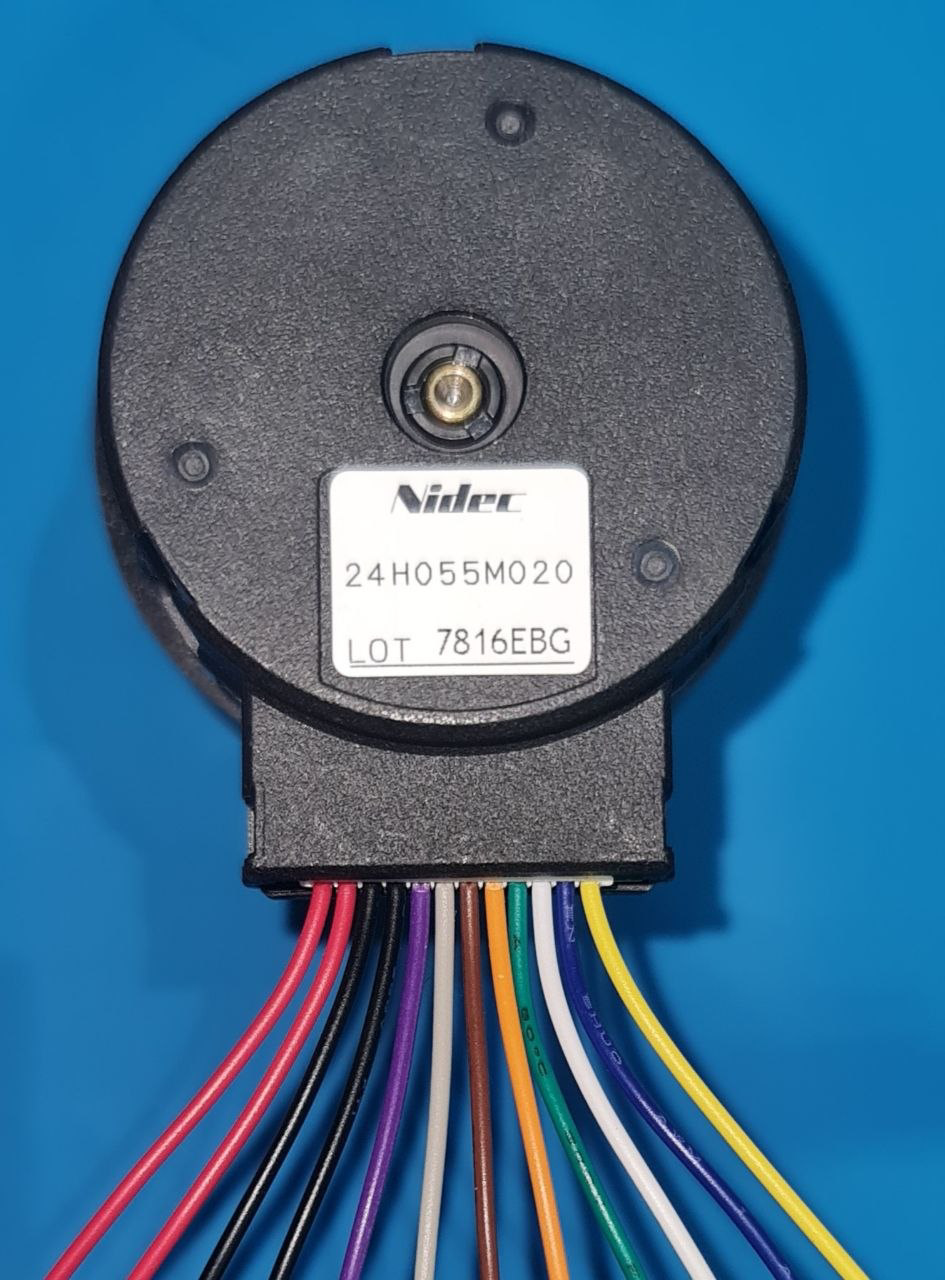

Image of nidec24h
Cirkit Designer LogoDesign with nidec24h in Cirkit Designer

Introduction

The Nidec 24H is a 24V DC brushless fan designed for high efficiency and reliability. It is widely used in cooling applications for electronic devices and systems, ensuring optimal thermal management in a variety of environments. Its brushless design enhances durability and reduces maintenance requirements, making it a preferred choice for industrial, commercial, and consumer electronics.

Explore Projects Built with nidec24h
Use Cirkit Designer to design, explore, and prototype these projects online. Some projects support real-time simulation. Click "Open Project" to start designing instantly!
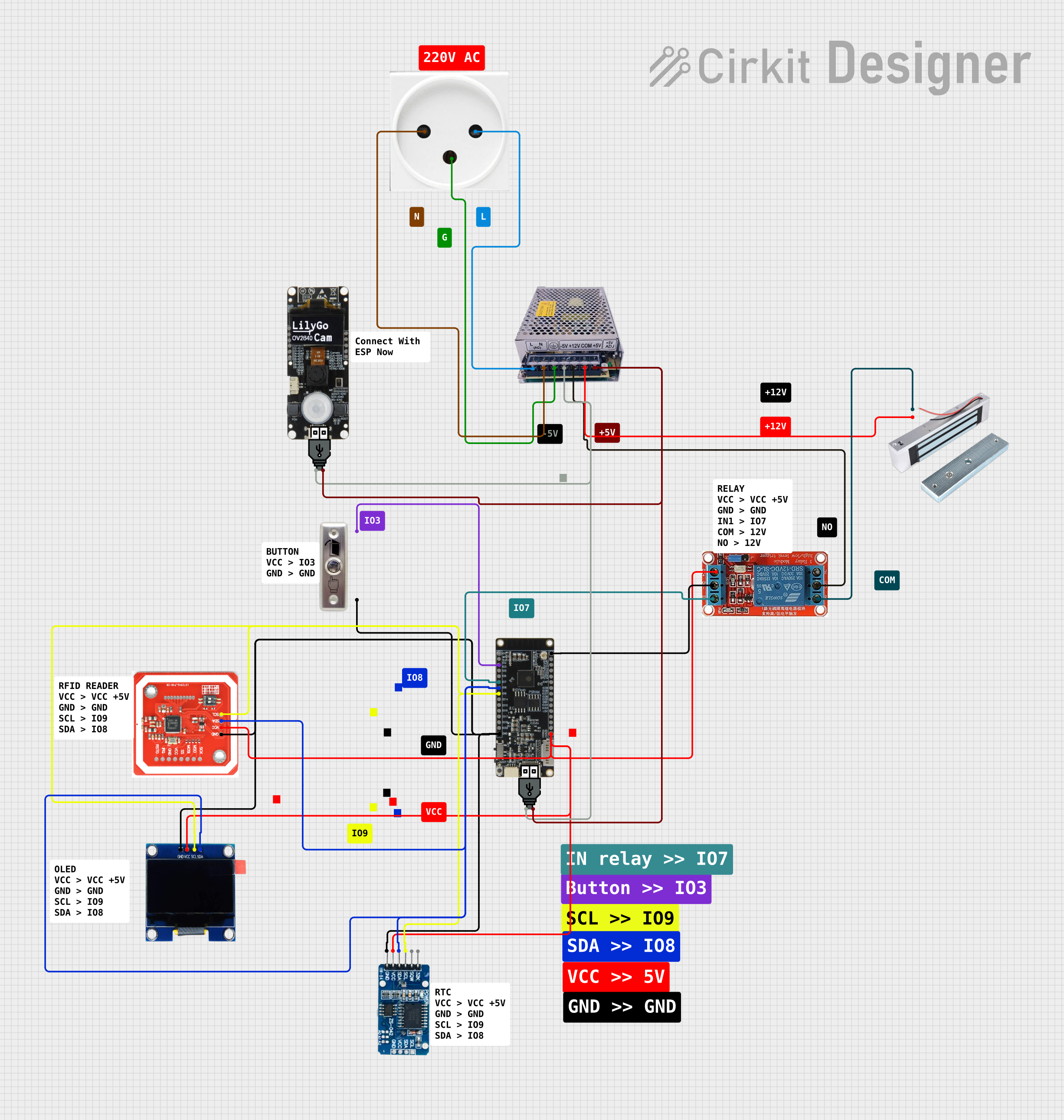
NFC-Enabled Access Control System with Real-Time Clock and OLED Display
Image of doorlock: A project utilizing nidec24h in a practical application
This circuit is designed as an access control system with time-tracking capabilities. It uses an NFC/RFID reader for authentication, a real-time clock for time-stamping events, and an OLED display for user interface, all controlled by a T8_S3 microcontroller. A relay module actuates a magnetic lock, and a button switch provides additional user input, with a switching power supply delivering the necessary voltages.
Cirkit Designer LogoOpen Project in Cirkit Designer
NFC-Enabled Access Control System with Time Logging
Image of doorlock: A project utilizing nidec24h in a practical application
This circuit is designed for access control with time tracking capabilities. It features an NFC/RFID reader for authentication, an RTC module (DS3231) for real-time clock functionality, and an OLED display for user interaction. A 12V relay controls a magnetic lock, which is activated upon successful NFC/RFID authentication, and a button switch is likely used for manual operation or input. The T8_S3 microcontroller serves as the central processing unit, interfacing with the NFC/RFID reader, RTC, OLED, and relay to manage the access control logic.
Cirkit Designer LogoOpen Project in Cirkit Designer
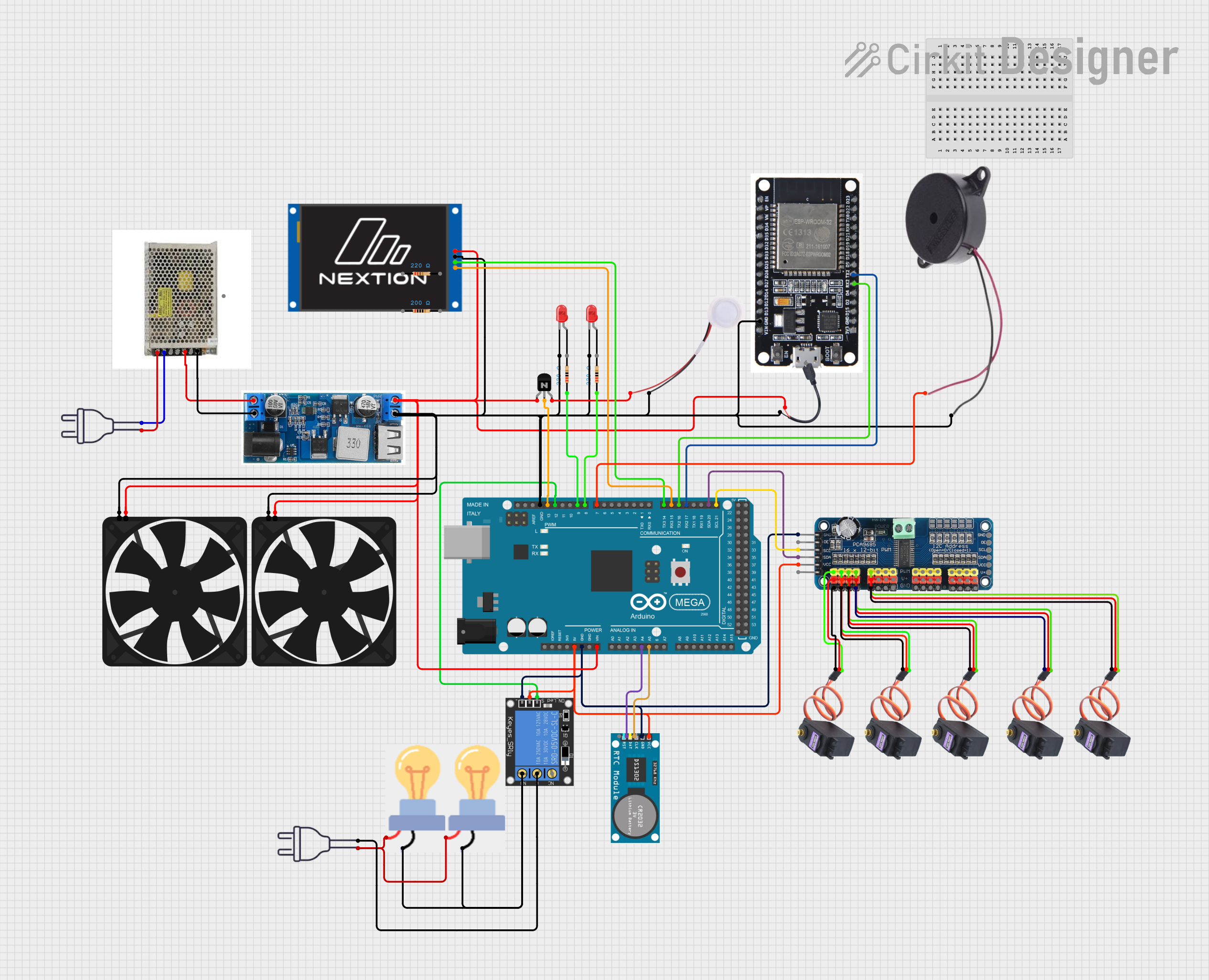
Arduino Mega 2560 and ESP32-Based Smart Home Automation System with Touch LCD and RTC
Image of Mega Thesis wiring: A project utilizing nidec24h in a practical application
This circuit is a complex control system utilizing an Arduino Mega 2560 to manage various peripherals including a 16-channel PWM servo driver, an RTC module, a relay, and multiple sensors and actuators such as fans, LEDs, and a humidifier. The system is powered by a 24V DC power supply with a buck converter to step down the voltage, and it includes communication with an ESP32 and a Nextion Touch LCD for user interaction.
Cirkit Designer LogoOpen Project in Cirkit Designer
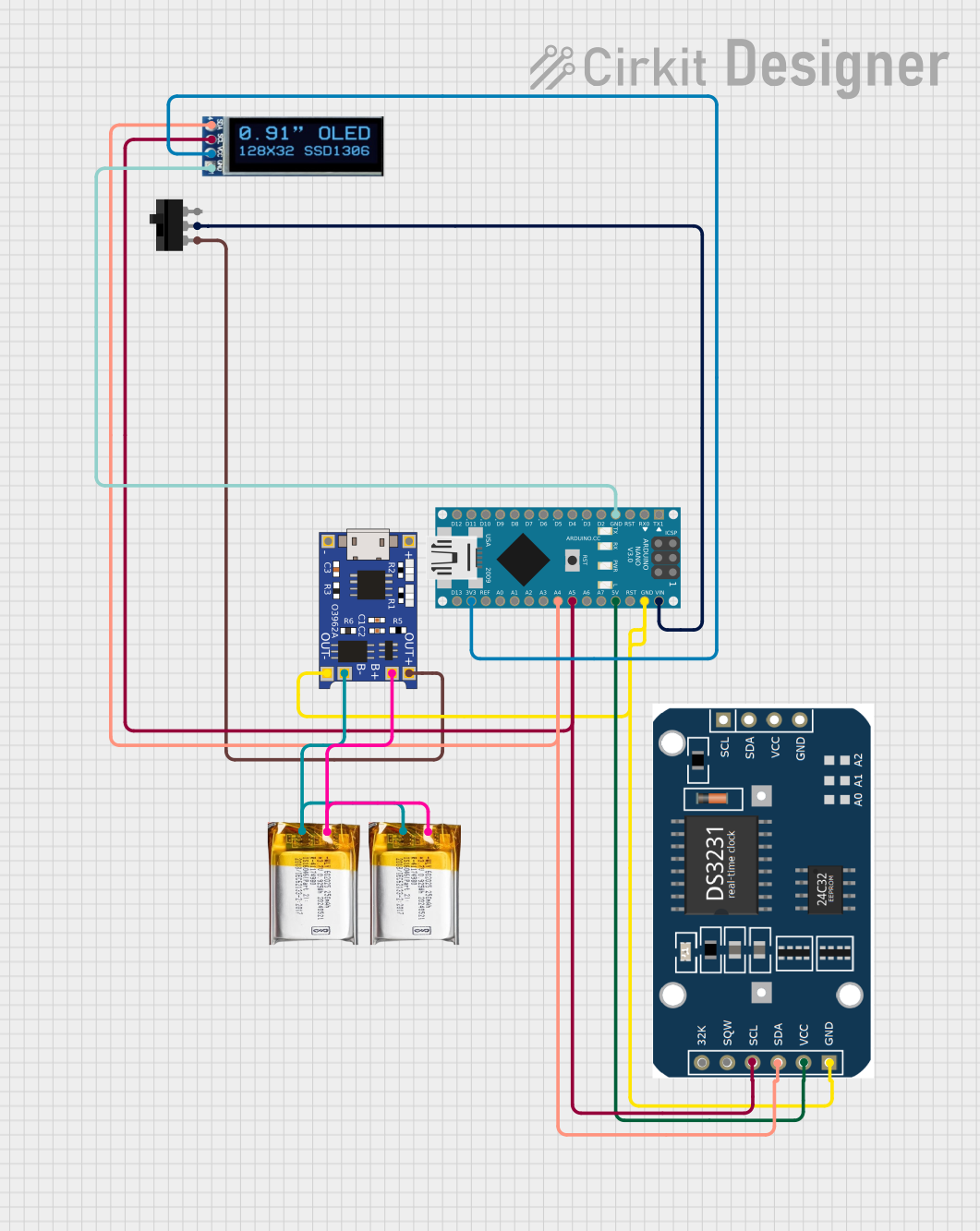
Arduino Nano-Based OLED Clock with RTC and LiPo Battery Charging
Image of RTC for Keyboard: A project utilizing nidec24h in a practical application
This circuit features an Arduino Nano connected to an OLED display and a DS3231 real-time clock (RTC) module for displaying the current time. The Arduino Nano is powered through a toggle switch connected to its VIN pin, with power supplied by a TP4056 charging module that charges and manages two 3.7V LiPo batteries connected in parallel. The OLED and RTC module communicate with the Arduino via I2C, with shared SDA and SCL lines connected to the A4 and A5 pins of the Arduino, respectively.
Cirkit Designer LogoOpen Project in Cirkit Designer

Explore Projects Built with nidec24h

Use Cirkit Designer to design, explore, and prototype these projects online. Some projects support real-time simulation. Click "Open Project" to start designing instantly!
Image of doorlock: A project utilizing nidec24h in a practical application
NFC-Enabled Access Control System with Real-Time Clock and OLED Display
This circuit is designed as an access control system with time-tracking capabilities. It uses an NFC/RFID reader for authentication, a real-time clock for time-stamping events, and an OLED display for user interface, all controlled by a T8_S3 microcontroller. A relay module actuates a magnetic lock, and a button switch provides additional user input, with a switching power supply delivering the necessary voltages.
Cirkit Designer LogoOpen Project in Cirkit Designer
Image of doorlock: A project utilizing nidec24h in a practical application
NFC-Enabled Access Control System with Time Logging
This circuit is designed for access control with time tracking capabilities. It features an NFC/RFID reader for authentication, an RTC module (DS3231) for real-time clock functionality, and an OLED display for user interaction. A 12V relay controls a magnetic lock, which is activated upon successful NFC/RFID authentication, and a button switch is likely used for manual operation or input. The T8_S3 microcontroller serves as the central processing unit, interfacing with the NFC/RFID reader, RTC, OLED, and relay to manage the access control logic.
Cirkit Designer LogoOpen Project in Cirkit Designer
Image of Mega Thesis wiring: A project utilizing nidec24h in a practical application
Arduino Mega 2560 and ESP32-Based Smart Home Automation System with Touch LCD and RTC
This circuit is a complex control system utilizing an Arduino Mega 2560 to manage various peripherals including a 16-channel PWM servo driver, an RTC module, a relay, and multiple sensors and actuators such as fans, LEDs, and a humidifier. The system is powered by a 24V DC power supply with a buck converter to step down the voltage, and it includes communication with an ESP32 and a Nextion Touch LCD for user interaction.
Cirkit Designer LogoOpen Project in Cirkit Designer
Image of RTC for Keyboard: A project utilizing nidec24h in a practical application
Arduino Nano-Based OLED Clock with RTC and LiPo Battery Charging
This circuit features an Arduino Nano connected to an OLED display and a DS3231 real-time clock (RTC) module for displaying the current time. The Arduino Nano is powered through a toggle switch connected to its VIN pin, with power supplied by a TP4056 charging module that charges and manages two 3.7V LiPo batteries connected in parallel. The OLED and RTC module communicate with the Arduino via I2C, with shared SDA and SCL lines connected to the A4 and A5 pins of the Arduino, respectively.
Cirkit Designer LogoOpen Project in Cirkit Designer

Common Applications

  • Cooling for power supplies, servers, and industrial equipment
  • Thermal management in consumer electronics
  • Ventilation in enclosures and cabinets
  • Heat dissipation in renewable energy systems (e.g., solar inverters)

Technical Specifications

Key Specifications

Parameter Value
Operating Voltage 24V DC
Operating Voltage Range 18V - 26V DC
Current Consumption 0.15A (typical)
Power Consumption 3.6W (typical)
Speed 3000 RPM (±10%)
Airflow 50 CFM (Cubic Feet/Minute)
Noise Level 28 dBA
Bearing Type Ball Bearing
Dimensions 80mm x 80mm x 25mm
Weight 120g
Connector Type 3-pin (Power, Ground, Tachometer)

Pin Configuration

Pin Number Name Description
1 Power (V+) Connect to 24V DC power supply
2 Ground (GND) Connect to circuit ground
3 Tachometer Outputs a pulse signal for speed monitoring

Usage Instructions

How to Use the Nidec 24H in a Circuit

  1. Power Connection: Connect the Power (V+) pin to a 24V DC power source. Ensure the power supply can provide at least 0.2A to account for startup current.
  2. Ground Connection: Connect the Ground (GND) pin to the circuit ground.
  3. Tachometer Signal (Optional): If speed monitoring is required, connect the Tachometer pin to a microcontroller or monitoring circuit. The tachometer outputs a square wave signal proportional to the fan speed.

Important Considerations

  • Voltage Range: Ensure the input voltage remains within the specified range (18V - 26V DC) to avoid damage.
  • Mounting: Secure the fan using screws or brackets to minimize vibration and noise.
  • Airflow Direction: Check the airflow direction indicated on the fan housing before installation.
  • Noise Reduction: Use rubber grommets or vibration dampeners to reduce noise in sensitive applications.

Example: Connecting to an Arduino UNO

The Nidec 24H can be connected to an Arduino UNO for speed monitoring using the Tachometer pin. Below is an example code snippet to read the fan speed:

// Arduino code to monitor the speed of the Nidec 24H fan
// The Tachometer pin is connected to Arduino digital pin 2

const int tachPin = 2; // Tachometer signal pin
volatile int pulseCount = 0; // Variable to store pulse count

void setup() {
  pinMode(tachPin, INPUT_PULLUP); // Set tachPin as input with pull-up resistor
  attachInterrupt(digitalPinToInterrupt(tachPin), countPulse, FALLING);
  Serial.begin(9600); // Initialize serial communication
}

void loop() {
  delay(1000); // Wait for 1 second
  int rpm = (pulseCount / 2) * 60; // Calculate RPM (2 pulses per revolution)
  Serial.print("Fan Speed: ");
  Serial.print(rpm);
  Serial.println(" RPM");
  pulseCount = 0; // Reset pulse count for the next measurement
}

void countPulse() {
  pulseCount++; // Increment pulse count on each falling edge
}

Notes:

  • The Tachometer pin outputs two pulses per revolution. The code calculates RPM accordingly.
  • Use a pull-up resistor if the Arduino's internal pull-up is insufficient for stable readings.

Troubleshooting and FAQs

Common Issues and Solutions

  1. Fan Does Not Spin

    • Cause: Insufficient power supply or incorrect wiring.
    • Solution: Verify the power supply voltage and current. Check the wiring connections.
  2. Excessive Noise or Vibration

    • Cause: Loose mounting or misalignment.
    • Solution: Secure the fan properly using screws or vibration dampeners.
  3. Tachometer Signal Not Detected

    • Cause: Incorrect connection or incompatible microcontroller pin.
    • Solution: Ensure the Tachometer pin is connected to a digital input pin with interrupt capability. Verify the pull-up resistor.
  4. Fan Speed Fluctuates

    • Cause: Unstable power supply or environmental factors.
    • Solution: Use a regulated power supply and ensure proper airflow around the fan.

FAQs

  • Can the Nidec 24H operate at 12V?

    • No, the fan requires a minimum of 18V for proper operation.
  • What is the lifespan of the Nidec 24H?

    • The fan has an estimated lifespan of 50,000 hours at 25°C.
  • Can the fan be controlled using PWM?

    • No, the Nidec 24H does not support PWM speed control. Use a voltage regulator for speed adjustment.
  • Is the fan waterproof?

    • No, the Nidec 24H is not waterproof. Avoid exposure to liquids or high humidity environments.