
How to Use MAX6675: Examples, Pinouts, and Specs
 Design with MAX6675 in Cirkit Designer
Introduction
The MAX6675 is a digital temperature sensor module designed to work with K-type thermocouples. It measures temperatures in the range of 0°C to 1024°C with a resolution of 0.25°C. The sensor converts the thermocouple's analog signal into a digital output, which can be easily read by microcontrollers via an SPI (Serial Peripheral Interface) communication protocol.
This component is widely used in industrial, scientific, and hobbyist applications where precise temperature monitoring is required. Common use cases include HVAC systems, 3D printers, kilns, and other high-temperature environments.
Explore Projects Built with MAX6675
 Open Project in Cirkit Designer
 Open Project in Cirkit Designer
 Open Project in Cirkit Designer
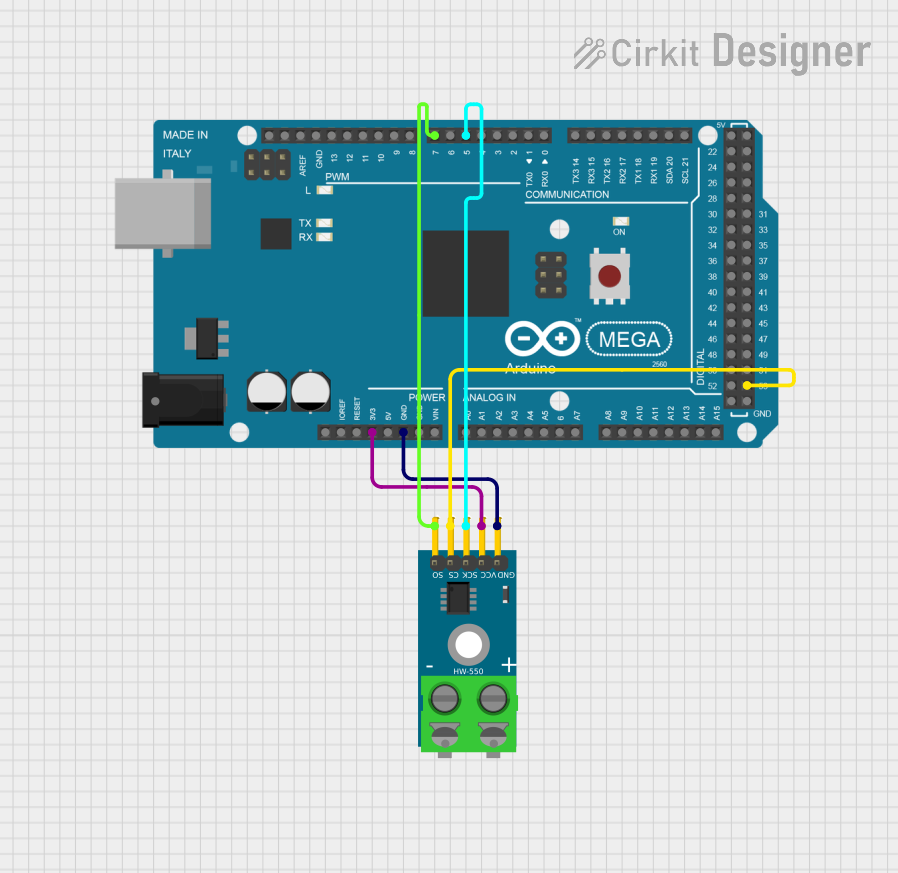 Open Project in Cirkit Designer
Explore Projects Built with MAX6675
Open Project in Cirkit DesignerOpen Project in Cirkit DesignerOpen Project in Cirkit DesignerOpen Project in Cirkit DesignerTechnical Specifications
- Manufacturer: Arduino
- Manufacturer Part ID: Nano
- Temperature Range: 0°C to 1024°C
- Resolution: 0.25°C
- Accuracy: ±2°C (typical)
- Interface: SPI (3-wire)
- Supply Voltage: 3.0V to 5.5V
- Current Consumption: 1.5mA (typical)
- Output Format: 12-bit digital value
- Thermocouple Type: K-type
Pin Configuration and Descriptions
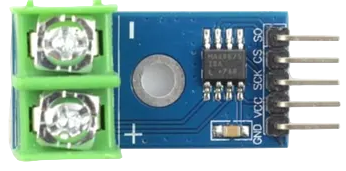
The MAX6675 module typically has 6 pins. Below is the pin configuration:
| Pin Name | Pin Number | Description |
|---|---|---|
| VCC | 1 | Power supply input (3.0V to 5.5V) |
| GND | 2 | Ground |
| SCK | 3 | Serial Clock Input (SPI clock) |
| CS | 4 | Chip Select (active low) |
| SO | 5 | Serial Data Output (SPI data) |
| T- | 6 | Negative terminal for K-type thermocouple |
| T+ | 7 | Positive terminal for K-type thermocouple |
Usage Instructions
How to Use the MAX6675 in a Circuit
- Connect the Thermocouple: Attach the K-type thermocouple to the T+ and T- pins of the MAX6675 module.
- Power the Module: Connect the VCC pin to a 3.3V or 5V power source and the GND pin to ground.
- SPI Connections: Connect the SCK, CS, and SO pins to the corresponding SPI pins on your microcontroller. For example, when using an Arduino Nano:
- SCK → D13 (SPI Clock)
- CS → D10 (Chip Select)
- SO → D12 (SPI Data Input)
- Load the Library: Use the
Adafruit_MAX6675library or a similar library to simplify communication with the module. - Read Temperature: Use the library functions to read the temperature data and convert it to Celsius.
Important Considerations and Best Practices
- Ensure the thermocouple is securely connected to the T+ and T- pins to avoid inaccurate readings.
- Avoid exposing the thermocouple to temperatures beyond its rated range, as this may damage the sensor.
- Use proper grounding to minimize noise and interference in the SPI communication.
- If using a 5V microcontroller, ensure the MAX6675 module is compatible with 5V logic levels.
Example Code for Arduino Nano
Below is an example of how to interface the MAX6675 with an Arduino Nano to read temperature data:
#include <SPI.h>
#include "Adafruit_MAX6675.h"

// Define MAX6675 pins
const int SCK_PIN = 13;  // SPI Clock
const int CS_PIN = 10;   // Chip Select
const int SO_PIN = 12;   // SPI Data Input

// Initialize MAX6675 object
Adafruit_MAX6675 thermocouple(SCK_PIN, CS_PIN, SO_PIN);

void setup() {
  Serial.begin(9600);  // Start serial communication
  Serial.println("MAX6675 Temperature Sensor Test");
  delay(500);  // Allow time for initialization
}

void loop() {
  // Read temperature in Celsius
  double temperature = thermocouple.readCelsius();

  // Check if the reading is valid
  if (isnan(temperature)) {
    Serial.println("Error: Failed to read temperature!");
  } else {
    Serial.print("Temperature: ");
    Serial.print(temperature);
    Serial.println(" °C");
  }

  delay(1000);  // Wait 1 second before the next reading
}
Troubleshooting and FAQs
Common Issues and Solutions
No Temperature Reading or NAN Output
- Cause: Loose or incorrect connection of the thermocouple.
- Solution: Ensure the thermocouple is securely connected to the T+ and T- pins.
Inaccurate Temperature Readings
- Cause: Electrical noise or interference in the SPI communication.
- Solution: Use shorter wires for SPI connections and ensure proper grounding.
Module Not Responding
- Cause: Incorrect SPI pin configuration or power supply issues.
- Solution: Double-check the wiring and ensure the module is powered with the correct voltage.
Temperature Stuck at a Fixed Value
- Cause: Faulty thermocouple or damaged MAX6675 module.
- Solution: Test with a different thermocouple or replace the module.
FAQs
Q: Can the MAX6675 work with other thermocouple types?
A: No, the MAX6675 is specifically designed for K-type thermocouples. For other types, consider using a different module like the MAX31855.
Q: What is the maximum cable length for the thermocouple?
A: The maximum length depends on the thermocouple wire gauge and the environment. For best results, use shielded cables and keep the length under 10 meters.
Q: Can I use the MAX6675 with a 3.3V microcontroller?
A: Yes, the MAX6675 is compatible with both 3.3V and 5V logic levels.
Q: How do I calibrate the MAX6675?
A: The MAX6675 does not require calibration, but you can verify its accuracy by comparing its readings with a known reference thermometer.