
How to Use TB6600: Examples, Pinouts, and Specs
 Design with TB6600 in Cirkit Designer
Introduction
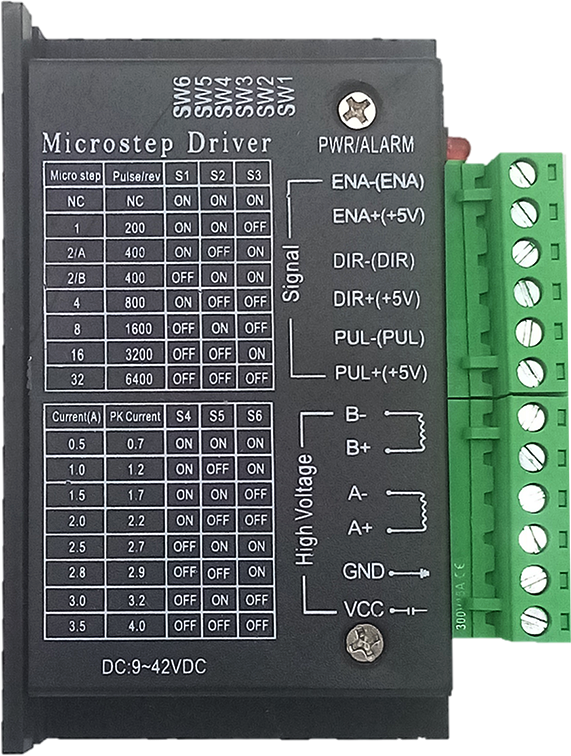
The TB6600 is a high-performance stepper motor driver designed to control bipolar stepper motors with precision and reliability. It supports adjustable current settings, microstepping capabilities, and includes built-in thermal protection, making it a versatile choice for demanding applications. The TB6600 is widely used in CNC machines, 3D printers, robotics, and other motion control systems where precise motor control is essential.
Explore Projects Built with TB6600
 Open Project in Cirkit Designer
 Open Project in Cirkit Designer
 Open Project in Cirkit Designer
 Open Project in Cirkit Designer
Explore Projects Built with TB6600
Open Project in Cirkit DesignerOpen Project in Cirkit DesignerOpen Project in Cirkit DesignerOpen Project in Cirkit DesignerCommon Applications:
- CNC machines for precise cutting, engraving, and milling
- 3D printers for accurate layer-by-layer printing
- Robotics for controlled motion and positioning
- Automated conveyor systems
- Industrial automation requiring stepper motor control
Technical Specifications
The TB6600 stepper motor driver offers robust performance and flexibility. Below are its key technical details:
Key Specifications:
| Parameter | Value |
|---|---|
| Input Voltage Range | 9V to 42V DC |
| Output Current Range | 0.5A to 4.0A (adjustable) |
| Microstepping Modes | Full, 1/2, 1/4, 1/8, 1/16 steps |
| Control Signal Voltage | 3.3V to 5V |
| Maximum Motor Voltage | 42V DC |
| Operating Temperature | -10°C to +45°C |
| Protection Features | Overheat, overcurrent, and short-circuit protection |
Pin Configuration and Descriptions:
The TB6600 driver typically has the following pin layout:
Input Pins:
| Pin Name | Description |
|---|---|
| PUL+ | Pulse signal input (positive terminal) |
| PUL- | Pulse signal input (negative terminal) |
| DIR+ | Direction signal input (positive terminal) |
| DIR- | Direction signal input (negative terminal) |
| ENA+ | Enable signal input (positive terminal) (optional, used to enable/disable) |
| ENA- | Enable signal input (negative terminal) |
Output Pins (to Stepper Motor):
| Pin Name | Description |
|---|---|
| A+ | Connect to one coil of the stepper motor (positive terminal) |
| A- | Connect to one coil of the stepper motor (negative terminal) |
| B+ | Connect to the other coil of the stepper motor (positive terminal) |
| B- | Connect to the other coil of the stepper motor (negative terminal) |
Power Pins:
| Pin Name | Description |
|---|---|
| VCC | Power supply input (9V to 42V DC) |
| GND | Ground connection |
Usage Instructions
How to Use the TB6600 in a Circuit:
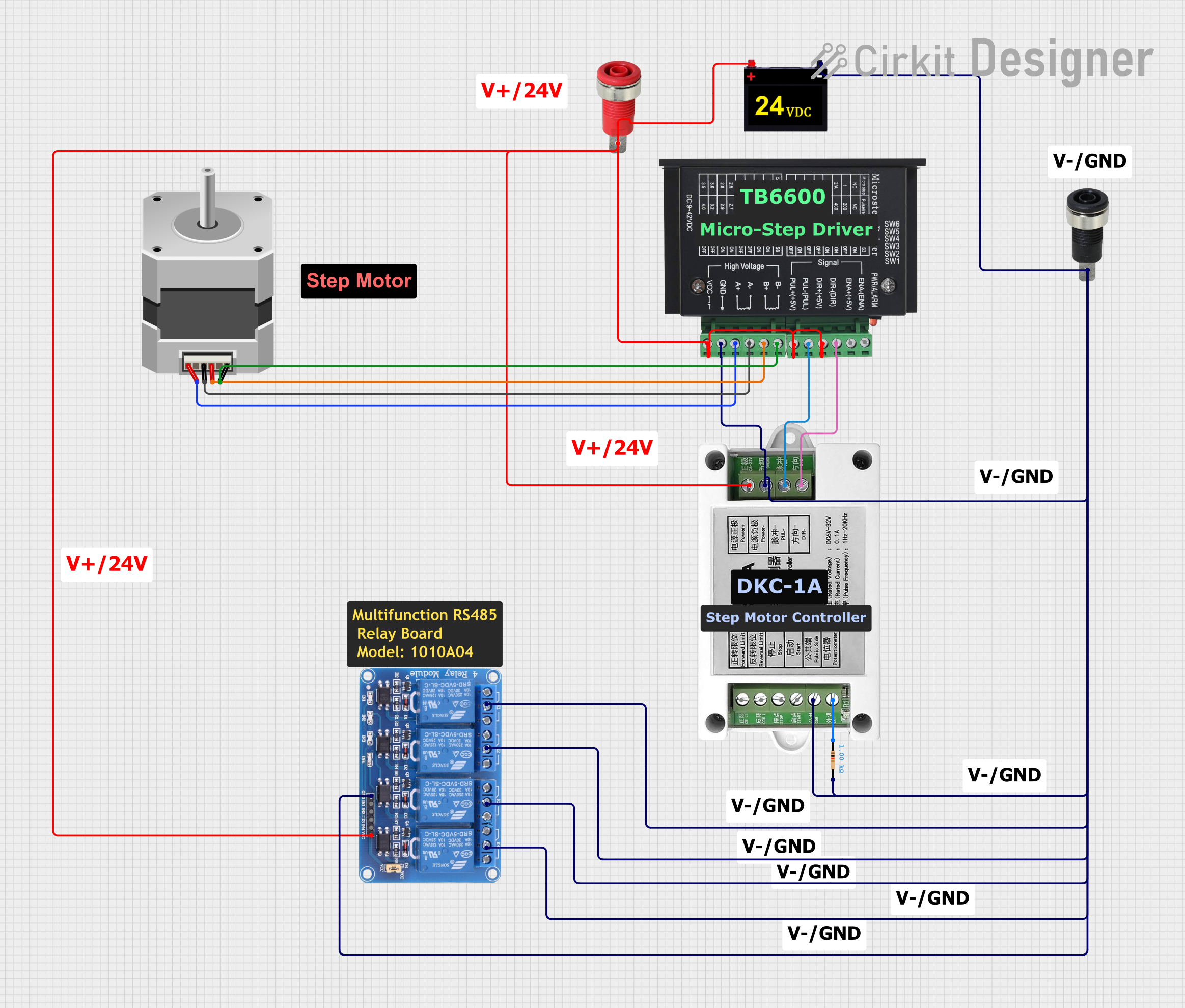
- Power Supply: Connect a DC power supply (9V to 42V) to the VCC and GND pins of the TB6600. Ensure the power supply can provide sufficient current for your stepper motor.
- Stepper Motor Connection: Connect the stepper motor coils to the A+, A-, B+, and B- output pins. Refer to your motor's datasheet to identify the correct coil pairs.
- Control Signals: Connect the PUL+, PUL-, DIR+, DIR-, ENA+, and ENA- pins to your microcontroller or control board (e.g., Arduino UNO). Use appropriate resistors if needed to match voltage levels.
- Microstepping Settings: Use the DIP switches on the TB6600 to configure the desired microstepping mode and current limit. Refer to the TB6600 datasheet for the DIP switch settings.
- Enable the Driver: If using the ENA pins, ensure the enable signal is active to allow the driver to operate.
- Control the Motor: Send pulse signals to the PUL pins to control the motor's steps and use the DIR pins to set the rotation direction.
Important Considerations:
- Heat Dissipation: The TB6600 can generate significant heat during operation. Use a heatsink or active cooling to prevent overheating.
- Current Settings: Set the current limit according to your stepper motor's rated current to avoid damage.
- Signal Voltage: Ensure the control signals from your microcontroller are within the 3.3V to 5V range.
- Wiring: Double-check all connections before powering the circuit to avoid short circuits or damage.
Example: Connecting the TB6600 to an Arduino UNO
Below is an example Arduino sketch to control a stepper motor using the TB6600:
// Define pin connections
#define PUL_PIN 2  // Pulse signal pin
#define DIR_PIN 3  // Direction signal pin
#define ENA_PIN 4  // Enable signal pin

void setup() {
  // Set pin modes
  pinMode(PUL_PIN, OUTPUT);
  pinMode(DIR_PIN, OUTPUT);
  pinMode(ENA_PIN, OUTPUT);

  // Enable the driver
  digitalWrite(ENA_PIN, LOW); // LOW to enable the driver
}

void loop() {
  // Set direction
  digitalWrite(DIR_PIN, HIGH); // HIGH for one direction, LOW for the other

  // Generate pulses to move the motor
  for (int i = 0; i < 200; i++) { // 200 steps for one revolution (example)
    digitalWrite(PUL_PIN, HIGH);
    delayMicroseconds(500); // Adjust for speed
    digitalWrite(PUL_PIN, LOW);
    delayMicroseconds(500); // Adjust for speed
  }

  delay(1000); // Wait 1 second before changing direction

  // Change direction
  digitalWrite(DIR_PIN, LOW);

  // Generate pulses in the opposite direction
  for (int i = 0; i < 200; i++) {
    digitalWrite(PUL_PIN, HIGH);
    delayMicroseconds(500);
    digitalWrite(PUL_PIN, LOW);
    delayMicroseconds(500);
  }

  delay(1000); // Wait 1 second before repeating
}
Notes:
- Adjust the
delayMicroseconds()values to control the motor speed. - Ensure the stepper motor's rated current and voltage match the TB6600 settings.
Troubleshooting and FAQs
Common Issues and Solutions:
Motor Not Moving:
- Check the power supply voltage and current.
- Verify the wiring between the TB6600 and the stepper motor.
- Ensure the control signals (PUL, DIR, ENA) are correctly connected and active.
Motor Vibrates but Doesn't Rotate:
- Verify the microstepping settings on the DIP switches.
- Check the stepper motor coil connections (A+, A-, B+, B-).
Driver Overheating:
- Ensure proper heat dissipation with a heatsink or cooling fan.
- Reduce the current limit if it exceeds the motor's requirements.
Motor Moves Erratically:
- Check for noise or interference in the control signal lines.
- Use shielded cables for long signal connections.
FAQs:
Can I use the TB6600 with a unipolar stepper motor? No, the TB6600 is designed for bipolar stepper motors only.
What is the maximum step rate for the TB6600? The TB6600 can handle pulse frequencies up to 200 kHz.
Do I need to use the ENA pins? The ENA pins are optional. If not used, leave them disconnected or set them to an active state.
Can I use a 12V power supply with the TB6600? Yes, the TB6600 supports input voltages from 9V to 42V. Ensure your motor is compatible with 12V.
By following this documentation, you can effectively use the TB6600 stepper motor driver in your projects.