
How to Use sensor ultrasonik: Examples, Pinouts, and Specs
 Design with sensor ultrasonik in Cirkit Designer
Introduction
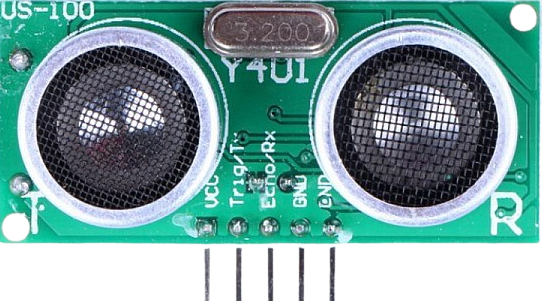
The US100 Ultrasonic Sensor, manufactured by Arduino and Raspberry, is a versatile distance-measuring device that uses ultrasonic waves to determine the distance between the sensor and an object. By emitting sound waves and calculating the time it takes for the echo to return, the US100 provides accurate distance measurements in a wide range of applications.
Explore Projects Built with sensor ultrasonik
 Open Project in Cirkit Designer
 Open Project in Cirkit Designer
 Open Project in Cirkit Designer
 Open Project in Cirkit Designer
Explore Projects Built with sensor ultrasonik
Open Project in Cirkit DesignerOpen Project in Cirkit DesignerOpen Project in Cirkit DesignerOpen Project in Cirkit DesignerCommon Applications and Use Cases
- Obstacle detection in robotics
- Distance measurement in automation systems
- Liquid level monitoring
- Parking assistance systems
- Proximity sensing in security systems
Technical Specifications
The US100 Ultrasonic Sensor is designed for precision and ease of use. Below are its key technical details:
| Parameter | Specification |
|---|---|
| Operating Voltage | 2.4V to 5.5V |
| Operating Current | ≤ 2.0 mA |
| Measuring Range | 2 cm to 450 cm |
| Accuracy | ± 0.3 cm |
| Operating Temperature | -20°C to 70°C |
| Communication Interface | UART (9600 bps) or Trigger/Echo Pins |
| Trigger Pulse Width | ≥ 10 µs |
| Echo Pulse Output | Width proportional to distance |
Pin Configuration and Descriptions
The US100 sensor has four pins, as described in the table below:
| Pin | Name | Description |
|---|---|---|
| 1 | VCC | Power supply pin (2.4V to 5.5V). Connect to the 5V pin of your microcontroller. |
| 2 | Trig/TX | Trigger pin for initiating ultrasonic pulses or TX pin for UART communication. |
| 3 | Echo/RX | Echo pin for receiving reflected signals or RX pin for UART communication. |
| 4 | GND | Ground pin. Connect to the ground of your circuit. |
Usage Instructions
The US100 Ultrasonic Sensor can operate in two modes: Trigger/Echo Mode and UART Mode. Below are instructions for using the sensor in both modes.
Trigger/Echo Mode
Wiring:
- Connect the
VCCpin to the 5V pin of your microcontroller. - Connect the
GNDpin to the ground. - Connect the
Trigpin to a digital output pin on your microcontroller. - Connect the
Echopin to a digital input pin on your microcontroller.
- Connect the
Operation:
- Send a 10 µs HIGH pulse to the
Trigpin to initiate a measurement. - The sensor will emit an ultrasonic pulse and set the
Echopin HIGH for a duration proportional to the distance. - Measure the duration of the HIGH signal on the
Echopin to calculate the distance.
- Send a 10 µs HIGH pulse to the
Distance Calculation:
Use the formula:
[ \text{Distance (cm)} = \frac{\text{Echo Pulse Width (µs)}}{58} ]Arduino Example Code:
// Define pins for the US100 sensor
const int trigPin = 9; // Trigger pin connected to digital pin 9
const int echoPin = 10; // Echo pin connected to digital pin 10

void setup() {
  pinMode(trigPin, OUTPUT); // Set trigger pin as output
  pinMode(echoPin, INPUT);  // Set echo pin as input
  Serial.begin(9600);       // Initialize serial communication
}

void loop() {
  // Send a 10 µs HIGH pulse to the trigger pin
  digitalWrite(trigPin, LOW);
  delayMicroseconds(2);
  digitalWrite(trigPin, HIGH);
  delayMicroseconds(10);
  digitalWrite(trigPin, LOW);

  // Measure the duration of the HIGH signal on the echo pin
  long duration = pulseIn(echoPin, HIGH);

  // Calculate the distance in cm
  float distance = duration / 58.0;

  // Print the distance to the Serial Monitor
  Serial.print("Distance: ");
  Serial.print(distance);
  Serial.println(" cm");

  delay(500); // Wait for 500 ms before the next measurement
}
UART Mode
Wiring:
- Connect the
VCCandGNDpins as described above. - Connect the
Trig/TXpin to the RX pin of your microcontroller. - Connect the
Echo/RXpin to the TX pin of your microcontroller.
- Connect the
Operation:
- Send a command via UART to initiate a measurement.
- The sensor will return the distance data in centimeters.
Arduino Example Code:
#include <SoftwareSerial.h>

// Define RX and TX pins for SoftwareSerial
SoftwareSerial us100(10, 11); // RX = pin 10, TX = pin 11

void setup() {
  Serial.begin(9600);       // Initialize Serial Monitor
  us100.begin(9600);        // Initialize US100 UART communication
}

void loop() {
  us100.write(0x55);        // Send measurement command to US100
  delay(100);               // Wait for the response

  if (us100.available() >= 2) { // Check if data is available
    int highByte = us100.read(); // Read high byte of distance
    int lowByte = us100.read();  // Read low byte of distance
    int distance = (highByte << 8) + lowByte; // Combine bytes

    Serial.print("Distance: ");
    Serial.print(distance);
    Serial.println(" cm");
  }

  delay(500); // Wait for 500 ms before the next measurement
}
Important Considerations and Best Practices
- Ensure the sensor is mounted securely and aligned properly for accurate measurements.
- Avoid placing the sensor near ultrasonic noise sources, such as motors or other ultrasonic sensors.
- Use a capacitor (e.g., 10 µF) across the
VCCandGNDpins to stabilize the power supply. - When using multiple sensors, trigger them sequentially to avoid interference.
Troubleshooting and FAQs
Common Issues
No Response from the Sensor
- Solution: Check the wiring and ensure the power supply voltage is within the specified range (2.4V to 5.5V). Verify that the
TrigandEchopins are connected to the correct microcontroller pins.
- Solution: Check the wiring and ensure the power supply voltage is within the specified range (2.4V to 5.5V). Verify that the
Inaccurate Distance Measurements
- Solution: Ensure there are no obstructions or reflective surfaces near the sensor that could cause false readings. Verify that the sensor is mounted perpendicular to the target surface.
Interference Between Multiple Sensors
- Solution: Trigger each sensor sequentially with a delay between measurements to prevent ultrasonic wave interference.
UART Communication Issues
- Solution: Confirm that the baud rate is set to 9600 bps and that the
Trig/TXandEcho/RXpins are correctly connected to the microcontroller's RX and TX pins.
- Solution: Confirm that the baud rate is set to 9600 bps and that the
FAQs
Can the US100 measure distances below 2 cm?
No, the minimum measurable distance is 2 cm. Objects closer than this may not be detected accurately.What is the maximum range of the US100?
The sensor can measure distances up to 450 cm under ideal conditions.Can the US100 operate outdoors?
Yes, but ensure the sensor is protected from direct exposure to rain or extreme environmental conditions.Is the US100 compatible with Raspberry Pi?
Yes, the US100 can be used with Raspberry Pi via GPIO pins or UART communication.