
How to Use MCB 3P: Examples, Pinouts, and Specs
 Design with MCB 3P in Cirkit Designer
Introduction
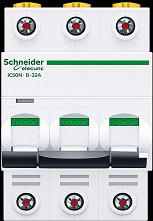
The MCB 3P (Miniature Circuit Breaker, Three Poles) is an essential safety device designed to protect electrical circuits from overloads and short circuits. It automatically disconnects the circuit when it detects a fault, preventing damage to equipment and reducing the risk of fire or electrical hazards. The three-pole configuration allows it to protect three-phase electrical systems, making it ideal for industrial, commercial, and residential applications.
Explore Projects Built with MCB 3P
 Open Project in Cirkit Designer
 Open Project in Cirkit Designer
 Open Project in Cirkit Designer
 Open Project in Cirkit Designer
Explore Projects Built with MCB 3P
Open Project in Cirkit DesignerOpen Project in Cirkit DesignerOpen Project in Cirkit DesignerOpen Project in Cirkit DesignerCommon Applications and Use Cases
- Protection of three-phase electrical systems in industrial machinery.
- Safeguarding commercial building power distribution systems.
- Residential use in homes with three-phase power supply.
- Protection of motors, HVAC systems, and other high-power equipment.
Technical Specifications
The following table outlines the key technical specifications of the MCB 3P:
| Parameter | Specification |
|---|---|
| Rated Voltage | 400V AC |
| Rated Current | 6A, 10A, 16A, 20A, 32A, 40A, 63A (varies by model) |
| Breaking Capacity | 6kA or 10kA (depending on model) |
| Number of Poles | 3 (Three-phase protection) |
| Tripping Curve | B, C, or D (defines response to overloads) |
| Operating Temperature | -5°C to +40°C |
| Mounting Type | DIN Rail |
| Standards Compliance | IEC 60898-1, IS/IEC 60947-2 |
Pin Configuration and Descriptions
The MCB 3P does not have traditional pins but instead features terminals for connecting wires. The table below describes the terminal configuration:
| Terminal | Description |
|---|---|
| L1 | Input terminal for Phase 1 (Line 1) |
| L2 | Input terminal for Phase 2 (Line 2) |
| L3 | Input terminal for Phase 3 (Line 3) |
| T1 | Output terminal for Phase 1 (Load 1) |
| T2 | Output terminal for Phase 2 (Load 2) |
| T3 | Output terminal for Phase 3 (Load 3) |
Usage Instructions
How to Use the MCB 3P in a Circuit
- Mounting the MCB: Securely mount the MCB 3P onto a standard DIN rail in the distribution box.
- Wiring:
- Connect the three-phase input wires (L1, L2, L3) to the input terminals of the MCB.
- Connect the load wires to the corresponding output terminals (T1, T2, T3).
- Ensure all connections are tight and secure to avoid loose contacts.
- Power On:
- Switch on the MCB by flipping the lever to the "ON" position.
- The MCB will now monitor the circuit for overloads or short circuits.
- Testing:
- Periodically test the MCB using the test button (if available) to ensure proper functionality.
Important Considerations and Best Practices
- Select the Correct Rating: Choose an MCB with the appropriate current rating and tripping curve (B, C, or D) based on the load requirements.
- Avoid Overloading: Do not exceed the rated current of the MCB to prevent nuisance tripping.
- Proper Installation: Ensure the MCB is installed by a qualified electrician to comply with safety standards.
- Regular Maintenance: Inspect the MCB periodically for signs of wear, damage, or loose connections.
Arduino Integration
While MCBs are not directly connected to microcontrollers like Arduino, they can be used in conjunction with Arduino-based systems to protect the power supply. For example, an Arduino can monitor the status of an MCB using auxiliary contacts (if available) to detect tripping events.
// Example Arduino code to monitor MCB status using an auxiliary contact
const int mcbStatusPin = 2; // Pin connected to the auxiliary contact of the MCB
const int ledPin = 13;      // Built-in LED to indicate MCB status

void setup() {
  pinMode(mcbStatusPin, INPUT_PULLUP); // Configure MCB status pin as input
  pinMode(ledPin, OUTPUT);             // Configure LED pin as output
}

void loop() {
  int mcbStatus = digitalRead(mcbStatusPin); // Read the MCB status
  if (mcbStatus == LOW) {
    // MCB is tripped (auxiliary contact is open)
    digitalWrite(ledPin, HIGH); // Turn on LED to indicate fault
  } else {
    // MCB is in normal state (auxiliary contact is closed)
    digitalWrite(ledPin, LOW);  // Turn off LED
  }
}
Troubleshooting and FAQs
Common Issues and Solutions
| Issue | Possible Cause | Solution |
|---|---|---|
| MCB trips frequently | Overloaded circuit or short circuit | Check the load and reduce it if necessary. Inspect for wiring faults. |
| MCB does not trip during a fault | Faulty MCB or incorrect rating | Replace the MCB with a properly rated one. Test the MCB functionality. |
| Loose connections at terminals | Improper installation | Tighten all terminal screws securely. |
| MCB lever does not stay in "ON" position | Internal fault in the MCB | Replace the MCB with a new one. |
FAQs
Can I use an MCB 3P for single-phase systems?
- Yes, but it is not recommended as it is designed for three-phase systems. For single-phase systems, use a single-pole or double-pole MCB.
What is the difference between tripping curves B, C, and D?
- Tripping curves define the response of the MCB to overloads:
- B Curve: Trips at 3-5 times the rated current (used for resistive loads).
- C Curve: Trips at 5-10 times the rated current (used for inductive loads).
- D Curve: Trips at 10-20 times the rated current (used for high inrush current loads).
- Tripping curves define the response of the MCB to overloads:
How do I test if my MCB is working?
- Use the test button (if available) to simulate a fault and verify that the MCB trips.
Can an MCB 3P protect against electric shocks?
- No, MCBs protect against overloads and short circuits. For shock protection, use an RCD (Residual Current Device) or RCCB (Residual Current Circuit Breaker).