
How to Use Fermion: MCP9808 High Accuracy I2C Temperature Sensor: Examples, Pinouts, and Specs
 Design with Fermion: MCP9808 High Accuracy I2C Temperature Sensor in Cirkit Designer
Introduction
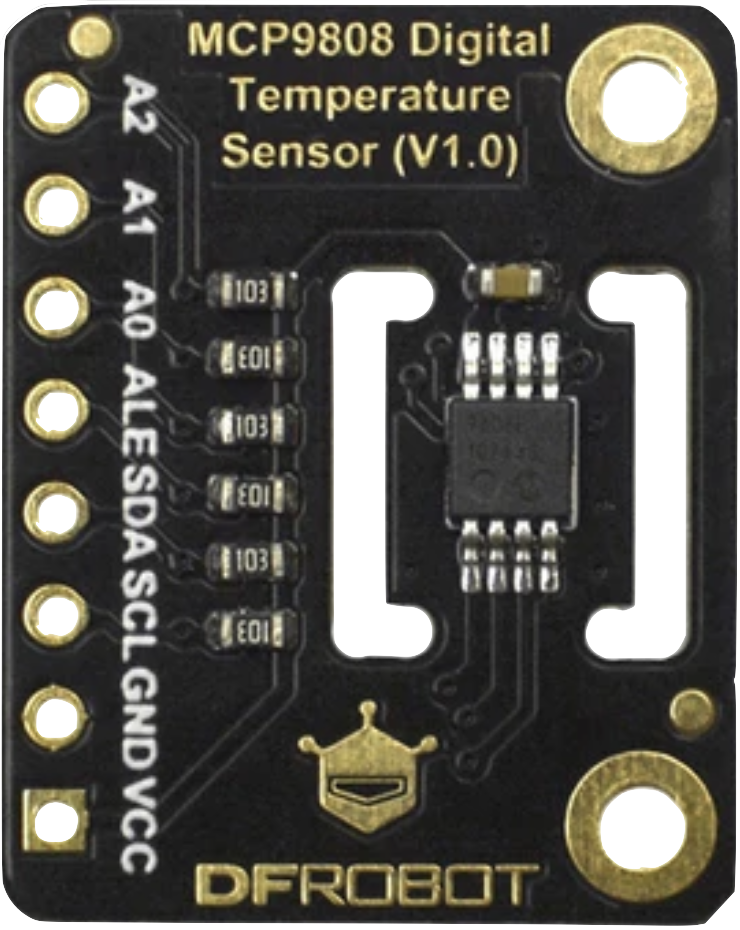
The Fermion: MCP9808 High Accuracy I2C Temperature Sensor, manufactured by DFRobot (Part ID: SEN0435), is a digital temperature sensor designed to deliver precise temperature readings. It communicates via the I2C interface, making it easy to integrate into a wide range of microcontroller-based projects. With its high accuracy and low power consumption, this sensor is ideal for applications such as environmental monitoring, HVAC systems, industrial automation, and IoT devices.
Key features of the MCP9808 include:
- High accuracy of ±0.25°C (typical) in the range of -40°C to +125°C.
- Configurable alert output for temperature thresholds.
- Low power consumption, suitable for battery-powered applications.
- Wide operating voltage range of 2.7V to 5.5V.
Explore Projects Built with Fermion: MCP9808 High Accuracy I2C Temperature Sensor
 Open Project in Cirkit Designer
 Open Project in Cirkit Designer
 Open Project in Cirkit Designer
 Open Project in Cirkit Designer
Explore Projects Built with Fermion: MCP9808 High Accuracy I2C Temperature Sensor
Open Project in Cirkit DesignerOpen Project in Cirkit DesignerOpen Project in Cirkit DesignerOpen Project in Cirkit DesignerTechnical Specifications
Below are the key technical details of the MCP9808 sensor:
| Parameter | Value |
|---|---|
| Operating Voltage | 2.7V to 5.5V |
| Temperature Range | -40°C to +125°C |
| Accuracy | ±0.25°C (typical) |
| Communication Interface | I2C |
| I2C Address (Default) | 0x18 |
| Power Consumption | 200 µA (typical) |
| Alert Output | Configurable (active-low) |
| Dimensions | 22mm x 22mm |
Pin Configuration
The MCP9808 sensor module has the following pinout:
| Pin | Name | Description |
|---|---|---|
| 1 | VCC | Power supply input (2.7V to 5.5V) |
| 2 | GND | Ground |
| 3 | SDA | I2C data line |
| 4 | SCL | I2C clock line |
| 5 | ALERT | Alert output (active-low, configurable threshold) |
Usage Instructions
Connecting the MCP9808 to a Microcontroller
To use the MCP9808 sensor, connect it to a microcontroller (e.g., Arduino UNO) as follows:
- Connect the VCC pin to the 3.3V or 5V power supply of the microcontroller.
- Connect the GND pin to the ground of the microcontroller.
- Connect the SDA pin to the I2C data line (A4 on Arduino UNO).
- Connect the SCL pin to the I2C clock line (A5 on Arduino UNO).
- Optionally, connect the ALERT pin to a GPIO pin if you want to use the alert functionality.
Arduino Code Example
Below is an example Arduino sketch to read temperature data from the MCP9808 sensor:
#include <Wire.h>
#include "Adafruit_MCP9808.h"

// Create an MCP9808 object
Adafruit_MCP9808 tempsensor = Adafruit_MCP9808();

void setup() {
  Serial.begin(9600);
  Serial.println("MCP9808 Temperature Sensor Test");

  // Initialize the sensor
  if (!tempsensor.begin(0x18)) {
    // Check if the sensor is connected at the default I2C address (0x18)
    Serial.println("Couldn't find MCP9808! Check wiring.");
    while (1); // Halt execution if sensor is not found
  }

  // Set resolution to 0.0625°C (highest resolution)
  tempsensor.setResolution(3);
}

void loop() {
  // Read temperature in Celsius
  float tempC = tempsensor.readTempC();

  // Print temperature to the Serial Monitor
  Serial.print("Temperature: ");
  Serial.print(tempC);
  Serial.println(" °C");

  delay(1000); // Wait 1 second before the next reading
}
Important Considerations
- Ensure pull-up resistors (typically 4.7kΩ) are connected to the SDA and SCL lines if they are not already present on the module.
- The default I2C address is 0x18, but it can be changed by configuring the address pins (consult the MCP9808 datasheet for details).
- Avoid placing the sensor in direct sunlight or near heat sources to ensure accurate readings.
Troubleshooting and FAQs
Common Issues
Sensor not detected on the I2C bus:
- Verify the wiring connections, especially the SDA and SCL lines.
- Ensure the correct I2C address (default: 0x18) is being used in the code.
- Check if pull-up resistors are present on the I2C lines.
Inaccurate temperature readings:
- Ensure the sensor is not exposed to external heat sources or airflow.
- Verify that the power supply voltage is within the specified range (2.7V to 5.5V).
Alert pin not functioning:
- Confirm that the alert functionality is properly configured in the code.
- Check the GPIO pin connection to the microcontroller.
FAQs
Q: Can the MCP9808 operate at 5V?
A: Yes, the MCP9808 supports an operating voltage range of 2.7V to 5.5V, making it compatible with both 3.3V and 5V systems.
Q: How do I change the I2C address of the sensor?
A: The I2C address can be changed by configuring the address pins (A0, A1, A2) on the sensor module. Refer to the MCP9808 datasheet for the address configuration table.
Q: What is the resolution of the temperature readings?
A: The MCP9808 supports resolutions of 0.5°C, 0.25°C, 0.125°C, and 0.0625°C, which can be configured using the setResolution() function in the code.
Q: Is the sensor suitable for outdoor use?
A: The MCP9808 is not waterproof or weatherproof. For outdoor applications, it should be enclosed in a protective housing.
By following this documentation, you can effectively integrate and utilize the Fermion: MCP9808 High Accuracy I2C Temperature Sensor in your projects.