
How to Use Industrial USB To RS485: Examples, Pinouts, and Specs
 Design with Industrial USB To RS485 in Cirkit Designer
Introduction
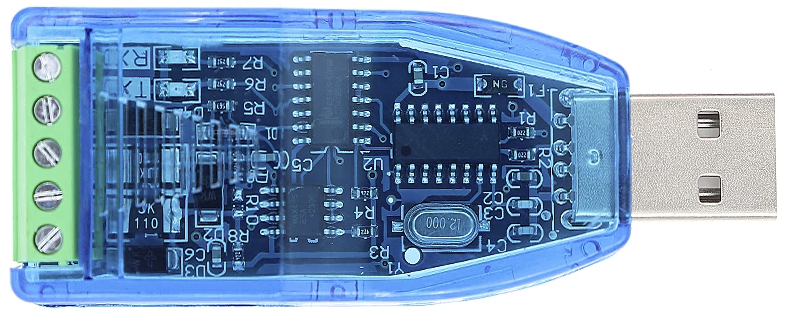
The Industrial USB to RS485 is a versatile converter that bridges USB devices with RS485 serial devices. It enables seamless data transmission over long distances, making it ideal for industrial environments where robust and reliable communication is essential. This component is widely used in applications such as industrial automation, building management systems, and data acquisition systems. Its plug-and-play functionality and compatibility with various operating systems make it a convenient solution for modern industrial communication needs.
Explore Projects Built with Industrial USB To RS485
 Open Project in Cirkit Designer
 Open Project in Cirkit Designer
 Open Project in Cirkit Designer
 Open Project in Cirkit Designer
Explore Projects Built with Industrial USB To RS485
Open Project in Cirkit DesignerOpen Project in Cirkit DesignerOpen Project in Cirkit DesignerOpen Project in Cirkit DesignerTechnical Specifications
- Communication Standard: USB 2.0 to RS485
- Baud Rate: 300 bps to 3 Mbps
- Operating Voltage: 5V (powered via USB)
- Operating Temperature: -40°C to 85°C
- Maximum Communication Distance: Up to 1200 meters (depending on cable quality and baud rate)
- Protection Features:
- Built-in surge protection
- ESD (Electrostatic Discharge) protection
- Connector Types: USB Type-A (input) and terminal block or DB9 (RS485 output)
- Driver Support: Compatible with Windows, macOS, and Linux
Pin Configuration and Descriptions
RS485 Terminal Block Pinout
| Pin Name | Description |
|---|---|
| A (D+) | RS485 Data Line Positive (non-inverting) |
| B (D-) | RS485 Data Line Negative (inverting) |
| GND | Ground Reference |
USB Connector Pinout (Type-A)
| Pin Name | Description |
|---|---|
| VBUS | +5V Power Supply |
| D+ | USB Data Positive |
| D- | USB Data Negative |
| GND | Ground Reference |
Usage Instructions
How to Use the Component in a Circuit
- Connect the USB Port: Plug the USB Type-A connector into your computer or USB host device. Ensure the necessary drivers are installed (most operating systems will install them automatically).
- Connect the RS485 Device:
- Use the terminal block or DB9 connector to connect the RS485 device.
- Match the RS485 device's A (D+) and B (D-) lines to the corresponding pins on the converter.
- Power and Communication: The converter is powered via the USB port. Once connected, it will enable communication between the USB host and the RS485 device.
Important Considerations and Best Practices
- Cable Quality: Use high-quality twisted-pair cables for RS485 connections to minimize signal degradation over long distances.
- Termination Resistors: For long-distance communication, ensure proper termination resistors (typically 120 ohms) are installed at both ends of the RS485 bus to prevent signal reflections.
- Grounding: Ensure a common ground between the USB to RS485 converter and the RS485 device to avoid communication errors.
- Device Addressing: If multiple RS485 devices are connected on the same bus, ensure each device has a unique address to avoid conflicts.
Example Code for Arduino UNO
The Industrial USB to RS485 converter can be used with an Arduino UNO to communicate with RS485 devices. Below is an example of how to send and receive data using the SoftwareSerial library.
#include <SoftwareSerial.h>

// Define RS485 pins for communication
#define RX_PIN 10  // Arduino pin connected to RS485 RX
#define TX_PIN 11  // Arduino pin connected to RS485 TX
#define DE_PIN 9   // Arduino pin for Driver Enable (DE) control

SoftwareSerial RS485Serial(RX_PIN, TX_PIN);

void setup() {
  pinMode(DE_PIN, OUTPUT);  // Set DE pin as output
  digitalWrite(DE_PIN, LOW); // Set DE to LOW (receive mode)

  Serial.begin(9600);       // Initialize Serial Monitor
  RS485Serial.begin(9600);  // Initialize RS485 communication

  Serial.println("RS485 Communication Initialized");
}

void loop() {
  // Send data to RS485 device
  digitalWrite(DE_PIN, HIGH); // Enable transmit mode
  RS485Serial.println("Hello RS485 Device!");
  digitalWrite(DE_PIN, LOW);  // Enable receive mode

  delay(1000); // Wait for a second

  // Receive data from RS485 device
  if (RS485Serial.available()) {
    String receivedData = RS485Serial.readString();
    Serial.print("Received: ");
    Serial.println(receivedData);
  }
}
Notes:
- Connect the DE (Driver Enable) pin to control the RS485 transceiver's transmit and receive modes.
- Adjust the baud rate in the code to match the RS485 device's communication settings.
Troubleshooting and FAQs
Common Issues
No Communication Between Devices
- Cause: Incorrect wiring or mismatched baud rates.
- Solution: Double-check the wiring and ensure the baud rate settings match on both devices.
Data Corruption Over Long Distances
- Cause: Signal degradation or lack of termination resistors.
- Solution: Use high-quality cables and install 120-ohm termination resistors at both ends of the RS485 bus.
Device Not Recognized by Computer
- Cause: Missing or outdated USB drivers.
- Solution: Install the latest drivers from the manufacturer's website or allow the operating system to update them automatically.
Interference in Communication
- Cause: Electrical noise in the environment.
- Solution: Use shielded cables and ensure proper grounding.
FAQs
Q: Can I connect multiple RS485 devices to this converter?
- A: Yes, RS485 supports multi-drop communication. Ensure each device has a unique address.
Q: What is the maximum cable length supported?
- A: The maximum length is 1200 meters, but this depends on the cable quality and baud rate.
Q: Do I need external power for the converter?
- A: No, the converter is powered via the USB port.
Q: Is this converter compatible with macOS and Linux?
- A: Yes, it is compatible with Windows, macOS, and Linux operating systems.