
How to Use TTL - RS485: Examples, Pinouts, and Specs
 Design with TTL - RS485 in Cirkit Designer
Introduction
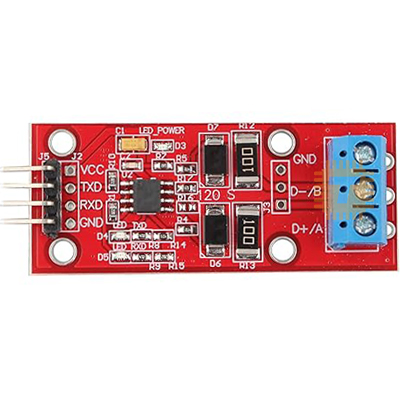
The TTL to RS485 converter is a versatile electronic component that facilitates the conversion of TTL (Transistor-Transistor Logic) signals to RS485 protocol. RS485 is a robust communication standard designed for long-distance and noise-resistant data transmission. This converter is widely used in industrial automation, sensor networks, and other applications requiring reliable communication over extended distances.
Explore Projects Built with TTL - RS485
 Open Project in Cirkit Designer
 Open Project in Cirkit Designer
 Open Project in Cirkit Designer
 Open Project in Cirkit Designer
Explore Projects Built with TTL - RS485
Open Project in Cirkit DesignerOpen Project in Cirkit DesignerOpen Project in Cirkit DesignerOpen Project in Cirkit DesignerCommon Applications and Use Cases
- Industrial automation systems
- Communication between microcontrollers and RS485 devices
- Long-distance data transmission in noisy environments
- Sensor networks and IoT applications
- Serial communication in robotics and embedded systems
Technical Specifications
The TTL to RS485 converter is designed to operate efficiently in a variety of environments. Below are its key technical details:
General Specifications
| Parameter | Value |
|---|---|
| Operating Voltage | 3.3V to 5V |
| Communication Protocol | RS485 |
| Baud Rate | Up to 115200 bps |
| Transmission Distance | Up to 1200 meters (4000 feet) |
| Operating Temperature | -40°C to 85°C |
| Power Consumption | Low power |
Pin Configuration and Descriptions
| Pin Name | Direction | Description |
|---|---|---|
| VCC | Input | Power supply input (3.3V to 5V) |
| GND | Input | Ground connection |
| DI | Input | Data input (TTL signal from microcontroller) |
| RO | Output | Data output (TTL signal to microcontroller) |
| DE | Input | Driver enable (active high to enable transmission) |
| RE | Input | Receiver enable (active low to enable reception) |
| A | Output | RS485 differential signal (non-inverting) |
| B | Output | RS485 differential signal (inverting) |
Usage Instructions
How to Use the Component in a Circuit
- Power the Converter: Connect the
VCCpin to a 3.3V or 5V power source and theGNDpin to ground. - Connect TTL Signals:
- Connect the
DIpin to the TTL data output of your microcontroller. - Connect the
ROpin to the TTL data input of your microcontroller.
- Connect the
- Enable Transmission and Reception:
- Set the
DEpin high to enable data transmission. - Set the
REpin low to enable data reception.
- Set the
- Connect RS485 Bus:
- Connect the
AandBpins to the RS485 bus for differential signaling.
- Connect the
- Termination Resistor: If the converter is at the end of the RS485 bus, connect a 120-ohm termination resistor between the
AandBpins to prevent signal reflections.
Important Considerations and Best Practices
- Ensure proper grounding between all devices on the RS485 bus to avoid communication errors.
- Use twisted-pair cables for the RS485 bus to minimize noise and signal degradation.
- Avoid exceeding the maximum transmission distance (1200 meters) or baud rate (115200 bps) for reliable communication.
- If using multiple devices on the RS485 bus, ensure that only one device is transmitting at a time to prevent data collisions.
Example: Connecting to an Arduino UNO
Below is an example of how to use the TTL to RS485 converter with an Arduino UNO for serial communication:
// Example: Arduino UNO with TTL to RS485 Converter
// This code demonstrates sending and receiving data over RS485

#define DE_PIN 2  // Driver Enable pin connected to Arduino pin 2
#define RE_PIN 3  // Receiver Enable pin connected to Arduino pin 3

void setup() {
  Serial.begin(9600); // Initialize serial communication at 9600 bps
  pinMode(DE_PIN, OUTPUT); // Set DE pin as output
  pinMode(RE_PIN, OUTPUT); // Set RE pin as output

  // Enable receiver and disable transmitter initially
  digitalWrite(DE_PIN, LOW);
  digitalWrite(RE_PIN, LOW);
}

void loop() {
  // Example: Sending data
  digitalWrite(DE_PIN, HIGH); // Enable transmitter
  digitalWrite(RE_PIN, HIGH); // Disable receiver
  Serial.println("Hello, RS485!"); // Send data
  delay(1000); // Wait for 1 second

  // Example: Receiving data
  digitalWrite(DE_PIN, LOW); // Disable transmitter
  digitalWrite(RE_PIN, LOW); // Enable receiver
  if (Serial.available()) {
    String receivedData = Serial.readString(); // Read incoming data
    Serial.println("Received: " + receivedData); // Print received data
  }
}
Troubleshooting and FAQs
Common Issues and Solutions
No Communication Between Devices:
- Verify that the
AandBpins are correctly connected to the RS485 bus. - Check the
DEandREpin states to ensure proper transmission and reception. - Ensure all devices on the RS485 bus share a common ground.
- Verify that the
Data Corruption or Noise:
- Use shielded or twisted-pair cables for the RS485 bus.
- Add a 120-ohm termination resistor at both ends of the RS485 bus.
Short Transmission Distance:
- Check the power supply voltage and ensure it meets the converter's requirements.
- Reduce the baud rate to improve signal integrity over longer distances.
Multiple Devices Not Communicating:
- Ensure only one device is transmitting at a time.
- Use unique addresses or identifiers for each device in the communication protocol.
FAQs
Q: Can I use the TTL to RS485 converter with a 3.3V microcontroller?
A: Yes, the converter supports both 3.3V and 5V logic levels.
Q: How many devices can I connect to the RS485 bus?
A: RS485 supports up to 32 devices on a single bus without additional hardware.
Q: Do I need to use a termination resistor?
A: Yes, termination resistors are recommended at both ends of the RS485 bus to prevent signal reflections.
Q: What is the maximum baud rate supported?
A: The converter supports baud rates up to 115200 bps.