
How to Use sy6280: Examples, Pinouts, and Specs
 Design with sy6280 in Cirkit Designer
Introduction
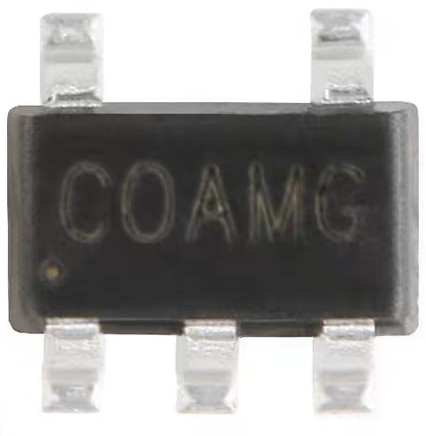
The SY6280, manufactured by Silergy, is a low-power 8-bit microcontroller designed for a wide range of embedded applications. It integrates an 8-bit CPU, RAM, and multiple I/O ports, making it a versatile choice for projects requiring efficient processing and interfacing capabilities. Its compact design and low power consumption make it ideal for battery-powered devices, IoT applications, and small-scale automation systems.
Explore Projects Built with sy6280
 Open Project in Cirkit Designer
 Open Project in Cirkit Designer
 Open Project in Cirkit Designer
 Open Project in Cirkit Designer
Explore Projects Built with sy6280
Open Project in Cirkit DesignerOpen Project in Cirkit DesignerOpen Project in Cirkit DesignerOpen Project in Cirkit DesignerCommon Applications and Use Cases
- Home automation systems
- IoT devices and sensors
- Consumer electronics
- Industrial control systems
- Educational and prototyping projects
Technical Specifications
The SY6280 microcontroller is designed to deliver reliable performance while maintaining low power consumption. Below are its key technical specifications:
General Specifications
| Parameter | Value |
|---|---|
| CPU Architecture | 8-bit |
| Operating Voltage | 2.0V to 5.5V |
| Operating Frequency | Up to 16 MHz |
| RAM | 256 bytes |
| Flash Memory | 8 KB |
| I/O Ports | 16 GPIO pins |
| Power Consumption | Ultra-low power (standby mode < 1 µA) |
| Package Type | SOP-20, TSSOP-20 |
Pin Configuration and Descriptions
The SY6280 is available in a 20-pin package. Below is the pin configuration and description:
| Pin Number | Pin Name | Description |
|---|---|---|
| 1 | VDD | Positive power supply (2.0V to 5.5V) |
| 2 | GND | Ground |
| 3-10 | P0.0-P0.7 | General-purpose I/O pins (Port 0) |
| 11-18 | P1.0-P1.7 | General-purpose I/O pins (Port 1) |
| 19 | RESET | Active-low reset input |
| 20 | XTAL | External clock input for precise timing |
Usage Instructions
The SY6280 microcontroller is straightforward to use in embedded systems. Below are the steps and considerations for integrating it into your project:
Basic Circuit Setup
- Power Supply: Connect the VDD pin to a stable power source (2.0V to 5.5V) and the GND pin to ground.
- Clock Source: If precise timing is required, connect an external crystal oscillator to the XTAL pin.
- Reset: Use a pull-up resistor (typically 10 kΩ) on the RESET pin to ensure proper startup. Pull the pin low momentarily to reset the microcontroller.
- I/O Pins: Configure the GPIO pins (P0.0-P0.7 and P1.0-P1.7) as input or output based on your application.
Programming the SY6280
The SY6280 can be programmed using standard 8-bit microcontroller programming tools. Below is an example of interfacing the SY6280 with an Arduino UNO for basic GPIO control:
Example Code: Controlling GPIO Pins
// Example: Controlling SY6280 GPIO pins using Arduino UNO
// This code assumes the SY6280 is connected to the Arduino via GPIO pins.

#define SY6280_PIN_1 2  // Arduino pin connected to SY6280 P0.0
#define SY6280_PIN_2 3  // Arduino pin connected to SY6280 P0.1

void setup() {
  pinMode(SY6280_PIN_1, OUTPUT); // Set SY6280 P0.0 as output
  pinMode(SY6280_PIN_2, INPUT);  // Set SY6280 P0.1 as input
}

void loop() {
  digitalWrite(SY6280_PIN_1, HIGH); // Set P0.0 to HIGH
  delay(1000);                      // Wait for 1 second
  digitalWrite(SY6280_PIN_1, LOW);  // Set P0.0 to LOW
  delay(1000);                      // Wait for 1 second

  // Read the state of P0.1 and print it to the serial monitor
  int pinState = digitalRead(SY6280_PIN_2);
  Serial.begin(9600);
  Serial.print("P0.1 State: ");
  Serial.println(pinState);
}
Best Practices
- Use decoupling capacitors (e.g., 0.1 µF) near the VDD pin to stabilize the power supply.
- Avoid leaving unused GPIO pins floating; configure them as inputs with pull-up or pull-down resistors.
- Ensure the RESET pin is properly pulled high during normal operation to prevent accidental resets.
Troubleshooting and FAQs
Common Issues and Solutions
Microcontroller Not Powering On
- Cause: Insufficient or unstable power supply.
- Solution: Verify the VDD voltage is within the 2.0V to 5.5V range and use decoupling capacitors.
GPIO Pins Not Responding
- Cause: Incorrect pin configuration or wiring.
- Solution: Double-check the pinMode settings and ensure proper connections.
Microcontroller Not Resetting
- Cause: RESET pin not properly configured.
- Solution: Use a pull-up resistor on the RESET pin and ensure it is momentarily pulled low for a reset.
Clock Issues
- Cause: External crystal oscillator not connected or malfunctioning.
- Solution: Verify the XTAL pin connections and ensure the crystal oscillator is functioning correctly.
FAQs
Q: Can the SY6280 operate without an external clock?
A: Yes, the SY6280 has an internal clock, but an external clock can be used for applications requiring precise timing.
Q: What is the maximum current draw of the SY6280?
A: The SY6280 has ultra-low power consumption, with a typical operating current of a few milliamps and standby mode consuming less than 1 µA.
Q: How do I program the SY6280?
A: The SY6280 can be programmed using standard 8-bit microcontroller programming tools. Refer to the manufacturer's programming guide for detailed instructions.
Q: Can the SY6280 interface with sensors and actuators?
A: Yes, the GPIO pins can be configured to interface with a variety of sensors and actuators, making it suitable for embedded applications.
By following this documentation, users can effectively integrate the SY6280 microcontroller into their projects and troubleshoot common issues.