
How to Use Adafruit TPS61169: Examples, Pinouts, and Specs
 Design with Adafruit TPS61169 in Cirkit Designer
Introduction
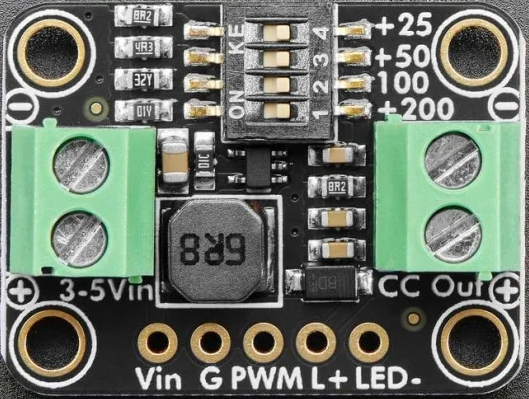
The Adafruit TPS61169 is a high-efficiency boost converter designed to step up low input voltages to higher output voltages. This component is ideal for applications requiring a compact and efficient power supply solution, such as powering LEDs, OLED displays, or other devices from batteries or low-voltage sources. It features adjustable output voltage, high output current capability, and built-in protection features, making it versatile and reliable for a wide range of projects.
Explore Projects Built with Adafruit TPS61169
 Open Project in Cirkit Designer
 Open Project in Cirkit Designer
 Open Project in Cirkit Designer
 Open Project in Cirkit Designer
Explore Projects Built with Adafruit TPS61169
Open Project in Cirkit DesignerOpen Project in Cirkit DesignerOpen Project in Cirkit DesignerOpen Project in Cirkit DesignerCommon Applications
- Driving high-power LEDs or LED arrays
- Powering OLED displays or LCD backlights
- Boosting battery voltage for portable devices
- General-purpose DC-DC boost conversion
Technical Specifications
The Adafruit TPS61169 is based on the Texas Instruments TPS61169 IC and comes with the following key specifications:
| Parameter | Value |
|---|---|
| Input Voltage Range | 2.7V to 18V |
| Output Voltage Range | Adjustable up to 38V |
| Maximum Output Current | 1.2A (dependent on input voltage and configuration) |
| Switching Frequency | 1.2 MHz |
| Efficiency | Up to 90% |
| Feedback Voltage | 200 mV |
| Operating Temperature | -40°C to +85°C |
| Package Type | SOT-23-6 |
Pin Configuration
The Adafruit TPS61169 module has six pins, as described in the table below:
| Pin Name | Pin Number | Description |
|---|---|---|
| VIN | 1 | Input voltage pin. Connect to the power source (2.7V to 18V). |
| GND | 2 | Ground pin. Connect to the system ground. |
| FB | 3 | Feedback pin. Used to set the output voltage via an external resistor divider. |
| EN | 4 | Enable pin. Drive high to enable the converter, low to disable it. |
| SW | 5 | Switch pin. Connect to the inductor and diode. |
| VOUT | 6 | Output voltage pin. Connect to the load and output capacitor. |
Usage Instructions
How to Use the Adafruit TPS61169 in a Circuit
- Power Supply: Connect the input voltage (2.7V to 18V) to the VIN pin. Ensure the input voltage is within the specified range.
- Inductor Selection: Choose an appropriate inductor value (typically 4.7 µH to 22 µH) based on your desired output voltage and current.
- Output Voltage Adjustment: Use a resistor divider network connected to the FB pin to set the desired output voltage. The formula for the output voltage is: [ V_{OUT} = V_{FB} \times \left(1 + \frac{R1}{R2}\right) ] where ( V_{FB} ) is the feedback voltage (200 mV), and ( R1 ) and ( R2 ) are the resistors in the divider.
- Enable Pin: Drive the EN pin high (logic level) to enable the boost converter. Pull it low to disable the device.
- Output Capacitor: Connect a low-ESR capacitor (e.g., 10 µF or higher) to the VOUT pin to stabilize the output voltage.
- Diode Selection: Use a fast-recovery Schottky diode (e.g., 1N5819) between the SW pin and VOUT to handle the switching current.
Example Circuit
Below is a basic circuit diagram for using the Adafruit TPS61169 to drive an LED:
VIN (Battery) -----> [TPS61169 VIN]
                     [TPS61169 GND] -----> System Ground
                     [TPS61169 SW] -----> Inductor -----> Diode -----> LED -----> VOUT
                     [TPS61169 FB] -----> Resistor Divider -----> System Ground
                     [TPS61169 EN] -----> Logic High (Enable)
Arduino Example Code
The Adafruit TPS61169 can be used with an Arduino to control the enable pin. Below is an example code snippet:
// Define the enable pin for the TPS61169
const int enablePin = 7;

void setup() {
  // Set the enable pin as an output
  pinMode(enablePin, OUTPUT);

  // Enable the TPS61169 by setting the pin HIGH
  digitalWrite(enablePin, HIGH);

  // Optional: Add a delay to allow the boost converter to stabilize
  delay(100);
}

void loop() {
  // Example: Toggle the enable pin to turn the boost converter on and off
  digitalWrite(enablePin, HIGH);  // Enable the TPS61169
  delay(5000);                   // Keep it on for 5 seconds
  digitalWrite(enablePin, LOW);  // Disable the TPS61169
  delay(5000);                   // Keep it off for 5 seconds
}
Best Practices
- Use low-ESR capacitors for both input and output to minimize voltage ripple.
- Ensure proper thermal management, as the device can heat up under high load conditions.
- Keep the feedback resistor divider close to the FB pin to reduce noise.
- Use short and wide traces for the power connections to minimize resistance and inductance.
Troubleshooting and FAQs
Common Issues and Solutions
No Output Voltage:
- Ensure the EN pin is driven high to enable the device.
- Verify that the input voltage is within the specified range (2.7V to 18V).
- Check the connections for the inductor, diode, and output capacitor.
Output Voltage is Incorrect:
- Double-check the resistor values in the feedback divider network.
- Ensure the feedback pin (FB) is properly connected to the resistor divider.
Device Overheating:
- Verify that the inductor and diode are rated for the required current.
- Check for excessive input or output current beyond the device's specifications.
High Output Ripple:
- Use low-ESR capacitors for the output.
- Ensure proper grounding and minimize the length of high-current traces.
FAQs
Q: Can the TPS61169 drive multiple LEDs in series?
A: Yes, the TPS61169 can drive multiple LEDs in series, provided the total forward voltage of the LEDs does not exceed the maximum output voltage (38V).
Q: What type of inductor should I use?
A: Use a shielded inductor with a current rating higher than the peak current of your application. Typical values range from 4.7 µH to 22 µH.
Q: How do I calculate the output voltage?
A: Use the formula ( V_{OUT} = V_{FB} \times (1 + R1/R2) ), where ( V_{FB} ) is 200 mV.
Q: Can I use the TPS61169 with a 3.3V microcontroller?
A: Yes, the EN pin can be controlled by a 3.3V logic signal to enable or disable the device.
By following this documentation, you can effectively integrate the Adafruit TPS61169 into your projects and troubleshoot common issues.