
How to Use Siemens LOGO! Logic Module: Examples, Pinouts, and Specs
 Design with Siemens LOGO! Logic Module in Cirkit Designer
Introduction
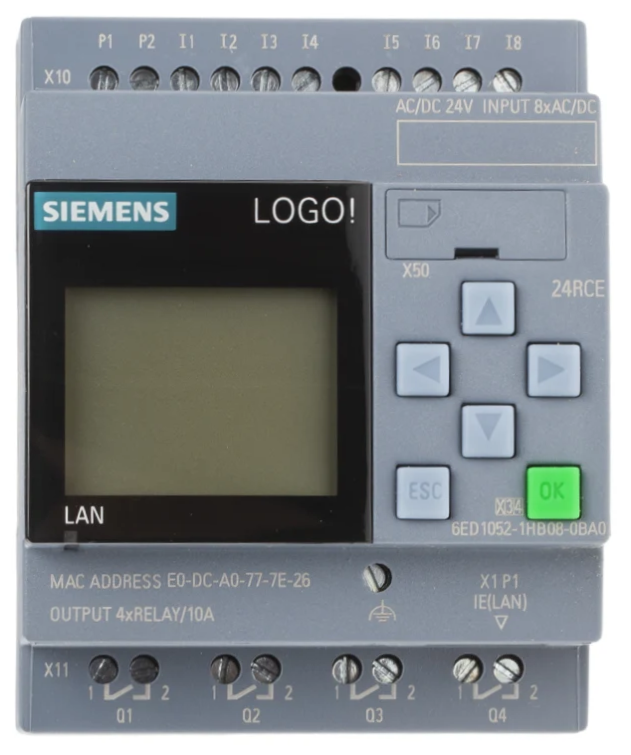
The Siemens LOGO! Logic Module is a compact and versatile programmable logic controller (PLC) designed for simple automation tasks. It is widely used in industrial, commercial, and residential applications due to its user-friendly interface, robust design, and flexibility. The module supports a variety of input/output (I/O) configurations, making it suitable for controlling devices and processes such as lighting systems, motor control, HVAC systems, and more.
Explore Projects Built with Siemens LOGO! Logic Module
 Open Project in Cirkit Designer
 Open Project in Cirkit Designer
 Open Project in Cirkit Designer
 Open Project in Cirkit Designer
Explore Projects Built with Siemens LOGO! Logic Module
Open Project in Cirkit DesignerOpen Project in Cirkit DesignerOpen Project in Cirkit DesignerOpen Project in Cirkit DesignerCommon Applications and Use Cases
- Industrial Automation: Controlling machinery, conveyor belts, and production lines.
- Building Automation: Managing lighting, HVAC, and security systems.
- Residential Automation: Automating garden irrigation, garage doors, and lighting.
- Commercial Use: Automating shop displays, signage, and small-scale processes.
Technical Specifications
The Siemens LOGO! Logic Module is available in various models, each with slightly different specifications. Below are the general technical details for a typical LOGO! module:
Key Technical Details
| Parameter | Specification |
|---|---|
| Supply Voltage | 12V DC, 24V DC, or 230V AC (model-specific) |
| Digital Inputs | 8 (expandable with additional modules) |
| Digital Outputs | 4 (expandable with additional modules) |
| Analog Inputs | 2 (expandable with additional modules) |
| Analog Outputs | 0 or 2 (model-specific) |
| Programming Interface | Ethernet or USB (via adapter) |
| Memory | 400 function blocks |
| Display | 6-line LCD with backlight |
| Operating Temperature Range | -20°C to +55°C |
| Dimensions | 72mm x 90mm x 55mm |
Pin Configuration and Descriptions
Below is a typical pin configuration for a Siemens LOGO! module:
Digital Inputs
| Pin | Label | Description |
|---|---|---|
| I1 | Input 1 | Digital input for external signals |
| I2 | Input 2 | Digital input for external signals |
| I3 | Input 3 | Digital input for external signals |
| I4 | Input 4 | Digital input for external signals |
| I5 | Input 5 | Digital input for external signals |
| I6 | Input 6 | Digital input for external signals |
| I7 | Input 7 | Digital input for external signals |
| I8 | Input 8 | Digital input for external signals |
Digital Outputs
| Pin | Label | Description |
|---|---|---|
| Q1 | Output 1 | Digital output for controlling loads |
| Q2 | Output 2 | Digital output for controlling loads |
| Q3 | Output 3 | Digital output for controlling loads |
| Q4 | Output 4 | Digital output for controlling loads |
Power Supply
| Pin | Label | Description |
|---|---|---|
| L/+ | Line/Positive | Power supply input (AC or DC) |
| N/- | Neutral/Negative | Power supply input (AC or DC) |
Usage Instructions
How to Use the Component in a Circuit
- Power Connection: Connect the power supply to the L/+ and N/- terminals. Ensure the voltage matches the module's specifications.
- Input Connections: Connect sensors, switches, or other input devices to the digital input terminals (I1–I8).
- Output Connections: Connect actuators, relays, or other output devices to the digital output terminals (Q1–Q4).
- Programming: Use the Siemens LOGO! Soft Comfort software to create and upload your logic program via Ethernet or USB.
- Testing: Verify the functionality of your program using the built-in LCD display or the simulation feature in the software.
Important Considerations and Best Practices
- Power Supply: Ensure the power supply voltage and current ratings match the module's requirements.
- Input Signal Levels: Verify that input signals are within the acceptable voltage range for the module.
- Output Load Ratings: Do not exceed the maximum current rating for the digital outputs.
- Grounding: Properly ground the module to avoid electrical noise and interference.
- Firmware Updates: Keep the module's firmware updated for optimal performance and compatibility.
Example Code for Arduino UNO Integration
Although the Siemens LOGO! is a standalone PLC, it can communicate with an Arduino UNO via digital or analog signals. Below is an example of how to send a signal from an Arduino to the LOGO! module:
// Example: Sending a digital signal from Arduino to Siemens LOGO!
// Connect Arduino pin 7 to LOGO! digital input I1

const int logoInputPin = 7; // Arduino pin connected to LOGO! I1

void setup() {
  pinMode(logoInputPin, OUTPUT); // Set pin 7 as an output
}

void loop() {
  digitalWrite(logoInputPin, HIGH); // Send HIGH signal to LOGO! I1
  delay(1000); // Wait for 1 second
  digitalWrite(logoInputPin, LOW);  // Send LOW signal to LOGO! I1
  delay(1000); // Wait for 1 second
}
Troubleshooting and FAQs
Common Issues Users Might Face
Module Not Powering On:
- Cause: Incorrect power supply voltage or loose connections.
- Solution: Verify the power supply voltage and ensure all connections are secure.
Inputs Not Responding:
- Cause: Signal levels are outside the acceptable range.
- Solution: Check the input signal voltage and ensure it matches the module's specifications.
Outputs Not Activating:
- Cause: Load exceeds the output current rating or incorrect wiring.
- Solution: Verify the load current and check the wiring connections.
Program Upload Fails:
- Cause: Incorrect communication settings or faulty cable.
- Solution: Ensure the correct IP address or USB port is selected in the software and check the cable.
Solutions and Tips for Troubleshooting
- Use the built-in LCD display to monitor input/output status and diagnose issues.
- Test the module with a simple program to verify basic functionality before deploying complex logic.
- Refer to the Siemens LOGO! user manual for detailed error codes and troubleshooting steps.
By following this documentation, users can effectively utilize the Siemens LOGO! Logic Module for a wide range of automation tasks.