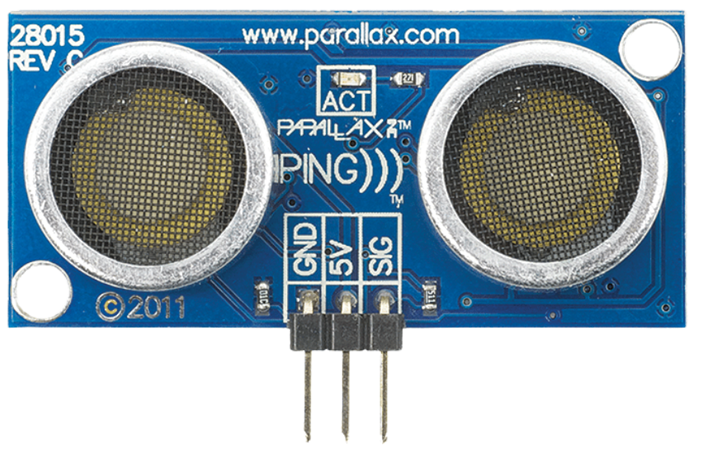
The PING 28015 is an ultrasonic distance sensor manufactured by Parallax. It measures the distance to an object by emitting ultrasonic sound waves and calculating the time it takes for the echo to return. This sensor is widely used in robotics, automation, and other applications requiring precise distance measurement or obstacle detection.
Explore Projects Built with Ultrasonic - PING 28015
Use Cirkit Designer to design, explore, and prototype these projects online. Some projects support real-time simulation. Click "Open Project" to start designing instantly!
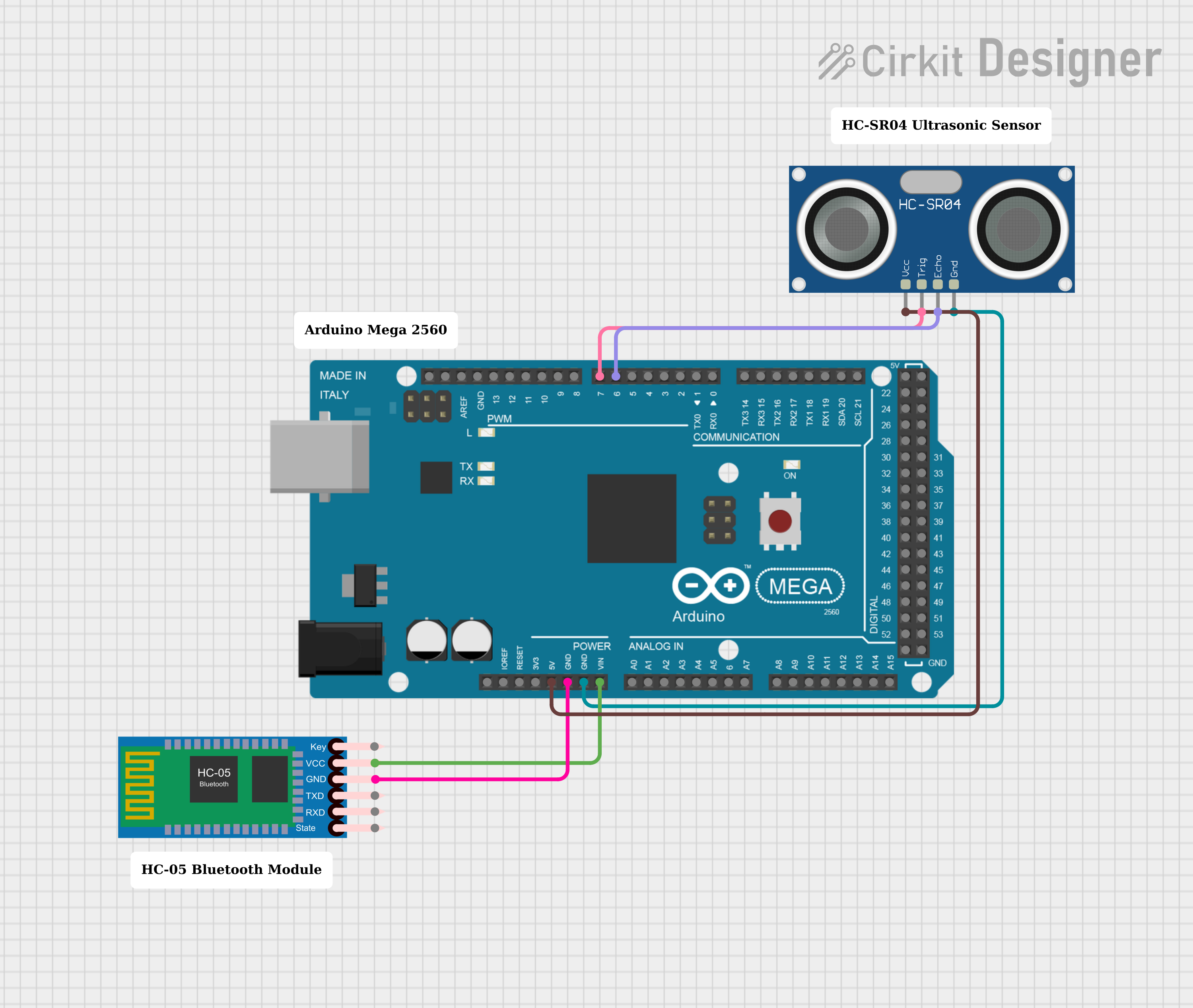
This circuit features an Arduino Mega 2560 microcontroller interfaced with an HC-05 Bluetooth Module and an HC-SR04 Ultrasonic Sensor. The HC-05 is powered by the Arduino's VIN pin and is grounded to the Arduino's GND, enabling wireless communication capabilities. The HC-SR04 is powered by the Arduino's 5V output and uses two digital PWM pins (D7 for TRIG and D6 for ECHO) to measure distances via ultrasonic waves.
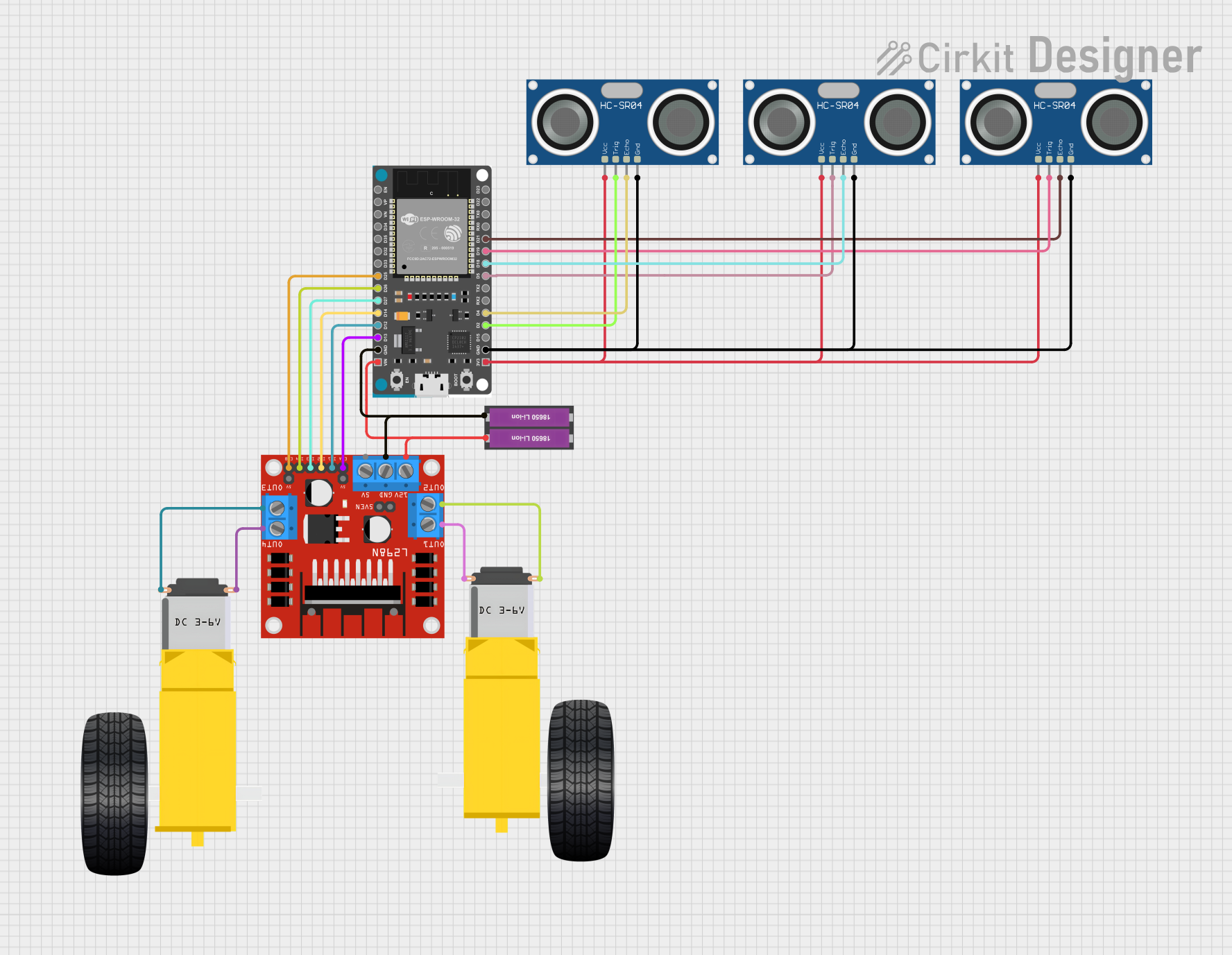
This circuit features an ESP32 microcontroller connected to three HC-SR04 ultrasonic sensors and an L298N motor driver. The ultrasonic sensors are likely used for distance measurement or obstacle detection, with their trigger and echo pins connected to specific GPIOs on the ESP32. The motor driver is interfaced with the ESP32 to control two DC gearmotors, suggesting that this circuit is part of a mobile robot or a similar automated vehicle that requires distance sensing and motor control.
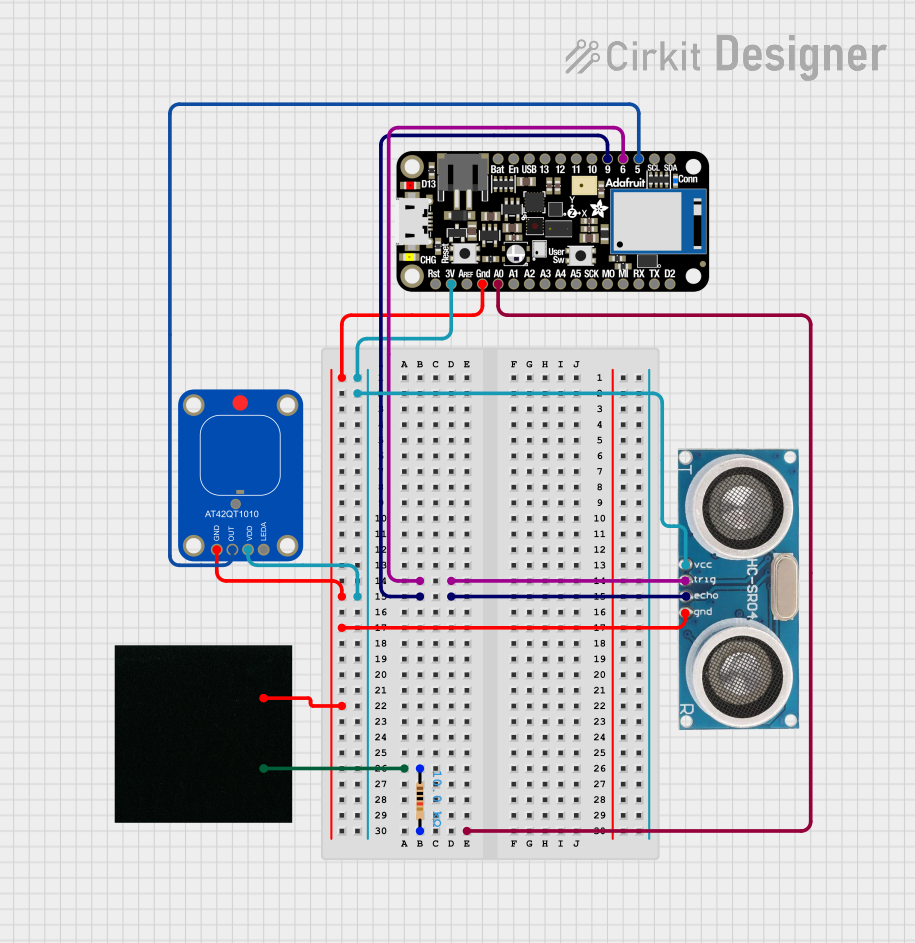
This circuit features an Adafruit Feather nRF52840 Sense microcontroller connected to an ultrasonic sensor for distance measurement and an Adafruit AT42QT1010 capacitive touch sensor for touch input. The ultrasonic sensor's Trigger and Echo pins are interfaced with the microcontroller's digital pins D6 and D9, respectively, to send and receive ultrasonic signals. Additionally, a pressure-sensitive conductive sheet (Velostat) is connected in series with a 10k Ohm resistor to the microcontroller's analog pin A0, likely forming a pressure sensor.
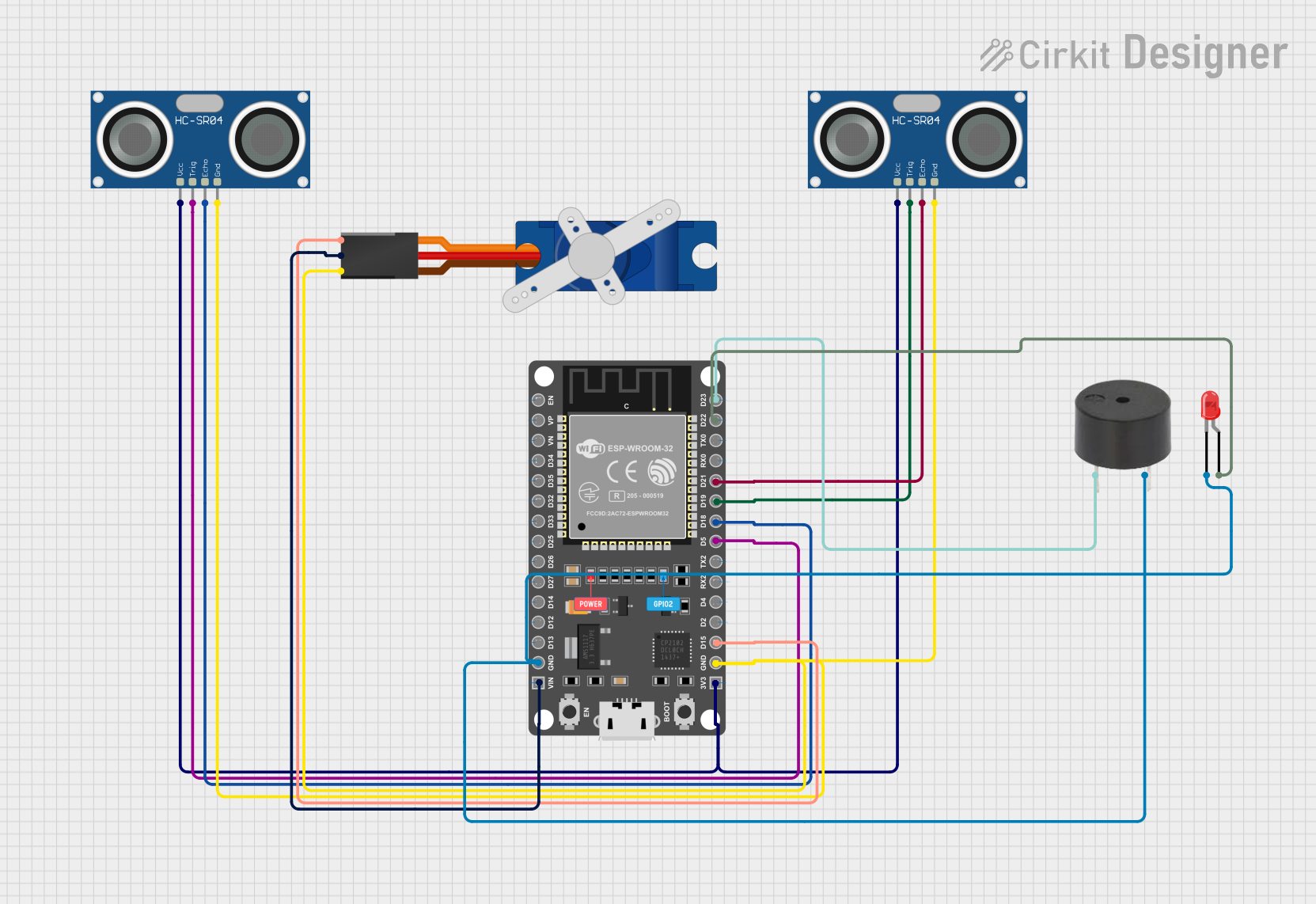
This circuit features an ESP32 microcontroller connected to two HC-SR04 ultrasonic sensors, a Tower Pro SG90 servo motor, a buzzer, and an LED. The ESP32 controls the servo motor via a signal connection on pin D15 and interfaces with the ultrasonic sensors through pins D5, D18, D19, and D21 for triggering and receiving echo signals. The LED and buzzer are connected to pins D22 and D23 respectively, allowing the ESP32 to activate visual and auditory indicators.
The PING 28015 sensor is designed for ease of use and reliable performance. Below are its key technical details:
Parameter
Value
Operating Voltage
5 V DC
Operating Current
30 mA (typical)
Measurement Range
2 cm to 3 m
Measurement Resolution
2 mm
Signal Frequency
40 kHz
Interface
Single I/O pin for trigger/echo
Dimensions
22 mm x 46 mm x 16 mm
Operating Temperature
0°C to 70°C
Pin Configuration
The PING 28015 has a 3-pin interface for power, ground, and signal. Below is the pinout:
Pin
Name
Description
1
VCC
Power supply input (5 V DC)
2
SIG
Signal pin for both trigger and echo (bidirectional)
3
GND
Ground connection
Usage Instructions
The PING 28015 sensor is simple to use and requires only one I/O pin for operation. Below are the steps to integrate it into a circuit and use it effectively:
Circuit Connection
Connect the VCC pin to a 5 V power supply.
Connect the GND pin to the ground of your circuit.
Connect the SIG pin to a digital I/O pin on your microcontroller (e.g., Arduino UNO).
How It Works
The microcontroller sends a short HIGH pulse (minimum 2 µs) to the SIG pin to trigger the sensor.
The sensor emits an ultrasonic pulse and waits for the echo to return.
The sensor outputs a HIGH pulse on the SIG pin, where the duration of the pulse corresponds to the time taken for the echo to return.
The microcontroller measures the duration of the HIGH pulse and calculates the distance using the formula:
Below is an example code to use the PING 28015 with an Arduino UNO:
// Define the pin connected to the SIG pin of the PING 28015
const int pingPin = 7;

void setup() {
  Serial.begin(9600); // Initialize serial communication at 9600 baud
}

void loop() {
  long duration, distance;

  // Send a 2 µs HIGH pulse to trigger the sensor
  pinMode(pingPin, OUTPUT);
  digitalWrite(pingPin, LOW);
  delayMicroseconds(2);
  digitalWrite(pingPin, HIGH);
  delayMicroseconds(5);
  digitalWrite(pingPin, LOW);

  // Set the pin to input mode to read the echo
  pinMode(pingPin, INPUT);
  duration = pulseIn(pingPin, HIGH);

  // Calculate the distance in cm
  distance = duration / 58;

  // Print the distance to the Serial Monitor
  Serial.print("Distance: ");
  Serial.print(distance);
  Serial.println(" cm");

  delay(100); // Wait 100 ms before the next measurement
}
Best Practices
Ensure the sensor is mounted securely to avoid vibrations that may affect accuracy.
Avoid placing the sensor near ultrasonic noise sources (e.g., other ultrasonic sensors).
Use a decoupling capacitor (e.g., 10 µF) across the power supply pins to reduce noise.
Troubleshooting and FAQs
Common Issues and Solutions
No Output or Incorrect Readings
Ensure the sensor is powered with 5 V DC.
Verify the connections to the microcontroller are correct.
Check for loose or damaged wires.
Inconsistent Distance Measurements
Ensure there are no obstructions or reflective surfaces near the sensor.
Avoid using the sensor in environments with high ultrasonic noise.
Sensor Not Responding
Confirm the microcontroller is sending a proper trigger pulse (minimum 2 µs).
Check the SIG pin for proper signal levels using an oscilloscope or logic analyzer.
FAQs
Q: Can the PING 28015 detect transparent objects?
A: The sensor may have difficulty detecting transparent or very small objects due to poor ultrasonic reflection.
Q: What is the maximum range of the sensor?
A: The maximum range is 3 meters, but accuracy may decrease at longer distances.
Q: Can I use multiple PING 28015 sensors in the same project?
A: Yes, but ensure they are triggered sequentially to avoid interference between sensors.
Q: Is the PING 28015 compatible with 3.3 V microcontrollers?
A: The sensor requires a 5 V power supply, but the SIG pin can interface with 3.3 V logic levels. Use a level shifter if needed.

 Open Project in Cirkit Designer