
How to Use SR602: Examples, Pinouts, and Specs
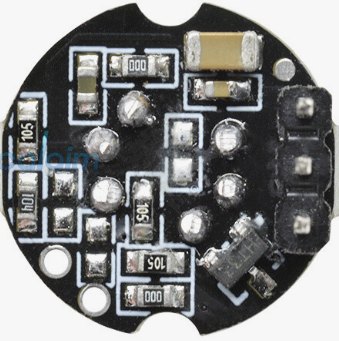
 Design with SR602 in Cirkit Designer
Introduction
The SR602 is a dual-channel infrared receiver module designed for remote control applications. It operates at a frequency of 38 kHz and is capable of receiving signals from infrared remote controls. This makes it an ideal choice for consumer electronics, home automation systems, and other applications requiring reliable infrared signal reception. Its compact design and high sensitivity allow it to be easily integrated into a variety of devices.
Explore Projects Built with SR602
 Open Project in Cirkit Designer
 Open Project in Cirkit Designer
 Open Project in Cirkit Designer
 Open Project in Cirkit Designer
Explore Projects Built with SR602
Open Project in Cirkit DesignerOpen Project in Cirkit DesignerOpen Project in Cirkit DesignerOpen Project in Cirkit DesignerCommon Applications
- Remote-controlled consumer electronics (e.g., TVs, DVD players)
- Home automation systems
- Infrared communication systems
- Robotics and IoT projects
- Arduino-based remote control projects
Technical Specifications
The SR602 module is designed to provide reliable performance in infrared signal reception. Below are its key technical specifications:
| Parameter | Value |
|---|---|
| Operating Voltage | 2.7V to 5.5V |
| Operating Current | ≤ 1.5 mA |
| Carrier Frequency | 38 kHz |
| Reception Distance | Up to 18 meters (line of sight) |
| Reception Angle | ±45° |
| Output Signal | Digital (active low) |
| Response Time | ≤ 2 ms |
| Operating Temperature | -25°C to +85°C |
| Dimensions | 7.5 mm x 5.5 mm x 3.0 mm |
Pin Configuration
The SR602 module has three pins, as described in the table below:
| Pin | Name | Description |
|---|---|---|
| 1 | VCC | Power supply pin (2.7V to 5.5V) |
| 2 | GND | Ground pin |
| 3 | OUT | Digital output pin (active low when signal detected) |
Usage Instructions
The SR602 is straightforward to use in a circuit. Follow the steps below to integrate it into your project:
Connecting the SR602
- Power Supply: Connect the
VCCpin to a 3.3V or 5V power source, depending on your system's voltage. - Ground: Connect the
GNDpin to the ground of your circuit. - Output Signal: Connect the
OUTpin to a digital input pin of your microcontroller or other logic circuit.
Important Considerations
- Ensure the module is aligned with the infrared transmitter for optimal signal reception.
- Avoid placing the module in direct sunlight or near strong light sources, as this may interfere with its operation.
- Use a pull-up resistor (typically 10kΩ) on the
OUTpin if required by your circuit design.
Example: Using SR602 with Arduino UNO
Below is an example of how to use the SR602 module with an Arduino UNO to detect infrared signals:
// Example code for interfacing SR602 with Arduino UNO
// This code reads the digital output from the SR602 and prints the status to the Serial Monitor.

const int IR_PIN = 2; // Connect the SR602 OUT pin to Arduino digital pin 2

void setup() {
  pinMode(IR_PIN, INPUT); // Set IR_PIN as input
  Serial.begin(9600);     // Initialize serial communication at 9600 baud
}

void loop() {
  int irSignal = digitalRead(IR_PIN); // Read the state of the SR602 OUT pin

  if (irSignal == LOW) {
    // Signal detected (active low output)
    Serial.println("Infrared signal detected!");
  } else {
    // No signal detected
    Serial.println("No infrared signal.");
  }

  delay(500); // Wait for 500 ms before reading again
}
Best Practices
- Use decoupling capacitors (e.g., 0.1 µF) near the
VCCpin to reduce noise and improve stability. - Keep the module away from high-frequency circuits or electromagnetic interference sources.
Troubleshooting and FAQs
Common Issues and Solutions
No Signal Detected:
- Cause: Misalignment between the SR602 and the infrared transmitter.
- Solution: Ensure the transmitter is within the module's reception angle (±45°) and within the specified range (up to 18 meters).
False Signal Detection:
- Cause: Ambient light interference or electrical noise.
- Solution: Shield the module from direct sunlight and fluorescent lights. Add a decoupling capacitor to the power supply.
Output Pin Always LOW:
- Cause: Faulty wiring or damaged module.
- Solution: Verify the connections and ensure the module is receiving the correct voltage. Replace the module if necessary.
Output Pin Always HIGH:
- Cause: No infrared signal or weak signal strength.
- Solution: Check the alignment and distance between the transmitter and receiver. Ensure the transmitter is functioning correctly.
FAQs
Q1: Can the SR602 work with 3.3V systems?
A1: Yes, the SR602 operates within a voltage range of 2.7V to 5.5V, making it compatible with both 3.3V and 5V systems.
Q2: What is the maximum range of the SR602?
A2: The SR602 can receive infrared signals up to 18 meters in a clear line of sight.
Q3: Does the SR602 require additional components to function?
A3: No additional components are required for basic operation. However, a pull-up resistor or decoupling capacitor may be used for improved performance in specific circuits.
Q4: Can the SR602 detect signals from any infrared remote control?
A4: The SR602 is designed to detect signals modulated at 38 kHz, which is the standard frequency for most infrared remote controls.
By following this documentation, you can effectively integrate the SR602 into your projects and troubleshoot any issues that arise.