
How to Use SI5351: Examples, Pinouts, and Specs
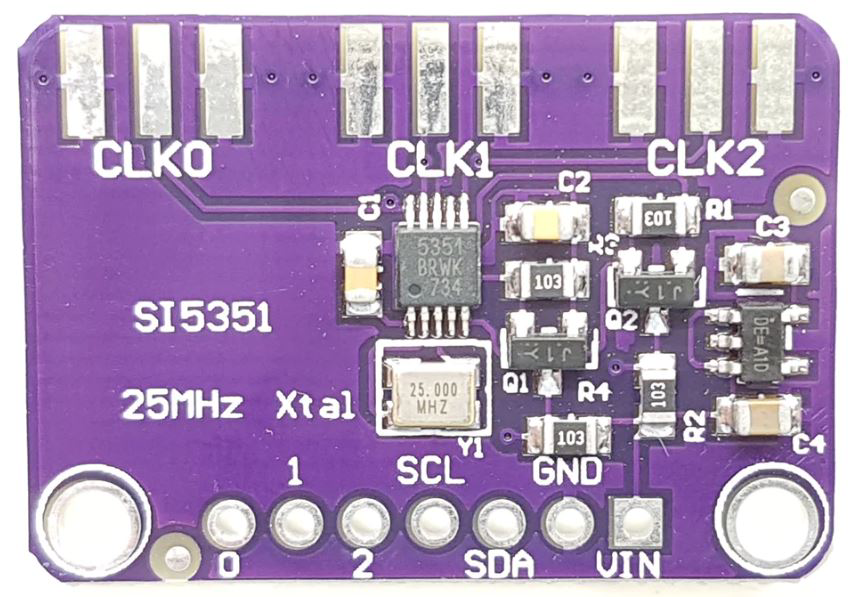
 Design with SI5351 in Cirkit Designer
Introduction
The SI5351 is a highly versatile programmable clock generator capable of producing multiple output frequencies from a single reference frequency. It is widely used in applications requiring precise and stable timing signals, such as communication systems, signal processing, microcontroller interfacing, and frequency synthesis. The SI5351 is particularly popular in hobbyist and professional electronics projects due to its ease of use, low cost, and compatibility with microcontrollers like the Arduino.
Common applications include:
- Generating clock signals for microcontrollers and digital circuits
- Frequency synthesis for radio communication systems
- Signal generation for testing and measurement equipment
- Replacing crystal oscillators in embedded systems
Explore Projects Built with SI5351
 Open Project in Cirkit Designer
 Open Project in Cirkit Designer
 Open Project in Cirkit Designer
 Open Project in Cirkit Designer
Explore Projects Built with SI5351
Open Project in Cirkit DesignerOpen Project in Cirkit DesignerOpen Project in Cirkit DesignerOpen Project in Cirkit DesignerTechnical Specifications
The SI5351 offers a range of features and specifications that make it suitable for a variety of timing applications. Below are the key technical details:
General Specifications
- Input Reference Frequency: 10 MHz to 25 MHz (typical crystal oscillator input)
- Output Frequency Range: 2.5 kHz to 200 MHz
- Number of Outputs: 3 independent clock outputs
- Output Signal Type: CMOS (3.3V logic level)
- Power Supply Voltage: 3.0V to 3.6V (typical 3.3V)
- I2C Interface Voltage: 3.3V (compatible with 5V logic via level shifters)
- I2C Address: 0x60 (default, configurable)
- Phase Jitter: <1 ps RMS (12 kHz to 20 MHz offset)
- Package: MSOP-10 or QFN-20
Pin Configuration
The SI5351 is available in multiple package types. Below is the pin configuration for the MSOP-10 package:
| Pin Number | Pin Name | Description |
|---|---|---|
| 1 | VDD | Power supply input (3.3V) |
| 2 | GND | Ground |
| 3 | CLK0 | Clock output 0 |
| 4 | CLK1 | Clock output 1 |
| 5 | CLK2 | Clock output 2 |
| 6 | SCL | I2C clock input |
| 7 | SDA | I2C data input/output |
| 8 | XTAL_IN | Crystal oscillator input (connect to crystal) |
| 9 | XTAL_OUT | Crystal oscillator output (connect to crystal) |
| 10 | NC | No connection |
Usage Instructions
The SI5351 is controlled via an I2C interface, making it easy to configure and integrate into a circuit. Below are the steps to use the SI5351 in a project:
Connecting the SI5351
- Power Supply: Connect the VDD pin to a 3.3V power source and the GND pin to ground.
- Crystal Oscillator: Attach a 25 MHz crystal between the XTAL_IN and XTAL_OUT pins, along with the appropriate load capacitors (typically 18-22 pF).
- I2C Interface: Connect the SCL and SDA pins to the corresponding I2C pins on your microcontroller. Use pull-up resistors (4.7 kΩ or 10 kΩ) on the SCL and SDA lines.
- Clock Outputs: Connect the CLK0, CLK1, and CLK2 pins to the devices requiring clock signals.
Configuring the SI5351
To configure the SI5351, you need to write to its internal registers via the I2C interface. Libraries such as the Adafruit SI5351 library for Arduino simplify this process.
Example: Using the SI5351 with Arduino UNO
Below is an example Arduino sketch to generate a 10 MHz clock signal on CLK0:
#include <Wire.h>
#include <Adafruit_SI5351.h>

// Create an instance of the SI5351 object
Adafruit_SI5351 si5351;

void setup() {
  Serial.begin(9600); // Initialize serial communication for debugging

  // Initialize the SI5351
  if (!si5351.begin()) {
    Serial.println("SI5351 initialization failed!");
    while (1); // Halt if initialization fails
  }
  Serial.println("SI5351 initialized successfully.");

  // Set CLK0 to output a 10 MHz signal
  if (!si5351.setupPLL(SI5351_PLL_A, 25, 0, 1)) {
    Serial.println("Failed to configure PLL A.");
  }
  if (!si5351.setupMultisynth(0, SI5351_PLL_A, 4, 0, 1)) {
    Serial.println("Failed to configure Multisynth for CLK0.");
  }
  si5351.enableOutputs(true); // Enable all clock outputs
}

void loop() {
  // The SI5351 runs independently once configured
}
Important Considerations
- Ensure the I2C pull-up resistors are properly connected to avoid communication issues.
- Use decoupling capacitors (e.g., 0.1 µF) near the VDD pin to reduce noise.
- If using a 5V microcontroller, use level shifters for the I2C lines to prevent damage to the SI5351.
Troubleshooting and FAQs
Common Issues
No Output Signal:
- Verify that the SI5351 is powered correctly (3.3V on VDD).
- Check the I2C connections and ensure the pull-up resistors are in place.
- Confirm that the crystal oscillator is properly connected and functioning.
I2C Communication Fails:
- Ensure the correct I2C address (0x60 by default) is being used.
- Check for loose or incorrect wiring on the SCL and SDA lines.
- Verify that the microcontroller's I2C pins are configured correctly.
Incorrect Output Frequency:
- Double-check the PLL and Multisynth configuration values.
- Ensure the reference crystal frequency matches the value used in calculations.
FAQs
Q: Can the SI5351 work with a 5V microcontroller?
A: Yes, but you need to use level shifters on the I2C lines to prevent damage to the SI5351, as it operates at 3.3V logic levels.
Q: What is the maximum output frequency of the SI5351?
A: The SI5351 can generate output frequencies up to 200 MHz.
Q: Can I use the SI5351 without a crystal oscillator?
A: No, the SI5351 requires a reference clock, typically provided by a crystal oscillator, to generate output frequencies.
Q: How many independent frequencies can the SI5351 generate?
A: The SI5351 can generate up to three independent frequencies simultaneously using its three clock outputs (CLK0, CLK1, and CLK2).