Cirkit Designer Logo
Cirkit Designer
Your all-in-one circuit design IDE
Home / 
Component Documentation

How to Use SparkFun Soil Moisture Sensor: Examples, Pinouts, and Specs
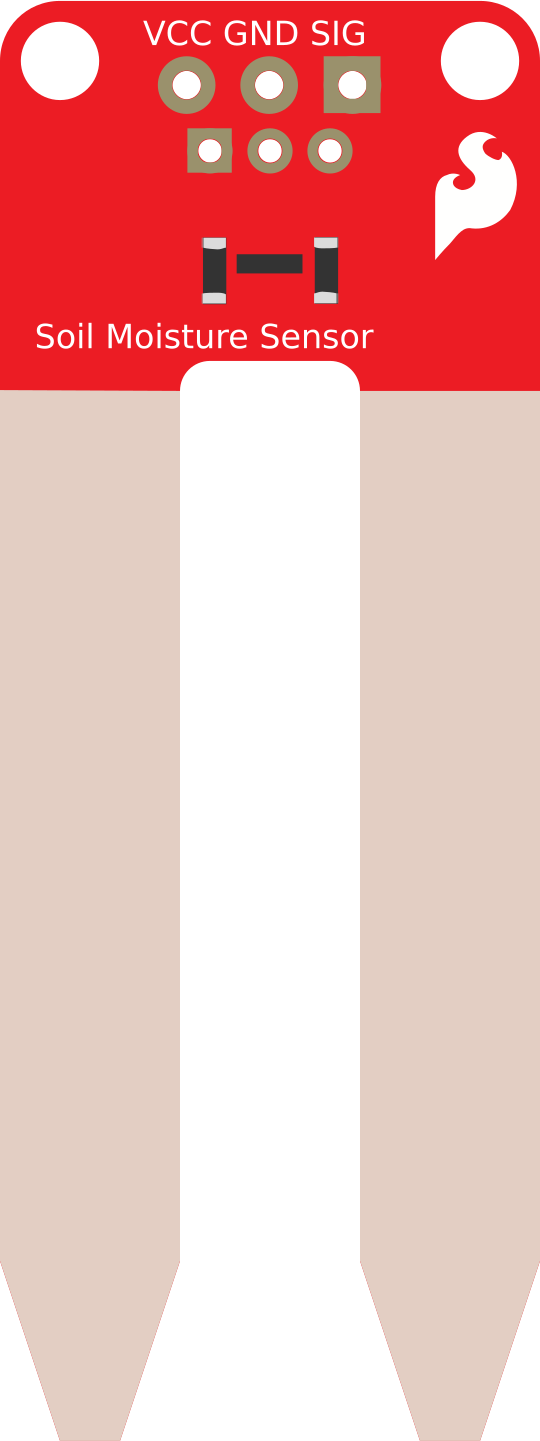

Image of SparkFun Soil Moisture Sensor
Cirkit Designer LogoDesign with SparkFun Soil Moisture Sensor in Cirkit Designer

Introduction

The SparkFun Soil Moisture Sensor is a device designed to measure the volumetric water content in soil. It provides an analog output that corresponds to the moisture level, making it an essential tool for applications such as precision agriculture, automated gardening systems, and environmental monitoring. By integrating this sensor into your project, you can monitor soil conditions and optimize irrigation schedules, ensuring healthier plants and efficient water usage.

Explore Projects Built with SparkFun Soil Moisture Sensor
Use Cirkit Designer to design, explore, and prototype these projects online. Some projects support real-time simulation. Click "Open Project" to start designing instantly!
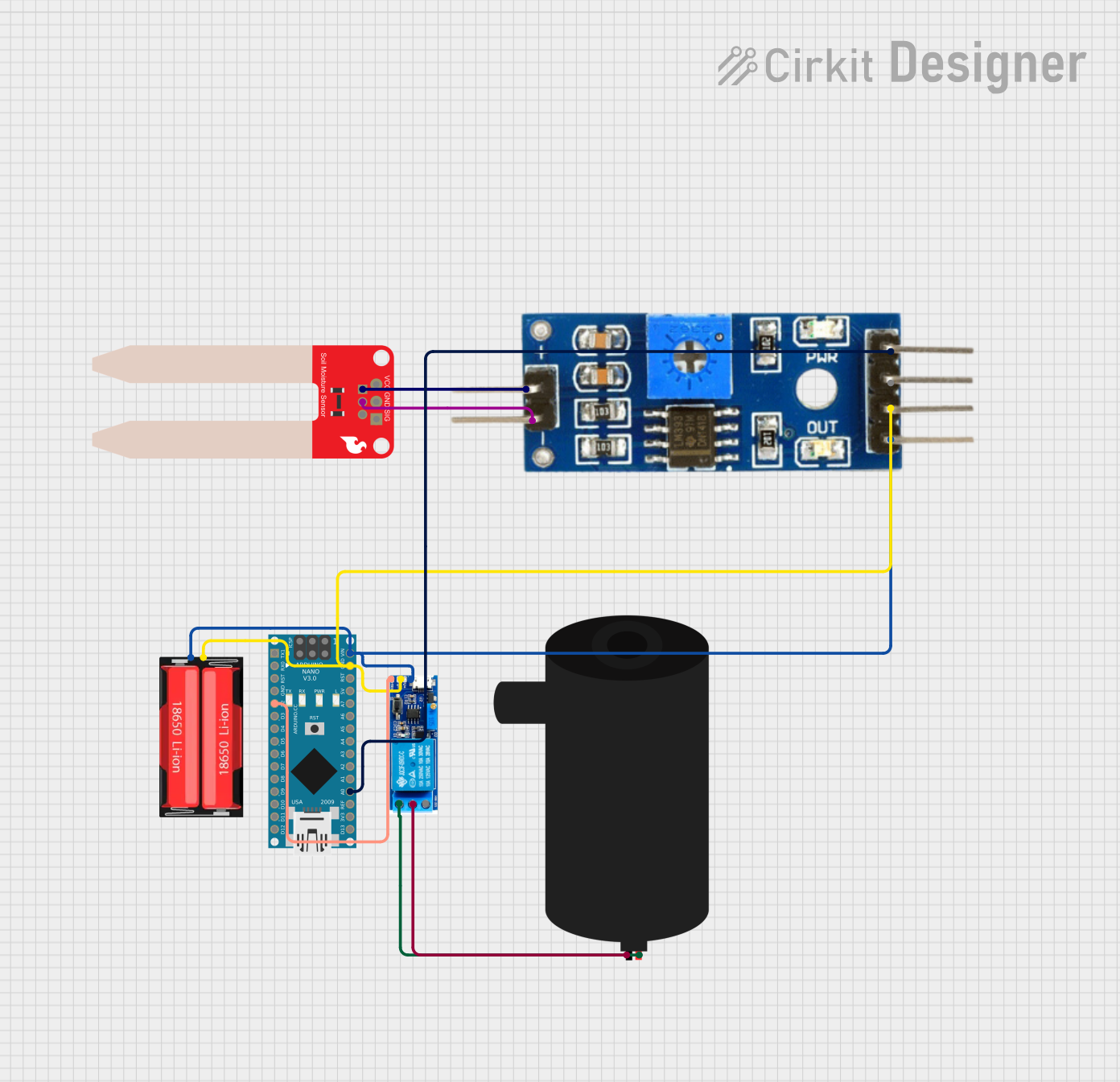
Arduino-Controlled Soil Moisture Sensing and Water Pump System
Image of SachetBhaiya: A project utilizing SparkFun Soil Moisture Sensor in a practical application
This circuit is designed to monitor soil moisture levels using a SparkFun Soil Moisture Sensor connected to a Soil Moisture Module, which interfaces with an Arduino Nano microcontroller. The Arduino reads the analog moisture level and can control a water pump via a relay module based on the moisture data. The system is powered by an 18650 Li-Ion battery, and the relay ensures that the pump is activated only when the soil moisture falls below a certain threshold, as determined by the Arduino's programmed logic.
Cirkit Designer LogoOpen Project in Cirkit Designer
Arduino UNO Based Soil Moisture Sensing System
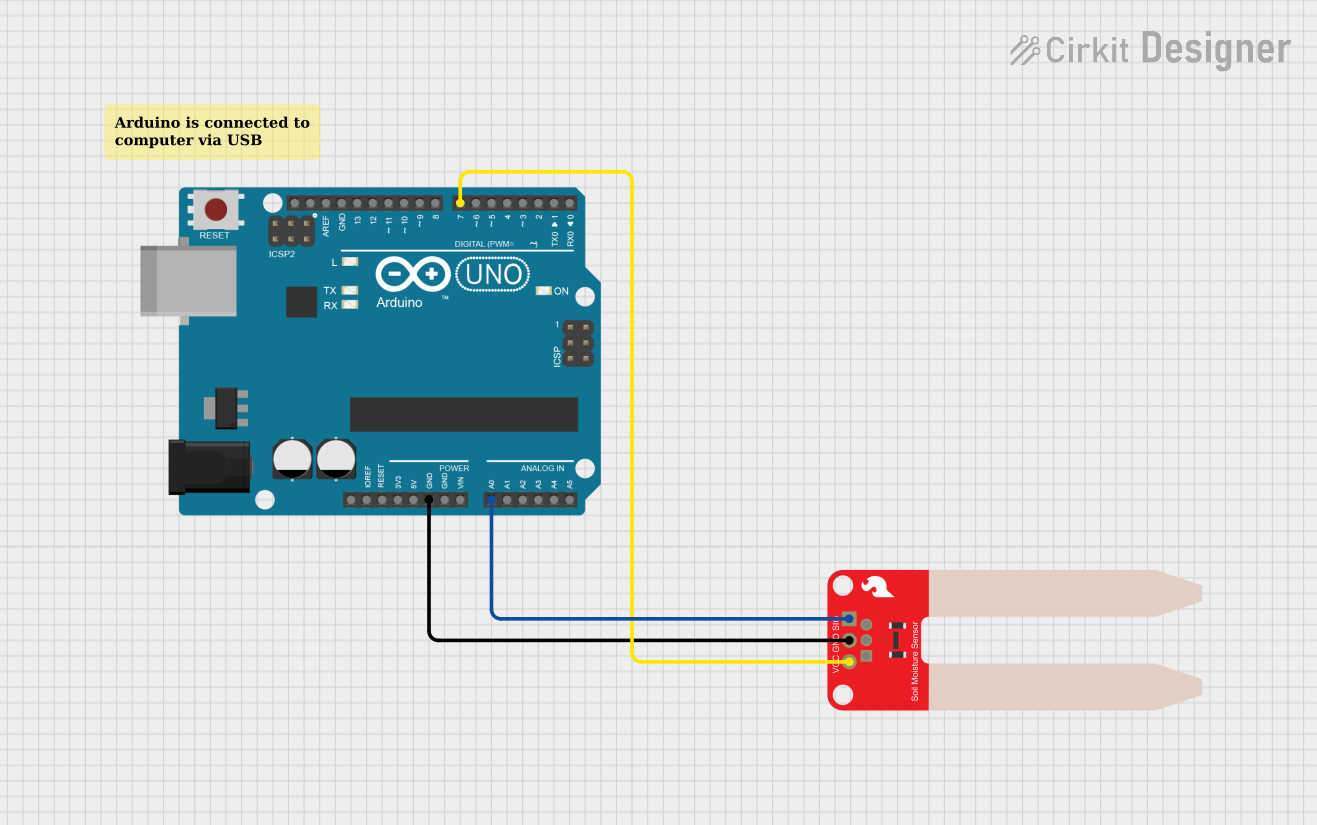
Image of Measure Soil Moisture With Arduino Uno: A project utilizing SparkFun Soil Moisture Sensor in a practical application
This circuit connects an Arduino UNO to a SparkFun Soil Moisture Sensor to measure the moisture content of soil. The sensor's signal pin is connected to the Arduino's analog input A0 for moisture readings, and it is powered by digital pin D7 to minimize corrosion by only supplying power when a measurement is taken. The embedded code on the Arduino manages the power to the sensor and reads the moisture levels, outputting the data to the serial monitor at a one-second interval.
Cirkit Designer LogoOpen Project in Cirkit Designer
ESP8266 NodeMCU-Based Landslide Detection System with MPU-6050 and Soil Moisture Sensing
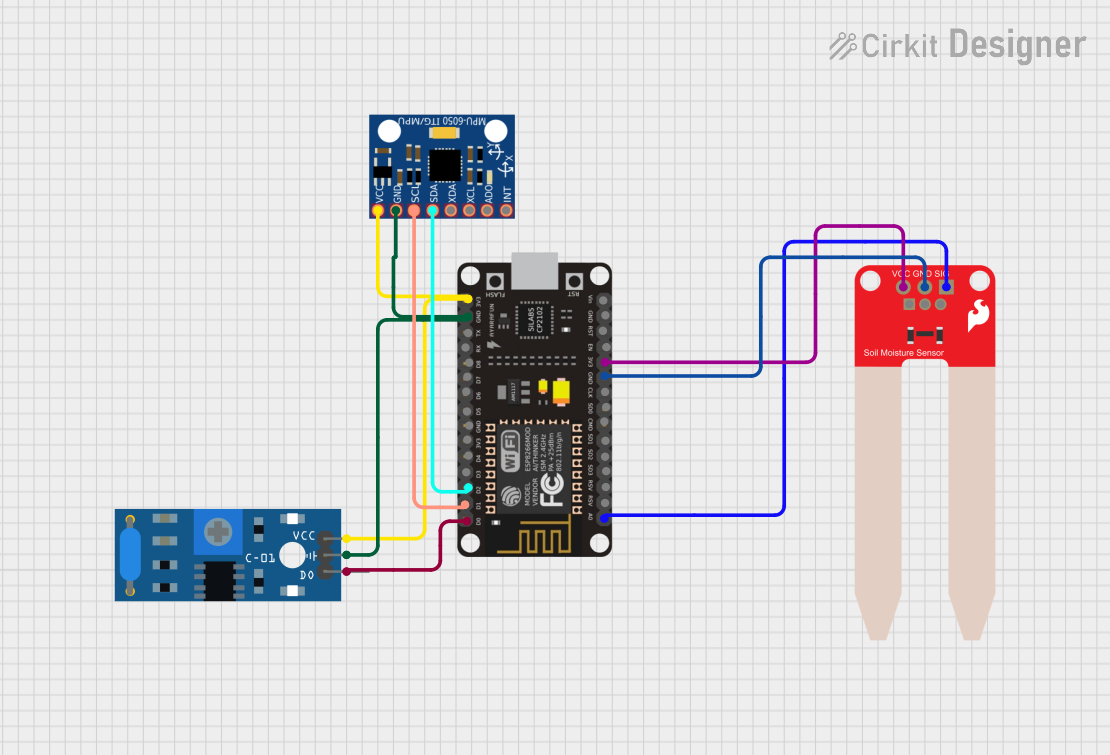
Image of Landslide monitoring system: A project utilizing SparkFun Soil Moisture Sensor in a practical application
This circuit is designed for environmental monitoring, specifically for detecting soil moisture levels, vibrations, and motion. It uses an ESP8266 NodeMCU microcontroller to read data from a SparkFun Soil Moisture Sensor, an SW-420 Vibration Sensor, and an MPU-6050 gyroscope/accelerometer. The microcontroller processes the sensor data and can send alerts or log events through the Blynk IoT platform when moisture levels are below a set threshold, vibrations are detected, or significant motion is observed.
Cirkit Designer LogoOpen Project in Cirkit Designer
ESP8266 NodeMCU Based Environmental Monitoring System
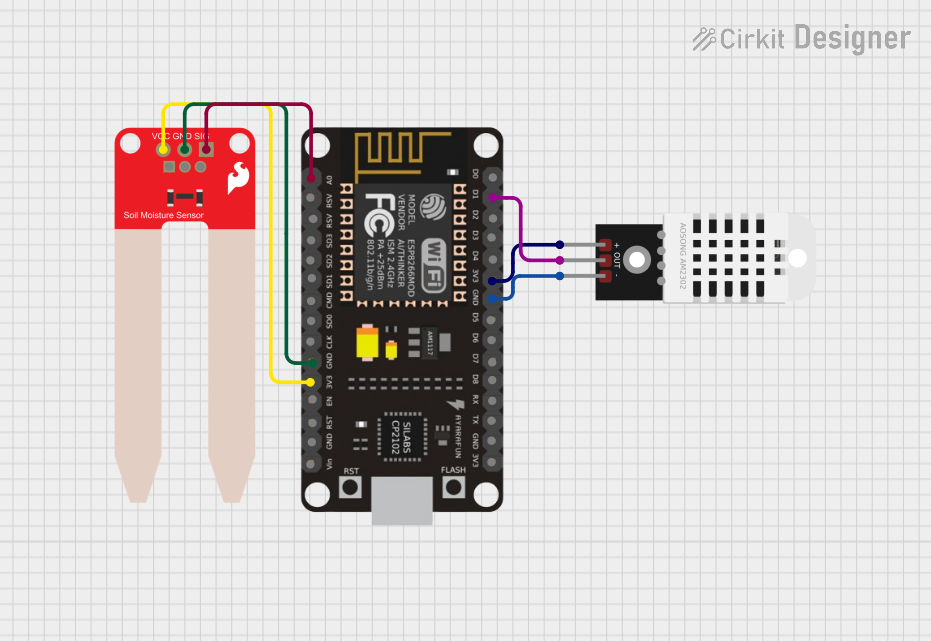
Image of Image1: A project utilizing SparkFun Soil Moisture Sensor in a practical application
This circuit features an ESP8266 NodeMCU microcontroller connected to a DHT22 temperature and humidity sensor and a SparkFun Soil Moisture Sensor. The DHT22 sensor's data output is connected to the D1 pin of the NodeMCU, while the soil moisture sensor's signal is connected to the A0 analog pin. Both sensors are powered by the 3V3 output of the NodeMCU, and their grounds are connected to the NodeMCU's ground, enabling the microcontroller to monitor environmental conditions and soil moisture levels.
Cirkit Designer LogoOpen Project in Cirkit Designer

Explore Projects Built with SparkFun Soil Moisture Sensor

Use Cirkit Designer to design, explore, and prototype these projects online. Some projects support real-time simulation. Click "Open Project" to start designing instantly!
Image of SachetBhaiya: A project utilizing SparkFun Soil Moisture Sensor in a practical application
Arduino-Controlled Soil Moisture Sensing and Water Pump System
This circuit is designed to monitor soil moisture levels using a SparkFun Soil Moisture Sensor connected to a Soil Moisture Module, which interfaces with an Arduino Nano microcontroller. The Arduino reads the analog moisture level and can control a water pump via a relay module based on the moisture data. The system is powered by an 18650 Li-Ion battery, and the relay ensures that the pump is activated only when the soil moisture falls below a certain threshold, as determined by the Arduino's programmed logic.
Cirkit Designer LogoOpen Project in Cirkit Designer
Image of Measure Soil Moisture With Arduino Uno: A project utilizing SparkFun Soil Moisture Sensor in a practical application
Arduino UNO Based Soil Moisture Sensing System
This circuit connects an Arduino UNO to a SparkFun Soil Moisture Sensor to measure the moisture content of soil. The sensor's signal pin is connected to the Arduino's analog input A0 for moisture readings, and it is powered by digital pin D7 to minimize corrosion by only supplying power when a measurement is taken. The embedded code on the Arduino manages the power to the sensor and reads the moisture levels, outputting the data to the serial monitor at a one-second interval.
Cirkit Designer LogoOpen Project in Cirkit Designer
Image of Landslide monitoring system: A project utilizing SparkFun Soil Moisture Sensor in a practical application
ESP8266 NodeMCU-Based Landslide Detection System with MPU-6050 and Soil Moisture Sensing
This circuit is designed for environmental monitoring, specifically for detecting soil moisture levels, vibrations, and motion. It uses an ESP8266 NodeMCU microcontroller to read data from a SparkFun Soil Moisture Sensor, an SW-420 Vibration Sensor, and an MPU-6050 gyroscope/accelerometer. The microcontroller processes the sensor data and can send alerts or log events through the Blynk IoT platform when moisture levels are below a set threshold, vibrations are detected, or significant motion is observed.
Cirkit Designer LogoOpen Project in Cirkit Designer
Image of Image1: A project utilizing SparkFun Soil Moisture Sensor in a practical application
ESP8266 NodeMCU Based Environmental Monitoring System
This circuit features an ESP8266 NodeMCU microcontroller connected to a DHT22 temperature and humidity sensor and a SparkFun Soil Moisture Sensor. The DHT22 sensor's data output is connected to the D1 pin of the NodeMCU, while the soil moisture sensor's signal is connected to the A0 analog pin. Both sensors are powered by the 3V3 output of the NodeMCU, and their grounds are connected to the NodeMCU's ground, enabling the microcontroller to monitor environmental conditions and soil moisture levels.
Cirkit Designer LogoOpen Project in Cirkit Designer

Common Applications and Use Cases

  • Automated irrigation systems
  • Smart gardening projects
  • Agricultural monitoring
  • Environmental research and data collection
  • DIY plant care systems

Technical Specifications

The SparkFun Soil Moisture Sensor is a simple yet effective tool for measuring soil moisture. Below are its key technical details and pin configuration:

Key Technical Details

Parameter Value
Operating Voltage 3.3V to 5V
Output Type Analog
Output Voltage Range 0V (dry soil) to ~3.3V (wet soil)
Current Consumption ~5mA
Dimensions 60mm x 20mm
Connector Type 3-pin header

Pin Configuration and Descriptions

Pin Name Description
VCC Power supply pin (3.3V to 5V)
GND Ground pin
SIG Analog signal output pin (provides moisture data)

Usage Instructions

The SparkFun Soil Moisture Sensor is easy to integrate into your circuit. Follow the steps below to use it effectively:

Connecting the Sensor

  1. Power the Sensor: Connect the VCC pin to a 3.3V or 5V power source and the GND pin to the ground of your circuit.
  2. Read the Signal: Connect the SIG pin to an analog input pin on your microcontroller (e.g., Arduino UNO).

Example Circuit

Below is an example of how to connect the SparkFun Soil Moisture Sensor to an Arduino UNO:

  • VCC → Arduino 5V
  • GND → Arduino GND
  • SIG → Arduino A0

Sample Arduino Code

The following code reads the sensor's analog output and prints the soil moisture level to the Serial Monitor:

// Define the analog pin connected to the sensor's SIG pin
const int sensorPin = A0;

void setup() {
  // Initialize the Serial Monitor for debugging
  Serial.begin(9600);
}

void loop() {
  // Read the analog value from the sensor
  int sensorValue = analogRead(sensorPin);

  // Map the sensor value to a percentage (0% = dry, 100% = wet)
  int moisturePercent = map(sensorValue, 0, 1023, 0, 100);

  // Print the moisture level to the Serial Monitor
  Serial.print("Soil Moisture: ");
  Serial.print(moisturePercent);
  Serial.println("%");

  // Wait for 1 second before the next reading
  delay(1000);
}

Important Considerations and Best Practices

  • Avoid Corrosion: The sensor's probes can corrode over time if left in the soil continuously. To extend its lifespan, consider using it intermittently (e.g., power it only when taking a reading).
  • Calibration: The sensor's output may vary depending on soil type. Calibrate the sensor for your specific soil by testing it in dry and wet conditions.
  • Placement: Insert the sensor probes fully into the soil for accurate readings. Ensure the probes are clean and free of debris before use.
  • Power Supply: Use a stable power source to avoid fluctuations in the sensor's output.

Troubleshooting and FAQs

Common Issues and Solutions

  1. No Output or Incorrect Readings

    • Cause: Loose or incorrect wiring.
    • Solution: Double-check all connections, ensuring the VCC, GND, and SIG pins are properly connected.
  2. Fluctuating Readings

    • Cause: Unstable power supply or electrical noise.
    • Solution: Use a decoupling capacitor (e.g., 0.1µF) between VCC and GND to stabilize the power supply.
  3. Sensor Corrosion

    • Cause: Continuous exposure to moisture.
    • Solution: Use the sensor intermittently or coat the probes with a protective layer (e.g., waterproof paint).
  4. Inconsistent Results in Different Soils

    • Cause: Soil type affects sensor output.
    • Solution: Calibrate the sensor for each soil type by testing in known dry and wet conditions.

FAQs

Q: Can this sensor be used with a 3.3V microcontroller?
A: Yes, the sensor operates at both 3.3V and 5V, making it compatible with most microcontrollers.

Q: How do I interpret the sensor's analog output?
A: The output voltage increases with soil moisture. Dry soil produces a low voltage (0V), while wet soil produces a higher voltage (3.3V).

Q: Is the sensor waterproof?
A: The probes are designed for soil insertion, but the PCB is not waterproof. Avoid exposing the PCB to water.

Q: How often should I take readings?
A: To minimize sensor wear, take readings at intervals (e.g., every few hours) rather than continuously.

By following this documentation, you can effectively integrate the SparkFun Soil Moisture Sensor into your projects and ensure reliable performance.