
How to Use Матрица WS2812B: Examples, Pinouts, and Specs
 Design with Матрица WS2812B in Cirkit Designer
Introduction
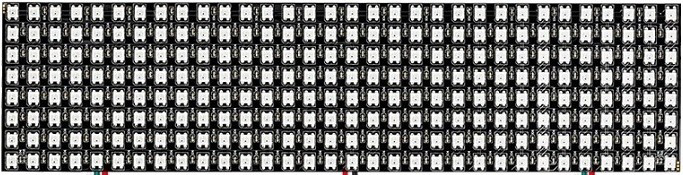
The Матрица из 256 RGB светодиодов WS2812 (32×8), manufactured by WORLDSEMI CO, is a programmable RGB LED matrix consisting of 256 WS2812B LEDs arranged in a 32×8 grid. Each LED in the matrix is individually addressable, allowing for precise control of color and brightness. The matrix is widely used in decorative lighting, dynamic displays, and creative projects requiring vibrant visual effects.
Explore Projects Built with Матрица WS2812B
 Open Project in Cirkit Designer
 Open Project in Cirkit Designer
 Open Project in Cirkit Designer
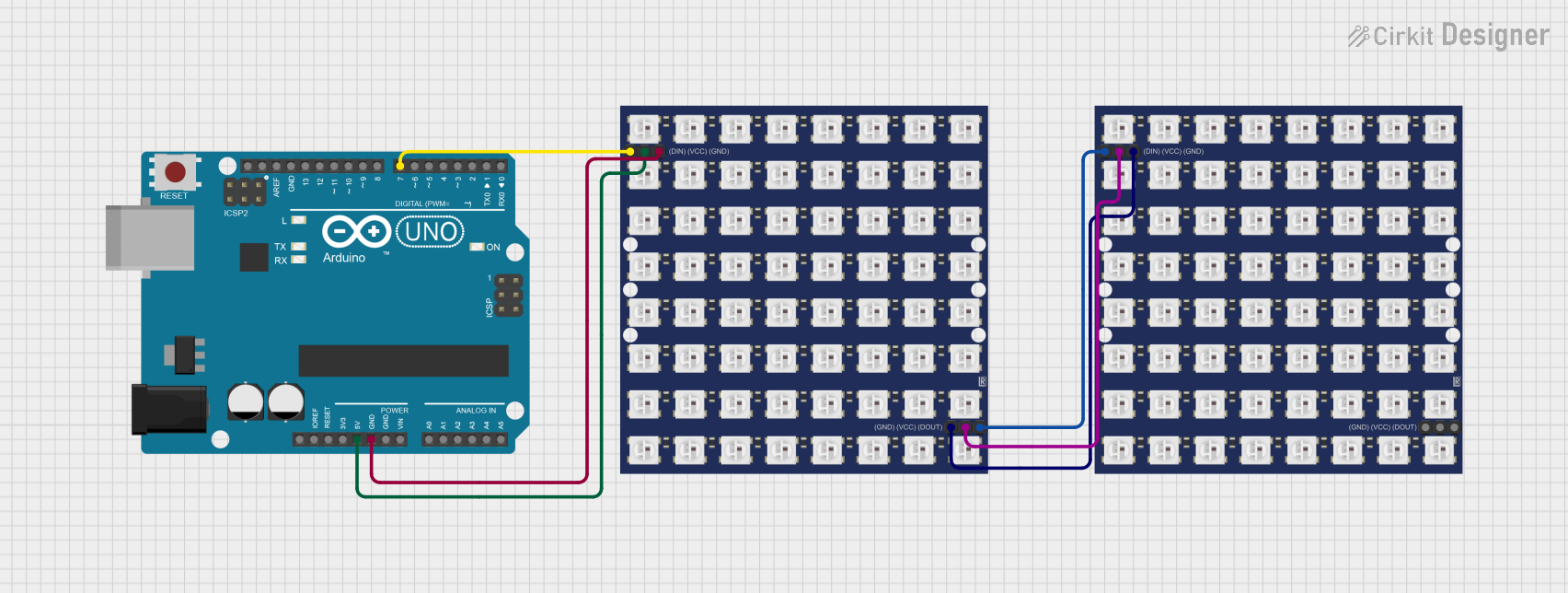 Open Project in Cirkit Designer
Explore Projects Built with Матрица WS2812B
Open Project in Cirkit DesignerOpen Project in Cirkit DesignerOpen Project in Cirkit DesignerOpen Project in Cirkit DesignerCommon Applications
- Decorative lighting for events and installations
- Animated signage and displays
- DIY projects and hobbyist electronics
- Wearable technology
- Gaming setups and ambient lighting
Technical Specifications
Below are the key technical details of the Матрица WS2812B:
| Parameter | Value |
|---|---|
| Manufacturer | WORLDSEMI CO |
| Part Number | Матрица из 256 RGB светодиодов WS2812 (32×8) |
| LED Type | WS2812B |
| Matrix Dimensions | 32 LEDs (width) × 8 LEDs (height) |
| Operating Voltage | 5V DC |
| Power Consumption | ~60mA per LED (maximum brightness, white) |
| Communication Protocol | Single-wire (based on NRZ) |
| Refresh Rate | ~400 Hz |
| LED Color Depth | 24-bit (8 bits per R, G, B) |
| Viewing Angle | 120° |
| Operating Temperature | -25°C to +80°C |
Pin Configuration
The Матрица WS2812B has three main pins for operation:
| Pin Name | Description |
|---|---|
| VCC | Power supply input (5V DC) |
| GND | Ground connection |
| DIN | Data input for controlling the LEDs |
Note: The data signal must be provided by a microcontroller or similar device capable of generating the WS2812B protocol.
Usage Instructions
Connecting the Матрица WS2812B
- Power Supply: Connect the VCC pin to a stable 5V DC power source and the GND pin to ground. Ensure the power supply can handle the total current draw of the matrix (up to ~15.36A at full brightness).
- Data Input: Connect the DIN pin to the data output pin of a microcontroller (e.g., Arduino UNO). Use a resistor (330–470Ω) in series with the data line to protect the LEDs.
- Capacitor: Place a 1000µF capacitor across VCC and GND near the matrix to stabilize the power supply.
Arduino UNO Example Code
Below is an example of how to control the Матрица WS2812B using an Arduino UNO and the Adafruit NeoPixel library:
#include <Adafruit_NeoPixel.h>

// Define the number of LEDs in the matrix
#define NUM_LEDS 256

// Define the data pin connected to the DIN pin of the matrix
#define DATA_PIN 6

// Create a NeoPixel object
Adafruit_NeoPixel matrix = Adafruit_NeoPixel(NUM_LEDS, DATA_PIN, NEO_GRB + NEO_KHZ800);

void setup() {
  // Initialize the NeoPixel library
  matrix.begin();
  matrix.show(); // Turn off all LEDs initially
}

void loop() {
  // Example: Light up the matrix with a rainbow effect
  rainbowCycle(10); // Adjust the delay for speed
}

// Function to create a rainbow effect
void rainbowCycle(uint8_t wait) {
  uint16_t i, j;

  for (j = 0; j < 256 * 5; j++) { // 5 cycles of all colors
    for (i = 0; i < matrix.numPixels(); i++) {
      // Calculate the color for each pixel
      matrix.setPixelColor(i, Wheel(((i * 256 / matrix.numPixels()) + j) & 255));
    }
    matrix.show(); // Update the matrix
    delay(wait);
  }
}

// Helper function to generate rainbow colors
uint32_t Wheel(byte WheelPos) {
  WheelPos = 255 - WheelPos;
  if (WheelPos < 85) {
    return matrix.Color(255 - WheelPos * 3, 0, WheelPos * 3);
  } else if (WheelPos < 170) {
    WheelPos -= 85;
    return matrix.Color(0, WheelPos * 3, 255 - WheelPos * 3);
  } else {
    WheelPos -= 170;
    return matrix.Color(WheelPos * 3, 255 - WheelPos * 3, 0);
  }
}
Best Practices
- Power Management: Use a dedicated 5V power supply capable of providing sufficient current for the matrix. Avoid powering the matrix directly from the Arduino UNO.
- Signal Integrity: Keep the data line as short as possible to prevent signal degradation. For longer distances, use a level shifter to ensure a 5V data signal.
- Heat Dissipation: At full brightness, the matrix can generate significant heat. Ensure proper ventilation to avoid overheating.
Troubleshooting and FAQs
Common Issues
Matrix Not Lighting Up
- Cause: Incorrect wiring or insufficient power supply.
- Solution: Double-check all connections and ensure the power supply provides at least 5V and sufficient current.
Flickering LEDs
- Cause: Signal degradation or unstable power supply.
- Solution: Add a 330–470Ω resistor in series with the data line and a 1000µF capacitor across VCC and GND.
Incorrect Colors
- Cause: Data signal timing issues or incorrect library settings.
- Solution: Ensure the microcontroller is using the correct WS2812B protocol (NEO_GRB + NEO_KHZ800).
Only a Few LEDs Work
- Cause: Faulty LED or data signal interruption.
- Solution: Check for physical damage and ensure the data signal is reaching all LEDs.
FAQs
Can I cut the matrix into smaller sections? Yes, the matrix can be cut along the designated lines. Ensure proper reconnection of VCC, GND, and DIN/DOUT.
What is the maximum length of the data line? For reliable operation, keep the data line under 1 meter. Use a level shifter for longer distances.
Can I use a 3.3V microcontroller? Yes, but you may need a level shifter to convert the 3.3V data signal to 5V for proper operation.
By following this documentation, you can effectively integrate and troubleshoot the Матрица WS2812B in your projects.