
How to Use SK9822: Examples, Pinouts, and Specs
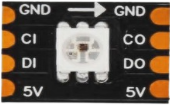
 Design with SK9822 in Cirkit Designer
Introduction
The SK9822 is a digital RGB LED driver designed for precise control of individual LEDs' color and brightness. It features a two-wire interface (data and clock), enabling fast and reliable communication. This component is widely used in applications such as decorative lighting, LED displays, and dynamic animations. Its ability to control each LED independently makes it ideal for creating complex lighting effects with high precision.
Common applications include:
- Decorative and architectural lighting
- LED displays and signage
- Wearable electronics
- Gaming peripherals and PC case lighting
- Animated light shows and art installations
Explore Projects Built with SK9822
 Open Project in Cirkit Designer
 Open Project in Cirkit Designer
 Open Project in Cirkit Designer
 Open Project in Cirkit Designer
Explore Projects Built with SK9822
Open Project in Cirkit DesignerOpen Project in Cirkit DesignerOpen Project in Cirkit DesignerOpen Project in Cirkit DesignerTechnical Specifications
The SK9822 is a versatile and efficient LED driver with the following key specifications:
| Parameter | Value |
|---|---|
| Operating Voltage | 4.5V to 5.5V |
| Data Protocol | Two-wire (Data and Clock) |
| Maximum Clock Frequency | 30 MHz |
| LED Channels | 3 (Red, Green, Blue) |
| PWM Resolution | 8-bit per channel (24-bit color) |
| Brightness Control | 5-bit global brightness control |
| Operating Temperature | -40°C to +85°C |
| Package Type | SMD (Surface Mount Device) |
Pin Configuration and Descriptions
The SK9822 is typically integrated into LED strips or modules. Below is the pin configuration for a single SK9822 chip:
| Pin Name | Description |
|---|---|
| VDD | Power supply input (4.5V to 5.5V) |
| GND | Ground connection |
| DI | Data input (receives data from the microcontroller) |
| CI | Clock input (receives clock signal) |
| DO | Data output (sends data to the next LED) |
| CO | Clock output (sends clock to the next LED) |
Usage Instructions
How to Use the SK9822 in a Circuit
- Power Supply: Connect the VDD pin to a 5V power source and the GND pin to ground. Ensure the power supply can handle the current requirements of all LEDs in the circuit.
- Data and Clock Lines: Connect the DI and CI pins to the microcontroller's data and clock output pins, respectively. Use the DO and CO pins to chain additional SK9822 LEDs.
- Bypass Capacitor: Place a 0.1 µF ceramic capacitor between VDD and GND near each SK9822 chip to stabilize the power supply.
- Termination Resistor: Add a 330Ω resistor in series with the data and clock lines to reduce signal reflections and noise.
Important Considerations and Best Practices
- Signal Integrity: Keep the data and clock lines as short as possible to minimize signal degradation, especially at high clock frequencies.
- Power Distribution: For long LED strips, inject power at multiple points to prevent voltage drops.
- Heat Management: Ensure adequate ventilation or heat dissipation for high-density LED setups.
- Data Timing: The SK9822 requires precise timing for data and clock signals. Refer to the datasheet for timing diagrams if needed.
Example Code for Arduino UNO
Below is an example of how to control an SK9822 LED strip using an Arduino UNO and the Adafruit DotStar library (compatible with SK9822):
#include <Adafruit_DotStar.h>
#include <SPI.h>

// Define the number of LEDs in the strip
#define NUM_LEDS 30

// Define data and clock pins
#define DATAPIN 4
#define CLOCKPIN 5

// Create an instance of the DotStar object
Adafruit_DotStar strip = Adafruit_DotStar(NUM_LEDS, DATAPIN, CLOCKPIN, DOTSTAR_BRG);

void setup() {
  strip.begin();  // Initialize the LED strip
  strip.show();   // Turn off all LEDs initially
}

void loop() {
  // Example: Cycle through red, green, and blue colors
  for (int i = 0; i < NUM_LEDS; i++) {
    strip.setPixelColor(i, 255, 0, 0);  // Set LED to red
  }
  strip.show();  // Update the strip
  delay(500);    // Wait for 500ms

  for (int i = 0; i < NUM_LEDS; i++) {
    strip.setPixelColor(i, 0, 255, 0);  // Set LED to green
  }
  strip.show();  // Update the strip
  delay(500);    // Wait for 500ms

  for (int i = 0; i < NUM_LEDS; i++) {
    strip.setPixelColor(i, 0, 0, 255);  // Set LED to blue
  }
  strip.show();  // Update the strip
  delay(500);    // Wait for 500ms
}
Troubleshooting and FAQs
Common Issues and Solutions
LEDs Not Lighting Up:
- Verify the power supply voltage (4.5V to 5.5V) and ensure it can handle the current demand.
- Check the connections for the data and clock lines.
- Ensure the microcontroller is correctly programmed and the library is installed.
Flickering LEDs:
- Add a 330Ω resistor in series with the data and clock lines to reduce noise.
- Use a capacitor (e.g., 1000 µF) across the power supply to stabilize voltage.
Incorrect Colors:
- Ensure the data format matches the SK9822's expected protocol (e.g., BRG or RGB).
- Check for timing issues in the microcontroller's code.
Signal Degradation in Long Strips:
- Use a level shifter to boost the data and clock signals.
- Inject power at multiple points along the strip.
FAQs
Q: Can I control the SK9822 with a Raspberry Pi?
A: Yes, the SK9822 can be controlled using the Raspberry Pi's SPI interface. Libraries such as rpi_ws281x or dotstar can be used.
Q: How many SK9822 LEDs can I chain together?
A: Theoretically, you can chain hundreds of LEDs, but practical limits depend on power supply capacity and signal integrity.
Q: What is the difference between SK9822 and WS2812?
A: The SK9822 uses a two-wire interface (data and clock) for more reliable communication, especially at high speeds, while the WS2812 uses a single-wire protocol.
Q: Do I need an external clock source for the SK9822?
A: No, the clock signal is provided by the microcontroller or controller driving the SK9822.