
How to Use Magnetic Key Card Switch: Examples, Pinouts, and Specs
 Design with Magnetic Key Card Switch in Cirkit Designer
Introduction
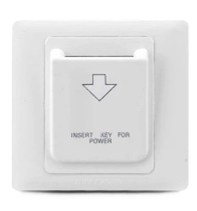
The Magnetic Key Card Switch is a device that utilizes a magnetic strip on a card to control the opening and closing of an electrical switch. It is widely used in access control systems, such as hotel room power management, secure entry systems, and automated locking mechanisms. The switch operates by detecting the unique magnetic pattern encoded on the card, ensuring secure and reliable operation.
Explore Projects Built with Magnetic Key Card Switch
 Open Project in Cirkit Designer
 Open Project in Cirkit Designer
 Open Project in Cirkit Designer
 Open Project in Cirkit Designer
Explore Projects Built with Magnetic Key Card Switch
Open Project in Cirkit DesignerOpen Project in Cirkit DesignerOpen Project in Cirkit DesignerOpen Project in Cirkit DesignerCommon Applications:
- Hotel room power control (activating room power when the card is inserted)
- Secure access control for doors and gates
- Industrial equipment activation
- Time-based access systems in offices or restricted areas
Technical Specifications
Key Technical Details:
- Operating Voltage: 5V to 12V DC
- Current Consumption: 50mA (typical)
- Switch Type: Normally Open (NO) or Normally Closed (NC), depending on configuration
- Card Type: Magnetic stripe card (ISO/IEC 7810 standard)
- Detection Method: Magnetic stripe pattern recognition
- Output Type: Digital signal (High/Low)
- Operating Temperature: -10°C to 50°C
- Dimensions: 86mm x 86mm x 35mm (typical wall-mounted size)
Pin Configuration and Descriptions:
| Pin Name | Description | Notes |
|---|---|---|
| VCC | Power supply input (5V to 12V DC) | Connect to the positive terminal of the power source. |
| GND | Ground | Connect to the ground of the circuit. |
| OUT | Digital output signal | Outputs HIGH when the correct card is detected. |
| LED+ | Positive terminal for status LED | Optional connection for an external LED. |
| LED- | Negative terminal for status LED | Connect to ground for LED operation. |
Usage Instructions
How to Use the Magnetic Key Card Switch in a Circuit:
Power Connection:
- Connect the VCC pin to a 5V or 12V DC power source.
- Connect the GND pin to the ground of the power source.
Output Signal:
- The OUT pin provides a digital signal. It outputs a HIGH signal when the correct magnetic card is detected and a LOW signal otherwise.
- This output can be connected to a microcontroller (e.g., Arduino) or a relay module to control other devices.
Optional LED Indicator:
- Connect an external LED to the LED+ and LED- pins to visually indicate the card detection status.
Card Usage:
- Swipe or insert the magnetic card into the switch. Ensure the card's magnetic stripe is aligned with the reader's sensor.
Important Considerations:
- Ensure the magnetic card is clean and undamaged for reliable operation.
- Avoid placing the switch near strong magnetic fields, as they may interfere with detection.
- Use a regulated power supply to prevent voltage fluctuations that could damage the switch.
Example: Connecting to an Arduino UNO
Below is an example of how to connect the Magnetic Key Card Switch to an Arduino UNO and read the output signal.
Circuit Connections:
- VCC → 5V pin on Arduino
- GND → GND pin on Arduino
- OUT → Digital pin 2 on Arduino
Arduino Code:
// Magnetic Key Card Switch Example
// This code reads the output signal from the switch and turns on an LED
// when the correct card is detected.

const int switchPin = 2;  // Pin connected to the OUT pin of the switch
const int ledPin = 13;    // Built-in LED on Arduino

void setup() {
  pinMode(switchPin, INPUT);  // Set the switch pin as input
  pinMode(ledPin, OUTPUT);    // Set the LED pin as output
  Serial.begin(9600);         // Initialize serial communication
}

void loop() {
  int switchState = digitalRead(switchPin);  // Read the switch state

  if (switchState == HIGH) {
    // If the correct card is detected, turn on the LED
    digitalWrite(ledPin, HIGH);
    Serial.println("Card detected!");
  } else {
    // If no card or incorrect card, turn off the LED
    digitalWrite(ledPin, LOW);
    Serial.println("No card detected.");
  }

  delay(100);  // Small delay for stability
}
Troubleshooting and FAQs
Common Issues:
The switch does not detect the card:
- Ensure the card's magnetic stripe is clean and undamaged.
- Verify that the card is being swiped or inserted in the correct orientation.
- Check the power supply voltage and connections.
Output signal is unstable:
- Use a regulated power supply to avoid voltage fluctuations.
- Ensure the switch is not exposed to strong electromagnetic interference.
LED does not light up:
- Verify the LED connections to the LED+ and LED- pins.
- Check if the correct card is being used.
FAQs:
Can I use any magnetic card with this switch? No, the switch is designed to detect specific magnetic stripe patterns. Ensure the card matches the system's configuration.
What happens if the card is swiped too quickly? The switch may fail to read the magnetic stripe. Swipe the card at a moderate and consistent speed.
Can this switch be used outdoors? The switch is not weatherproof. Use it indoors or in a protected enclosure for outdoor applications.
Is it compatible with RFID cards? No, this switch is designed for magnetic stripe cards only. Use an RFID reader for RFID cards.