Cirkit Designer Logo
Cirkit Designer
Your all-in-one circuit design IDE
Home / 
Component Documentation

How to Use Arduino Uno R4 Minima Complete: Examples, Pinouts, and Specs
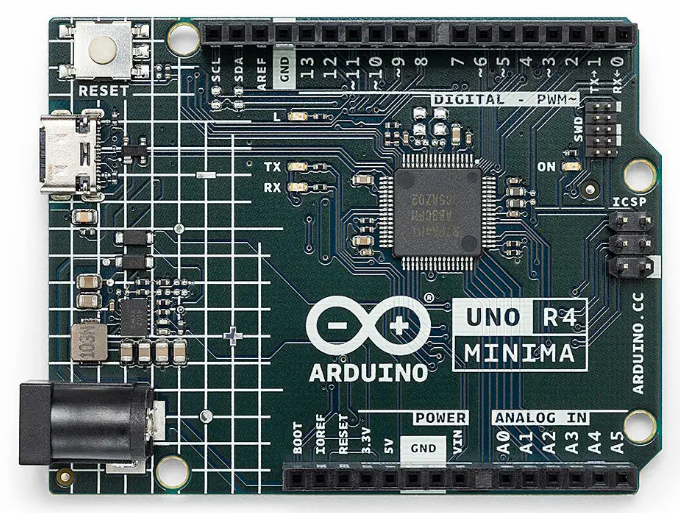

Image of Arduino Uno R4 Minima Complete
Cirkit Designer LogoDesign with Arduino Uno R4 Minima Complete in Cirkit Designer

Introduction

The Arduino Uno R4 Minima Complete (Manufacturer Part ID: ABX00080) is a compact and versatile microcontroller board developed by Arduino. It is based on the ATmega328P microcontroller and is designed to simplify the development of interactive electronic projects. The board features a range of digital and analog input/output pins, USB connectivity for programming, and compatibility with the extensive Arduino ecosystem, making it an ideal choice for both beginners and experienced developers.

Explore Projects Built with Arduino Uno R4 Minima Complete
Use Cirkit Designer to design, explore, and prototype these projects online. Some projects support real-time simulation. Click "Open Project" to start designing instantly!
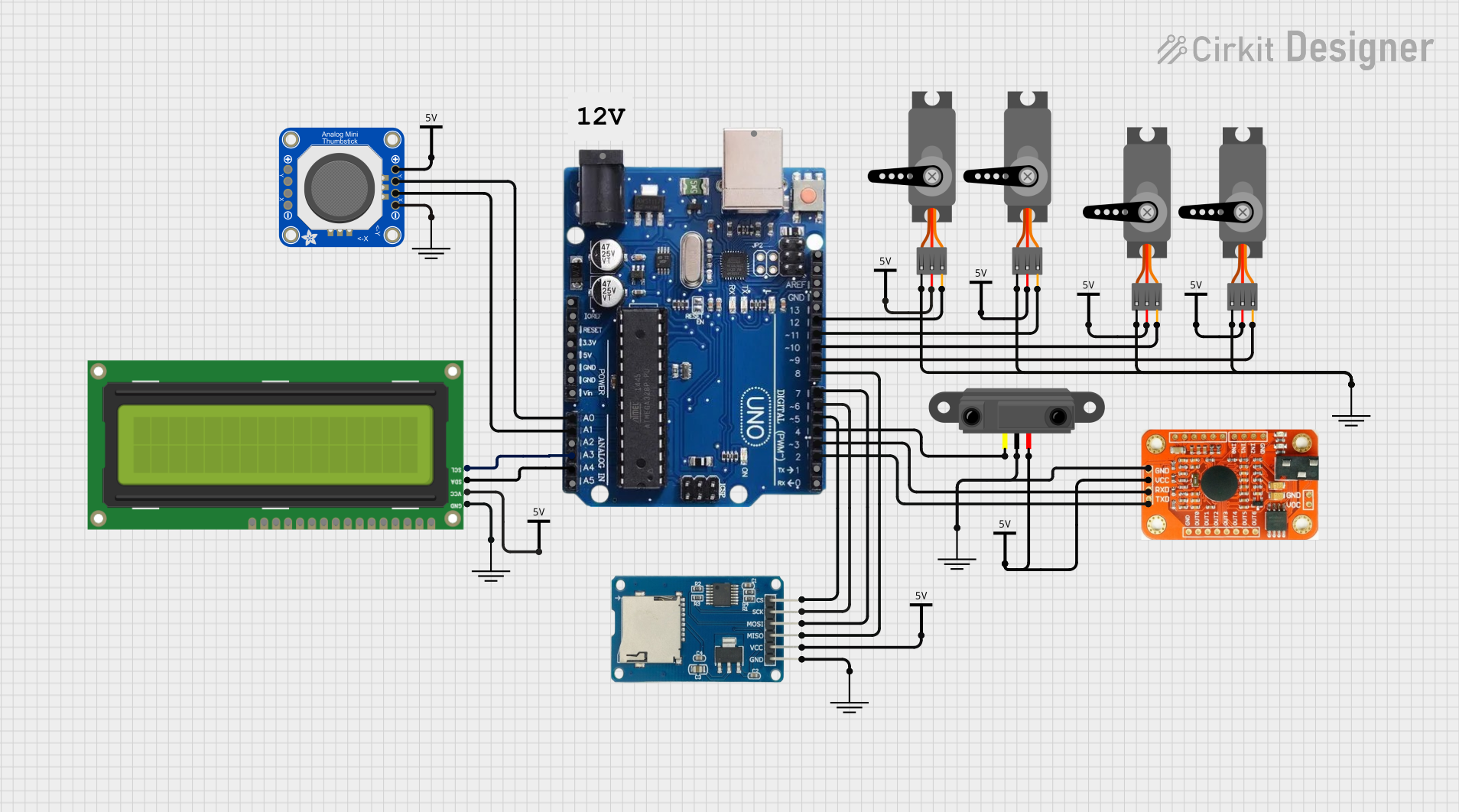
Arduino Uno R3-Based Voice-Controlled Robot with Servo Actuation and SD Logging
Image of wheel: A project utilizing Arduino Uno R4 Minima Complete in a practical application
This circuit features an Arduino Uno R3 as the central microcontroller, interfaced with a variety of components. It includes a voice recognition module for audio input commands, an analog thumbstick for manual control, and multiple servos for actuation. Additionally, the circuit integrates an I2C LCD screen for display purposes, an infrared proximity sensor for distance measurement, and a micro SD card module for data storage.
Cirkit Designer LogoOpen Project in Cirkit Designer
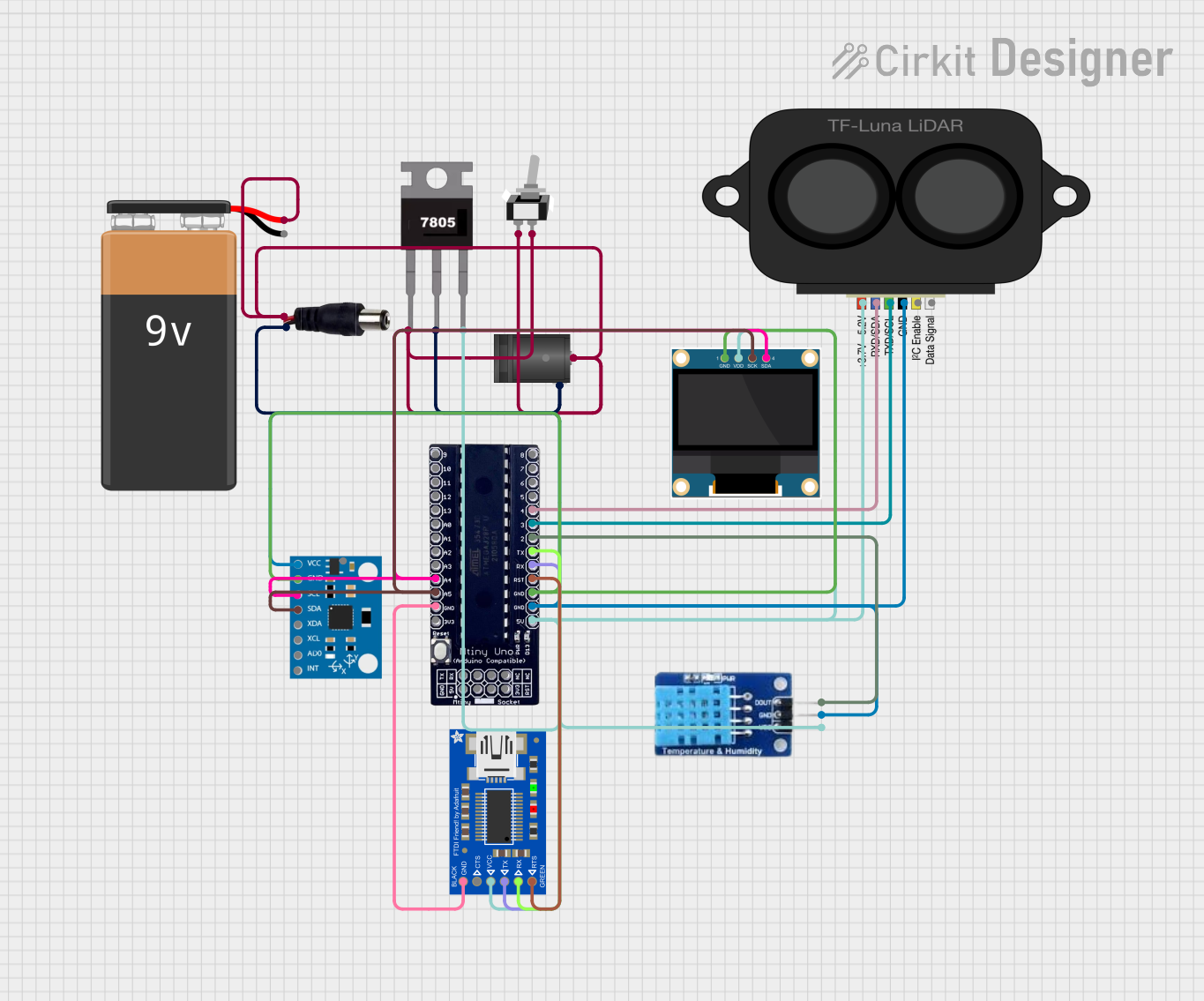
ATmega328P-Based Sensor Hub with OLED Display and LIDAR
Image of TILTPCB: A project utilizing Arduino Uno R4 Minima Complete in a practical application
This circuit features an Mtiny Uno ATmega328P microcontroller as its central processing unit, interfacing with a variety of sensors and peripherals. It includes a 0.96" OLED display and an MPU6050 accelerometer/gyroscope for user interface and motion sensing, respectively. The circuit also integrates a TF LUNA LIDAR for distance measurement, a DHT11 sensor for temperature and humidity readings, and uses a 9V battery with a 7805 voltage regulator for power management. Communication with a computer for programming and data exchange is facilitated by an Adafruit FTDI Friend module.
Cirkit Designer LogoOpen Project in Cirkit Designer
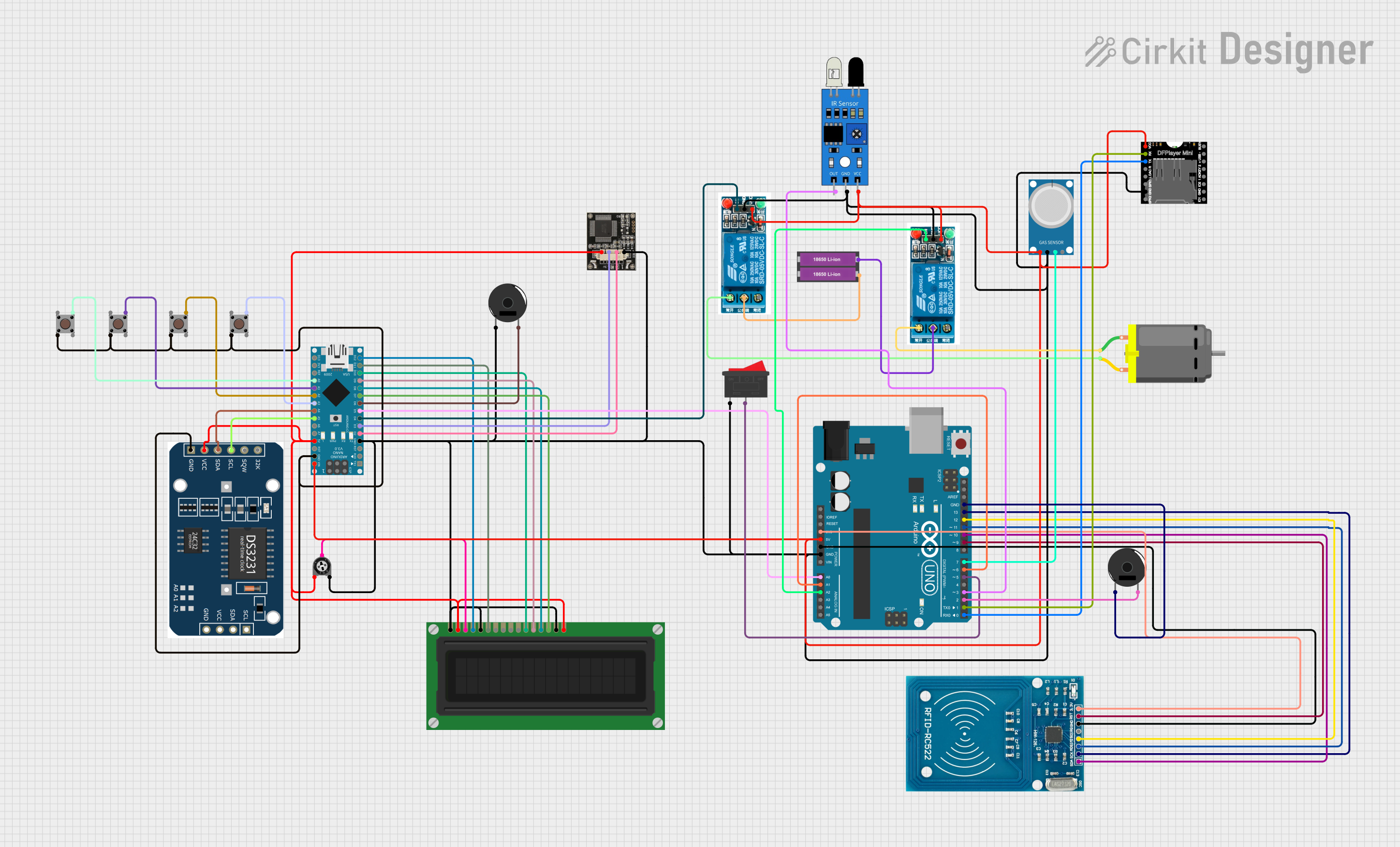
Multifunctional Smart Control System with RFID and Environmental Sensing
Image of Drivesheild_diagram: A project utilizing Arduino Uno R4 Minima Complete in a practical application
This circuit features an Arduino UNO and an Arduino Nano as the main microcontrollers, interfaced with a variety of sensors and modules including an RFID-RC522 for RFID reading, an MQ-4 gas sensor, an IR sensor, and an RTC module for real-time clock functionality. It also includes actuators such as a DC motor controlled by two 5V relays, an LCD display for user interface, and piezo buzzers for audio feedback. The circuit is powered by a 3.3V connection from the UNO to the RFID module and a 5V connection from the UNO to other components, with multiple ground connections for completing the circuits. Pushbuttons and a trimmer potentiometer provide user inputs, and the DFPlayer MINI module is used for audio file playback. The provided code for the microcontrollers is a template with empty setup and loop functions, indicating that custom functionality is to be implemented by the user.
Cirkit Designer LogoOpen Project in Cirkit Designer
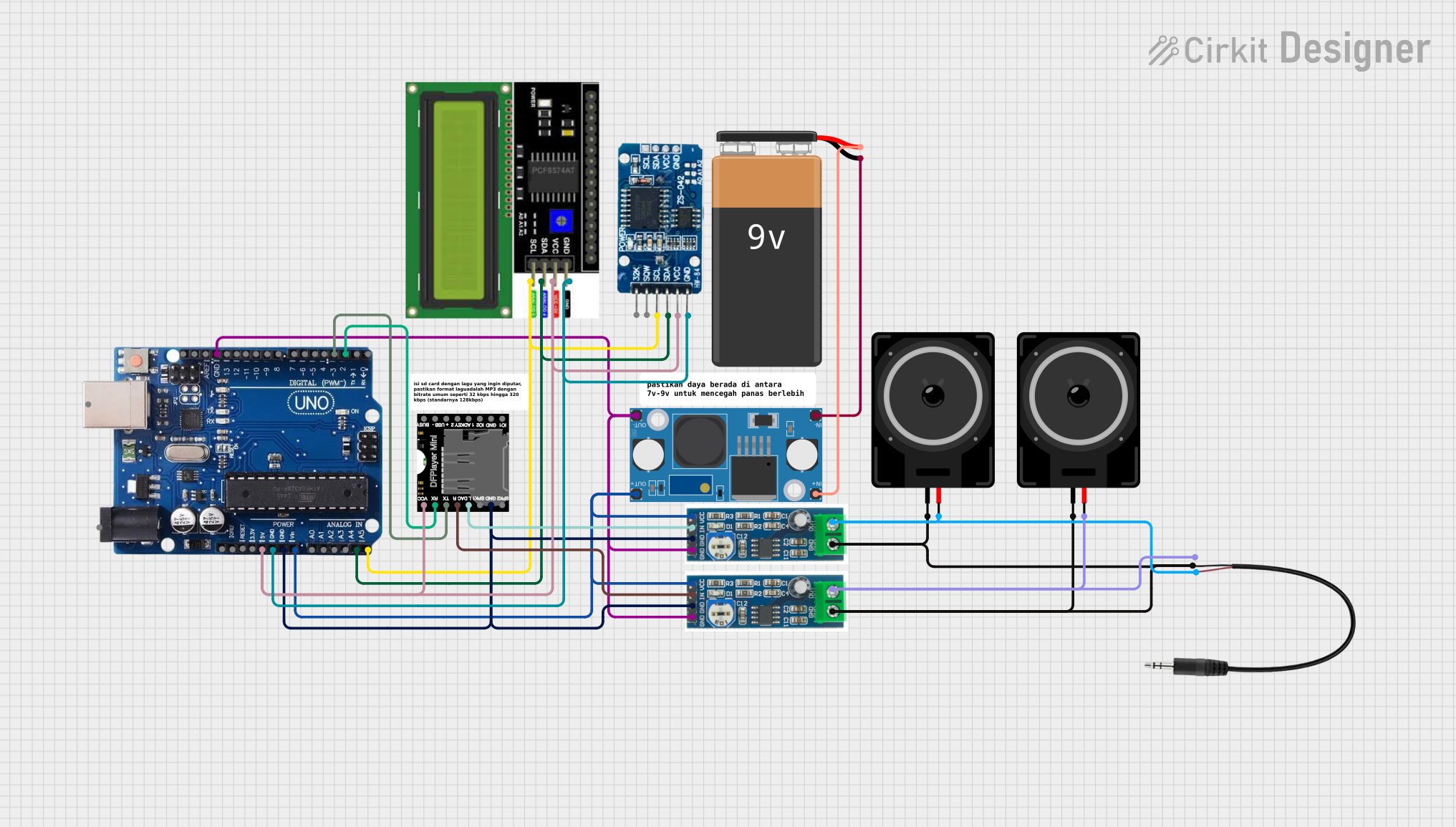
Arduino-Controlled Audio Player with Real-Time Clock and Amplification
Image of alarm using arduno with speaker: A project utilizing Arduino Uno R4 Minima Complete in a practical application
This circuit features an Arduino Uno R3 as the central microcontroller, interfaced with an RTC DS3231 for real-time clock functionality, and a DFPlayer MINI for audio playback. The audio output from the DFPlayer MINI is amplified by two LM386 audio amplifier modules, each driving a loudspeaker, and a 3.5mm audio jack provides additional audio output options. An LCD I2C Display is included for user interface, and a 9V battery with an LM2596 step-down module supplies regulated power to the system.
Cirkit Designer LogoOpen Project in Cirkit Designer

Explore Projects Built with Arduino Uno R4 Minima Complete

Use Cirkit Designer to design, explore, and prototype these projects online. Some projects support real-time simulation. Click "Open Project" to start designing instantly!
Image of wheel: A project utilizing Arduino Uno R4 Minima Complete in a practical application
Arduino Uno R3-Based Voice-Controlled Robot with Servo Actuation and SD Logging
This circuit features an Arduino Uno R3 as the central microcontroller, interfaced with a variety of components. It includes a voice recognition module for audio input commands, an analog thumbstick for manual control, and multiple servos for actuation. Additionally, the circuit integrates an I2C LCD screen for display purposes, an infrared proximity sensor for distance measurement, and a micro SD card module for data storage.
Cirkit Designer LogoOpen Project in Cirkit Designer
Image of TILTPCB: A project utilizing Arduino Uno R4 Minima Complete in a practical application
ATmega328P-Based Sensor Hub with OLED Display and LIDAR
This circuit features an Mtiny Uno ATmega328P microcontroller as its central processing unit, interfacing with a variety of sensors and peripherals. It includes a 0.96" OLED display and an MPU6050 accelerometer/gyroscope for user interface and motion sensing, respectively. The circuit also integrates a TF LUNA LIDAR for distance measurement, a DHT11 sensor for temperature and humidity readings, and uses a 9V battery with a 7805 voltage regulator for power management. Communication with a computer for programming and data exchange is facilitated by an Adafruit FTDI Friend module.
Cirkit Designer LogoOpen Project in Cirkit Designer
Image of Drivesheild_diagram: A project utilizing Arduino Uno R4 Minima Complete in a practical application
Multifunctional Smart Control System with RFID and Environmental Sensing
This circuit features an Arduino UNO and an Arduino Nano as the main microcontrollers, interfaced with a variety of sensors and modules including an RFID-RC522 for RFID reading, an MQ-4 gas sensor, an IR sensor, and an RTC module for real-time clock functionality. It also includes actuators such as a DC motor controlled by two 5V relays, an LCD display for user interface, and piezo buzzers for audio feedback. The circuit is powered by a 3.3V connection from the UNO to the RFID module and a 5V connection from the UNO to other components, with multiple ground connections for completing the circuits. Pushbuttons and a trimmer potentiometer provide user inputs, and the DFPlayer MINI module is used for audio file playback. The provided code for the microcontrollers is a template with empty setup and loop functions, indicating that custom functionality is to be implemented by the user.
Cirkit Designer LogoOpen Project in Cirkit Designer
Image of alarm using arduno with speaker: A project utilizing Arduino Uno R4 Minima Complete in a practical application
Arduino-Controlled Audio Player with Real-Time Clock and Amplification
This circuit features an Arduino Uno R3 as the central microcontroller, interfaced with an RTC DS3231 for real-time clock functionality, and a DFPlayer MINI for audio playback. The audio output from the DFPlayer MINI is amplified by two LM386 audio amplifier modules, each driving a loudspeaker, and a 3.5mm audio jack provides additional audio output options. An LCD I2C Display is included for user interface, and a 9V battery with an LM2596 step-down module supplies regulated power to the system.
Cirkit Designer LogoOpen Project in Cirkit Designer

Common Applications and Use Cases

  • Prototyping and development of IoT devices
  • Robotics and automation projects
  • Sensor data acquisition and processing
  • Educational tools for learning embedded systems
  • Home automation and smart devices

Technical Specifications

The following table outlines the key technical details of the Arduino Uno R4 Minima Complete:

Specification Details
Microcontroller ATmega328P
Operating Voltage 5V
Input Voltage (recommended) 7-12V
Input Voltage (limit) 6-20V
Digital I/O Pins 14 (6 of which provide PWM output)
Analog Input Pins 6
DC Current per I/O Pin 20 mA
Flash Memory 32 KB (0.5 KB used by bootloader)
SRAM 2 KB
EEPROM 1 KB
Clock Speed 16 MHz
USB Connectivity USB-B port for programming and power
Dimensions 68.6 mm x 53.4 mm
Weight 25 g

Pin Configuration and Descriptions

The Arduino Uno R4 Minima Complete features the following pin configuration:

Digital Pins

Pin Number Function Description
D0 - D1 UART (RX, TX) Serial communication pins
D2 - D13 Digital I/O General-purpose digital input/output pins
D3, D5, D6, D9, D10, D11 PWM Output Pulse Width Modulation capable pins

Analog Pins

Pin Number Function Description
A0 - A5 Analog Input Read analog signals (0-5V)

Power Pins

Pin Name Function Description
VIN Input Voltage External power input (7-12V recommended)
5V Regulated 5V Output Provides 5V regulated power
3.3V Regulated 3.3V Output Provides 3.3V regulated power
GND Ground Common ground
RESET Reset Resets the microcontroller

Usage Instructions

How to Use the Arduino Uno R4 Minima Complete in a Circuit

  1. Powering the Board:

    • Connect the board to your computer using a USB-B cable for programming and power.
    • Alternatively, use an external power supply (7-12V) via the VIN pin or DC barrel jack.
  2. Programming the Board:

    • Install the Arduino IDE from the official Arduino website.
    • Select "Arduino Uno" as the board type in the IDE.
    • Write your code in the IDE and upload it to the board via the USB connection.
  3. Connecting Components:

    • Use the digital and analog pins to connect sensors, actuators, and other peripherals.
    • Ensure that the current drawn by connected components does not exceed the pin's maximum rating (20 mA).
  4. Using PWM Pins:

    • Connect devices like LEDs or motors to PWM-capable pins (D3, D5, D6, D9, D10, D11) for variable control.

Important Considerations and Best Practices

  • Avoid exceeding the voltage and current limits of the pins to prevent damage to the board.
  • Use appropriate resistors when connecting LEDs to prevent overcurrent.
  • For high-current devices, use external power supplies and transistors or relays for switching.
  • Always double-check connections before powering the board to avoid short circuits.

Example Code for Arduino Uno R4 Minima Complete

The following example demonstrates how to blink an LED connected to pin D13:

// Blink an LED connected to pin D13
// This example toggles the LED on and off every second.

void setup() {
  pinMode(13, OUTPUT); // Set pin 13 as an output
}

void loop() {
  digitalWrite(13, HIGH); // Turn the LED on
  delay(1000);            // Wait for 1 second
  digitalWrite(13, LOW);  // Turn the LED off
  delay(1000);            // Wait for 1 second
}

Troubleshooting and FAQs

Common Issues and Solutions

  1. The board is not detected by the computer:

    • Ensure the USB cable is properly connected and functional.
    • Verify that the correct COM port is selected in the Arduino IDE.
    • Install or update the USB drivers from the Arduino website.
  2. Code does not upload to the board:

    • Check that the correct board type ("Arduino Uno") is selected in the IDE.
    • Ensure no other application is using the COM port.
    • Press the RESET button on the board before uploading.
  3. Components connected to the board are not working:

    • Verify the wiring and connections.
    • Check that the components are functional and compatible with the board.
    • Ensure the power supply is adequate for the connected components.

FAQs

Q: Can I power the board with a battery?
A: Yes, you can use a 9V battery connected to the VIN pin or DC barrel jack.

Q: What is the maximum current the board can supply?
A: The 5V pin can supply up to 500 mA when powered via USB, or up to 1A when using an external power supply.

Q: Is the Arduino Uno R4 Minima Complete compatible with shields?
A: Yes, it is compatible with most Arduino Uno shields.

Q: Can I use the board for wireless communication?
A: The board itself does not have built-in wireless capabilities, but you can use external modules like the ESP8266 or Bluetooth modules for wireless communication.