A servo is a rotary actuator that allows for precise control of angular position, velocity, and acceleration. It consists of a motor coupled to a sensor for position feedback, along with a control circuit. Servos are widely used in robotics, automation, remote-controlled vehicles, and industrial machinery due to their ability to provide accurate and repeatable motion.
Explore Projects Built with Servo
Use Cirkit Designer to design, explore, and prototype these projects online. Some projects support real-time simulation. Click "Open Project" to start designing instantly!
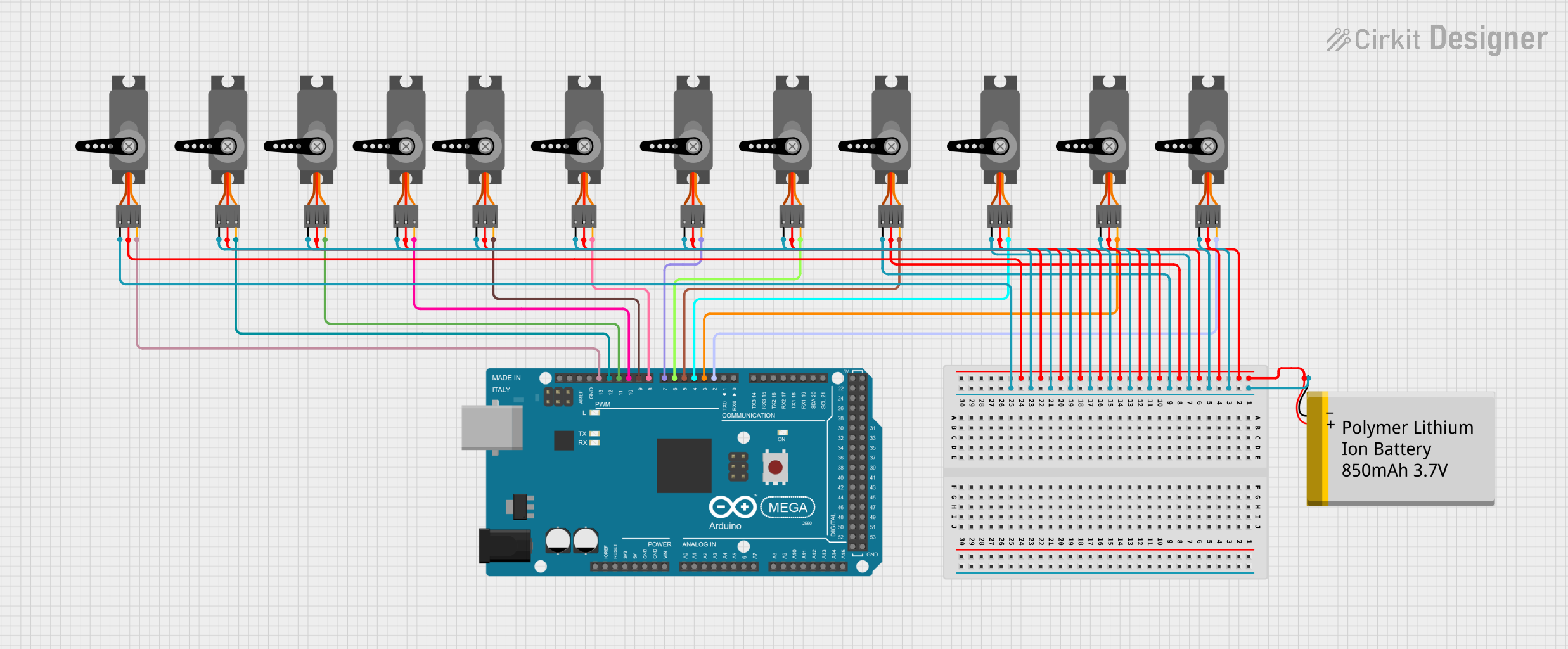
This circuit consists of an Arduino Mega 2560 microcontroller connected to twelve servo motors, each individually controlled by a distinct PWM pin on the Arduino. The servos are powered by a single Polymer Lithium Ion Battery, with all servos sharing a common power (VCC) and ground (GND) connection. The embedded code on the Arduino is designed to randomly position each servo within a 0 to 180-degree range, with a random delay between movements, demonstrating a multi-servo control system possibly for applications like robotics or animatronics.
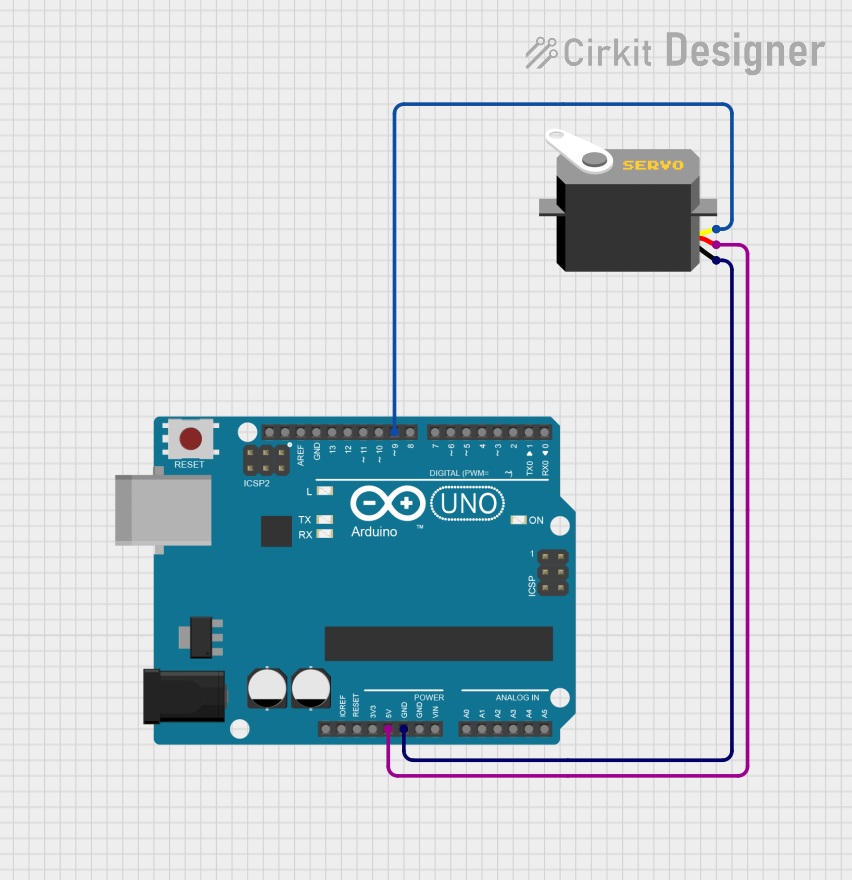
This circuit consists of an Arduino UNO microcontroller connected to a servo motor. The Arduino provides power (5V and GND) to the servo and controls its position through a pulse signal on pin D9. The embedded code on the Arduino is programmed to smoothly move the servo between 0 and 180 degrees, creating a sweeping motion.
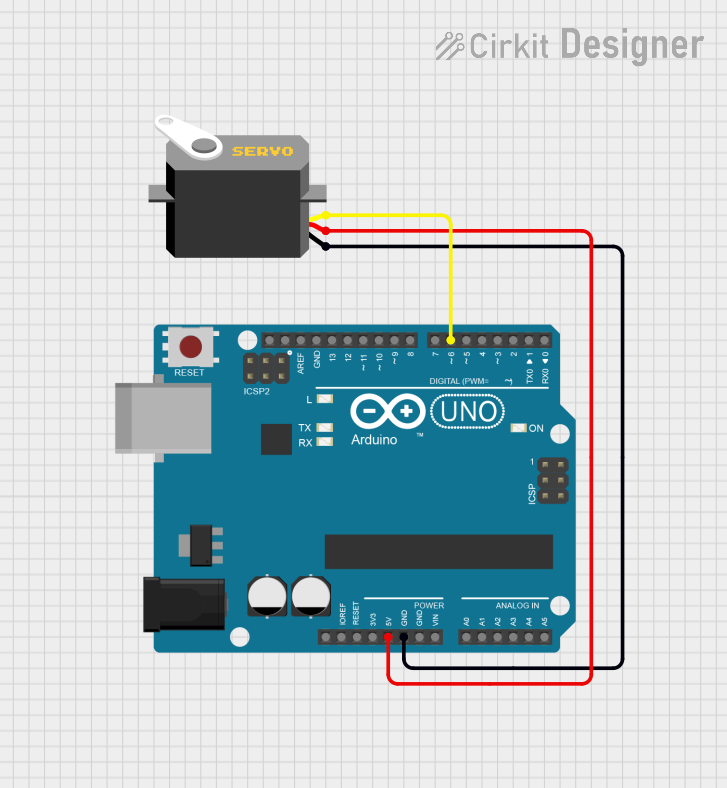
This circuit consists of an Arduino UNO microcontroller connected to a servo motor. The Arduino provides power (5V) and ground connections to the servo, as well as a control signal through one of its digital pins (D6). The embedded code on the Arduino is set up to control the servo's position, sending it to a fixed angle upon each loop iteration.
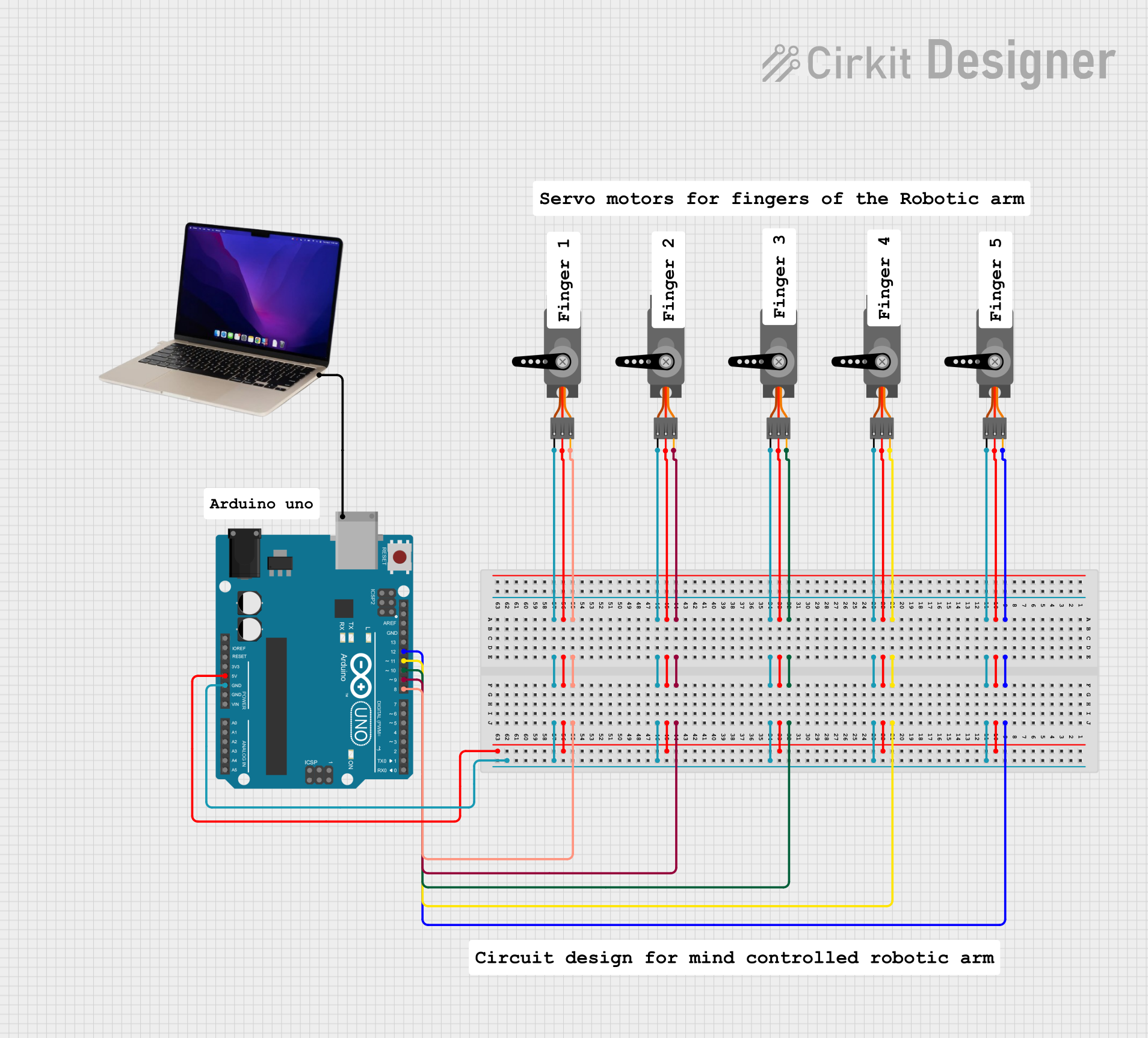
This circuit consists of an Arduino UNO microcontroller connected to five servo motors. The servos are powered by the Arduino's 5V output and share a common ground. Each servo's PWM control pin is individually connected to a digital pin on the Arduino (D8, D9, D10, D11, D12), allowing for independent control of each servo's position. The Arduino is also connected to a laptop via USB for programming and power.
Robotics: For controlling robotic arms, grippers, and joints.
RC Vehicles: Steering and throttle control in remote-controlled cars, boats, and planes.
Automation: Used in conveyor systems, camera gimbals, and automated manufacturing.
DIY Projects: Popular in hobbyist projects involving Arduino and other microcontrollers.
Technical Specifications
Below are the general technical specifications for a standard hobby servo. Note that specifications may vary depending on the specific model and manufacturer.
Key Technical Details
Operating Voltage: 4.8V to 6.0V (typical range)
Torque: 1.5 kg-cm to 20 kg-cm (varies by model)
Speed: 0.1 to 0.2 seconds per 60° (at rated voltage)
Control Signal: Pulse Width Modulation (PWM)
Angle Range: 0° to 180° (standard), some models support 360° continuous rotation
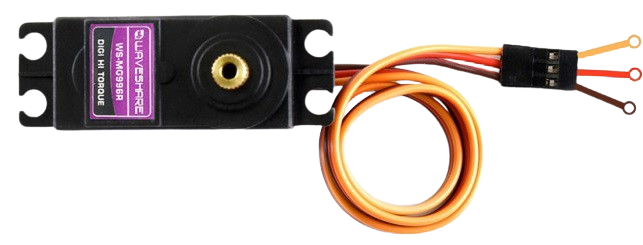
Connector Type: 3-pin (Signal, VCC, GND)
Pin Configuration and Descriptions
The servo motor typically has a 3-pin connector with the following configuration:
Pin Number
Name
Description
1
Signal
Receives PWM signal for position control
2
VCC
Power supply (4.8V to 6.0V)
3
GND
Ground connection
Usage Instructions
How to Use the Servo in a Circuit
Connect the Servo to a Power Source:
Connect the VCC pin to a 5V power supply (or as specified by the servo's datasheet).
Connect the GND pin to the ground of the power supply and the microcontroller.
Connect the Signal Pin:
Connect the Signal pin to a PWM-capable pin on your microcontroller (e.g., Arduino).
Control the Servo:
Use PWM signals to control the servo's position. The pulse width determines the angle:
1 ms pulse: 0° position
1.5 ms pulse: 90° position (center)
2 ms pulse: 180° position
Important Considerations and Best Practices
Power Supply: Ensure the power supply can provide sufficient current for the servo. High-torque servos may require up to 2A.
Avoid Overloading: Do not exceed the torque rating of the servo to prevent damage.
PWM Signal: Use a stable PWM signal to avoid jittery or erratic movements.
External Power: For multiple servos, use an external power source to avoid overloading the microcontroller's power regulator.
Example: Controlling a Servo with Arduino UNO
Below is an example code to control a servo using an Arduino UNO:
#include <Servo.h> // Include the Servo library

Servo myServo; // Create a Servo object

void setup() {
  myServo.attach(9); // Attach the servo to pin 9
}

void loop() {
  myServo.write(0); // Move servo to 0 degrees
  delay(1000);      // Wait for 1 second

  myServo.write(90); // Move servo to 90 degrees
  delay(1000);       // Wait for 1 second

  myServo.write(180); // Move servo to 180 degrees
  delay(1000);        // Wait for 1 second
}
Code Explanation
The Servo library simplifies controlling the servo.
The attach() function links the servo to a specific PWM pin.
The write() function sets the servo's position in degrees (0° to 180°).
Delays are used to allow the servo to reach the desired position before the next command.
Troubleshooting and FAQs
Common Issues and Solutions
Servo Not Moving:
Cause: Incorrect wiring or insufficient power supply.
Solution: Double-check connections and ensure the power supply meets the servo's requirements.
Jittery or Erratic Movements:
Cause: Unstable PWM signal or electrical noise.
Solution: Use a decoupling capacitor near the servo's power pins and ensure a clean PWM signal.
Overheating:
Cause: Overloading the servo or continuous operation at high torque.
Solution: Reduce the load or allow the servo to cool down periodically.
Limited Range of Motion:
Cause: Mechanical obstruction or incorrect PWM signal.
Solution: Check for physical obstructions and verify the PWM signal's pulse width.
FAQs
Q1: Can I connect multiple servos to an Arduino?
A1: Yes, but ensure the power supply can handle the combined current draw. Use an external power source if needed.
Q2: Can a servo rotate continuously?
A2: Standard servos have a limited range (0° to 180°). Continuous rotation servos are available for applications requiring full 360° motion.
Q3: How do I know the torque required for my application?
A3: Calculate the torque based on the load and lever arm length. Choose a servo with a torque rating higher than your calculated requirement.
Q4: Can I use a servo without a microcontroller?
A4: Yes, you can use a servo tester or a circuit that generates PWM signals to control the servo without a microcontroller.

 Open Project in Cirkit Designer