
How to Use Atolla 4-Port USB 3.0 Hub: Examples, Pinouts, and Specs
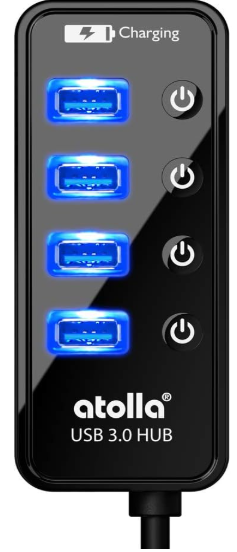
 Design with Atolla 4-Port USB 3.0 Hub in Cirkit Designer
Introduction
The Atolla 4-Port USB 3.0 Hub is a compact and efficient device designed to expand a single USB port into four, enabling users to connect multiple USB devices simultaneously. It supports high-speed data transfer rates of up to 5 Gbps, making it ideal for transferring large files, connecting peripherals, or charging devices. Its plug-and-play functionality ensures ease of use without the need for additional drivers.
Explore Projects Built with Atolla 4-Port USB 3.0 Hub
 Open Project in Cirkit Designer
 Open Project in Cirkit Designer
 Open Project in Cirkit Designer
 Open Project in Cirkit Designer
Explore Projects Built with Atolla 4-Port USB 3.0 Hub
Open Project in Cirkit DesignerOpen Project in Cirkit DesignerOpen Project in Cirkit DesignerOpen Project in Cirkit DesignerCommon Applications and Use Cases
- Expanding USB connectivity for laptops, desktops, or gaming consoles.
- Connecting peripherals such as keyboards, mice, printers, and external storage devices.
- High-speed data transfer for external hard drives, flash drives, and other storage media.
- Charging low-power USB devices like smartphones or wireless earbuds.
Technical Specifications
The Atolla 4-Port USB 3.0 Hub is designed to meet the needs of modern users with its robust features and reliable performance.
Key Technical Details
| Specification | Value |
|---|---|
| USB Standard | USB 3.0 (backward compatible with USB 2.0/1.1) |
| Data Transfer Rate | Up to 5 Gbps |
| Number of Ports | 4 |
| Power Supply | Bus-powered (via USB) or optional external power adapter |
| Compatibility | Windows, macOS, Linux, and other USB-enabled devices |
| Cable Length | Approximately 2 feet (60 cm) |
| Dimensions | 3.9 x 1.2 x 0.8 inches (approx.) |
| Weight | 2.1 ounces (approx.) |
Port Configuration and Descriptions
| Port Number | Description |
|---|---|
| Port 1 | USB 3.0 port for data transfer or device charging |
| Port 2 | USB 3.0 port for data transfer or device charging |
| Port 3 | USB 3.0 port for data transfer or device charging |
| Port 4 | USB 3.0 port for data transfer or device charging |
Usage Instructions
How to Use the Atolla 4-Port USB 3.0 Hub
- Connect the Hub to Your Device: Plug the USB cable of the hub into an available USB port on your computer or other host device.
- Connect USB Devices: Attach your USB devices (e.g., flash drives, keyboards, or external hard drives) to the hub's ports.
- Optional External Power: If you need to power high-energy devices (e.g., external hard drives), connect an external power adapter (not included) to the hub's power input port.
- Verify Connection: Ensure that the connected devices are recognized by your computer. The hub's LED indicator will light up to confirm power and connectivity.
Important Considerations and Best Practices
- Avoid Overloading: The hub is bus-powered by default, meaning it draws power from the host device. Avoid connecting multiple high-power devices simultaneously unless using an external power adapter.
- Backward Compatibility: While the hub supports USB 2.0 and USB 1.1 devices, data transfer rates will be limited to the maximum speed of the connected device.
- Cable Management: Use the included cable length wisely to avoid tangling or strain on the hub's connection.
- Driver-Free Operation: The hub is plug-and-play and does not require additional drivers for most operating systems.
Example: Connecting to an Arduino UNO
The Atolla 4-Port USB 3.0 Hub can be used to connect multiple peripherals to an Arduino UNO, such as a keyboard, mouse, or external storage for data logging. Below is an example of how to use the hub in such a setup:
// Example: Using the Atolla USB Hub with Arduino UNO
// This code demonstrates basic serial communication with a device
// connected via the USB hub.

void setup() {
  Serial.begin(9600); // Initialize serial communication at 9600 baud
  while (!Serial) {
    ; // Wait for the serial port to connect (for Leonardo/Micro boards)
  }
  Serial.println("USB Hub connected to Arduino UNO!");
}

void loop() {
  if (Serial.available() > 0) {
    // Read incoming data from the serial port
    char received = Serial.read();
    Serial.print("Received: ");
    Serial.println(received);
  }
}
Troubleshooting and FAQs
Common Issues and Solutions
Devices Not Recognized:
- Ensure the hub is securely connected to the host device.
- Check if the connected devices are functional by plugging them directly into the host device.
- If using high-power devices, connect an external power adapter to the hub.
Slow Data Transfer Speeds:
- Verify that the connected devices support USB 3.0 for maximum speed.
- Ensure the hub is connected to a USB 3.0 port on the host device.
Hub Not Powering Devices:
- For high-power devices, use an external power adapter to provide additional power.
- Check the power requirements of the connected devices to ensure compatibility.
Intermittent Connectivity:
- Avoid using excessively long USB cables, as they may cause signal degradation.
- Ensure the hub is not overloaded with too many devices drawing power simultaneously.
FAQs
Q: Can I use the Atolla 4-Port USB 3.0 Hub with a gaming console?
A: Yes, the hub is compatible with most gaming consoles that support USB peripherals, such as PlayStation and Xbox.
Q: Does the hub support charging devices?
A: Yes, the hub can charge low-power devices. However, for faster charging or high-power devices, an external power adapter is recommended.
Q: Is the hub compatible with USB-C devices?
A: The hub uses a USB-A connector. To use it with USB-C devices, a USB-C to USB-A adapter is required.
Q: Can I connect multiple external hard drives to the hub?
A: Yes, but it is recommended to use an external power adapter to ensure sufficient power for all connected drives.
This concludes the documentation for the Atolla 4-Port USB 3.0 Hub.