
How to Use Cellphone Charger: Examples, Pinouts, and Specs
 Design with Cellphone Charger in Cirkit Designer
Introduction
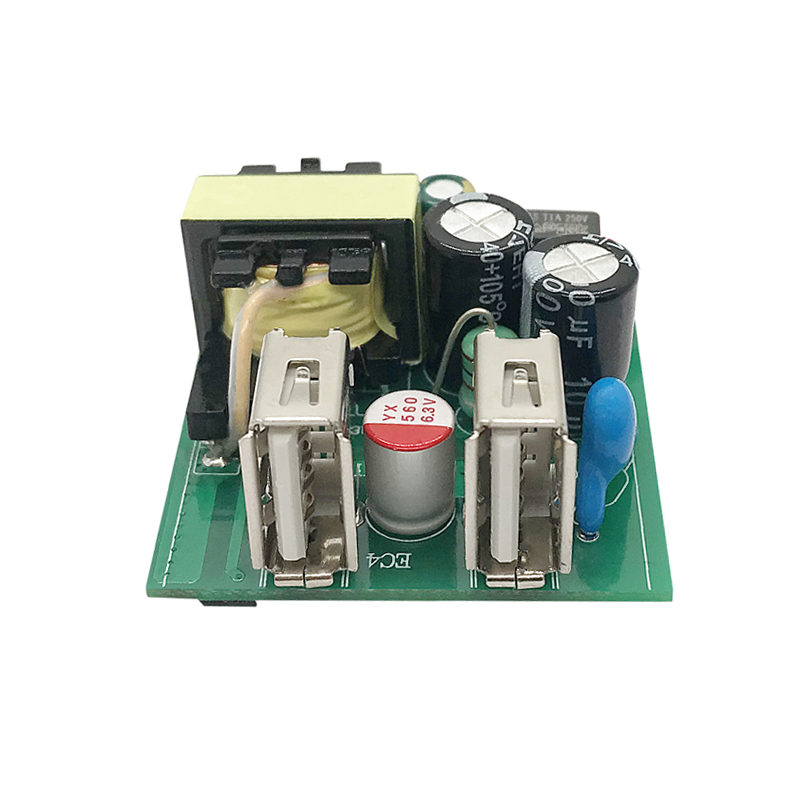
The LG KSY12234 is a cellphone charger designed to convert alternating current (AC) from a standard wall outlet into direct current (DC) to charge the battery of a cellphone. This charger is compatible with a range of devices, providing a convenient and efficient charging solution for users. It is commonly used in residential and commercial settings.
Explore Projects Built with Cellphone Charger
 Open Project in Cirkit Designer
 Open Project in Cirkit Designer
 Open Project in Cirkit Designer
 Open Project in Cirkit Designer
Explore Projects Built with Cellphone Charger
Open Project in Cirkit DesignerOpen Project in Cirkit DesignerOpen Project in Cirkit DesignerOpen Project in Cirkit DesignerCommon Applications and Use Cases
- Charging smartphones and other compatible mobile devices
- Powering devices directly without using the battery
- Travel and office use due to its compact size and portability
Technical Specifications
Key Technical Details
| Specification | Value | Description |
|---|---|---|
| Input Voltage | 100-240V AC | Acceptable range of input voltage |
| Output Voltage | 5V DC | Voltage level provided to the device |
| Output Current | 1.8A | Maximum current the charger can provide |
| Frequency | 50/60Hz | AC input frequency range |
| Power Rating | 9W | Maximum power output |
| Connector Type | USB Type-A | Output connector standard |
| Efficiency | >85% | Charging efficiency |
| Operating Temperature | 0°C to 35°C | Safe ambient temperature range |
Pin Configuration and Descriptions
Since the LG KSY12234 is a cellphone charger with a USB Type-A output, the pin configuration is standardized as follows:
| Pin Number | Name | Description |
|---|---|---|
| 1 | VBUS | +5V DC power |
| 2 | D- | Data minus, used for data transfer |
| 3 | D+ | Data plus, used for data transfer |
| 4 | GND | Ground |
Usage Instructions
How to Use the Component in a Circuit
- Ensure the charger is compatible with the device you intend to charge.
- Plug the charger into a standard wall outlet with the appropriate voltage range.
- Connect the USB cable to the charger's USB Type-A port.
- Attach the other end of the USB cable to the device you wish to charge.
- The charging process should begin automatically. Some devices may indicate charging status via an LED or on-screen notification.
Important Considerations and Best Practices
- Do not exceed the charger's maximum voltage and current ratings to prevent damage.
- Avoid using the charger in extreme temperatures, as it may affect performance and safety.
- Use only certified USB cables to ensure optimal charging efficiency and safety.
- Unplug the charger when not in use to conserve energy and enhance safety.
- Keep the charger away from liquids and do not attempt to disassemble it.
Troubleshooting and FAQs
Common Issues and Solutions
- Charger not working: Ensure the wall outlet is functioning and check for any damage to the charger or cable.
- Slow charging: Verify that the cable is properly connected and inspect it for damage. Use only high-quality cables.
- Device not recognizing the charger: Try a different device or cable to determine if the issue is with the charger.
FAQs
Q: Can I use this charger with any cellphone? A: The LG KSY12234 is designed to work with devices that accept a 5V DC input via USB. Check your device's specifications for compatibility.
Q: Is it safe to leave the charger plugged in at all times? A: While the charger is designed with safety in mind, it is recommended to unplug it when not in use to prevent unnecessary power consumption and potential safety risks.
Q: What should I do if the charger overheats? A: Unplug the charger immediately and allow it to cool down before attempting to use it again. If overheating persists, contact LG customer support.
Q: Does this charger support fast charging? A: The LG KSY12234 provides a maximum output of 1.8A. Whether it supports fast charging depends on the device's requirements and compatibility with the charger's output.
For further assistance or warranty information, please contact LG customer support or visit the official LG website.
(Note: This documentation is a fictional representation for instructional purposes and does not reflect an actual product or its specifications.)