
How to Use ROCKBLOCK: Examples, Pinouts, and Specs
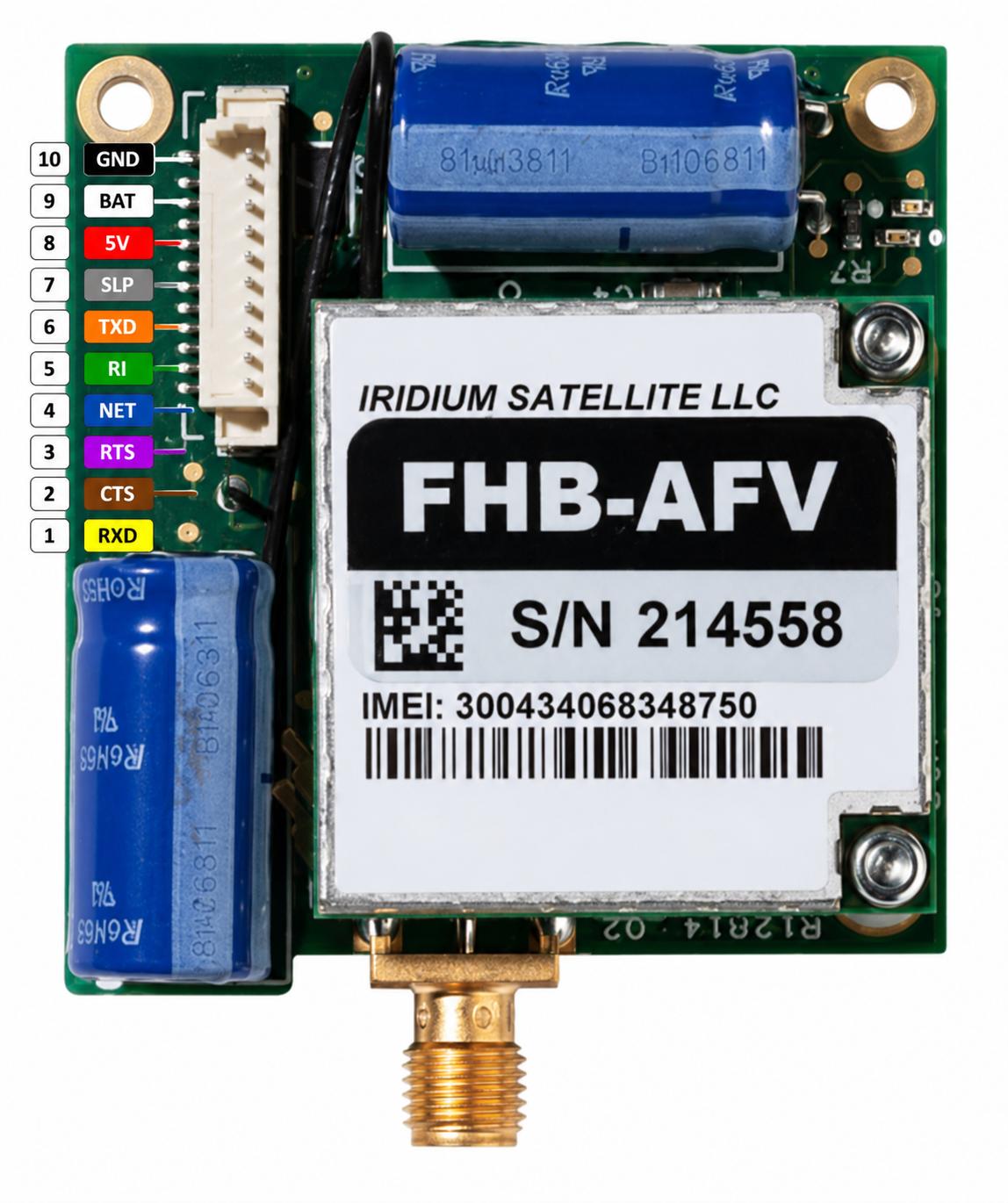
 Design with ROCKBLOCK in Cirkit Designer
Introduction
The ROCKBLOCK, manufactured by Adafruit, is a compact satellite communication device designed for two-way messaging and tracking. It operates via the Iridium satellite network, making it an ideal solution for communication in remote areas where traditional cellular networks are unavailable. This device is widely used in applications such as remote monitoring, emergency communication, asset tracking, and IoT deployments in isolated locations.
The ROCKBLOCK is particularly valued for its small form factor, low power consumption, and reliable global coverage, making it a versatile tool for developers and engineers working on satellite-based communication systems.
Explore Projects Built with ROCKBLOCK
 Open Project in Cirkit Designer
 Open Project in Cirkit Designer
 Open Project in Cirkit Designer
 Open Project in Cirkit Designer
Explore Projects Built with ROCKBLOCK
Open Project in Cirkit DesignerOpen Project in Cirkit DesignerOpen Project in Cirkit DesignerOpen Project in Cirkit DesignerTechnical Specifications
Below are the key technical details of the ROCKBLOCK:
| Specification | Value |
|---|---|
| Dimensions | 45 x 45 x 15 mm |
| Weight | 40 grams |
| Operating Voltage | 5V (via USB) or 3.7V to 5V (via external power supply) |
| Power Consumption | Idle: ~20mA, Transmit: ~190mA (average), Peak: ~1.5A |
| Communication Protocol | Serial UART (3.3V logic) |
| Satellite Network | Iridium |
| Data Rate | 2.4 kbps |
| Operating Temperature | -40°C to +85°C |
| Antenna | External patch antenna (included) |
| Interface | 0.1" pitch header pins for power, UART, and control signals |
Pin Configuration and Descriptions
The ROCKBLOCK features a 10-pin header for interfacing with external devices. Below is the pinout and description:
| Pin | Name | Description |
|---|---|---|
| 1 | GND | Ground connection |
| 2 | 5V | 5V power input (can also accept 3.7V to 5V) |
| 3 | TX | Transmit data (UART output, 3.3V logic) |
| 4 | RX | Receive data (UART input, 3.3V logic) |
| 5 | CTS | Clear to Send (flow control, optional) |
| 6 | RTS | Request to Send (flow control, optional) |
| 7 | NET | Network status indicator (active high when connected to the Iridium network) |
| 8 | RST | Reset pin (active low, optional) |
| 9 | SLEEP | Sleep mode control (active high, optional) |
| 10 | ANT | Antenna connection (external patch antenna required) |
Usage Instructions
How to Use the ROCKBLOCK in a Circuit
- Power Supply: Connect the ROCKBLOCK to a stable power source. It can be powered via a 5V USB connection or an external power supply providing 3.7V to 5V. Ensure the power source can handle peak currents of up to 1.5A during transmission.
- UART Communication: Connect the TX and RX pins of the ROCKBLOCK to the RX and TX pins of your microcontroller, respectively. Ensure the microcontroller operates at 3.3V logic levels or use a level shifter if necessary.
- Antenna: Attach the included external patch antenna to the ANT pin. Place the antenna in a location with a clear view of the sky for optimal satellite connectivity.
- Network Status: Monitor the NET pin to check the connection status with the Iridium satellite network. The pin goes high when the device is connected.
- Data Transmission: Use AT commands over the UART interface to send and receive messages. Refer to the ROCKBLOCK AT command set for detailed instructions.
Important Considerations and Best Practices
- Antenna Placement: Ensure the antenna has an unobstructed view of the sky to maintain a reliable connection with the Iridium satellite network.
- Power Supply: Use a power source capable of handling the ROCKBLOCK's peak current requirements to avoid unexpected resets during transmission.
- UART Configuration: Set the UART baud rate to 19200 bps (default) for communication with the ROCKBLOCK.
- Flow Control: If using CTS/RTS for hardware flow control, ensure they are properly connected and configured in your microcontroller.
Example Code for Arduino UNO
Below is an example of how to interface the ROCKBLOCK with an Arduino UNO for sending a simple message:
#include <SoftwareSerial.h>

// Define RX and TX pins for SoftwareSerial
SoftwareSerial rockblockSerial(10, 11); // RX = pin 10, TX = pin 11

void setup() {
  // Initialize serial communication
  Serial.begin(9600); // For debugging
  rockblockSerial.begin(19200); // For ROCKBLOCK communication

  Serial.println("Initializing ROCKBLOCK...");

  // Send an AT command to check communication
  rockblockSerial.println("AT");
  delay(1000);

  // Read and print the response
  while (rockblockSerial.available()) {
    Serial.write(rockblockSerial.read());
  }
}

void loop() {
  // Example: Send a message
  Serial.println("Sending message...");
  rockblockSerial.println("AT+SBDWT=Hello, World!"); // Write message to buffer
  delay(1000);

  rockblockSerial.println("AT+SBDIX"); // Initiate message transmission
  delay(5000);

  // Read and print the response
  while (rockblockSerial.available()) {
    Serial.write(rockblockSerial.read());
  }

  delay(10000); // Wait before sending the next message
}
Notes:
- Replace
10and11inSoftwareSerialwith the pins you are using for RX and TX on the Arduino UNO. - Ensure the ROCKBLOCK is powered and the antenna is properly connected before running the code.
Troubleshooting and FAQs
Common Issues and Solutions
Issue: The ROCKBLOCK does not connect to the satellite network.
- Solution: Ensure the antenna has a clear view of the sky. Check the NET pin to confirm the connection status. Verify the power supply is stable and capable of handling peak currents.
Issue: No response to AT commands.
- Solution: Double-check the UART connections (TX to RX and RX to TX). Ensure the baud rate is set to 19200 bps. Verify the ROCKBLOCK is powered on.
Issue: Unexpected resets during transmission.
- Solution: Use a power supply that can handle peak currents of up to 1.5A. Consider adding a capacitor near the power input to stabilize the voltage.
Issue: Messages are not being sent or received.
- Solution: Verify the message format and AT commands. Check the Iridium network status and ensure the ROCKBLOCK has sufficient signal strength.
FAQs
Q: Can the ROCKBLOCK be used indoors?
A: The ROCKBLOCK requires a clear view of the sky for reliable satellite communication. It may not work indoors or in obstructed environments.Q: What is the maximum message size?
A: The ROCKBLOCK supports messages up to 340 bytes for transmission and 270 bytes for reception.Q: Can I use the ROCKBLOCK with a 5V microcontroller?
A: Yes, but you must use a level shifter to convert the 5V logic levels to 3.3V for the ROCKBLOCK's UART interface.Q: How do I reset the ROCKBLOCK?
A: Pull the RST pin low for at least 100ms to reset the device.
By following this documentation, you can effectively integrate the ROCKBLOCK into your projects and leverage its satellite communication capabilities.