
How to Use PCA9685: Examples, Pinouts, and Specs
 Design with PCA9685 in Cirkit Designer
Introduction
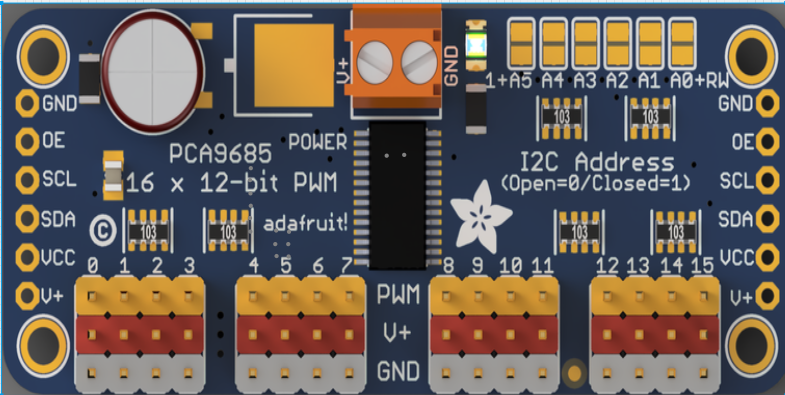
The PCA9685, manufactured by Adafruit (Part ID: PCA9685), is a 16-channel, 12-bit PWM (Pulse Width Modulation) controller. It is widely used for applications requiring precise control of multiple outputs, such as servo motors and LEDs. The PCA9685 communicates via the I2C protocol, making it easy to integrate with microcontrollers like the Arduino UNO. Its ability to control up to 16 channels simultaneously with minimal microcontroller resources makes it a versatile and efficient solution for robotics, lighting systems, and other automation projects.
Explore Projects Built with PCA9685
 Open Project in Cirkit Designer
 Open Project in Cirkit Designer
 Open Project in Cirkit Designer
 Open Project in Cirkit Designer
Explore Projects Built with PCA9685
Open Project in Cirkit DesignerOpen Project in Cirkit DesignerOpen Project in Cirkit DesignerOpen Project in Cirkit DesignerCommon Applications
- Controlling servo motors in robotics and automation systems
- Driving LED arrays for lighting and display purposes
- Generating PWM signals for motor speed control
- Applications requiring synchronized multi-channel PWM outputs
Technical Specifications
The PCA9685 is designed to provide high-precision PWM control with minimal external components. Below are its key technical specifications:
| Parameter | Value |
|---|---|
| Channels | 16 PWM outputs |
| Resolution | 12-bit (4096 steps) |
| Communication Protocol | I2C |
| Operating Voltage Range | 2.3V to 5.5V |
| Logic Voltage Level | 3.3V or 5V compatible |
| Maximum Output Current | 25mA per channel |
| PWM Frequency Range | Adjustable from 24Hz to 1526Hz |
| I2C Address Range | 0x40 to 0x7F (configurable via address pins) |
| Operating Temperature | -40°C to +85°C |
Pin Configuration
The PCA9685 comes in a 28-pin package. Below is the pin configuration and description:
| Pin Name | Type | Description |
|---|---|---|
| VCC | Power | Power supply input (2.3V to 5.5V). |
| GND | Ground | Ground connection. |
| SDA | Input | I2C data line. |
| SCL | Input | I2C clock line. |
| OE | Input | Output enable pin (active low). Disables all outputs when pulled high. |
| A0–A5 | Input | I2C address selection pins. Configures the I2C address of the device. |
| PWM0–PWM15 | Output | 16 PWM output channels for controlling servos, LEDs, or other devices. |
| EXTCLK | Input | External clock input for custom PWM frequency (optional). |
| V+ | Power | External power supply for driving high-current devices (e.g., servos, LEDs). |
Usage Instructions
The PCA9685 is straightforward to use in a circuit. Below are the steps and considerations for integrating it into your project:
Connecting the PCA9685
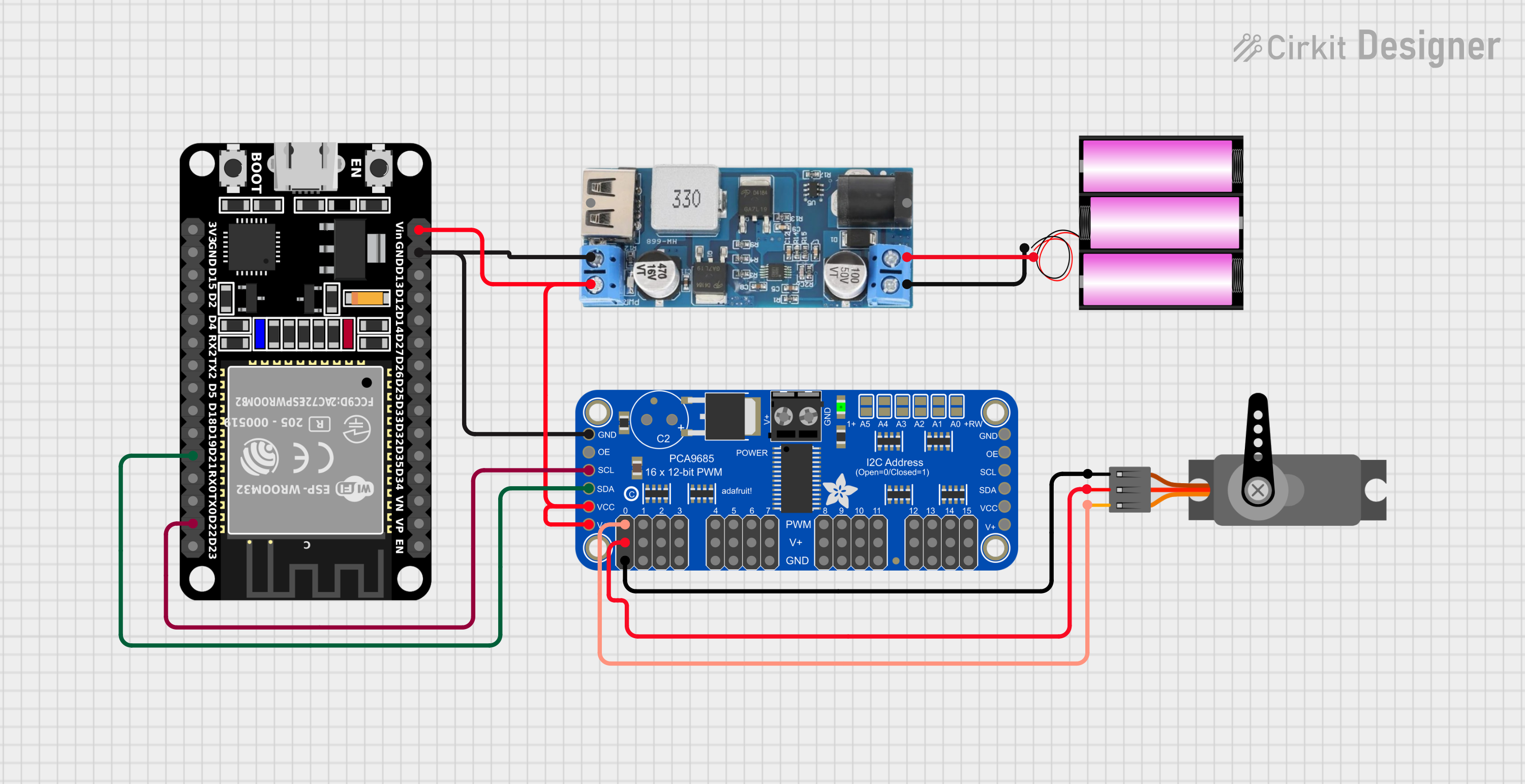
- Power Supply: Connect the VCC pin to a 3.3V or 5V power source, and connect GND to the ground of your circuit.
- I2C Communication: Connect the SDA and SCL pins to the corresponding I2C pins on your microcontroller. For an Arduino UNO, connect:
- SDA to A4
- SCL to A5
- Output Devices: Connect your servos, LEDs, or other devices to the PWM0–PWM15 pins. If driving high-current devices, connect an external power supply to the V+ pin.
- Address Configuration: Use the A0–A5 pins to set the I2C address if using multiple PCA9685 modules.
Example Code for Arduino UNO
Below is an example of how to use the PCA9685 with an Arduino UNO to control a servo motor:
#include <Wire.h>
#include <Adafruit_PWMServoDriver.h>

// Create an instance of the PCA9685 driver
Adafruit_PWMServoDriver pwm = Adafruit_PWMServoDriver();

void setup() {
  // Initialize serial communication for debugging
  Serial.begin(9600);
  Serial.println("Initializing PCA9685...");

  // Initialize the PCA9685 module
  pwm.begin();

  // Set the PWM frequency to 50Hz (common for servos)
  pwm.setPWMFreq(50);
}

void loop() {
  // Define the servo channel and pulse width range
  uint8_t servoChannel = 0; // Channel 0
  int pulseMin = 150;       // Minimum pulse width (0 degrees)
  int pulseMax = 600;       // Maximum pulse width (180 degrees)

  // Sweep the servo from 0 to 180 degrees
  for (int pulse = pulseMin; pulse <= pulseMax; pulse++) {
    pwm.setPWM(servoChannel, 0, pulse);
    delay(10); // Small delay for smooth movement
  }

  // Sweep the servo back from 180 to 0 degrees
  for (int pulse = pulseMax; pulse >= pulseMin; pulse--) {
    pwm.setPWM(servoChannel, 0, pulse);
    delay(10); // Small delay for smooth movement
  }
}
Best Practices
- Use decoupling capacitors near the VCC and GND pins to reduce noise.
- If driving high-current devices, ensure the external power supply connected to V+ can handle the load.
- Avoid exceeding the maximum current rating of 25mA per channel to prevent damage.
- Use pull-up resistors on the SDA and SCL lines if not already present on your microcontroller.
Troubleshooting and FAQs
Common Issues
No Response from the PCA9685
- Cause: Incorrect I2C address or wiring.
- Solution: Verify the I2C address and ensure SDA and SCL are correctly connected.
PWM Outputs Not Working
- Cause: Output enable (OE) pin is high.
- Solution: Ensure the OE pin is pulled low or connected to GND.
Servo Motors Jittering
- Cause: Insufficient power supply or incorrect PWM frequency.
- Solution: Use a stable power supply and set the PWM frequency to 50Hz for servos.
Overheating
- Cause: Exceeding the current rating of the outputs.
- Solution: Reduce the load on each channel or use external drivers for high-current devices.
FAQs
Q: Can I use multiple PCA9685 modules in one project?
A: Yes, you can connect up to 62 PCA9685 modules on the same I2C bus by configuring their addresses using the A0–A5 pins.
Q: What is the maximum number of servos I can control with one PCA9685?
A: You can control up to 16 servos with one PCA9685 module.
Q: Can the PCA9685 generate frequencies other than 50Hz?
A: Yes, the PWM frequency is adjustable from 24Hz to 1526Hz using the setPWMFreq() function.
Q: Do I need an external clock for the PCA9685?
A: No, the PCA9685 has an internal clock. However, you can use an external clock if precise timing is required.
By following this documentation, you can effectively integrate the PCA9685 into your projects and troubleshoot common issues.