
How to Use Automatic Buck-Boost Module 3.3V 2A / 5V 1A Output Regulated Power Supply Board TPS63802 Chip Lithium Battery Buck-Boost Control: Examples, Pinouts, and Specs
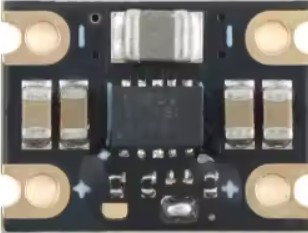
 Design with Automatic Buck-Boost Module 3.3V 2A / 5V 1A Output Regulated Power Supply Board TPS63802 Chip Lithium Battery Buck-Boost Control in Cirkit Designer
Introduction
The Automatic Buck-Boost Module HL802A-3.3V, manufactured by Shenzhen Zheng Yi Electronic Technology Co., Ltd, is a versatile power supply module designed to regulate voltage levels efficiently. It can step down (buck) or step up (boost) input voltages to provide a stable output of either 3.3V at 2A or 5V at 1A. This module is powered by the TPS63802 chip, which ensures high efficiency and reliable performance, even in demanding applications.
Explore Projects Built with Automatic Buck-Boost Module 3.3V 2A / 5V 1A Output Regulated Power Supply Board TPS63802 Chip Lithium Battery Buck-Boost Control
 Open Project in Cirkit Designer
 Open Project in Cirkit Designer
 Open Project in Cirkit Designer
 Open Project in Cirkit Designer
Explore Projects Built with Automatic Buck-Boost Module 3.3V 2A / 5V 1A Output Regulated Power Supply Board TPS63802 Chip Lithium Battery Buck-Boost Control
Open Project in Cirkit DesignerOpen Project in Cirkit DesignerOpen Project in Cirkit DesignerOpen Project in Cirkit DesignerCommon Applications and Use Cases
- Powering microcontrollers, sensors, and IoT devices from lithium-ion batteries.
- Providing a stable voltage supply for portable electronics.
- Applications requiring seamless transition between buck and boost modes.
- Battery-powered systems where input voltage fluctuates above and below the desired output voltage.
Technical Specifications
Key Technical Details
| Parameter | Value |
|---|---|
| Input Voltage Range | 1.8V to 5.5V |
| Output Voltage Options | 3.3V (2A max) or 5V (1A max) |
| Output Current | Up to 2A (3.3V mode) / Up to 1A (5V mode) |
| Efficiency | Up to 95% |
| Chipset | TPS63802 |
| Operating Temperature Range | -40°C to +85°C |
| Dimensions | 22mm x 17mm x 4mm |
Pin Configuration and Descriptions
| Pin Name | Pin Type | Description |
|---|---|---|
| VIN | Power Input | Connect to the input voltage source (1.8V to 5.5V). |
| GND | Ground | Connect to the ground of the circuit. |
| VOUT | Power Output | Provides the regulated output voltage (3.3V or 5V). |
| EN | Enable Input | Active-high pin to enable the module. Pull low to disable the output. |
| SEL | Voltage Select | Selects the output voltage: High for 5V, Low for 3.3V. |
Usage Instructions
How to Use the Component in a Circuit
Connect the Input Voltage:
- Attach the input voltage source (e.g., a lithium-ion battery) to the VIN pin.
- Ensure the input voltage is within the range of 1.8V to 5.5V.
Set the Output Voltage:
- Use the SEL pin to select the desired output voltage:
- Pull SEL high (connect to VIN) for a 5V output.
- Pull SEL low (connect to GND) for a 3.3V output.
- Use the SEL pin to select the desired output voltage:
Enable the Module:
- Pull the EN pin high to enable the module.
- To disable the output, pull the EN pin low.
Connect the Load:
- Attach the load to the VOUT pin and ensure the current draw does not exceed the module's limits (2A for 3.3V or 1A for 5V).
Ground Connections:
- Connect the GND pin to the ground of the input source and the load.
Important Considerations and Best Practices
- Input Voltage Range: Ensure the input voltage remains within the specified range (1.8V to 5.5V) to avoid damage to the module.
- Heat Dissipation: For high current loads, ensure adequate ventilation or heat sinking to prevent overheating.
- Capacitor Placement: Place decoupling capacitors close to the input and output pins to minimize noise and improve stability.
- SEL Pin Configuration: Avoid leaving the SEL pin floating; always connect it to either VIN or GND.
Example: Using the Module with an Arduino UNO
The following example demonstrates how to use the module to power an Arduino UNO with a 5V output.
Circuit Connections
- Connect the module's VIN pin to a 3.7V lithium-ion battery.
- Connect the VOUT pin to the Arduino UNO's 5V pin.
- Connect the GND pin to the Arduino UNO's GND pin.
- Pull the SEL pin high to set the output voltage to 5V.
- Pull the EN pin high to enable the module.
Arduino Code Example
// Example code to monitor the Arduino's input voltage using the Automatic Buck-Boost Module
// Ensure the module is set to 5V output mode (SEL pin high).

void setup() {
  Serial.begin(9600); // Initialize serial communication at 9600 baud
  pinMode(A0, INPUT); // Configure analog pin A0 to read input voltage
}

void loop() {
  int sensorValue = analogRead(A0); // Read the analog input
  float voltage = sensorValue * (5.0 / 1023.0); // Convert to voltage (5V reference)

  // Print the voltage to the Serial Monitor
  Serial.print("Input Voltage: ");
  Serial.print(voltage);
  Serial.println(" V");

  delay(1000); // Wait for 1 second before the next reading
}
Troubleshooting and FAQs
Common Issues and Solutions
| Issue | Possible Cause | Solution |
|---|---|---|
| No output voltage | EN pin is not pulled high | Ensure the EN pin is connected to VIN or a high logic level. |
| Incorrect output voltage | SEL pin is not configured correctly | Verify the SEL pin is connected to VIN for 5V or GND for 3.3V. |
| Overheating during operation | Excessive load current | Reduce the load current or improve heat dissipation. |
| Module not functioning with input below 3V | Input voltage too low for operation | Ensure the input voltage is within the specified range (1.8V to 5.5V). |
FAQs
Can this module be used with a 9V battery?
- No, the input voltage range is limited to 1.8V to 5.5V. A 9V battery exceeds this range and may damage the module.
What happens if the load exceeds the current limit?
- The module may enter thermal shutdown or reduce efficiency. Always ensure the load current is within the specified limits.
Is the module suitable for powering Raspberry Pi boards?
- The module can power Raspberry Pi boards that require 5V, but ensure the current demand does not exceed 1A.
Can I leave the SEL pin floating?
- No, the SEL pin must be explicitly connected to either VIN (for 5V) or GND (for 3.3V) to ensure proper operation.
By following this documentation, users can effectively integrate the HL802A-3.3V Automatic Buck-Boost Module into their projects for reliable and efficient power management.