
How to Use ESP32C3 Supermini: Examples, Pinouts, and Specs
 Design with ESP32C3 Supermini in Cirkit Designer
Introduction
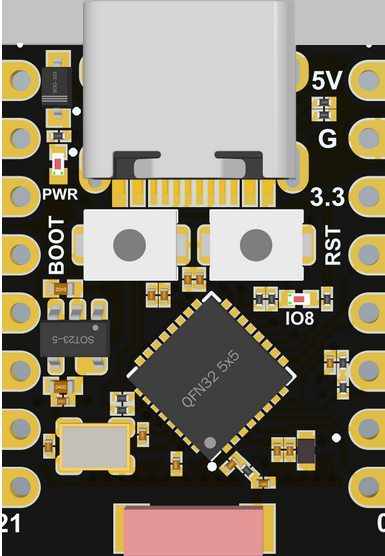
The ESP32C3 Supermini, manufactured by Generi, is a compact, low-power microcontroller designed for Internet of Things (IoT) applications. It integrates Wi-Fi and Bluetooth Low Energy (BLE) capabilities, making it ideal for wireless communication in smart devices. With its dual-core processor, ample GPIO pins, and support for multiple development environments, the ESP32C3 Supermini is a versatile solution for both hobbyists and professionals.
Explore Projects Built with ESP32C3 Supermini
 Open Project in Cirkit Designer
 Open Project in Cirkit Designer
 Open Project in Cirkit Designer
 Open Project in Cirkit Designer
Explore Projects Built with ESP32C3 Supermini
Open Project in Cirkit DesignerOpen Project in Cirkit DesignerOpen Project in Cirkit DesignerOpen Project in Cirkit DesignerCommon Applications
- Smart home devices (e.g., smart lights, thermostats)
- Wearable technology
- Industrial IoT systems
- Wireless sensor networks
- Robotics and automation
- Prototyping and educational projects
Technical Specifications
Below are the key technical details of the ESP32C3 Supermini:
| Parameter | Value |
|---|---|
| Manufacturer | Generi |
| Part ID | ESP32C3 Supermini |
| Processor | 32-bit RISC-V single-core processor |
| Clock Speed | Up to 160 MHz |
| Flash Memory | 4 MB |
| SRAM | 400 KB |
| Wi-Fi | IEEE 802.11 b/g/n (2.4 GHz) |
| Bluetooth | Bluetooth 5.0 Low Energy (BLE) |
| GPIO Pins | 22 |
| Operating Voltage | 3.3V |
| Power Consumption | Ultra-low power modes available |
| Communication Interfaces | UART, SPI, I2C, I2S, PWM, ADC |
| Dimensions | 18 mm x 25 mm |
Pin Configuration
The ESP32C3 Supermini features 22 GPIO pins, each with multiple functions. Below is the pin configuration:
| Pin Number | Pin Name | Function |
|---|---|---|
| 1 | GND | Ground |
| 2 | 3V3 | 3.3V Power Supply |
| 3 | GPIO0 | General Purpose I/O, ADC, PWM |
| 4 | GPIO1 | General Purpose I/O, UART TX |
| 5 | GPIO2 | General Purpose I/O, UART RX |
| 6 | GPIO3 | General Purpose I/O, SPI MOSI |
| 7 | GPIO4 | General Purpose I/O, SPI MISO |
| 8 | GPIO5 | General Purpose I/O, SPI CLK |
| 9 | GPIO6 | General Purpose I/O, I2C SDA |
| 10 | GPIO7 | General Purpose I/O, I2C SCL |
| 11 | EN | Enable Pin (Active High) |
| 12-22 | GPIO8-18 | General Purpose I/O, ADC, PWM |
Usage Instructions
How to Use the ESP32C3 Supermini in a Circuit
- Power Supply: Connect the 3V3 pin to a 3.3V power source and the GND pin to ground.
- Programming: Use a USB-to-serial adapter to upload code to the ESP32C3 Supermini. Ensure the EN pin is pulled high during programming.
- GPIO Usage: Configure the GPIO pins for input or output as needed. Many pins support multiple functions such as ADC, PWM, or communication protocols (UART, SPI, I2C).
- Wi-Fi and Bluetooth: Use the built-in Wi-Fi and BLE capabilities for wireless communication. Libraries such as
WiFi.handBLEDevice.hin the Arduino IDE simplify development.
Important Considerations
- Voltage Levels: Ensure all connected peripherals operate at 3.3V logic levels to avoid damaging the microcontroller.
- Power Consumption: Utilize the ultra-low power modes for battery-powered applications.
- Antenna Placement: Avoid placing metal objects near the onboard antenna to ensure optimal wireless performance.
Example Code for Arduino UNO
Below is an example of how to connect the ESP32C3 Supermini to a Wi-Fi network using the Arduino IDE:
#include <WiFi.h> // Include the Wi-Fi library

const char* ssid = "Your_SSID";       // Replace with your Wi-Fi network name
const char* password = "Your_Password"; // Replace with your Wi-Fi password

void setup() {
  Serial.begin(115200); // Initialize serial communication at 115200 baud
  delay(1000);          // Wait for the serial monitor to initialize

  Serial.println("Connecting to Wi-Fi...");
  WiFi.begin(ssid, password); // Start connecting to the Wi-Fi network

  while (WiFi.status() != WL_CONNECTED) {
    delay(500); // Wait for connection
    Serial.print(".");
  }

  Serial.println("\nConnected to Wi-Fi!");
  Serial.print("IP Address: ");
  Serial.println(WiFi.localIP()); // Print the assigned IP address
}

void loop() {
  // Add your main code here
}
Troubleshooting and FAQs
Common Issues
Wi-Fi Connection Fails
- Cause: Incorrect SSID or password.
- Solution: Double-check the Wi-Fi credentials in your code.
Microcontroller Not Detected by Computer
- Cause: Missing USB-to-serial driver or faulty cable.
- Solution: Install the appropriate driver for your USB-to-serial adapter and ensure the cable is functional.
GPIO Pin Not Responding
- Cause: Incorrect pin configuration or voltage mismatch.
- Solution: Verify the pin mode (input/output) in your code and ensure the connected device operates at 3.3V logic levels.
Poor Wireless Performance
- Cause: Interference or improper antenna placement.
- Solution: Keep the ESP32C3 Supermini away from metal objects and other sources of interference.
FAQs
Q: Can the ESP32C3 Supermini be powered by a 5V source?
A: No, the ESP32C3 Supermini operates at 3.3V. Using a 5V source may damage the microcontroller.
Q: Does the ESP32C3 Supermini support OTA updates?
A: Yes, the ESP32C3 Supermini supports Over-The-Air (OTA) updates for firmware.
Q: What development environments are compatible with the ESP32C3 Supermini?
A: The ESP32C3 Supermini is compatible with the Arduino IDE, PlatformIO, and Espressif's ESP-IDF.
Q: How many devices can connect to the ESP32C3 Supermini via BLE?
A: The ESP32C3 Supermini supports up to 4 simultaneous BLE connections.
By following this documentation, users can effectively integrate the ESP32C3 Supermini into their projects and troubleshoot common issues.