
How to Use NFC 4 Click ST25R3916: Examples, Pinouts, and Specs
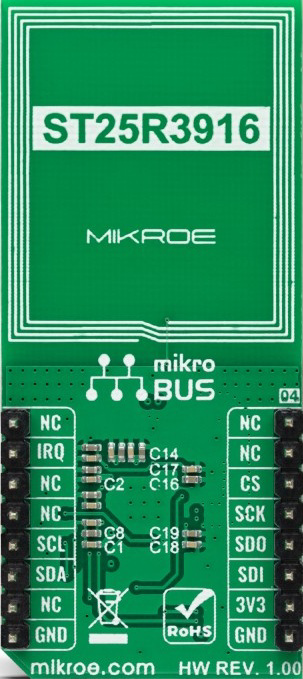
 Design with NFC 4 Click ST25R3916 in Cirkit Designer
Introduction
The NFC 4 Click ST25R3916 is a compact development board designed by Mikroe and powered by the ST25R3916 NFC/RFID reader IC. This versatile component supports multiple NFC modes, including reader, card emulation, and peer-to-peer communication, making it an excellent choice for a wide range of near-field communication (NFC) applications. Its high-performance design ensures reliable communication with NFC-enabled devices, making it ideal for prototyping and integrating NFC functionality into various projects.
Explore Projects Built with NFC 4 Click ST25R3916
 Open Project in Cirkit Designer
 Open Project in Cirkit Designer
 Open Project in Cirkit Designer
 Open Project in Cirkit Designer
Explore Projects Built with NFC 4 Click ST25R3916
Open Project in Cirkit DesignerOpen Project in Cirkit DesignerOpen Project in Cirkit DesignerOpen Project in Cirkit DesignerCommon Applications
- Contactless payment systems
- Access control and authentication
- NFC-enabled IoT devices
- Data exchange between NFC-enabled devices
- Smart posters and tags
- Inventory and asset tracking
Technical Specifications
Key Technical Details
| Parameter | Value |
|---|---|
| Manufacturer | Mikroe |
| Part Number | ST25R3916 |
| Operating Voltage | 3.3V |
| Communication Interface | SPI |
| NFC Modes Supported | Reader, Card Emulation, Peer-to-Peer |
| Operating Frequency | 13.56 MHz |
| Maximum Output Power | 1.4 W |
| Antenna Driver Current | Up to 350 mA |
| ISO Standards Supported | ISO 14443A/B, ISO 15693, ISO 18092 |
| Operating Temperature Range | -40°C to +85°C |
| Dimensions | 42.9 mm x 25.4 mm |
Pin Configuration and Descriptions
The NFC 4 Click board uses a standard mikroBUS™ socket for easy integration. Below is the pinout description:
| Pin Name | Pin Number | Type | Description |
|---|---|---|---|
| AN | 1 | Input | General-purpose analog pin |
| RST | 2 | Input | Reset pin for the ST25R3916 IC |
| CS | 3 | Input | SPI chip select |
| SCK | 4 | Input | SPI clock |
| MISO | 5 | Output | SPI master-in/slave-out |
| MOSI | 6 | Input | SPI master-out/slave-in |
| PWM | 7 | Output | General-purpose PWM pin |
| INT | 8 | Output | Interrupt signal from the IC |
| VCC | 9 | Power | Power supply (3.3V) |
| GND | 10 | Ground | Ground connection |
Usage Instructions
How to Use the Component in a Circuit
- Power Supply: Connect the NFC 4 Click to a 3.3V power source via the mikroBUS™ socket.
- SPI Communication: Ensure the SPI pins (CS, SCK, MISO, MOSI) are properly connected to your microcontroller or development board.
- Antenna Connection: The onboard antenna is pre-configured for NFC communication. No additional setup is required.
- Reset and Interrupt: Use the RST pin to reset the IC and monitor the INT pin for interrupt signals.
- Software Configuration: Use the provided Mikroe libraries or write custom SPI commands to configure the ST25R3916 for your desired NFC mode.
Important Considerations and Best Practices
- Power Requirements: Ensure a stable 3.3V power supply to avoid communication errors.
- Antenna Placement: Avoid placing the board near metal objects, as they can interfere with NFC communication.
- SPI Configuration: Set the SPI clock speed and mode according to the ST25R3916 datasheet for optimal performance.
- Interrupt Handling: Use the INT pin to detect events such as tag detection or communication errors.
- Firmware Updates: Check for updates to Mikroe's libraries to ensure compatibility with the latest features.
Example Code for Arduino UNO
Below is an example of how to interface the NFC 4 Click with an Arduino UNO using SPI:
#include <SPI.h>

// Pin definitions for the NFC 4 Click
#define CS_PIN 10    // Chip Select pin
#define RST_PIN 9    // Reset pin
#define INT_PIN 2    // Interrupt pin

void setup() {
  // Initialize serial communication for debugging
  Serial.begin(9600);

  // Initialize SPI communication
  SPI.begin();
  pinMode(CS_PIN, OUTPUT);
  pinMode(RST_PIN, OUTPUT);
  pinMode(INT_PIN, INPUT);

  // Reset the NFC module
  digitalWrite(RST_PIN, LOW);
  delay(100);
  digitalWrite(RST_PIN, HIGH);
  delay(100);

  Serial.println("NFC 4 Click Initialized");
}

void loop() {
  // Example: Send a dummy SPI command to the NFC module
  digitalWrite(CS_PIN, LOW); // Select the NFC module
  SPI.transfer(0x00);        // Send a dummy command
  digitalWrite(CS_PIN, HIGH); // Deselect the NFC module

  // Check for interrupt signal
  if (digitalRead(INT_PIN) == HIGH) {
    Serial.println("Interrupt detected!");
    // Handle the interrupt (e.g., read tag data)
  }

  delay(500); // Wait for a while
}
Troubleshooting and FAQs
Common Issues and Solutions
No Response from the NFC Module
- Cause: Incorrect SPI configuration or wiring.
- Solution: Double-check the SPI connections and ensure the SPI clock speed matches the ST25R3916 requirements.
NFC Tag Not Detected
- Cause: Improper antenna placement or interference.
- Solution: Ensure the tag is within the NFC range and avoid placing the board near metal objects.
Interrupt Pin Not Triggering
- Cause: Incorrect interrupt handling or configuration.
- Solution: Verify the INT pin connection and ensure the firmware is configured to enable interrupts.
Power Supply Issues
- Cause: Insufficient or unstable power supply.
- Solution: Use a regulated 3.3V power source and check for voltage drops.
FAQs
Q: Can the NFC 4 Click work with 5V systems?
A: No, the board operates at 3.3V. Use a level shifter if interfacing with a 5V system.Q: What is the maximum NFC range?
A: The range depends on the antenna and tag size but typically extends up to 10 cm.Q: Does Mikroe provide software libraries for this board?
A: Yes, Mikroe provides libraries and example code for various platforms, including Arduino and MikroC.Q: Can I use this board for peer-to-peer communication?
A: Yes, the ST25R3916 supports peer-to-peer NFC communication.
This documentation provides a comprehensive guide to using the NFC 4 Click ST25R3916. For further assistance, refer to the official Mikroe documentation or contact their support team.